What is SSC Form 3 employee registration?
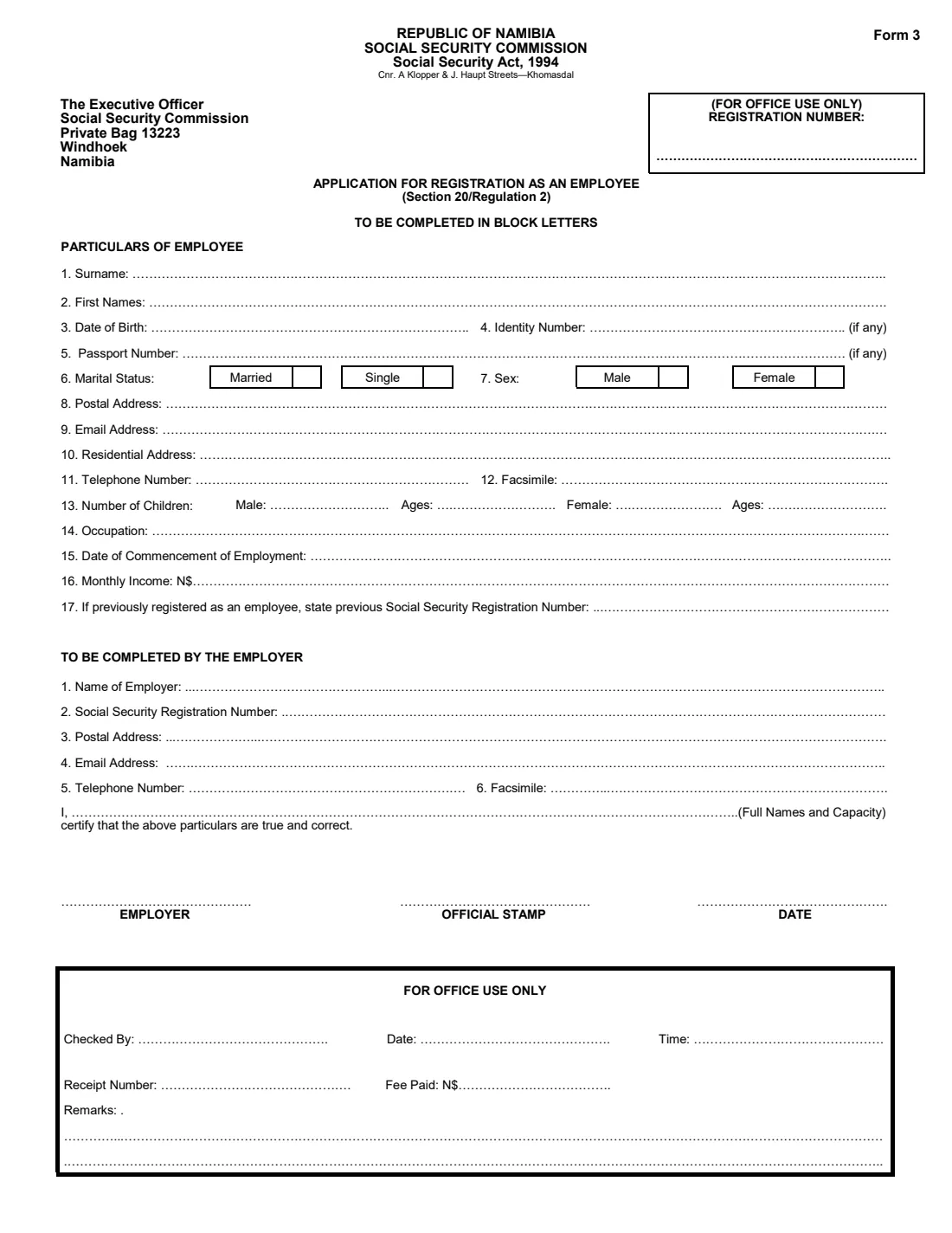
Form 3 is the Social Security Commission of Namibia's (SSC) application for registration as an employee, made under section 20 of the Social Security Act, 1994 and regulation 2. Registration puts a worker on the SSC's records so that contributions can be credited to them and they can later claim the benefits the Commission pays.
It is a single page in two parts. The top part, 'Particulars of employee', covers questions 1 to 17: name, date of birth, identity or passport number, marital status, sex, addresses, children, occupation, start date and monthly income. The lower part is completed by the employer, who gives the company's own Social Security registration number and contact details, certifies the particulars and signs next to the official stamp.
FileIt takes the employee and the employer through their questions, pre-fills names, the date of birth and the employer's details from the People and entities in your FileIt vault, checks that a Namibian ID number matches the date of birth, and prints everything in block letters into the SSC's own PDF. The finished form is saved in your vault. The employer signs and stamps it by hand and delivers it to the SSC. FileIt never sends anything to the Commission.
- Who fills it
- The employee (questions 1 to 17) and the employer (the lower part)
- Given to
- The Social Security Commission, whose Windhoek postal address (Private Bag 13223) is printed at the top
- When
- When someone starts work and is not yet registered with the SSC
- Signatures
- The employer signs by hand beside the official company stamp
- Legal basis
- Social Security Act, 1994, section 20 and regulation 2
- Length
- One page
Who needs to fill out SSC Form 3 employee registration?
- New employees in Namibia who have never been registered with the Social Security Commission.
- Employers and HR or payroll staff registering a new hire.
- Domestic workers and their employers, since the form covers anyone registering as an employee.
- Workers returning to employment who have lost track of whether they were registered. Question 17 records a previous registration number if there is one.
- Foreign nationals working in Namibia who have a passport but no Namibian identity number.
When to use SSC Form 3 employee registration
- When a person starts working for an employer and is not yet registered with the SSC.
- As part of a new employee's onboarding, together with the employer's payroll set-up.
- When an employee who was previously registered needs to be registered under a new employer and the SSC asks for Form 3. Put the earlier number in question 17.
- Before the employee needs to claim a benefit, so their contributions are on record.
What you need before you start
- The employee's Namibian identity document or passport.
- The employee's full names, date of birth, postal and residential addresses and contact details.
- The number and ages of the employee's children, split into boys and girls.
- The employee's occupation, start date and gross monthly income in Namibia dollars.
- Any previous Social Security registration number the employee has.
- The employer's name, Social Security registration number, postal address, email and phone number.
- The full name and position of the person certifying for the employer, and the company's official stamp.
What’s on SSC Form 3 employee registration
The 2026 edition has 1 page. FileIt asks for it in 2 parts:
- Particulars of employee (questions 1 to 17)Employee
- To be completed by the employerEmployer
How to fill out SSC Form 3 employee registration, step by step
1 Particulars of employee: questions 1 to 5
Surname, first names and date of birth come first, then the identity number and passport number. Both are marked '(if any)', but the SSC needs at least one. Citizens and permanent residents give their 11-digit Namibian ID number and foreign nationals give their passport number. A Namibian ID number starts with the date of birth (YYMMDD), so FileIt checks the two match.
The form asks for block letters, so FileIt prints names in capitals.
2 Questions 6 and 7: marital status and sex
The form offers only two boxes for marital status, Married and Single, and two for sex, Male and Female. FileIt marks the box beside the word you choose with an X.
3 Questions 8 to 12: addresses and contact numbers
Give a postal address (often a P O Box), an email address, a residential address where you actually live, a telephone number and, if you still use one, a fax number. The residential address should be specific enough to find you, such as a street and number or an erf number and town.
4 Question 13: number of children
The form splits children into male and female, each with a number and a list of ages. FileIt checks that the number of ages you list matches the number of children.
5 Questions 14 to 17: work details
Occupation, the date you started with this employer, your monthly income in Namibia dollars (N$) and, if you were registered before, your previous Social Security registration number. Give the gross monthly figure your employer agreed to pay.
6 To be completed by the employer: questions 1 to 6
The employer's name, its own Social Security registration number (from its registration as an employer), postal and email addresses, telephone and fax. FileIt can pre-fill the employer's name and address from the entity linked to the employee in your vault.
7 Employer's certification, signature and stamp
A person with authority writes their full names and capacity (for example 'HR Manager') on the 'I, ...' line to certify that the particulars are true and correct. They then sign on the EMPLOYER line, apply the official stamp and date the form. FileIt prints the name, capacity and date. The signature and stamp are added by hand.
Common mistakes to avoid
- Leaving both the identity number and the passport number blank. The SSC needs one to identify the employee.
- Writing an ID number that doesn't start with the date of birth. That is usually a typing error.
- Filling in the 'For office use only' boxes, including the registration number at the top right. Leave them for the SSC.
- Giving a net salary when the form asks for monthly income. Use the gross monthly pay.
- Forgetting the employer's own Social Security registration number.
- Sending the form without the employer's signature and official stamp.
- Listing children's ages without the matching number of boys or girls.
After you fill it out
Print the completed form from your FileIt vault. The person certifying for the employer signs on the EMPLOYER line and applies the official stamp. Name, capacity and date are already printed.
Deliver the form to the Social Security Commission yourself. The form is addressed to the Executive Officer, Social Security Commission, Private Bag 13223, Windhoek, and the office address printed at the top is the corner of A Klopper and J Haupt Streets, Khomasdal. FileIt does not submit it. The SSC completes the 'For office use only' block, including the registration number.
Keep a copy of the signed form in the employee's folder in your FileIt vault. Keep the registration number the SSC issues with it, as it will be needed for contributions and any future benefit claims.
Fill out SSC Form 3 employee registration online with FileIt
- Pick the person. Choose someone from People and FileIt fills in their name, date of birth, address and other details it already knows.
- Answer plain-language questions. One part of the form at a time, with the official help text beside each question — 29 fields in all. Your answers save as you go.
- Check the live preview. Watch your answers land on the real Social Security Commission of Namibia (SSC) form, and let FileIt do any worksheet arithmetic.
- Generate the official PDF. FileIt prints your answers into the agency’s own PDF and files it in that person’s folder in your vault.
FileIt fills the form — it never files or submits anything for you. Deliver the finished form to whoever asked for it, the way the form’s instructions say.
Start SSC Form 3 employee registration now — it’s freeSSC Form 3 employee registration: frequently asked questions
What is SSC Form 3 used for?
Form 3 is the application for registration as an employee with the Social Security Commission of Namibia, under section 20 of the Social Security Act, 1994. It puts the worker on the SSC's records so contributions can be credited to them.
Who fills in Form 3, the employee or the employer?
Both. The employee's particulars (questions 1 to 17) come first, then the employer completes its details, certifies the form, signs it and stamps it.
Can I fill in SSC Form 3 online?
Yes, with FileIt. It guides the employee and employer through the questions and prints the answers into the SSC's official PDF, saved in your vault. The employer still signs and stamps the printed form, and you deliver it to the SSC yourself. FileIt doesn't submit forms.
Where do I send Form 3?
The form is addressed to the Executive Officer, Social Security Commission, Private Bag 13223, Windhoek. The office address printed at the top is the corner of A Klopper and J Haupt Streets in Khomasdal.
What if the employee has no Namibian ID number?
Both the identity number and the passport number are marked '(if any)'. A foreign national gives their passport number instead.
What goes in question 17?
If the employee was registered with the SSC before, for example through a previous job, write that earlier Social Security registration number. Otherwise leave it blank.
Does the employer need its own SSC number?
Yes. The employer's part asks for the employer's Social Security registration number, which it gets when it registers as an employer.
Is there a fee?
The office-use block has a 'Fee Paid: N$' line, but the form does not state an amount. Check with the SSC when you hand the form in.
Official sources
- Blank form (PDF), published by Social Security Commission of Namibia (SSC): https://www.ssc.org.na/downloads/documents/form%203%20v10.pdf
- Official instructions and guidance: https://www.ssc.org.na/
- Edition shown on this page: Form 3 (file 'form 3 v10', no date printed) (checked 2026-09-26).
FileIt is not affiliated with or endorsed by Social Security Commission of Namibia (SSC) or any government. This page explains the form in general terms and is not legal, tax or immigration advice. Always read the official instructions, and check that you are using the edition the recipient accepts. Page last reviewed 2026-09-26.