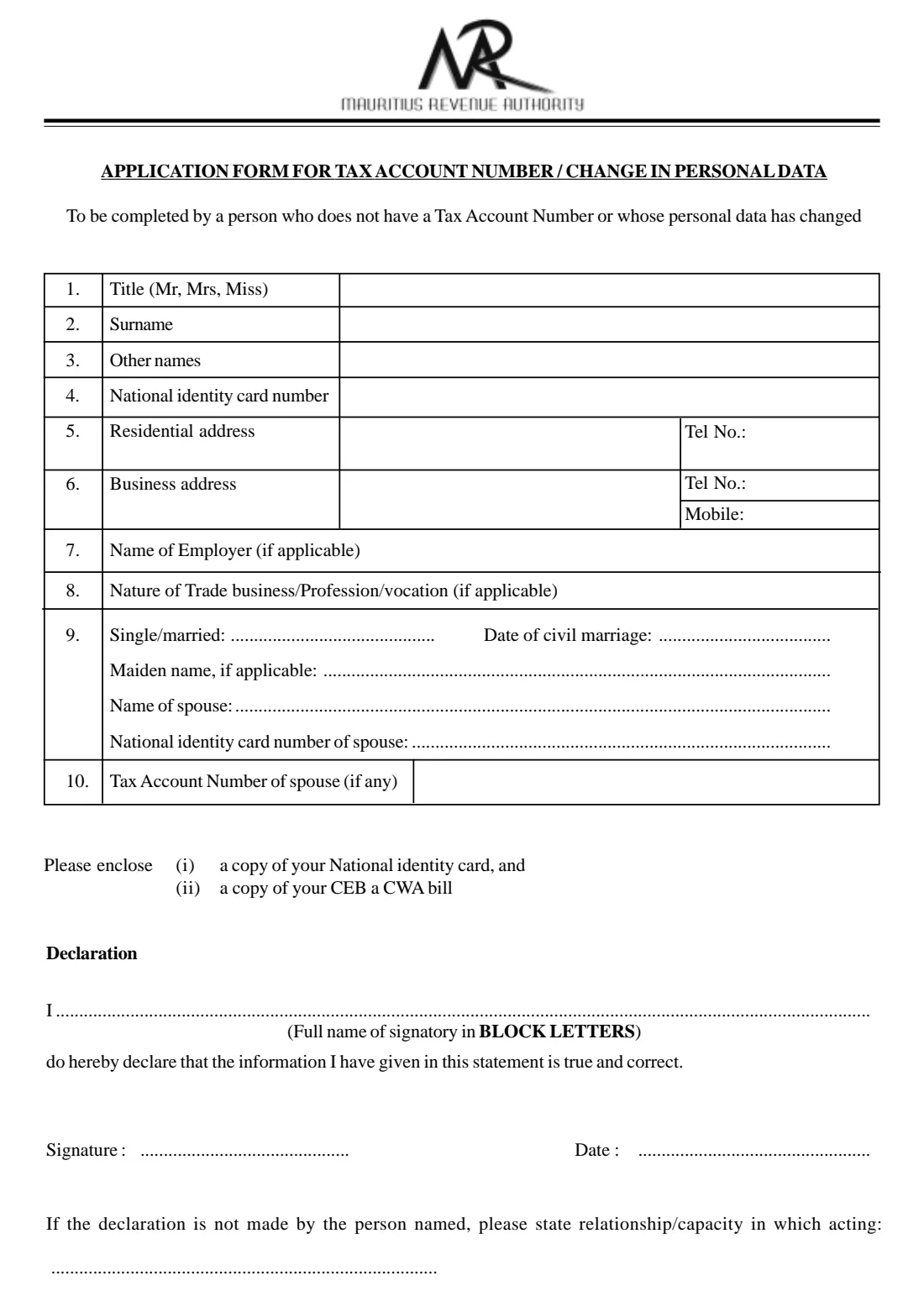
What is TAN application / change of personal data?
The Tax Account Number (TAN) identifies you to the Mauritius Revenue Authority (MRA). This one-page MRA form is for two situations, as its heading says: a person who does not have a Tax Account Number, and a person whose personal data has changed. It asks for your title, surname, other names and National Identity Card number, your residential and business addresses and phone numbers, your employer or the nature of your trade or profession, and your marital status with your spouse's details.
You enclose a copy of your National Identity Card and a copy of a CEB or CWA bill as proof of address, as the form asks, and sign a declaration that the information is true and correct. If someone else makes the declaration for you, they state their relationship or the capacity in which they act.
FileIt walks you through each line, prints names in block letters, checks the format of the 14-character identity card numbers and shows the spouse questions only if you are married. The filled official PDF is saved in your FileIt vault. FileIt never submits anything to the MRA. You print the form, sign it by hand and hand it in with the enclosures yourself.
- Who fills it
- A person without a Tax Account Number, or whose personal data has changed
- Given to
- The Mauritius Revenue Authority
- Enclosures
- A copy of your National Identity Card and a copy of a CEB or CWA bill
- Signatures
- The applicant, or someone acting for them, signs by hand
- Pages
- 1
- Edition
- No edition date printed; the PDF linked on mra.mu dates from September 2008
Who needs to fill out TAN application / change of personal data?
- Someone starting work, a trade or a profession in Mauritius who does not yet have a Tax Account Number.
- A taxpayer who has moved house and needs the MRA to have the new address.
- Someone whose name changed on marriage, or whose marital status has changed.
- A taxpayer whose employer, business address or phone numbers have changed.
- A family member or representative completing the form for someone else, who states the capacity in which they act.
When to use TAN application / change of personal data
- Before you need a TAN, for example for income tax or other dealings with the MRA.
- Whenever the personal data the MRA holds about you changes: name, address, contact numbers, employer, occupation or marital status.
What you need before you start
- Your title, surname, other names and National Identity Card number.
- Your residential address and phone number, and your business address and numbers if you have them.
- Your employer's name, or the nature of your trade, business, profession or vocation, if applicable.
- If married: the date of civil marriage, your maiden name if applicable, and your spouse's name, identity card number and TAN if they have one.
- A copy of your National Identity Card and a copy of a CEB or CWA bill to enclose.
What’s on TAN application / change of personal data
The 2008 edition has 1 page. FileIt asks for it in 4 parts:
- 1-4 Name and identity cardApplicant
- 5-8 Addresses, employer and occupationApplicant
- 9-10 Marital status and spouseApplicant
- DeclarationApplicant
How to fill out TAN application / change of personal data, step by step
1 1-4. Title, names and identity card
Give your title (Mr, Mrs or Miss), surname, other names and National Identity Card number. FileIt prints names in capitals and checks the card number has 14 characters starting with a letter.
2 5-6. Addresses and telephone numbers
Your residential address with its phone number, then your business address with its phone and mobile numbers, if you have them. The residential address should match the CEB or CWA bill you enclose.
3 7-8. Employer and occupation
Name your employer, or the nature of your trade, business, profession or vocation. Both are marked 'if applicable'.
4 9-10. Marital status and spouse
Write single or married. A married applicant adds the date of civil marriage and, if applicable, a maiden name, then the spouse's name, National Identity Card number and Tax Account Number if they have one.
5 Declaration
Write your full name in block letters, then sign and date the declaration that the information is true and correct. If the declaration is not made by the person named, the person signing states their relationship or the capacity in which they act.
Common mistakes to avoid
- Forgetting the enclosures: a copy of the identity card and a copy of a CEB or CWA bill.
- Giving an address that doesn't match the utility bill you enclose.
- Copying the identity card number with a missing or extra character.
- Signing for someone else without stating the relationship or capacity in which you act.
- Leaving out the spouse's details when married.
After you fill it out
Print the filled form from your FileIt vault and sign it by hand.
Attach a copy of your National Identity Card and a copy of a CEB or CWA bill, and give the form to the MRA.
Keep the copy FileIt files in your vault together with any reply from the MRA, so you have your TAN on record.
Fill out TAN application / change of personal data online with FileIt
- Pick the person. Choose someone from People and FileIt fills in their name, date of birth, address and other details it already knows.
- Answer plain-language questions. One part of the form at a time, with the official help text beside each question — 21 fields in all. Your answers save as you go.
- Check the live preview. Watch your answers land on the real Mauritius Revenue Authority (MRA) form, and let FileIt do any worksheet arithmetic.
- Generate the official PDF. FileIt prints your answers into the agency’s own PDF and files it in that person’s folder in your vault.
FileIt fills the form — it never files or submits anything for you. Deliver the finished form to whoever asked for it, the way the form’s instructions say.
Start TAN application / change of personal data now — it’s freeTAN application / change of personal data: frequently asked questions
What is a Tax Account Number (TAN)?
It is the number the Mauritius Revenue Authority uses to identify a taxpayer. This form is how a person without one applies for it.
Do I use the same form to change my address?
Yes. The form is for a person who does not have a Tax Account Number or whose personal data has changed, so it also covers a new address, name, contact details, employer or marital status.
What do I enclose?
As printed on the form: a copy of your National Identity Card and a copy of your CEB or CWA bill.
Can someone else complete it for me?
The declaration allows for it. If the declaration is not made by the person named, the signatory states the relationship or capacity in which they act.
Can I sign it electronically?
FileIt does not offer e-signature for this form. Print it and sign by hand.
Does FileIt send the form to the MRA?
No. FileIt fills in the official PDF and saves it in your vault. You sign it and hand it in yourself.
Official sources
- Blank form (PDF), published by Mauritius Revenue Authority (MRA): https://www.mra.mu/download/MRANewTAN_240908.pdf
- Official instructions and guidance: https://www.mra.mu/index.php/forms
- Edition shown on this page: No edition date printed (MRANewTAN_240908.pdf, PDF created 24 September 2008) (checked 2026-10-01).
FileIt is not affiliated with or endorsed by Mauritius Revenue Authority (MRA) or any government. This page explains the form in general terms and is not legal, tax or immigration advice. Always read the official instructions, and check that you are using the edition the recipient accepts. Page last reviewed 2026-10-01.