What is EDF (PAYE) 2026-27?
The Employee Declaration Form, usually called the EDF, is published by the Mauritius Revenue Authority (MRA) as part of the Pay As You Earn (PAYE) system. Your employer deducts income tax from your salary every month, and the EDF tells them which personal reliefs, deductions and allowances to take into account when doing so. This edition covers the income year 1 July 2026 to 30 June 2027 and prints the amounts that apply to that year, such as the deduction for dependents and the caps on pension contributions, donations and school fees.
The EDF matters because it changes how much tax comes off each payslip. Without it, your employer cannot apply your deduction for dependents or reliefs such as interest on a secured housing loan or medical insurance premiums, so too much tax may be withheld during the year. Claiming too much is also risky: the form warns that where a claim under items 3.2 to 3.12 is unjustified or more than 10% too high, you can be liable to a penalty of up to 25% of the tax underpaid under PAYE.
FileIt guides you through every section of the EDF in plain English and prints your answers onto the MRA's own PDF, one letter per box where the form has boxes. Your name, the employer's name and the date can be pre-filled from the People records in your FileIt vault, and FileIt adds up the Rs column for you: the dependents deduction, the retired or disabled person's deduction, the tertiary education, medical insurance and school-fee totals, and the overall total. It also checks the limits printed on the form. The finished PDF is saved in your vault. FileIt does not send anything to your employer or the MRA; you hand the form over yourself.
- Who fills it
- An employee paid through PAYE in Mauritius
- Given to
- Your employer (only one employer if you have several at the same time), not the MRA
- When
- When you start your first job, change employer, or become entitled to new reliefs during the income year ending 30 June 2027
- Signatures
- No signature line: you write your name into the declaration and date it
- Edition
- Income year 1 July 2026 to 30 June 2027
Who needs to fill out EDF (PAYE) 2026-27?
- Employees in Mauritius whose employer deducts income tax under PAYE and who want their reliefs and deductions applied during the year.
- Anyone taking up employment for the first time during the income year ending 30 June 2027, who is required to submit an EDF.
- Employees who leave one job for another during the year, who must give an EDF to the new employer.
- Employees who become entitled to new reliefs during the year, for example after a new dependent, a housing loan or a solar investment, and want a fresh EDF applied.
- Government employees, who give their Div/Paysite code on the form instead of an employer registration number.
- Non-citizens working in Mauritius, who use their Non-Citizen Identity Card number in the same boxes.
When to use EDF (PAYE) 2026-27
- At the start of a new job during the income year 1 July 2026 to 30 June 2027.
- When you change employer during that income year: the new employer needs a new EDF.
- When your circumstances change and you become entitled to a new relief, deduction or allowance listed in section 3.
- If you have more than one employer at the same time, submit the EDF to only one of them.
- Each income year has its own edition with its own amounts, so use the form for the year you are claiming for.
What you need before you start
- Your National Identity Card (or Non-Citizen Identity Card) with its 14-character number.
- Your employer's exact name and its ERN (Employer Registration Number), or your Div/Paysite code if you work for Government.
- The number of dependents you will claim for and, for each, confidence that their own net and exempt income is within the limits in Note 4.
- For children in tertiary education: each child's name and institution.
- Your housing loan statement showing the interest (or profit charge) payable for the income year.
- Medical or health insurance premiums, or approved medical fund contributions, for yourself and each dependent.
- Amounts invested in solar energy, rainwater harvesting or an electric-car fast charger during the year.
- Personal pension contributions, electronic donations to charitable institutions and fee-paying private school fees.
- Wages paid to a carer, if you employ one and pay their contributions.
What’s on EDF (PAYE) 2026-27
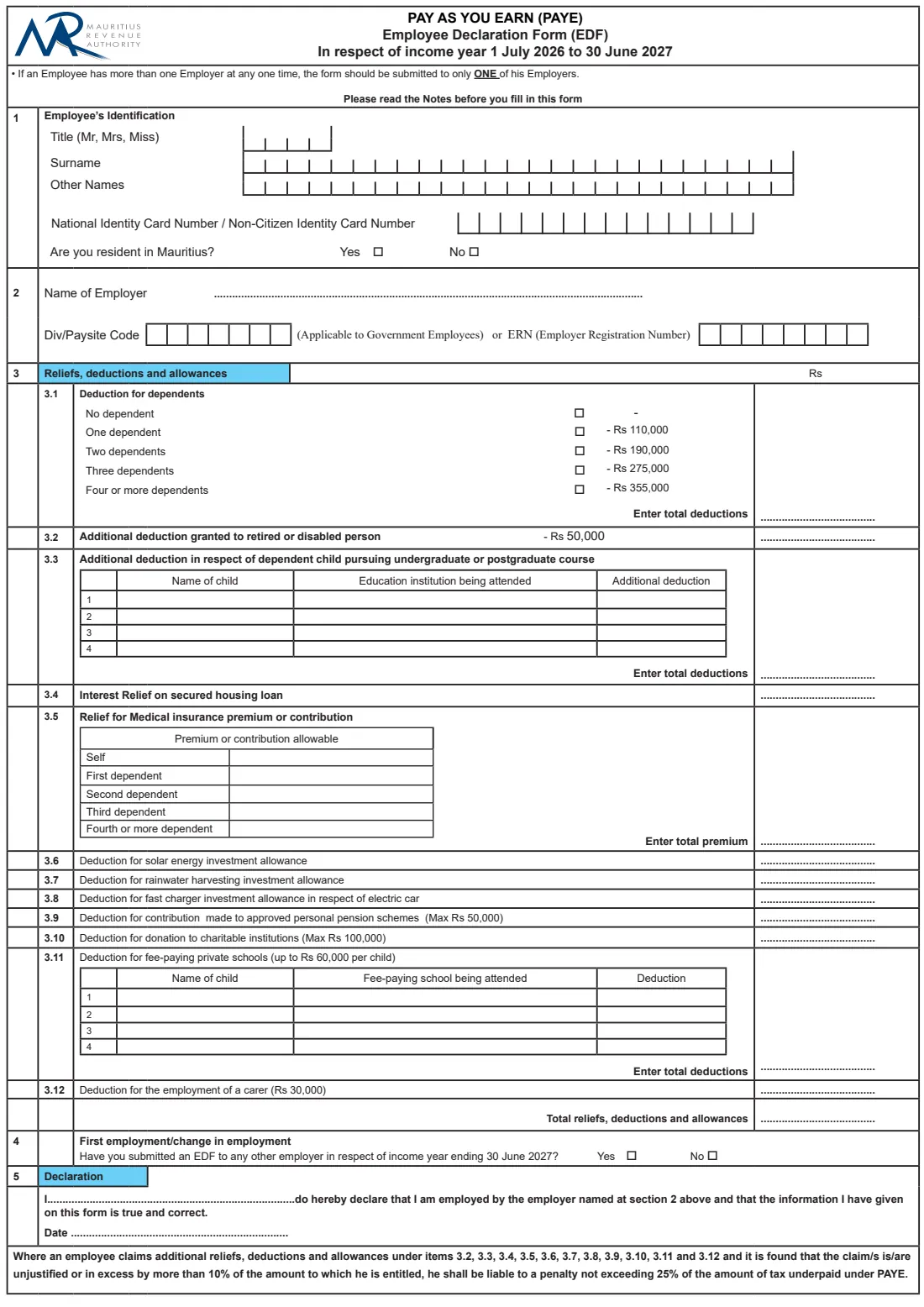
The 2026 edition has 4 pages. FileIt asks for it in 5 parts:
- 1 Employee's identificationEmployee
- 2 Name of employerEmployee
- 3 Reliefs, deductions and allowancesEmployee
- 4 First employment / change in employmentEmployee
- 5 DeclarationEmployee
How to fill out EDF (PAYE) 2026-27, step by step
1 1 Employee's identification
Tick your title (Mr, Mrs or Miss), then write your surname and other names one letter per box, and your National Identity Card or Non-Citizen Identity Card number in the 14 boxes. FileIt prints these in capital letters and removes spaces from the card number so each character lands in its own box.
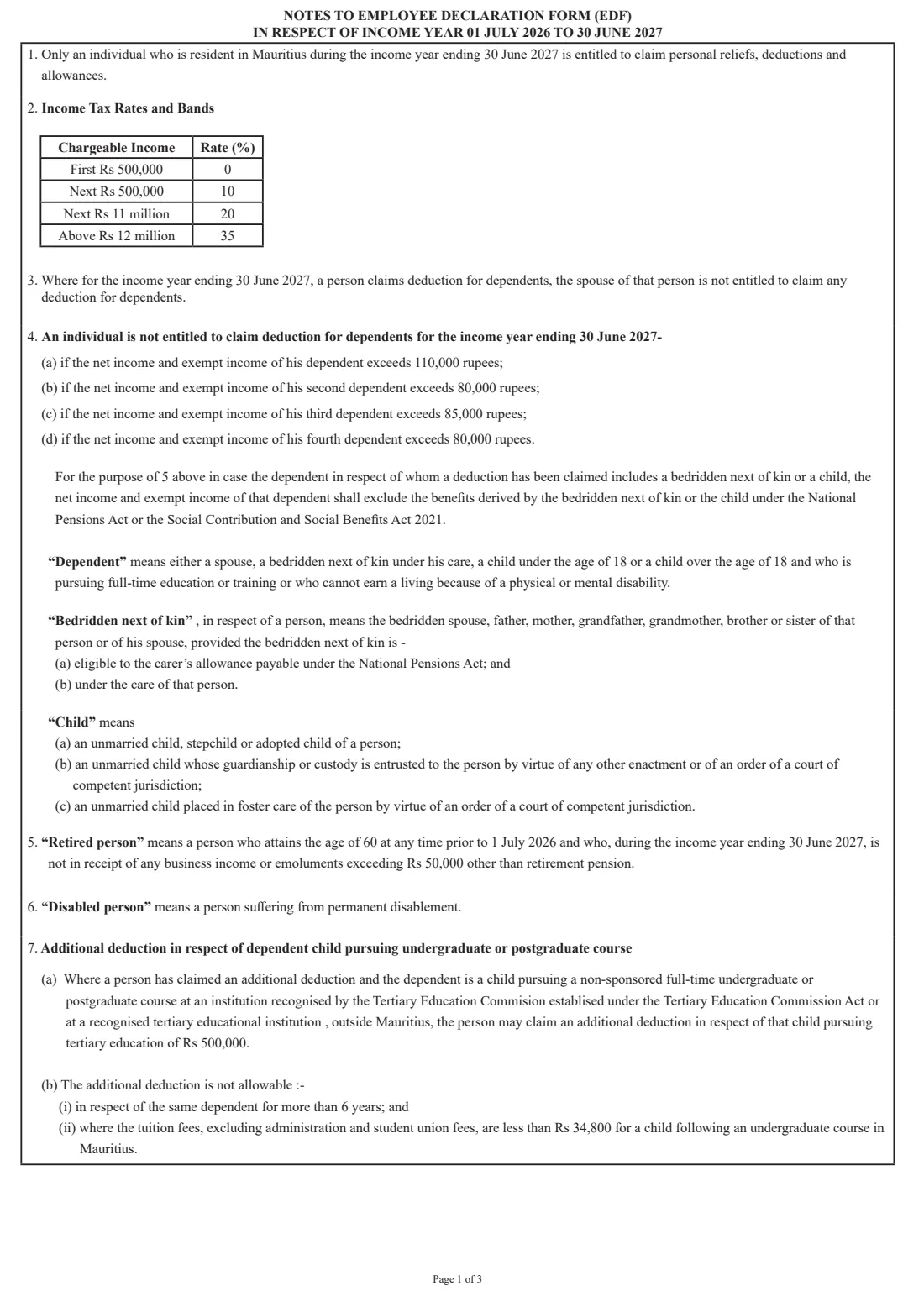
Then say whether you are resident in Mauritius. This question matters: Note 1 says only an individual resident in Mauritius during the income year ending 30 June 2027 can claim personal reliefs, deductions and allowances. If you answer No, leave section 3 at no dependent and no claims.
2 2 Name of employer
Write the name of the employer you are giving the form to. Government employees then fill in the seven-box Div/Paysite code; everyone else fills in the eight-box ERN, the Employer Registration Number. Ask your payroll or HR team if you don't know it.
3 3.1 Deduction for dependents
Tick one box for the number of dependents you claim for: none, one (Rs 110,000), two (Rs 190,000), three (Rs 275,000) or four or more (Rs 355,000), as printed on this edition. The total goes in the Rs column, which FileIt fills in for you.
A dependent can be your spouse, a bedridden next of kin under your care, a child under 18, or an older child in full-time education or training or unable to earn a living because of a disability. If you claim this deduction, your spouse cannot. Note 4 also sets income limits for each dependent, above which no deduction is allowed.
4 3.2 Retired or disabled person
An additional Rs 50,000 is granted to a retired or disabled person. The notes define a retired person as someone who reached 60 before 1 July 2026 and who, during the income year, receives no business income or emoluments above Rs 50,000 other than retirement pension. A disabled person is someone suffering from permanent disablement. Tick the box in FileIt and the Rs 50,000 is added.
5 3.3 Child in undergraduate or postgraduate study
For each dependent child pursuing a non-sponsored full-time undergraduate or postgraduate course at a recognised institution, in Mauritius or abroad, write the child's name, the institution and the additional deduction. Note 7 sets it at Rs 500,000 per child, for no more than six years for the same child, and not where the tuition fees for an undergraduate course in Mauritius are below the figure in the note. FileIt totals up to four children.
6 3.4 Interest relief on secured housing loan
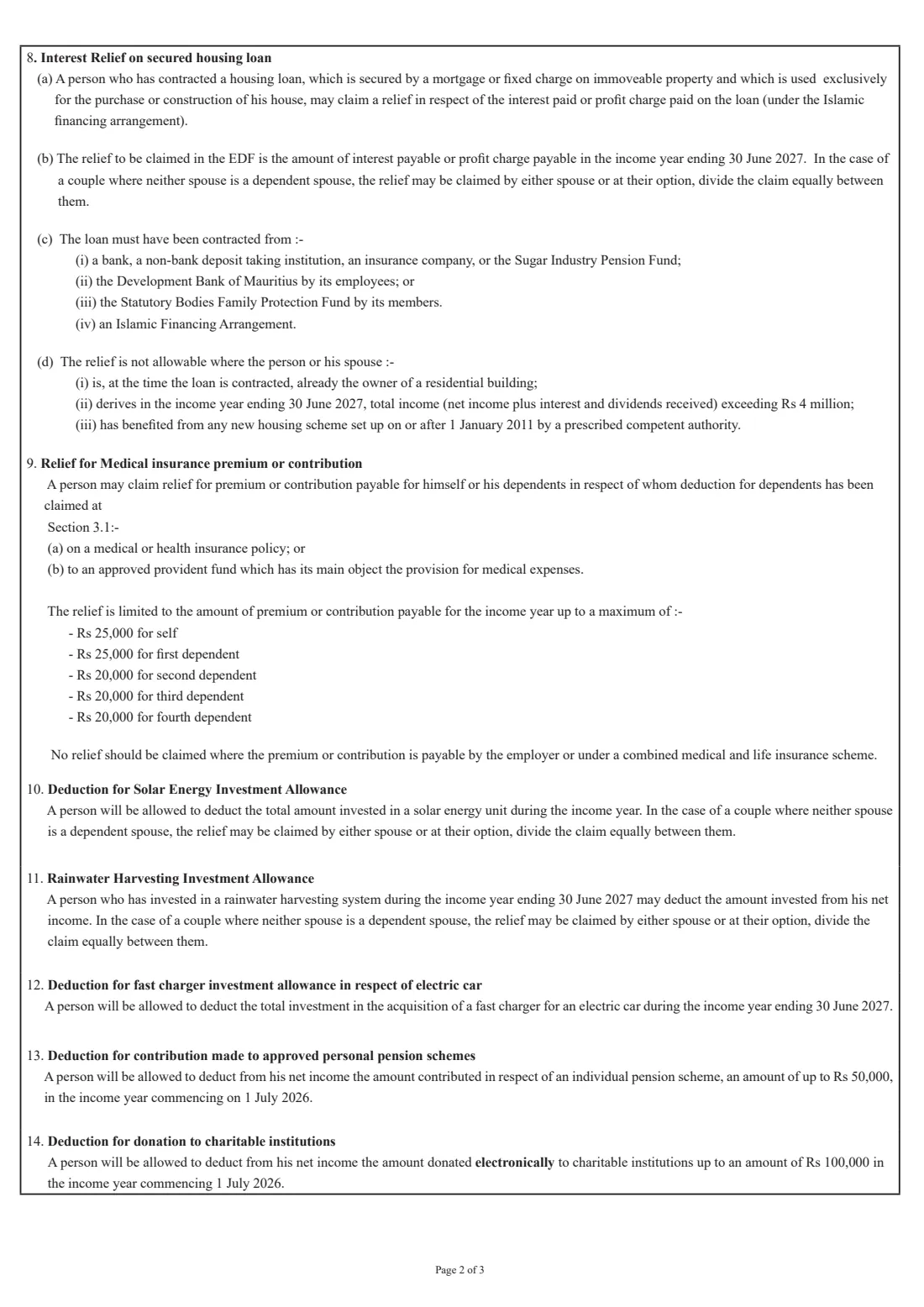
Enter the interest, or the profit charge under an Islamic financing arrangement, payable during the income year on a loan secured on immoveable property and used only to buy or build your house. The loan must come from one of the lenders in Note 8. The relief is not allowed if you or your spouse already owned a residential building when the loan was taken, have total income above Rs 4 million, or benefited from a new housing scheme set up on or after 1 January 2011. A couple where neither is a dependent spouse can let one of them claim it or split it equally.
7 3.5 Medical insurance premium or contribution
Enter the premium or contribution payable for yourself and for each dependent claimed at 3.1, on a medical or health insurance policy or to an approved medical provident fund. The notes cap the relief at Rs 25,000 for yourself and for the first dependent, and Rs 20,000 each for the second, third and fourth. Don't claim premiums paid by your employer or under a combined medical and life scheme. FileIt checks each line against its cap and adds the total.
8 3.6 to 3.10 Investment, pension and donation deductions
These lines take a single amount each: the amount invested in a solar energy unit (3.6), a rainwater harvesting system (3.7) or a fast charger for an electric car (3.8) during the income year; contributions to an approved personal pension scheme, up to Rs 50,000 (3.9); and donations made electronically to charitable institutions, up to Rs 100,000 (3.10). Couples can share the solar and rainwater allowances as the notes explain.
9 3.11 Fee-paying private schools
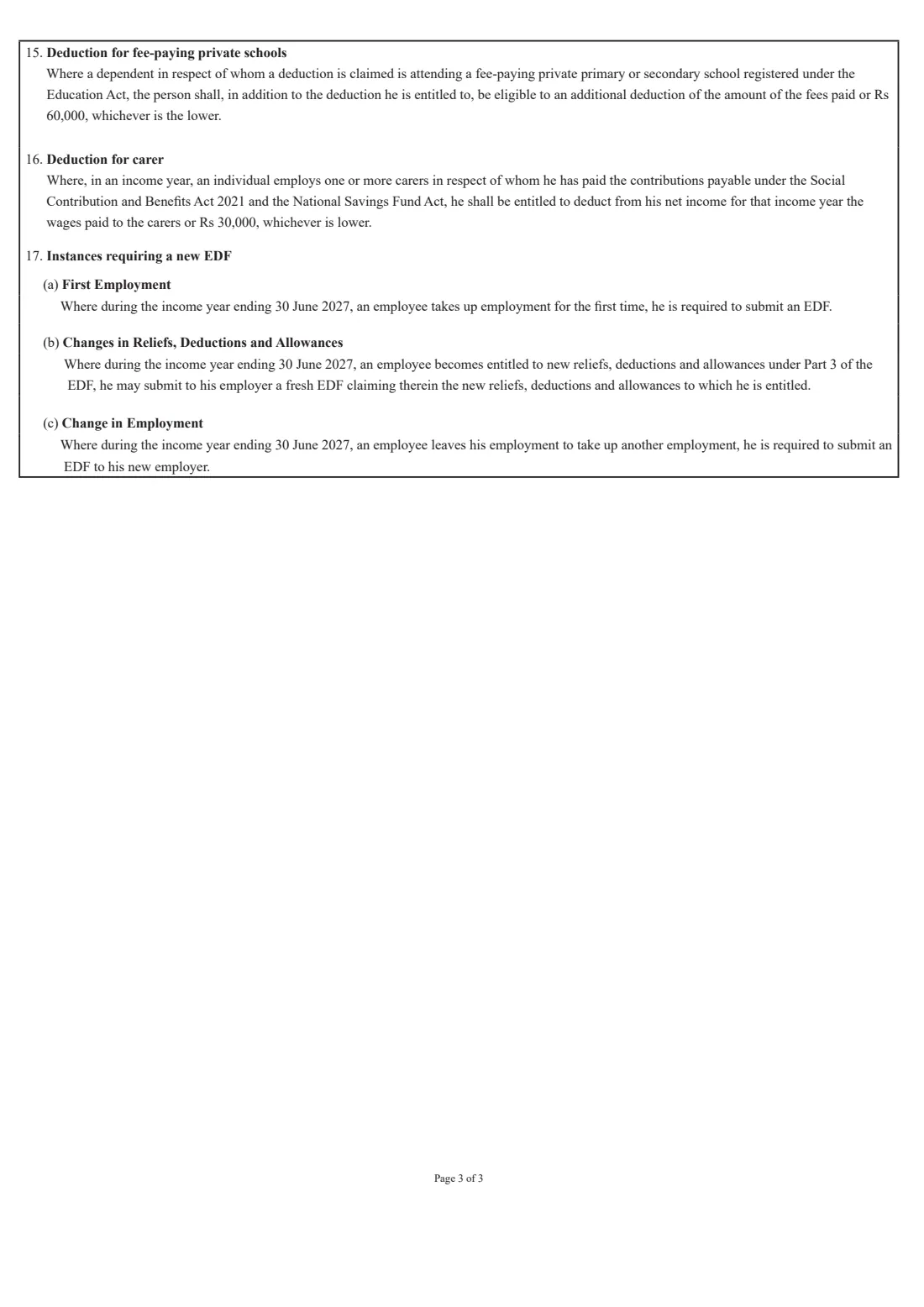
For each dependent child at a fee-paying private primary or secondary school registered under the Education Act, write the child's name, the school and the deduction: the fees paid or Rs 60,000, whichever is lower. FileIt adds the lines together.
10 3.12 Carer and total
If you employ one or more carers and pay the contributions due for them, you can deduct the wages paid or Rs 30,000, whichever is lower. FileIt then adds up every line of section 3 into the Total reliefs, deductions and allowances box.
11 4 First employment / change in employment
Say whether you have already submitted an EDF to any other employer for the income year ending 30 June 2027. This helps your employer know whether this is your first or only declaration for the year.
12 5 Declaration
The declaration reads "I ... do hereby declare that I am employed by the employer named at section 2 above and that the information I have given on this form is true and correct." You write your full name on the dotted line and the date below. There is no separate signature line on this edition.
Common mistakes to avoid
- Giving an EDF to more than one employer at the same time: the form says to submit it to only one.
- Claiming reliefs while not resident in Mauritius: only residents can claim them.
- Claiming the dependents deduction when your spouse already claims it: only one of you can.
- Counting a dependent whose own income is above the limits in Note 4.
- Claiming medical premiums for more dependents than you claimed at 3.1, or above the per-person caps.
- Entering more than the maximum for pension contributions (Rs 50,000), donations (Rs 100,000), school fees (Rs 60,000 per child) or a carer (Rs 30,000).
- Using an EDF for the wrong income year: the amounts change from year to year.
- Forgetting the ERN or Div/Paysite code, which your employer needs to process the form.
After you fill it out
Check the printed PDF, write the date if you haven't, and give the form to your employer's payroll or HR department. The EDF is not sent to the MRA by you; your employer uses it to work out the PAYE deducted from your pay. FileIt does not send it anywhere, so you deliver it yourself on paper or however your employer asks.
Keep a copy. The finished PDF is saved in your FileIt vault, and it is worth keeping the evidence behind each claim, such as loan statements, insurance receipts and school-fee receipts, because unjustified or excessive claims can lead to a penalty.
Fill in a new EDF if you change employer, start a first job, or become entitled to new reliefs during the year, and use the new edition when the next income year begins on 1 July.
Fill out EDF (PAYE) 2026-27 online with FileIt
- Pick the person. Choose someone from People and FileIt fills in their name, date of birth, address and other details it already knows.
- Answer plain-language questions. One part of the form at a time, with the official help text beside each question — 56 fields in all. Your answers save as you go.
- Check the live preview. Watch your answers land on the real Mauritius Revenue Authority (MRA) form, and let FileIt do any worksheet arithmetic.
- Generate the official PDF. FileIt prints your answers into the agency’s own PDF and files it in that person’s folder in your vault.
FileIt fills the form — it never files or submits anything for you. Deliver the finished form to whoever asked for it, the way the form’s instructions say.
Start EDF (PAYE) 2026-27 now — it’s freeEDF (PAYE) 2026-27: frequently asked questions
What is the EDF form in Mauritius?
The EDF is the Employee Declaration Form under the PAYE system run by the Mauritius Revenue Authority. You give it to your employer so they can take your deduction for dependents and other reliefs into account when working out the income tax withheld from your pay.
Where do I send the EDF?
To your employer, not to the MRA. If you have more than one employer at the same time, give it to only one of them. FileIt prepares the PDF but never submits it; you hand it over yourself.
Can I fill in the EDF online?
Yes. FileIt lets you fill in the 2026-27 EDF online, pre-fills your details from your vault, adds up the Rs column and prints everything onto the MRA's official PDF, which you then give to your employer. Filling forms is available on every FileIt account, including the free plan.
How much is the deduction for dependents for 2026-27?
This edition prints Rs 110,000 for one dependent, Rs 190,000 for two, Rs 275,000 for three and Rs 355,000 for four or more. Only one spouse can claim it, and each dependent's own income must be within the limits in Note 4.
Do I need to sign the EDF?
This edition has no signature line. You complete the declaration by writing your name after "I" and the date. Your employer may ask for a signature as well; if so, you can sign the printed copy.
Do I need a new EDF when I change jobs?
Yes. Note 17 says an employee who leaves one employment to take up another during the income year is required to submit an EDF to the new employer. The same applies when you take up employment for the first time.
What happens if I claim too much?
The form warns that where a claim under items 3.2 to 3.12 is unjustified or more than 10% above what you are entitled to, you can be liable to a penalty of up to 25% of the tax underpaid under PAYE. Claim only what the notes allow and keep your receipts.
Can a non-resident claim reliefs on the EDF?
No. Note 1 says only an individual resident in Mauritius during the income year ending 30 June 2027 is entitled to claim personal reliefs, deductions and allowances.
Official sources
- Blank form (PDF), published by Mauritius Revenue Authority (MRA): https://www.mra.mu/download/EDFForm.pdf
- Official instructions and guidance: https://www.mra.mu/download/EDFForm.pdf
- Edition shown on this page: Income year 1 July 2026 to 30 June 2027 (checked 2026-09-26).
FileIt is not affiliated with or endorsed by Mauritius Revenue Authority (MRA) or any government. This page explains the form in general terms and is not legal, tax or immigration advice. Always read the official instructions, and check that you are using the edition the recipient accepts. Page last reviewed 2026-09-26.