What is P.F.136A Mauritius passport renewal?
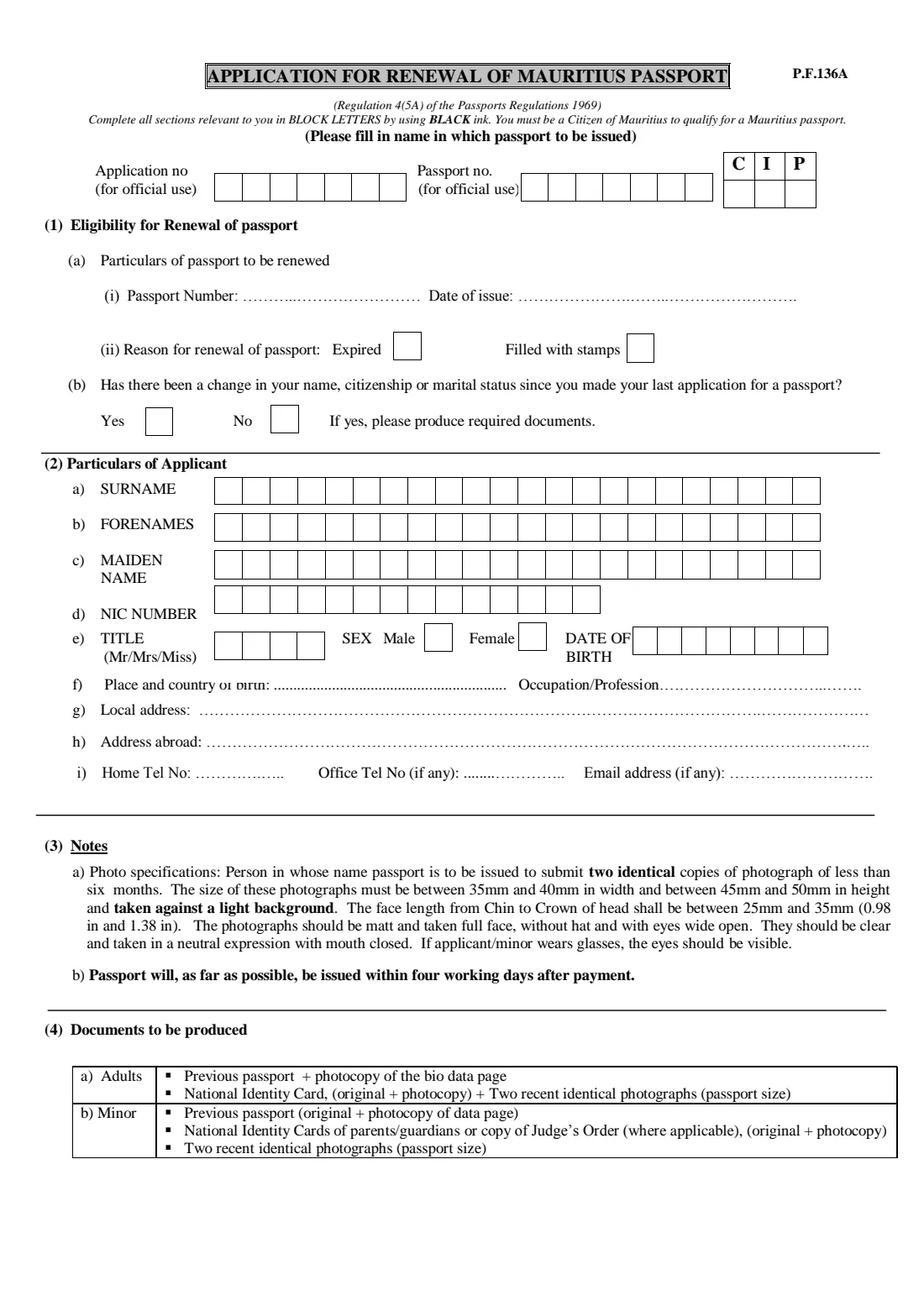
P.F.136A is the application for renewal of a Mauritius passport, made under Regulation 4(5A) of the Passports Regulations 1969 and issued by the Passport and Immigration Office. It is a two-page form for one situation: your existing Mauritius passport has expired or is filled with stamps and you want a new one. Because the office already holds your earlier application, it asks for much less than the full application form, P.F.136, which is used for first passports and for lost or damaged ones.
The form asks about the passport being renewed, whether your name, citizenship or marital status has changed since your last application, and your current particulars and contact details. For a child under 18, both parents or the guardian give their consent in front of a police officer. Like the full form, it must be completed in block letters with black ink, signed by hand and handed in with your previous passport and your documents.
FileIt lets you fill in the typed parts of P.F.136A in plain English and prints them onto the office's own editable PDF, in capital letters and one character per box where the form has boxes. Names, date of birth and email can be pre-filled from the People records in your FileIt vault, and the finished PDF is saved in the applicant's folder. The specimen signature, the other signatures and the police certification stay blank for you to complete by hand. FileIt does not submit the form; you take it in yourself.
- Who fills it
- A Mauritius passport holder renewing their passport, or a parent or guardian for a child
- Given to
- The Passport and Immigration Office, in person (or, abroad, a Mauritian mission that handles passports)
- When
- When your passport has expired or is filled with stamps
- Signatures
- By hand in black ink: applicant or parent, both parents for a minor, and a police officer for the consent
- Edition
- No edition date printed; editable PDF from passport.govmu.org
Who needs to fill out P.F.136A Mauritius passport renewal?
- Adults whose Mauritius passport has expired and who need a new one.
- Frequent travellers whose passport is filled with stamps before it expires.
- Parents or guardians renewing a child's expired or full Mauritius passport.
- Holders whose name, citizenship or marital status changed since their last application, who renew with this form but bring the supporting documents.
- Not for a lost or damaged passport, or a first passport: those use P.F.136.
When to use P.F.136A Mauritius passport renewal
- Once your passport has expired, or when it has no room left for stamps.
- Ahead of planned travel, since the form's notes say the passport will, as far as possible, be issued within four working days after payment.
- When a child's passport expires: note that passports for children under 16 are shorter-lived, so children's passports come up for renewal more often.
- If your passport was lost or damaged, use P.F.136 instead.
What you need before you start
- Your previous passport and a photocopy of its bio-data page.
- Your National Identity Card, original and photocopy.
- Two recent identical passport-size photographs, taken less than six months ago, to the specification in the notes.
- For a minor: the previous passport (original and photocopy of the data page), the parents' or guardians' identity cards or the Judge's Order where applicable, and two photographs.
- Documents for any change of name, citizenship or marital status since your last application, such as a marriage certificate or divorce decree.
- The passport number and date of issue of the passport being renewed.
- Your local address, any address abroad, telephone numbers and email address.
What’s on P.F.136A Mauritius passport renewal
The 2026 edition has 2 pages. FileIt asks for it in 4 parts:
- (1) Eligibility for renewal of passportApplicant
- (2) Particulars of applicantApplicant
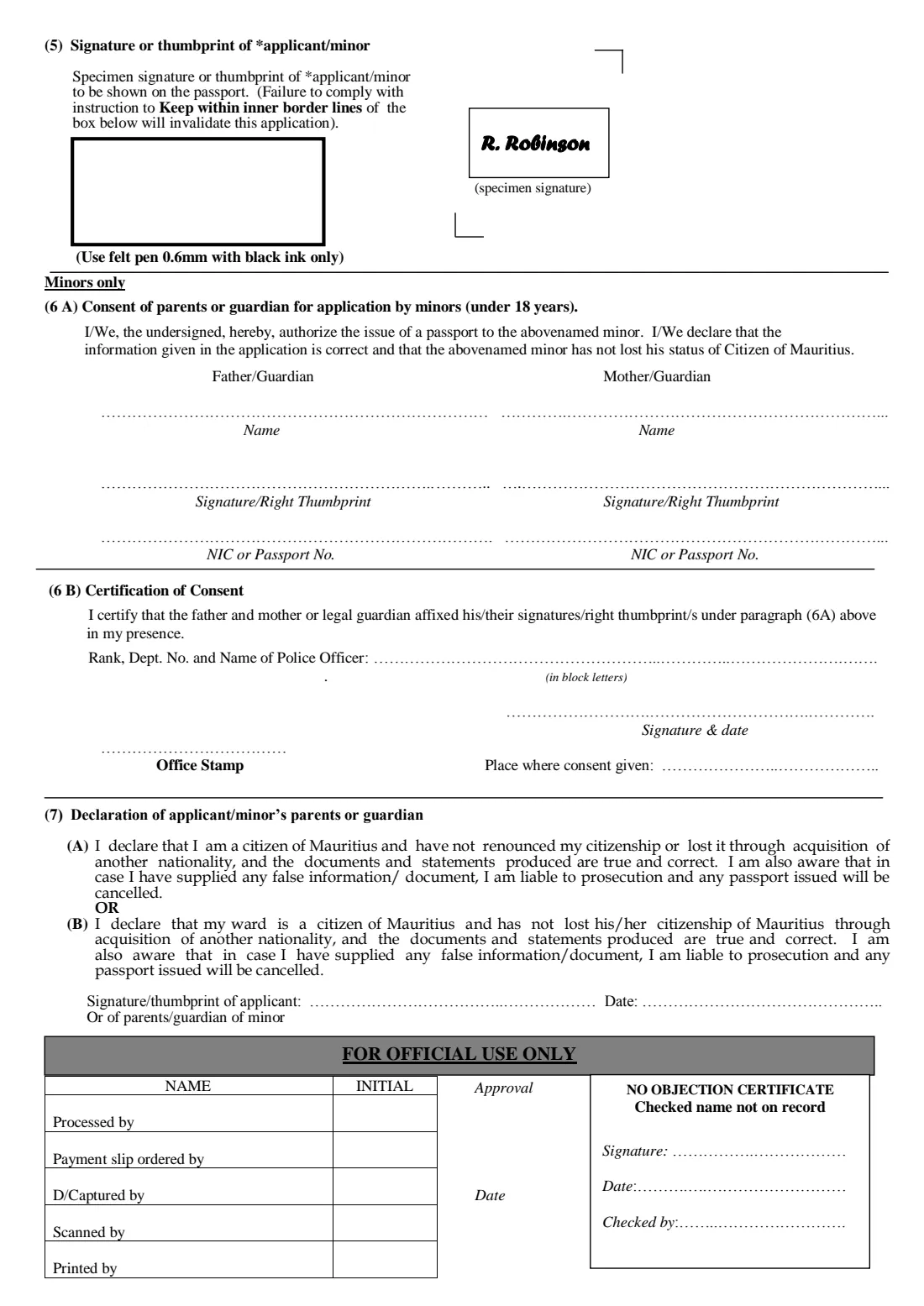
- (6A) Consent of parents or guardian (minors only)Applicant
- (7) DeclarationApplicant
How to fill out P.F.136A Mauritius passport renewal, step by step
1 (1) Eligibility for renewal of passport
Give the number and date of issue of the passport to be renewed, and tick the reason: expired or filled with stamps. These are the only two reasons this form covers.
Then answer whether there has been a change in your name, citizenship or marital status since your last passport application. If yes, bring the documents that prove the change.
2 (2) Particulars of applicant
Write the surname, forenames and maiden name in which the passport is to be issued, one letter per box, the 14-character NIC number, the title (Mr, Mrs or Miss), sex and date of birth in the eight day-month-year boxes. Then give the place and country of birth, occupation or profession, local address, address abroad, home and office telephone numbers and email address. For a child, these are the child's details.
3 (3) Notes and (4) Documents to be produced
These parts are information, not questions. They set out the photograph specification, the four-working-day issuing target after payment, and the documents adults and minors must bring. Check them against what you plan to take with you.
4 (5) Specimen signature
The applicant signs or places a thumbprint inside the box with a 0.6 mm black felt pen. This signature is reproduced in the passport, and the form warns that failing to keep within the inner border lines invalidates the application, so it is always done by hand.
5 (6A) and (6B) Consent for minors
Only for applicants under 18. Both parents, or the legal guardian, authorise the new passport and confirm the child has not lost Mauritian citizenship, and FileIt prints their names and NIC or passport numbers. They sign or thumbprint by hand in front of a police officer, who completes the certification of consent in 6B with rank, number, name, signature, date and office stamp.
6 (7) Declaration
Declaration (A) is made by an adult applicant and (B) by a parent or guardian for a minor. FileIt ticks the one that applies and prints the date; the signature or thumbprint is added by hand. The declaration warns that false information can lead to prosecution and cancellation of the passport.
Common mistakes to avoid
- Using P.F.136A for a lost or damaged passport, which needs the full form P.F.136.
- Forgetting the photocopy of the previous passport's bio-data page.
- Answering No to the change question when your name or marital status did change since the last application.
- Signing outside the inner border of the specimen signature box.
- Leaving out the parents' consent in front of a police officer for a child under 18.
- Bringing photographs that are older than six months or not identical.
After you fill it out
Print the PDF and complete the handwritten parts in black ink: the specimen signature in section 5, the declaration signature and, for a minor, the parents' signatures in front of a police officer.
Take the form in person to the Passport and Immigration Office, or abroad to a Mauritian mission that handles passports, with your previous passport and the documents listed in section 4. FileIt does not submit anything on your behalf.
The filled form is kept in your FileIt vault. When the new passport arrives, add a scan of it to the vault so its expiry date is tracked and you are reminded before the next renewal.
Fill out P.F.136A Mauritius passport renewal online with FileIt
- Pick the person. Choose someone from People and FileIt fills in their name, date of birth, address and other details it already knows.
- Answer plain-language questions. One part of the form at a time, with the official help text beside each question — 27 fields in all. Your answers save as you go.
- Check the live preview. Watch your answers land on the real Passport and Immigration Office, Republic of Mauritius (PIO) form, and let FileIt do any worksheet arithmetic.
- Generate the official PDF. FileIt prints your answers into the agency’s own PDF and files it in that person’s folder in your vault.
FileIt fills the form — it never files or submits anything for you. Deliver the finished form to whoever asked for it, the way the form’s instructions say.
Start P.F.136A Mauritius passport renewal now — it’s freeP.F.136A Mauritius passport renewal: frequently asked questions
What is form P.F.136A?
P.F.136A is the application for renewal of a Mauritius passport, under Regulation 4(5A) of the Passports Regulations 1969. It is for passports that have expired or are filled with stamps.
Can I renew my Mauritius passport online?
You can fill in the typed parts of P.F.136A online with FileIt, which prints them onto the official PDF. The form is then printed, signed by hand in black ink and handed in in person with your previous passport and documents. Filling forms is available on every FileIt account, including the free plan.
Where do I submit the renewal form?
In person at the Passport and Immigration Office, or abroad at a Mauritian embassy or high commission that handles passports. FileIt never submits it for you.
What documents do I need to renew a Mauritius passport?
For an adult: the previous passport and a photocopy of its bio-data page, the National Identity Card (original and photocopy) and two recent identical passport-size photographs. For a minor: the previous passport and a copy of its data page, the parents' or guardians' identity cards or a Judge's Order, and two photographs.
My passport was lost. Can I use P.F.136A?
No. This form only covers expired passports and passports filled with stamps. For a lost or damaged passport, use the full application form P.F.136 and bring a police report of the loss.
How long does a Mauritius passport renewal take?
The form's notes say the passport will, as far as possible, be issued within four working days after payment. That is the office's target, not a guarantee.
Do both parents need to sign for a child's passport renewal?
Section 6A asks for the consent of the father and mother, or the legal guardian, signed or thumbprinted in the presence of a police officer, who certifies it in section 6B.
Official sources
- Blank form (PDF), published by Passport and Immigration Office, Republic of Mauritius (PIO): https://passport.govmu.org/passport/?mdocs-file=704
- Official instructions and guidance: https://passport.govmu.org/passport/
- Edition shown on this page: Not dated on the form (file PF136A-2014, editable) (checked 2026-09-26).
FileIt is not affiliated with or endorsed by Passport and Immigration Office, Republic of Mauritius (PIO) or any government. This page explains the form in general terms and is not legal, tax or immigration advice. Always read the official instructions, and check that you are using the edition the recipient accepts. Page last reviewed 2026-09-26.