What is PAYE request to withhold tax?
Under Pay As You Earn (PAYE), your employer normally works out the income tax on your pay from the Employee Declaration Form (EDF) you give them. This Mauritius Revenue Authority (MRA) form is the alternative for someone who has not given that employer, or that payer of an annuity or pension, an EDF. It asks them to withhold tax at a flat rate instead: 15% or 20%.
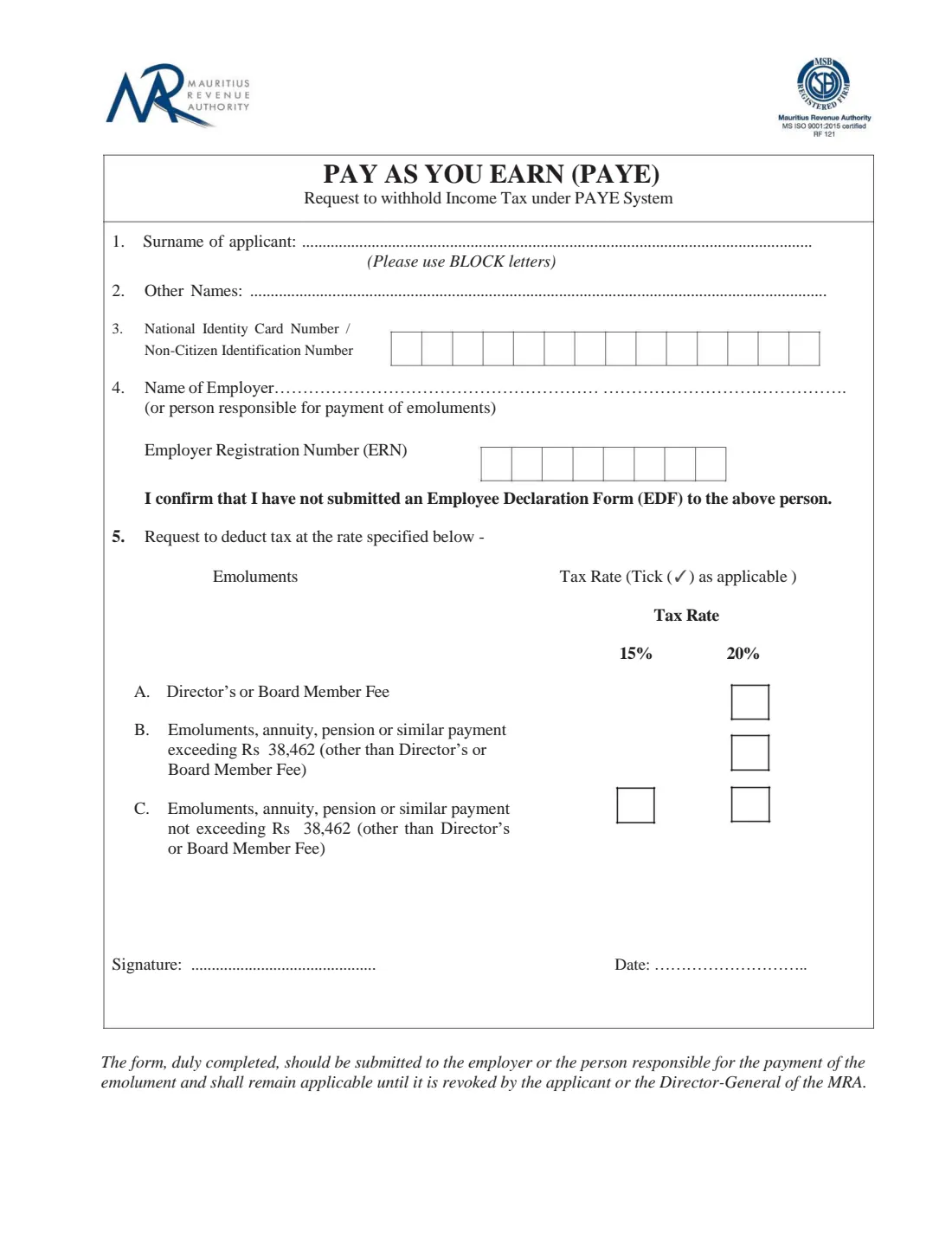
The form is short: your surname, other names, identity card number, the name of the employer or payer and their Employer Registration Number (ERN), a confirmation that you have not submitted an EDF to them, and a tick for the rate. As printed on this edition, a director's or board member fee is withheld at 20%, emoluments, an annuity, a pension or a similar payment exceeding Rs 38,462 at 20%, and such a payment not exceeding Rs 38,462 at 15% or 20%.
FileIt prints your details in block letters, puts your 14-character identity card number and the 8-character ERN one per box, and offers only the rate boxes the form allows. The filled official PDF is saved in your vault, and you can sign it with FileIt's eSignature or by hand. FileIt never submits anything: you give the form to your employer or payer yourself.
- Who fills it
- An employee, director, board member or pensioner who has not given this payer an EDF
- Given to
- The employer or the person responsible for paying the emoluments, not the MRA
- Rates
- 15% or 20%, per the boxes printed on this edition (threshold Rs 38,462)
- How long it applies
- Until you revoke it or the Director-General of the MRA does, as printed on the form
- Signatures
- The applicant signs and dates it
- Edition
- No edition date printed; the PDF on mra.mu was created in August 2025
Who needs to fill out PAYE request to withhold tax?
- A company director or board member who is paid a fee, which this edition withholds at 20%.
- Someone receiving an annuity or pension who prefers a flat rate of PAYE to an EDF.
- An employee with a second job who wants tax withheld at a flat rate on it rather than giving that employer an EDF.
- Anyone whose emoluments are not more than Rs 38,462 and who wants a 15% or 20% withholding rate.
When to use PAYE request to withhold tax
- When you start receiving emoluments, an annuity, a pension or a director's fee from a payer to whom you have not given an EDF.
- When you want to change from no withholding to a flat rate.
- Not if you have already given this payer an EDF. The form makes you confirm that you have not.
What you need before you start
- Your surname and other names.
- Your National Identity Card number or Non-Citizen Identification Number (14 characters).
- The name of your employer or the person who pays you.
- Their Employer Registration Number (ERN), 8 characters.
- Which kind of payment it is (director's fee, more than Rs 38,462, or not more than Rs 38,462) and the rate you want.
What’s on PAYE request to withhold tax
The 2025 edition has 1 page. FileIt asks for it in 3 parts, and it is signed by Applicant:
- 1-4 Applicant and employerApplicant
- 5 Request to deduct tax at the rate specifiedApplicant
- Signature and dateApplicant
How to fill out PAYE request to withhold tax, step by step
1 1-3. Your name and identity card number
Write your surname and other names in block letters, then your National Identity Card number or Non-Citizen Identification Number, one character per box. FileIt checks it has 14 characters starting with a letter.
2 4. Employer and ERN
Name the employer or the person responsible for paying your emoluments, and give their Employer Registration Number in the 8 boxes. The form then has you confirm that you have not submitted an Employee Declaration Form (EDF) to that person.
3 5. Emoluments and tax rate
Tick one box. A: director's or board member fee, 20% only. B: emoluments, an annuity, a pension or a similar payment exceeding Rs 38,462 (other than a director's or board member fee), 20% only. C: such a payment not exceeding Rs 38,462, 15% or 20%.
4 Signature and date
Sign and date the form and give it to your employer or payer. As printed at the foot of the form, it remains applicable until you or the Director-General of the MRA revoke it.
Common mistakes to avoid
- Using this form when you have already given the same employer an EDF.
- Ticking 15% for a director's fee or for a payment above Rs 38,462. This edition only offers 20% for those.
- Leaving the ERN blank or getting the identity card number wrong.
- Sending the form to the MRA instead of giving it to the employer or payer.
- Forgetting that the request stays in force until it is revoked.
After you fill it out
Sign the form with FileIt's eSignature or print it and sign by hand, then give it to your employer or the person who pays you.
Keep the copy FileIt files in your vault. It shows which rate you asked for and when.
To change the arrangement later, revoke the request with your employer. If you give them an EDF instead, your PAYE is worked out from that.
Fill out PAYE request to withhold tax online with FileIt
- Pick the person. Choose someone from People and FileIt fills in their name, date of birth, address and other details it already knows.
- Answer plain-language questions. One part of the form at a time, with the official help text beside each question — 9 fields in all. Your answers save as you go.
- Check the live preview. Watch your answers land on the real Mauritius Revenue Authority (MRA) form, and let FileIt do any worksheet arithmetic.
- Generate the official PDF. FileIt prints your answers into the agency’s own PDF and files it in that person’s folder in your vault. Sign it, or send it for e-signature.
FileIt fills the form — it never files or submits anything for you. Deliver the finished form to whoever asked for it, the way the form’s instructions say.
Start PAYE request to withhold tax now — it’s freePAYE request to withhold tax: frequently asked questions
What is the MRA PAYE request to withhold income tax?
It is a one-page form you give your employer or payer to have income tax withheld at a flat 15% or 20% under PAYE, when you have not given them an Employee Declaration Form (EDF).
Can I choose 15% on a director's fee?
No. On this edition a director's or board member fee has only a 20% box. 15% is offered only for emoluments, an annuity, a pension or a similar payment not exceeding Rs 38,462.
Do I send it to the MRA?
No. The form says it should be submitted to the employer or the person responsible for paying the emoluments.
How long does the request apply?
Until it is revoked by you or by the Director-General of the MRA, as printed on the form.
Can I sign it electronically?
FileIt can place an e-signature on the signature line. If your employer wants a handwritten signature, print the form and sign it by hand.
Does FileIt submit the form?
No. FileIt fills in the official PDF and saves it in your vault. You give it to your employer or payer.
Official sources
- Blank form (PDF), published by Mauritius Revenue Authority (MRA): https://www.mra.mu/download/PAYEAuthorisationForm.pdf
- Official instructions and guidance: https://www.mra.mu/index.php/downloadable-forms/income-tax/pay-as-you-earn
- Edition shown on this page: No edition date printed (PDF created 26 August 2025) (checked 2026-10-01).
FileIt is not affiliated with or endorsed by Mauritius Revenue Authority (MRA) or any government. This page explains the form in general terms and is not legal, tax or immigration advice. Always read the official instructions, and check that you are using the edition the recipient accepts. Page last reviewed 2026-10-01.