What is Form TR2 (company tax registration)?
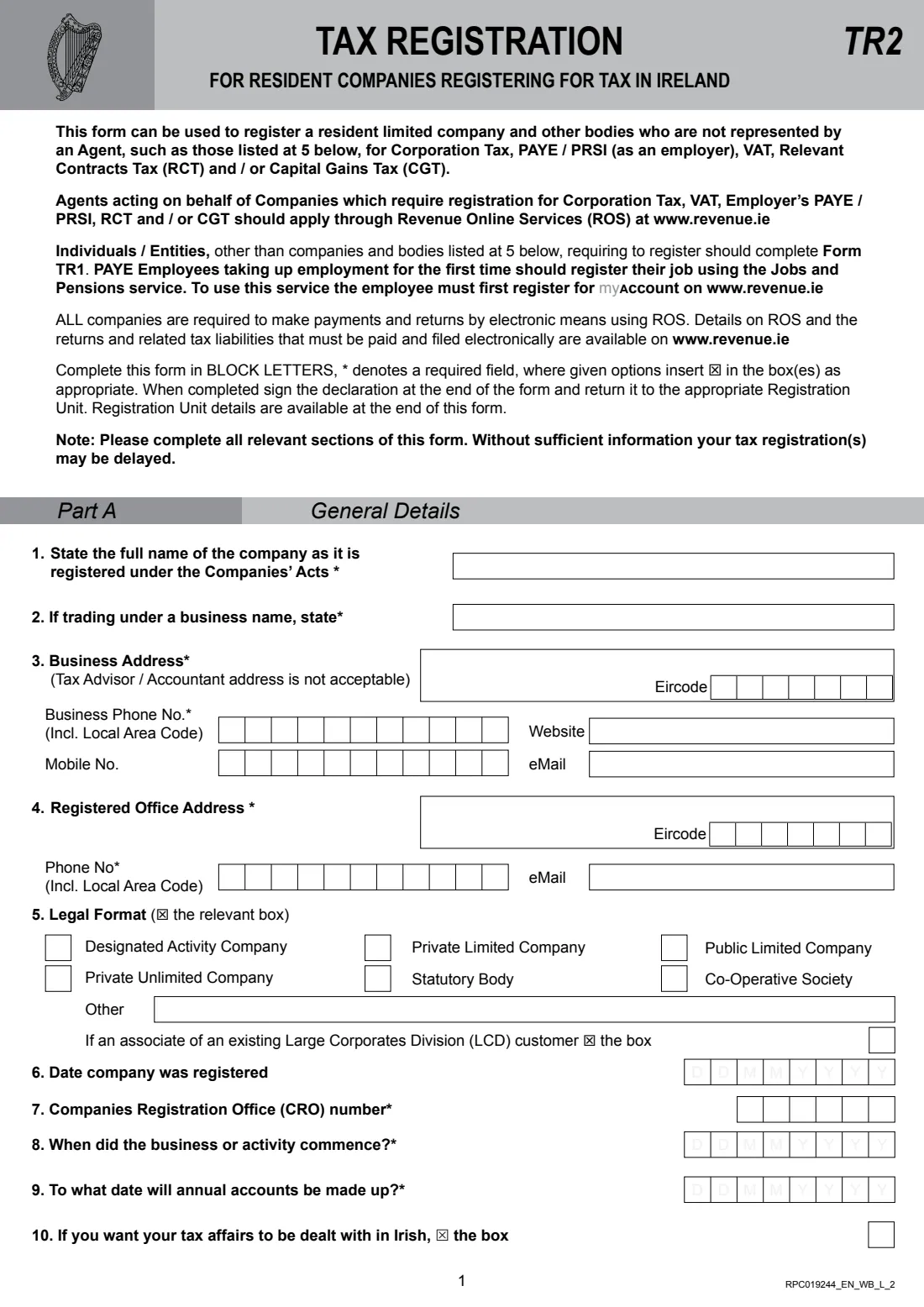
Form TR2 registers a resident limited company, or another body listed in question 5 such as a statutory body or co-operative society, with Revenue for one or more taxes: Corporation Tax, employer's PAYE / PRSI, VAT, Relevant Contracts Tax (RCT) and Capital Gains Tax (CGT). Revenue's guidance says you need the company's Companies Registration Office (CRO) number first.
It's the route for companies that aren't represented by a tax agent. Agents register their clients online through ROS, individuals, partnerships and trusts use Form TR1, and non-resident companies use Form TR2 (FT). Part A covers the company, its directors, secretary, larger shareholders, advisor and premises; Parts B to F cover each tax; and a director or the secretary signs the declaration.
FileIt asks only for the parts you switch on, puts each digit in its own box, ticks the 'registering for' box of every part you complete, places shareholdings digit by digit around the printed decimal point, adds up the turnover totals and checks the IBAN. Once registered, the company files and pays electronically through ROS.
- Who fills it
- Resident companies and bodies without a tax agent
- Registers for
- Corporation Tax, VAT, employer PAYE / PRSI, RCT and / or CGT
- Not for
- Companies with an agent (ROS), individuals and partnerships (TR1), non-resident companies (TR2 (FT))
- Return to
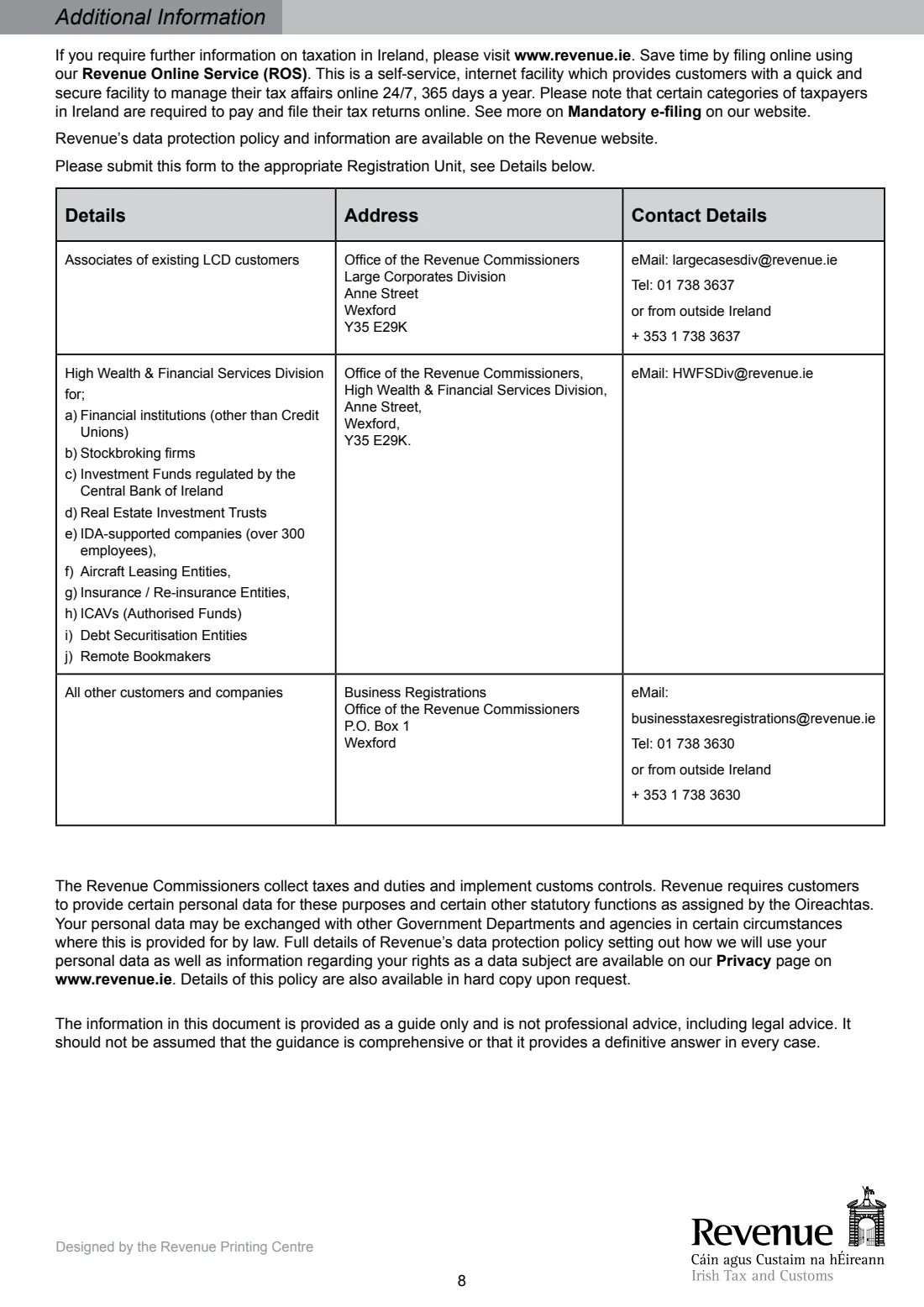
- The Registration Unit listed on page 8 (Business Registrations, Wexford, for most companies)
- Pages
- 8, completed in block letters
- Edition
- RPC019244_EN_WB_L_2
Who needs to fill out Form TR2 (company tax registration)?
- Newly incorporated Irish companies registering for Corporation Tax without an accountant or agent.
- Companies taking on their first employee and registering as an employer.
- Companies whose turnover passes the VAT threshold, or that choose to register for VAT.
- Construction companies registering as principal contractors or subcontractors for RCT.
- Statutory bodies, designated activity companies and co-operative societies registering for tax.
When to use Form TR2 (company tax registration)
- Once the company has its CRO number and starts trading or another taxable activity.
- Before the company's first employee starts work.
- When the company needs to register for VAT, RCT or Capital Gains Tax.
What you need before you start
- The company's registered name, any business name, CRO number, date of registration, business and registered office addresses with Eircodes, phone and email.
- The commencement date, the accounts year-end and the expected turnover for the next 12 months.
- A precise description of what the business does.
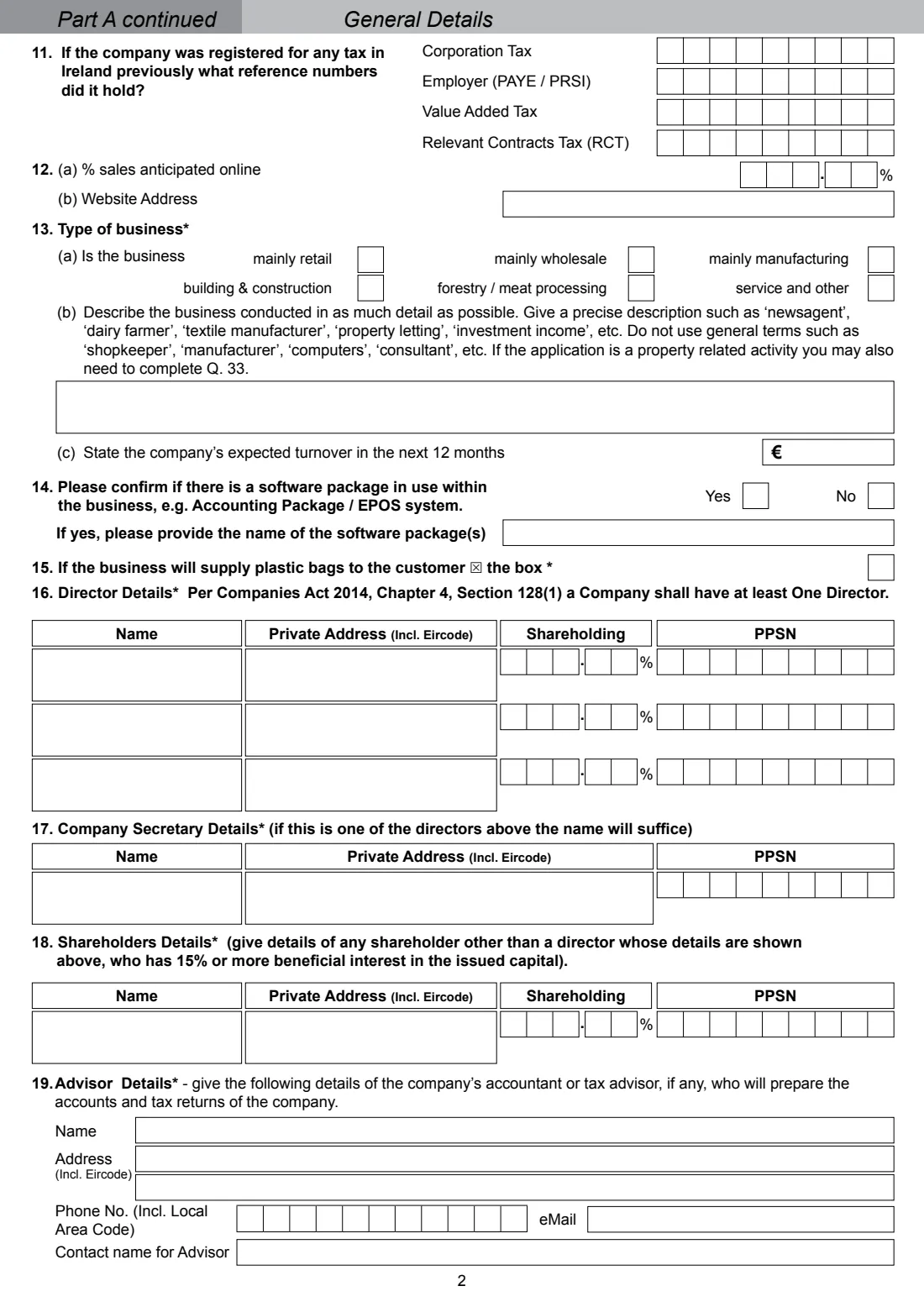
- Each director's name, private address, PPSN and shareholding, the secretary's details, and any other shareholder with 15% or more.
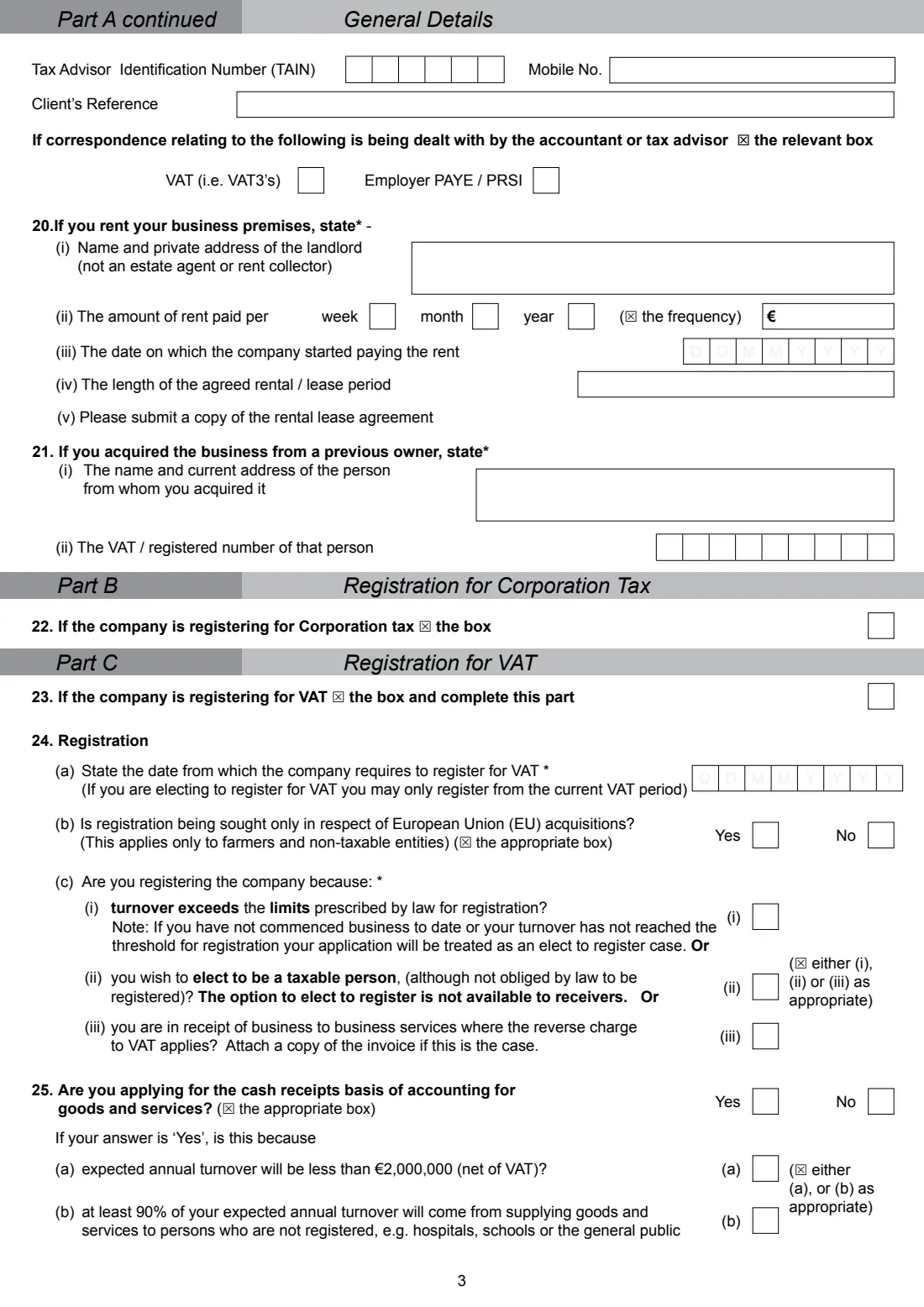
- The accountant's or tax advisor's details and TAIN, if there is one, and landlord and rent details if the premises are rented.
- For VAT: the registration date, turnover figures, your EU trade plans, bank details for refunds and any import plans.
- For PAYE: the number of employees, the first start date and your payroll system.
What’s on Form TR2 (company tax registration)
The 2026 edition has 8 pages. FileIt asks for it in 19 parts, and it is signed by Company (secretary, director or responsible person):
- Part A: General details (1-10)Company (secretary, director or responsible person)
- 11. Previous tax registrationsCompany (secretary, director or responsible person)
- Part A continued: the business (12-15)Company (secretary, director or responsible person)
- 16. Director detailsCompany (secretary, director or responsible person)
- 17. Company secretary detailsCompany (secretary, director or responsible person)
- 18. Shareholder detailsCompany (secretary, director or responsible person)
- 19. Advisor detailsCompany (secretary, director or responsible person)
- 20. Rented business premisesCompany (secretary, director or responsible person)
- 21. Business acquired from a previous ownerCompany (secretary, director or responsible person)
- Part B: Registration for Corporation TaxCompany (secretary, director or responsible person)
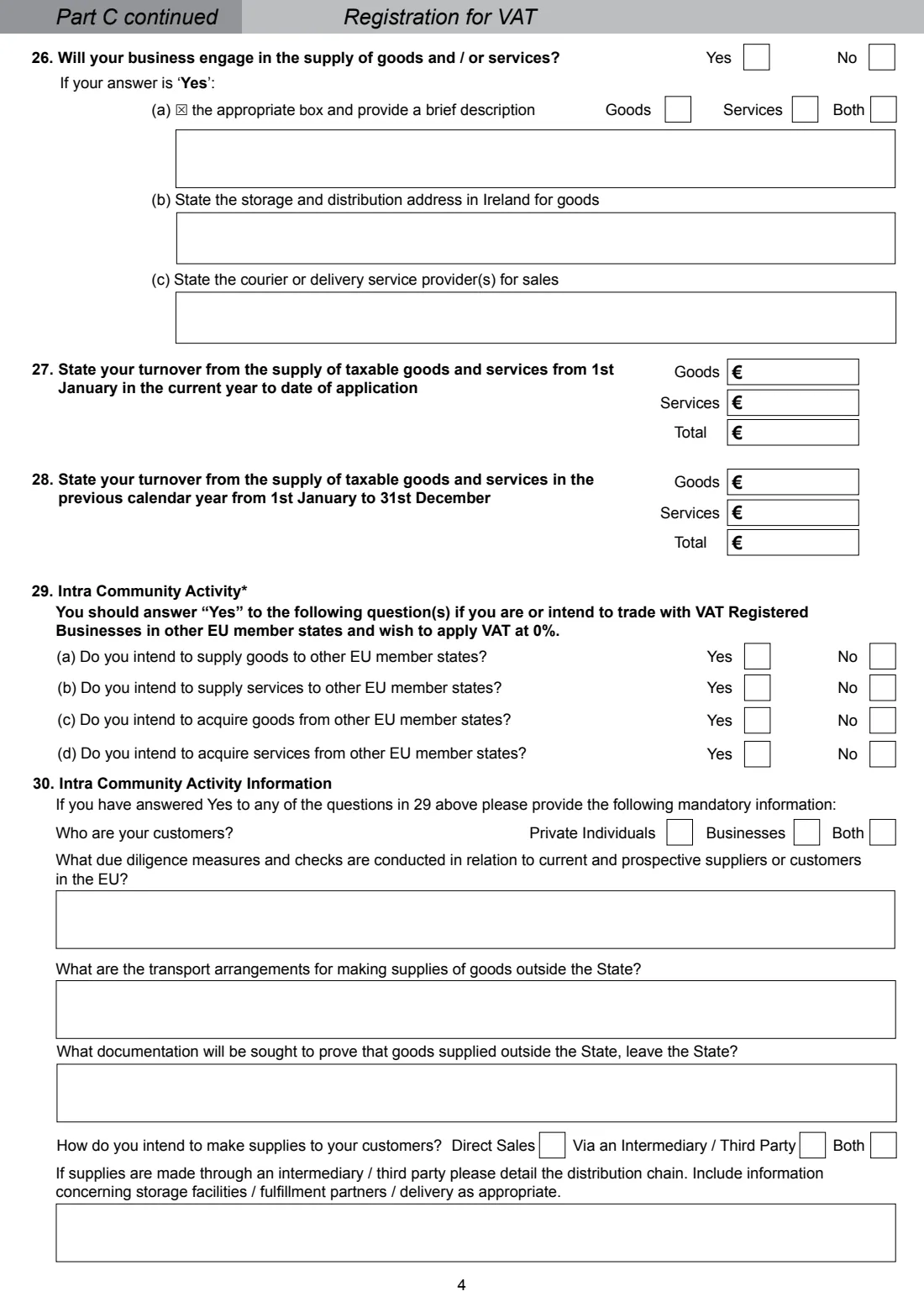
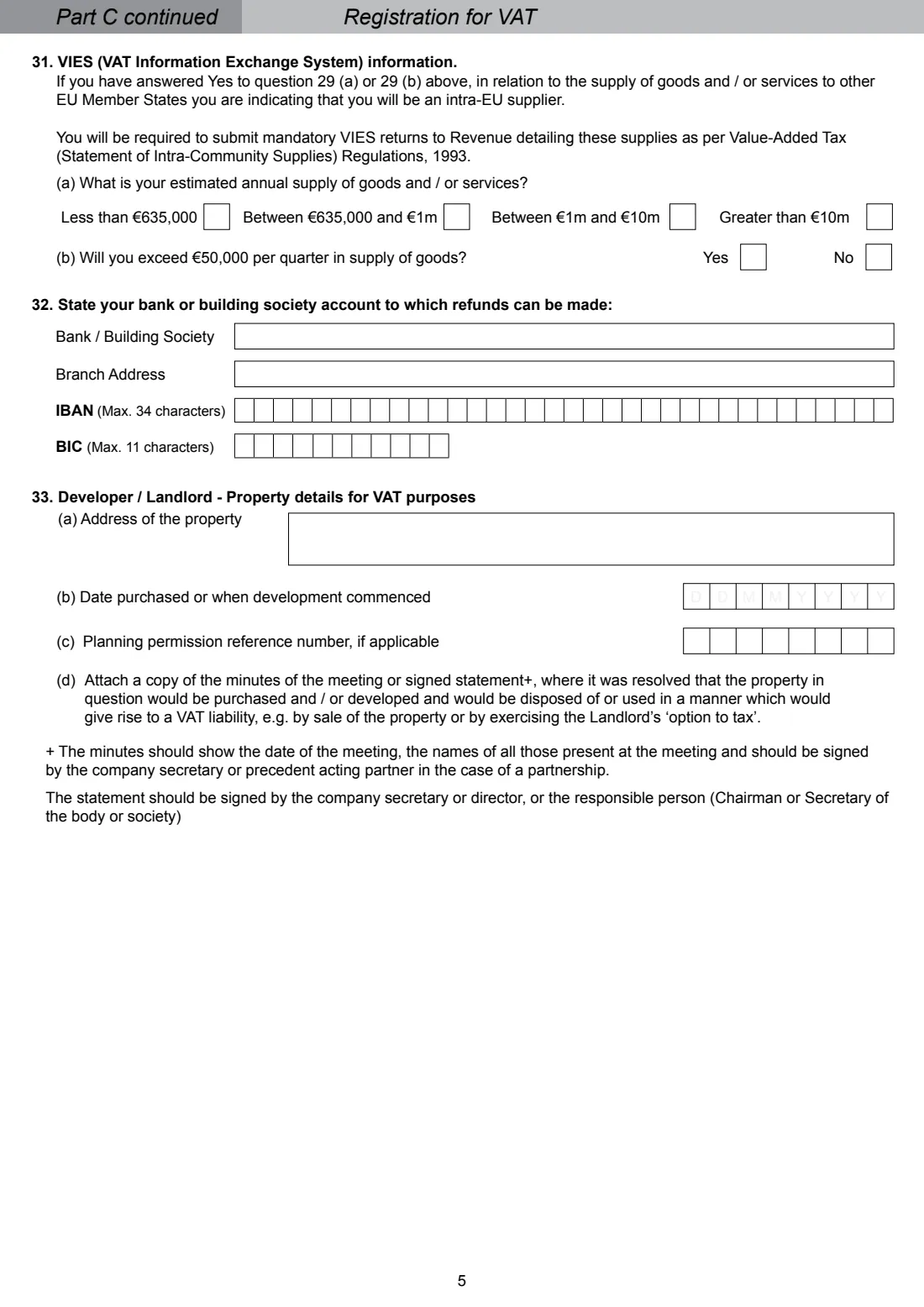
- Part C: Registration for VAT (23-29)Company (secretary, director or responsible person)
- 30-31. Intra-Community activity information and VIESCompany (secretary, director or responsible person)
- 32. Account for refundsCompany (secretary, director or responsible person)
- 33. Developer / landlord: property details for VATCompany (secretary, director or responsible person)
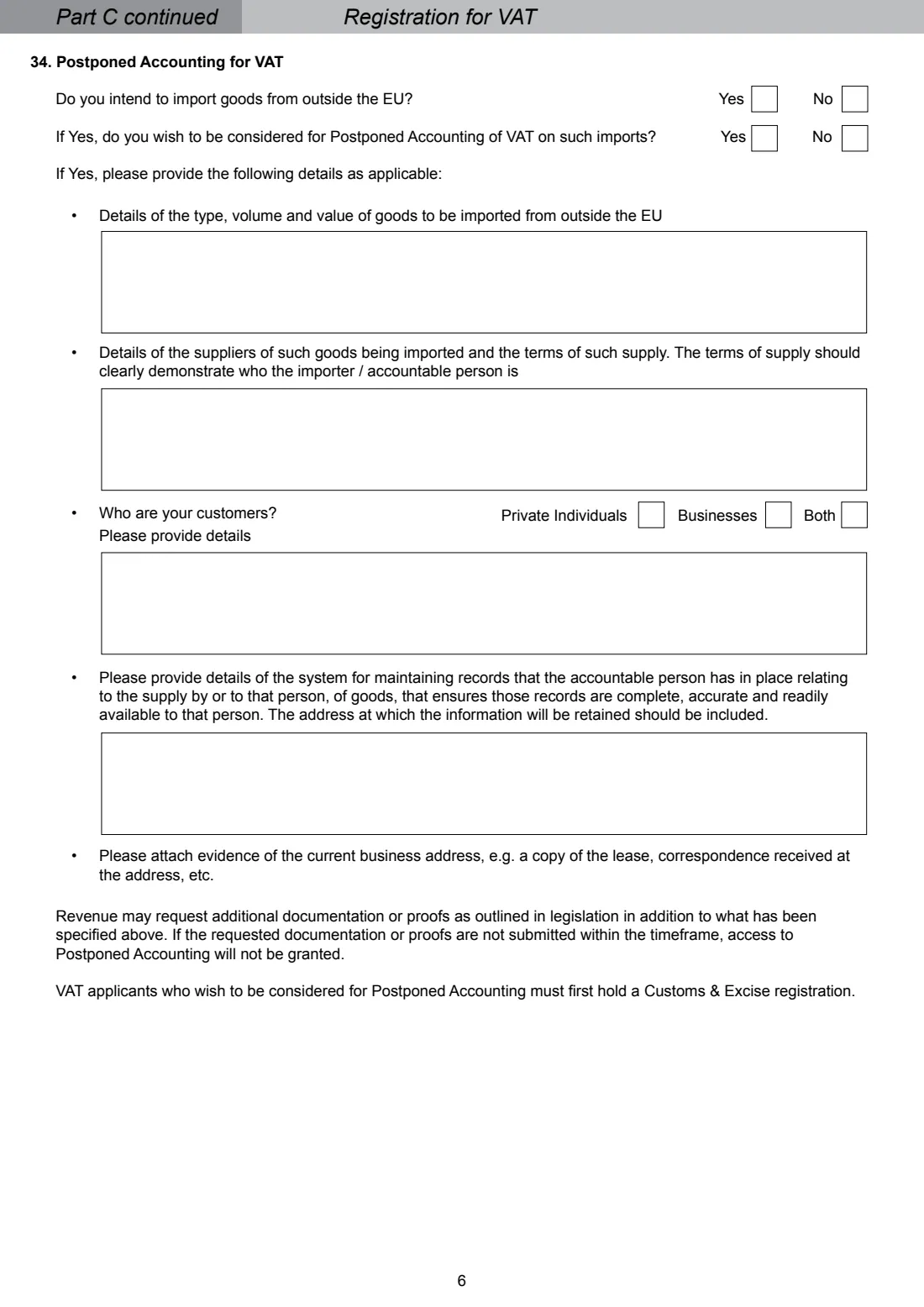
- 34. Postponed Accounting for VATCompany (secretary, director or responsible person)
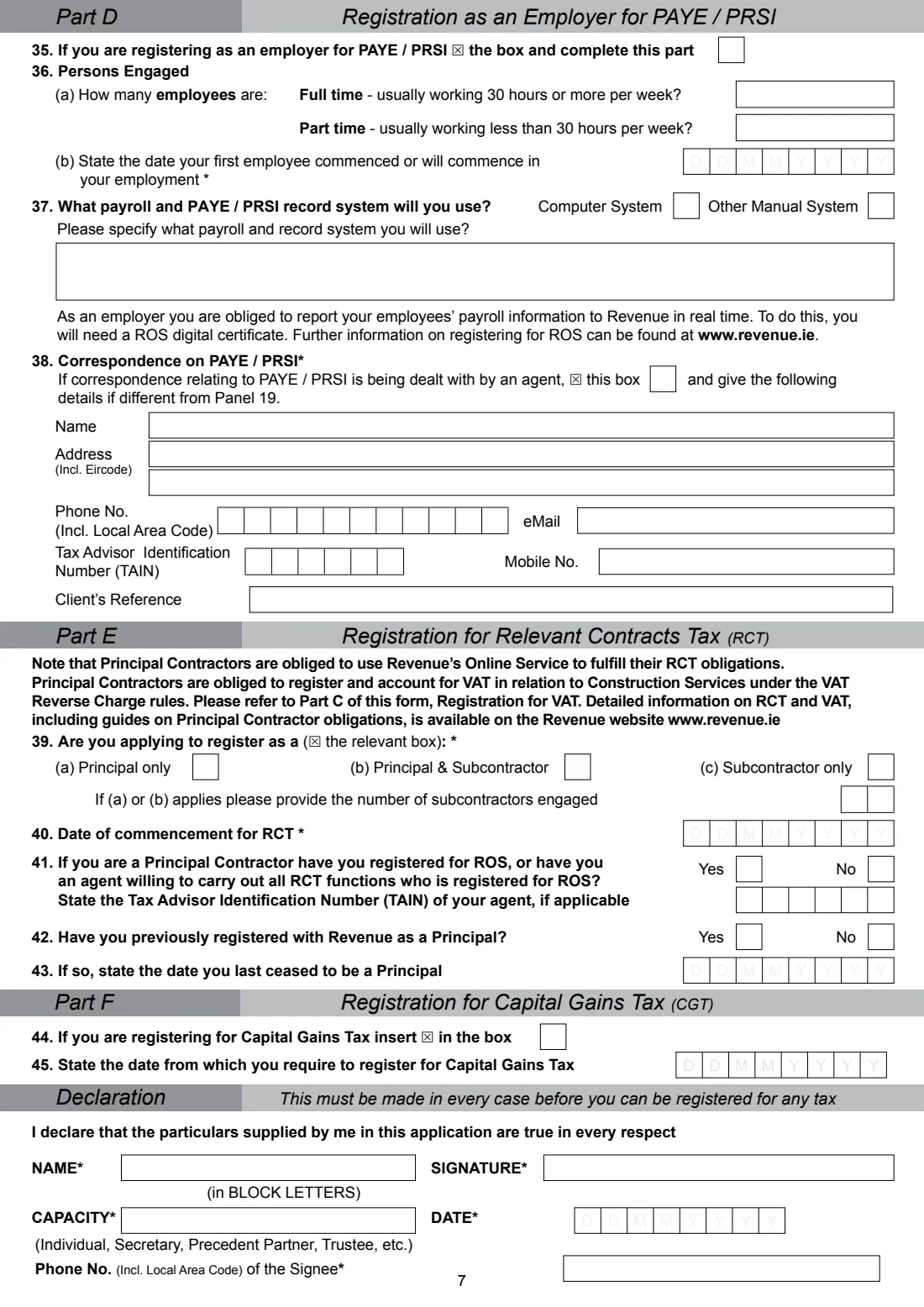
- Part D: Registration as an employer for PAYE / PRSI (35-38)Company (secretary, director or responsible person)
- Part E: Registration for Relevant Contracts Tax (39-43)Company (secretary, director or responsible person)
- Part F: Registration for Capital Gains Tax (44-45)Company (secretary, director or responsible person)
- DeclarationCompany (secretary, director or responsible person)
How to fill out Form TR2 (company tax registration), step by step
1 Part A: general details
The company's name, addresses, contacts and legal format, its registration date and CRO number, when it started and its accounts date, any previous tax numbers, online sales, type of business, a precise description and expected turnover.
2 Directors, secretary and shareholders
Each director's name, private address, shareholding and PPSN (at least one director), the company secretary, and any other shareholder with 15% or more of the issued capital.
3 Advisor and premises
The accountant or tax advisor who prepares the accounts, whether they handle VAT and PAYE correspondence, the landlord and rent if you rent your premises, and the previous owner if you bought the business.
4 Parts B and C: Corporation Tax and VAT
Tick to register for Corporation Tax. For VAT, give the registration date and reason, the cash receipts basis, what you supply, your turnover, your intra-EU trade (with panels 30 and 31 if you answer Yes), the refund account, any property details and Postponed Accounting for imports.
5 Parts D, E and F
As an employer, the number of full-time and part-time staff, the first start date and your payroll system, and any PAYE agent. For RCT, principal or subcontractor and the start date. For CGT, the date you want registration from.
6 Declaration
The person signing (a director or the secretary) prints their name, capacity and phone number, dates it and signs. It's needed in every case before the company can be registered for any tax.
Common mistakes to avoid
- Using the TR2 when the company has a tax agent. Agents must register clients through ROS.
- Giving the accountant's address as the business address. The form says it isn't acceptable.
- Describing the business in general terms like 'consultant' or 'computers'.
- Answering Yes in question 29 without completing panels 30 and 31.
- Leaving out a copy of the lease when you rent the premises.
- Sending it to the wrong Registration Unit. Page 8 lists which unit deals with which companies.
After you fill it out
Download the PDF, have a director or the secretary sign the declaration, and attach anything the form asks for, such as the lease or the reverse-charge invoice.
Return it to the Registration Unit listed on page 8: Business Registrations, Office of the Revenue Commissioners, P.O. Box 1, Wexford, for most companies.
Once registered, the company must file returns and pay electronically through ROS.
Keep the copy in your FileIt vault for when Revenue writes with the company's tax reference numbers.
Fill out Form TR2 (company tax registration) online with FileIt
- Pick the person. Choose someone from People and FileIt fills in their name, date of birth, address and other details it already knows.
- Answer plain-language questions. One part of the form at a time, with the official help text beside each question — 143 fields in all. Your answers save as you go.
- Check the live preview. Watch your answers land on the real Office of the Revenue Commissioners (Revenue) form, and let FileIt do any worksheet arithmetic.
- Generate the official PDF. FileIt prints your answers into the agency’s own PDF and files it in that person’s folder in your vault. Sign it, or send it for e-signature.
FileIt fills the form — it never files or submits anything for you. Deliver the finished form to whoever asked for it, the way the form’s instructions say.
Start Form TR2 (company tax registration) now — it’s freeForm TR2 (company tax registration): frequently asked questions
What is Form TR2 used for?
Registering an Irish resident company, or certain other bodies, for Corporation Tax, VAT, employer PAYE / PRSI, RCT and / or Capital Gains Tax when there's no tax agent acting.
Do I need a CRO number first?
Yes. Revenue says you must have a Companies Registration Office number to register a company for tax.
What if the company has an accountant?
If a tax agent represents the company, the agent registers it online through ROS instead of using the TR2.
Is there a form for non-resident companies?
Yes. Revenue has Form TR2 (FT) for foreign companies.
Where do I send the TR2?
To the Registration Unit on page 8. Associates of Large Corporates Division customers and the financial and other entities the High Wealth & Financial Services Division lists go to those divisions in Wexford; all other companies go to Business Registrations, P.O. Box 1, Wexford.
Does FileIt register the company?
No. FileIt fills the official form so every box is neat and complete. You sign it and send it to Revenue yourself.
Official sources
- Blank form (PDF), published by Office of the Revenue Commissioners (Revenue): https://www.revenue.ie/en/self-assessment-and-self-employment/documents/form-tr2.pdf
- Official instructions and guidance: https://www.revenue.ie/en/starting-a-business/registering-for-tax/how-to-register-for-tax-as-a-new-company.aspx
- Edition shown on this page: RPC019244_EN_WB_L_2 (checked 2026-10-25).
FileIt is not affiliated with or endorsed by Office of the Revenue Commissioners (Revenue) or any government. This page explains the form in general terms and is not legal, tax or immigration advice. Always read the official instructions, and check that you are using the edition the recipient accepts. Page last reviewed 2026-10-25.