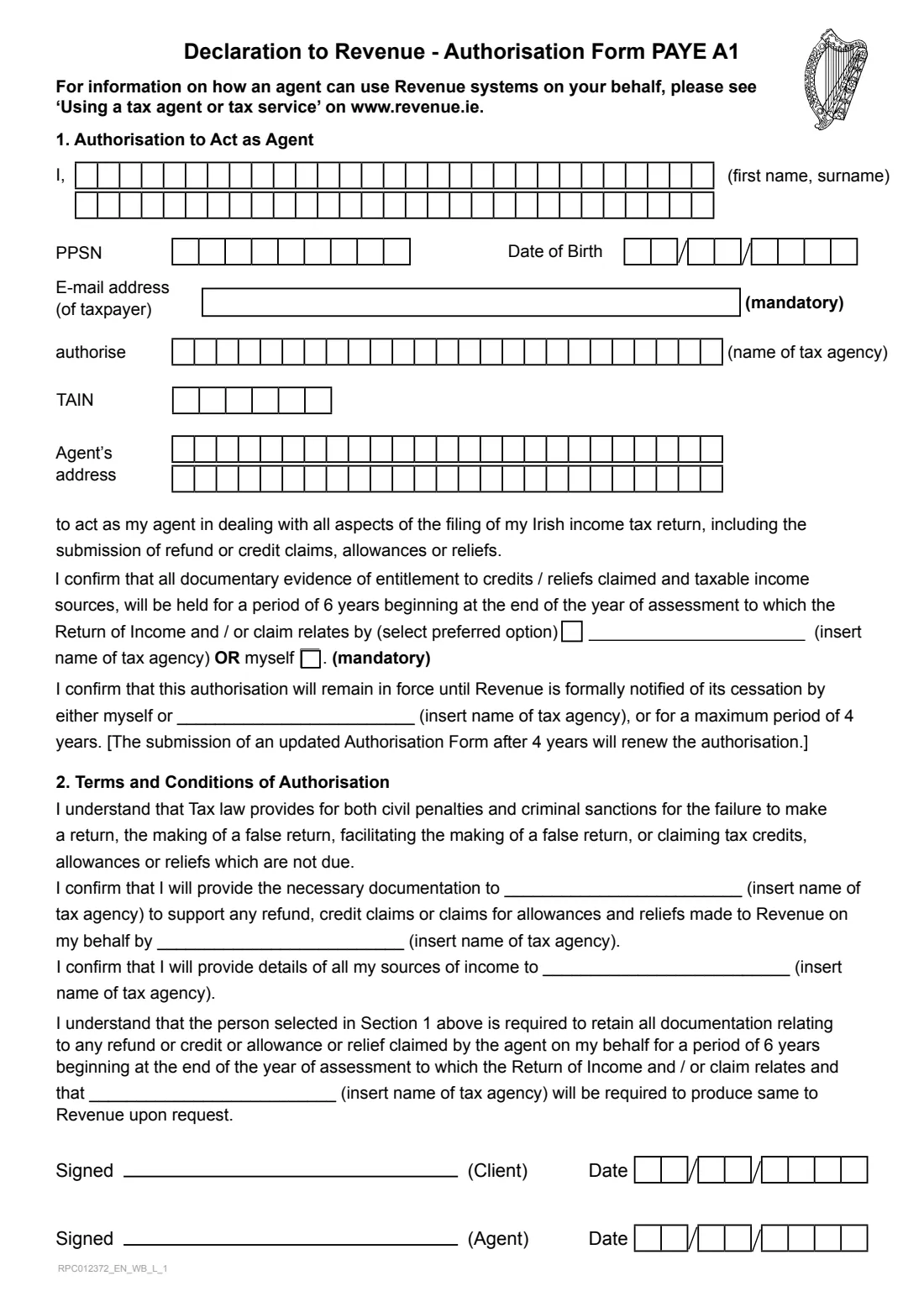
What is Form PAYE A1 (authorise a tax agent)?
Authorisation Form PAYE A1 is Revenue's declaration that names a tax agent to act for a PAYE taxpayer. Once Revenue has it, the agency you name can deal with all aspects of filing your Irish income tax return, including claims for refunds, tax credits, allowances and reliefs.
The form records who you are (name, PPSN, date of birth and a mandatory e-mail address), who the agent is (the agency's name, its Tax Agent Identification Number or TAIN, and its address), and who will keep the supporting documents for six years. It stays in force until you or the agency tell Revenue it has ended, or for up to four years, after which a new form renews it.
FileIt walks you through each box, prints your answers one character per cell the way Revenue's grid expects, and writes the agency's name into every blank that asks for it, so you type it only once. Your name, date of birth and e-mail can come from the People records in your FileIt vault, and the filled form is saved there. Revenue asks for the A1 if you aren't registered for myAccount or ROS. FileIt doesn't send anything to Revenue: you and the agent sign it, and it goes in through your agent, through MyEnquiries, or by post to your Revenue office.
- Who fills it
- A PAYE taxpayer appointing a tax agent or refund agency
- Signed by
- You (the client) and the agent
- Sent
- Through your agent, MyEnquiries, or by post to your Revenue office
- How long it lasts
- Until cancelled, or a maximum of 4 years
- Records kept for
- 6 years from the end of the tax year concerned
- Edition
- RPC012372_EN_WB_L_1
Who needs to fill out Form PAYE A1 (authorise a tax agent)?
- Employees and pensioners taxed under PAYE who want an accountant to file their income tax return.
- People using a tax refund agency to claim back tax, credits or reliefs such as medical expenses or rent credit.
- Anyone whose agent has asked them to sign an A1 so the agent can link to their Revenue record.
- Taxpayers renewing an authorisation that is close to its four-year limit.
When to use Form PAYE A1 (authorise a tax agent)
- When you first engage a tax agent or refund agency for your PAYE affairs.
- When four years have passed since your last authorisation and you want the agent to carry on.
- When you move to a new agency and want it to take over from the old one.
What you need before you start
- Your full name, PPSN and date of birth.
- An e-mail address (the form marks it as mandatory).
- The agency's exact name, as registered with Revenue.
- The agent's TAIN (Tax Agent Identification Number) and postal address.
- A decision on who keeps the supporting documents: the agency or you.
What’s on Form PAYE A1 (authorise a tax agent)
The 2026 edition has 1 page. FileIt asks for it in 4 parts, and it is signed by Taxpayer (client) and Tax agent:
- 1. Your details (the taxpayer)Taxpayer (client)
- The tax agent you are authorisingTax agent
- Who keeps the recordsTaxpayer (client)
- SigningTaxpayer (client)
How to fill out Form PAYE A1 (authorise a tax agent), step by step
1 Your name, PPSN and date of birth
Give your first name(s) and surname, your PPSN and your date of birth. FileIt prints each in its row of cells and the date as DD/MM/YYYY.
2 Your e-mail address
The form marks the taxpayer's e-mail as mandatory, so FileIt asks for it before you can generate the PDF.
3 The agency, its TAIN and address
Enter the name of the tax agency you are authorising, its TAIN and its address over two rows. The name is reused wherever the form says 'insert name of tax agency'.
4 Who holds the documentary evidence
Choose whether the agency or you will keep the evidence for your credits, reliefs and income for six years. This choice is mandatory, and whoever you choose must produce the documents if Revenue asks.
5 Terms and signing
Section 2 sets out what you are agreeing to: giving the agency the documents it needs and details of all your income sources. You sign and date as the client, and the agent signs and dates below you.
Common mistakes to avoid
- Leaving out the e-mail address. It is mandatory on the form.
- Not ticking who keeps the records. The form treats that choice as mandatory too.
- Getting the TAIN wrong. Copy it from the agent's letter of engagement or ask them for it.
- Using a trading name that differs from the one the agency is registered with Revenue under.
- Forgetting that the authorisation lapses after four years unless a new form is sent.
After you fill it out
Download the PDF from FileIt, sign it as the client and pass it to your agent to sign and date.
Send it to Revenue through your agent, through MyEnquiries, or by post to your Revenue office.
Keep the copy in your FileIt vault, and note the date so you know when the four-year period runs out.
Fill out Form PAYE A1 (authorise a tax agent) online with FileIt
- Pick the person. Choose someone from People and FileIt fills in their name, date of birth, address and other details it already knows.
- Answer plain-language questions. One part of the form at a time, with the official help text beside each question — 12 fields in all. Your answers save as you go.
- Check the live preview. Watch your answers land on the real Office of the Revenue Commissioners (Revenue) form, and let FileIt do any worksheet arithmetic.
- Generate the official PDF. FileIt prints your answers into the agency’s own PDF and files it in that person’s folder in your vault. Sign it, or send it for e-signature.
FileIt fills the form — it never files or submits anything for you. Deliver the finished form to whoever asked for it, the way the form’s instructions say.
Start Form PAYE A1 (authorise a tax agent) now — it’s freeForm PAYE A1 (authorise a tax agent): frequently asked questions
What does Form PAYE A1 do?
It authorises a named tax agency to act as your agent for all aspects of filing your Irish income tax return, including refund and credit claims, allowances and reliefs.
How long does the authorisation last?
The form says it stays in force until Revenue is formally told it has ended, by you or the agency, or for a maximum of four years. Sending an updated form after four years renews it.
What is a TAIN?
The Tax Agent Identification Number Revenue gives to registered agents. Your agent can tell you theirs.
Who should keep my receipts and records?
You choose on the form: the agency or yourself. The documents are kept for six years from the end of the tax year the return or claim relates to.
Does FileIt send the form to Revenue?
No. FileIt fills Revenue's official PDF for you. You and your agent sign it, and it goes to Revenue through the agent, MyEnquiries or the post.
Can I fill out Form PAYE A1 online?
Yes. FileIt guides you through the form and prints your answers into Revenue's own PDF, ready to sign.
Official sources
- Blank form (PDF), published by Office of the Revenue Commissioners (Revenue): https://www.revenue.ie/en/starting-a-business/documents/authorisation-form-paye-a1.pdf
- Official instructions and guidance: https://www.revenue.ie/en/jobs-and-pensions/tax-agent-tax-service/inform-revenue-agent.aspx
- Edition shown on this page: RPC012372_EN_WB_L_1 (checked 2026-10-19).
FileIt is not affiliated with or endorsed by Office of the Revenue Commissioners (Revenue) or any government. This page explains the form in general terms and is not legal, tax or immigration advice. Always read the official instructions, and check that you are using the edition the recipient accepts. Page last reviewed 2026-10-19.