What is Form Med 2 (dental expenses receipt)?
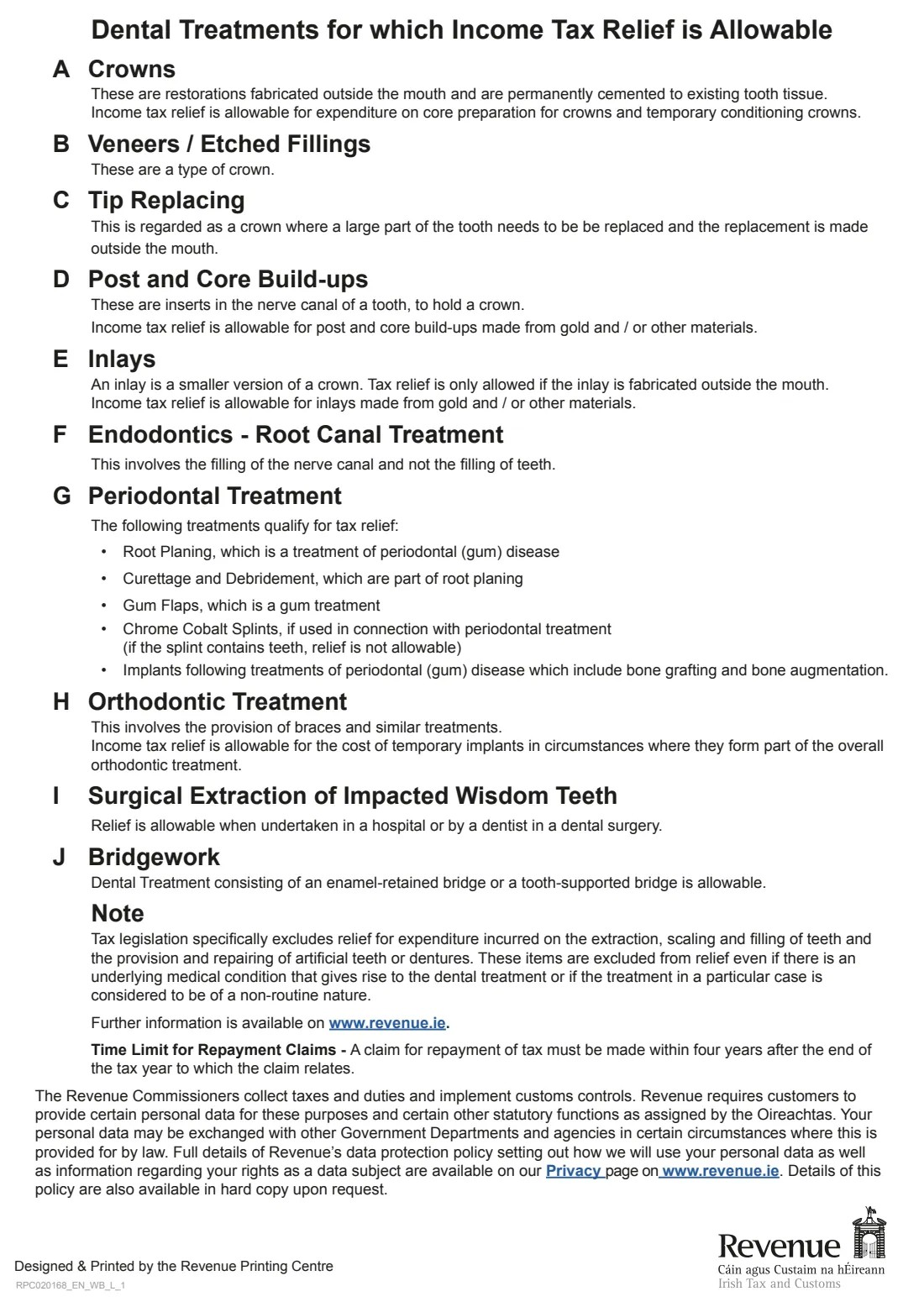
In Ireland you can claim tax relief on non-routine dental treatment as a health expense, generally at the standard rate of 20%. Routine care does not qualify: extraction, scaling, filling, and providing or repairing artificial teeth or dentures are excluded, even if there's an underlying medical reason.
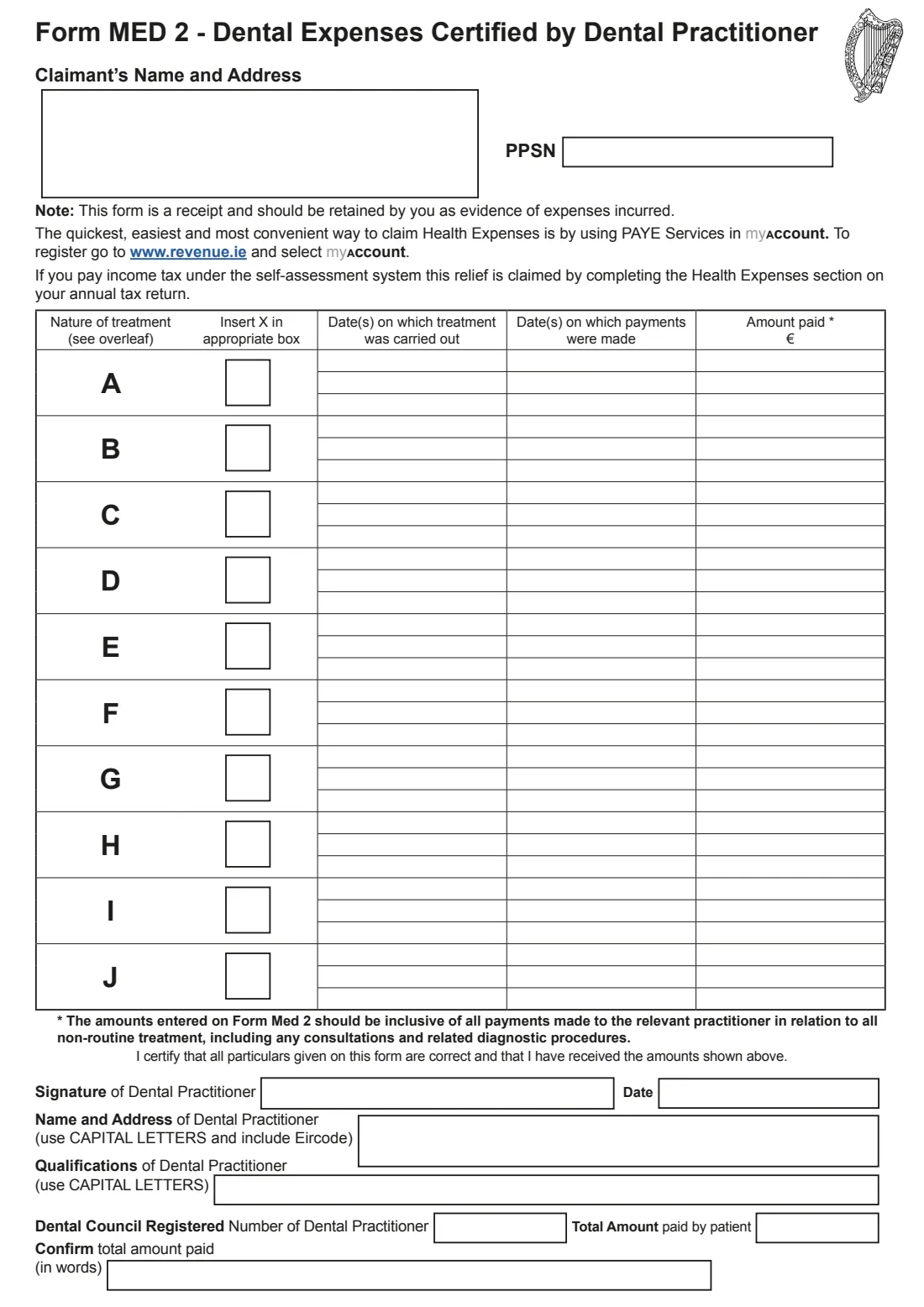
Form Med 2 is the receipt for the treatment. Your dentist normally completes and signs it after treatment, with a separate Med 2 for each year if treatment runs over more than one year. It is not the claim form, and you don't send it to Revenue. You claim the expense in myAccount (PAYE) or on your Form 11 through ROS, and keep the Med 2 in case Revenue asks to see it.
FileIt lets you fill in your name, address and PPSN, and, if you have the details from your bills, each treatment's dates and amounts. It ticks the right boxes, adds up the total and writes it out in words, printing everything into Revenue's official PDF for your dentist to check and sign.
- Who fills it
- The dentist certifies it; the patient's name, address and PPSN go at the top
- Given to
- Kept by you as a receipt, not sent to Revenue
- What qualifies
- Non-routine treatment A-J: crowns, veneers, tip replacing, post and core, inlays, root canal, periodontal, orthodontic, impacted wisdom teeth, bridgework
- Relief
- Health expenses relief, generally at the standard rate of 20%
- Signatures
- The dental practitioner signs and dates the certificate
- Edition
- RPC020168_EN_WB_L_1 (March 2026)
Who needs to fill out Form Med 2 (dental expenses receipt)?
- Anyone in Ireland who paid for non-routine dental treatment and wants to claim health expenses tax relief on it.
- Parents who paid for a child's orthodontic treatment, such as braces.
- People who had qualifying treatment abroad; the dentist must be qualified under that country's laws and complete a Med 2.
- Dentists' patients who want the form prepared before they collect the dentist's signature.
When to use Form Med 2 (dental expenses receipt)
- After non-routine dental treatment has been carried out and paid for.
- Once for each tax year: treatment spanning more than one year needs a separate Med 2 for each year.
- Before claiming, since you can only claim for expenses you have receipts for. Revenue allows claims for the last four years.
What you need before you start
- Your name, address with Eircode and PPSN.
- For each treatment, the date(s) it was carried out, the date(s) you paid and the amounts, including consultations and related diagnostic procedures.
- The dentist's name and address, qualifications and Dental Council registered number, if you are filling in their part.
What’s on Form Med 2 (dental expenses receipt)
The 2026 edition has 2 pages. FileIt asks for it in 12 parts, and it is signed by Dental practitioner:
- ClaimantClaimant (patient)
- A: CrownsClaimant (patient)
- B: Veneers / etched fillingsClaimant (patient)
- C: Tip replacingClaimant (patient)
- D: Post and core build-upsClaimant (patient)
- E: InlaysClaimant (patient)
- F: Endodontics (root canal treatment)Claimant (patient)
- G: Periodontal treatmentClaimant (patient)
- H: Orthodontic treatmentClaimant (patient)
- I: Surgical extraction of impacted wisdom teethClaimant (patient)
- J: BridgeworkClaimant (patient)
- Dental practitioner's certificateDental practitioner
How to fill out Form Med 2 (dental expenses receipt), step by step
1 Claimant's name, address and PPSN
Give the name and address of the person who paid, and their PPSN. They go in the box at the top of the form.
2 Treatments A to J
Switch on each type of treatment you had, as listed on page 2 of the form. For each, give up to three lines of treatment dates, payment dates and amounts in euro. FileIt ticks the treatment's X box for you. Amounts should include all payments to the practitioner for that non-routine treatment, including consultations and related diagnostic procedures.
3 Dental practitioner's certificate
The dentist certifies that the particulars are correct and that they received the amounts shown. Their name and address and qualifications go in capital letters, with their Dental Council registered number. FileIt adds up the total paid and writes it in words. You can leave this part for the dentist to complete by hand.
4 Signature and date
The dentist signs and dates the form beside 'Signature of Dental Practitioner'.
Common mistakes to avoid
- Including routine treatment. Extractions, scaling, fillings and dentures don't qualify.
- Sending the Med 2 to Revenue. It's your receipt; keep it.
- Putting two years' treatment on one form. Use a separate Med 2 for each year.
- Leaving out consultation or diagnostic costs that were part of the non-routine treatment.
- Claiming amounts your health insurer paid or will pay back. Relief is only for the part you paid yourself.
- Using an unregistered practitioner. Relief needs a registered practitioner, or a qualified dentist under the laws of the country abroad.
After you fill it out
Print the form and ask your dentist to check, complete and sign it.
Claim the health expense in myAccount (PAYE Services) or, if you're self-assessed, in the health expenses section of your Form 11 on ROS, under the non-routine heading.
Keep the signed Med 2 with your receipts for six years. Revenue may ask to see it if your claim is checked. A copy stays in your FileIt vault.
Fill out Form Med 2 (dental expenses receipt) online with FileIt
- Pick the person. Choose someone from People and FileIt fills in their name, date of birth, address and other details it already knows.
- Answer plain-language questions. One part of the form at a time, with the official help text beside each question — 108 fields in all. Your answers save as you go.
- Check the live preview. Watch your answers land on the real Office of the Revenue Commissioners (Revenue) form, and let FileIt do any worksheet arithmetic.
- Generate the official PDF. FileIt prints your answers into the agency’s own PDF and files it in that person’s folder in your vault. Sign it, or send it for e-signature.
FileIt fills the form — it never files or submits anything for you. Deliver the finished form to whoever asked for it, the way the form’s instructions say.
Start Form Med 2 (dental expenses receipt) now — it’s freeForm Med 2 (dental expenses receipt): frequently asked questions
What is Form Med 2?
It is the form a dental practitioner completes to certify non-routine dental treatment and the amounts you paid. It acts as the receipt for your health expenses tax relief claim.
Do I send the Med 2 to Revenue?
No. Revenue says the Med 2 is a receipt, not the claim form. Keep it in your records; Revenue may ask for it if it checks your claim.
Which dental treatments qualify?
Crowns, veneers and etched fillings, tip replacing, post and core build-ups, inlays made outside the mouth, root canal treatment, periodontal treatment, orthodontic treatment, surgical extraction of impacted wisdom teeth, and bridgework.
What doesn't qualify?
Extraction, scaling and filling of teeth, and providing or repairing artificial teeth or dentures, even if there's an underlying medical condition.
How much relief do I get?
Revenue says health expenses relief is generally given at the standard rate of tax, 20%. You must have paid tax in the year to benefit.
What if my treatment was abroad?
You can claim if the dentist is a qualified dental practitioner under that country's laws and completes a Med 2 for you.
How far back can I claim?
A claim for repayment must be made within four years after the end of the tax year it relates to.
Official sources
- Blank form (PDF), published by Office of the Revenue Commissioners (Revenue): https://www.revenue.ie/en/personal-tax-credits-reliefs-and-exemptions/documents/med2.pdf
- Official instructions and guidance: https://www.revenue.ie/en/personal-tax-credits-reliefs-and-exemptions/health-and-age/health-expenses/dental-expenses.aspx
- Edition shown on this page: RPC020168_EN_WB_L_1 (March 2026) (checked 2026-09-28).
FileIt is not affiliated with or endorsed by Office of the Revenue Commissioners (Revenue) or any government. This page explains the form in general terms and is not legal, tax or immigration advice. Always read the official instructions, and check that you are using the edition the recipient accepts. Page last reviewed 2026-09-28.