What is Form IT31 (tuition fees tax relief)?
Form IT31 is the Irish Revenue Commissioners' paper form for claiming tax relief on tuition fees. If you paid qualifying fees for an approved course at an approved college, for yourself or for someone else such as your child, you can claim relief at the standard rate of 20%. Qualifying fees are tuition fees and the student contribution; administration fees, student centre or sports levies and the USI levy don't qualify.
Revenue caps the qualifying fee at €7,000 per course, per person, per academic year, and subtracts one disregard amount from each claim per tax year: €3,000 where a full-time course is included, or €1,500 for part-time courses only. Revenue's main route for the claim is myAccount (during the year) or an Income Tax Return (after the year ends); it says to send the paper IT31 to your Revenue office if you don't have access to myAccount.
FileIt asks the IT31's questions in plain language, shows only the course questions that apply, prints your PPSN, amounts, years and Eircode into the right boxes of Revenue's own PDF and checks your IBAN. The claimant's name can come from the People records in your FileIt vault, and the finished form is saved there. FileIt doesn't send anything to Revenue: you sign the printed form and post it yourself.
- Who fills it
- The person who actually paid the fees (the student, a parent or someone else)
- Given to
- Your Revenue office
- Relief
- 20% of qualifying fees after the disregard, up to €7,000 per course per academic year
- Signatures
- You sign and date the declaration
- Edition
- RPC014460_EN_WB_L_1 (October 2020)
Who needs to fill out Form IT31 (tuition fees tax relief)?
- Parents or others who paid a student's third level tuition fees or student contribution and want the tax relief.
- Students who paid their own fees for an approved undergraduate or postgraduate course.
- People who paid for an approved foreign language or information technology training course.
- Anyone who can't use Revenue's myAccount to claim the relief online.
When to use Form IT31 (tuition fees tax relief)
- During the tax year, once the fees have been paid, if you pay tax under PAYE and don't have myAccount access.
- For each student you paid fees for: the form covers one student and one course.
- Only where the course is on Revenue's list of approved courses at an approved college.
- Self-assessed taxpayers claim through the tuition fees section of Form 11 instead, per Revenue.
What you need before you start
- Your PPSN and the student's PPSN.
- The name of the college and the course title, and how many years the course lasts.
- The amount of qualifying fees you paid (tuition fees and student contribution only).
- The academic year and the tax year the claim is for.
- Details of any grant, scholarship or employer payment towards the fees.
- Your IBAN and BIC if you want any refund paid into your bank account.
- Your receipts, which you keep for six years rather than sending them.
What’s on Form IT31 (tuition fees tax relief)
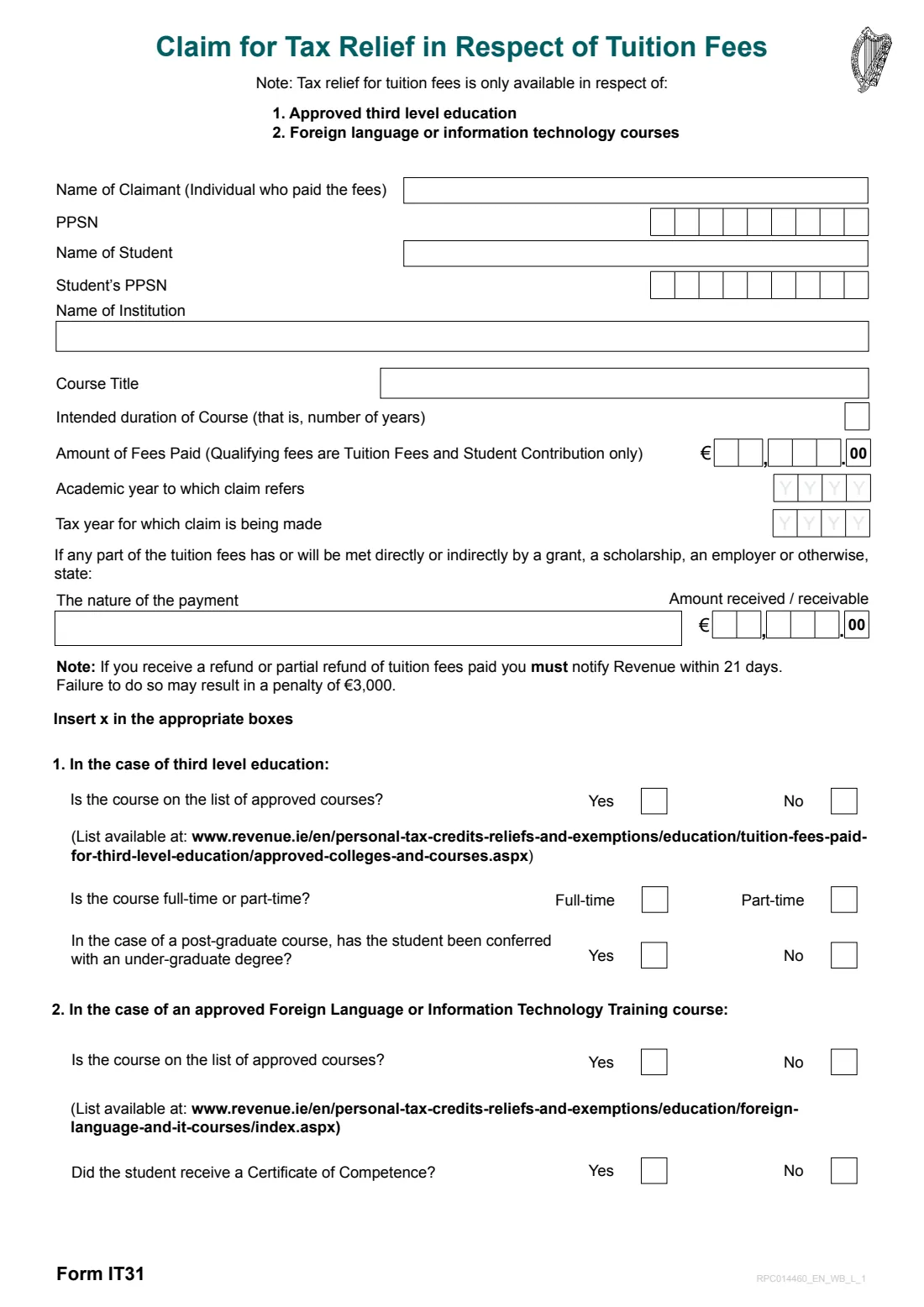
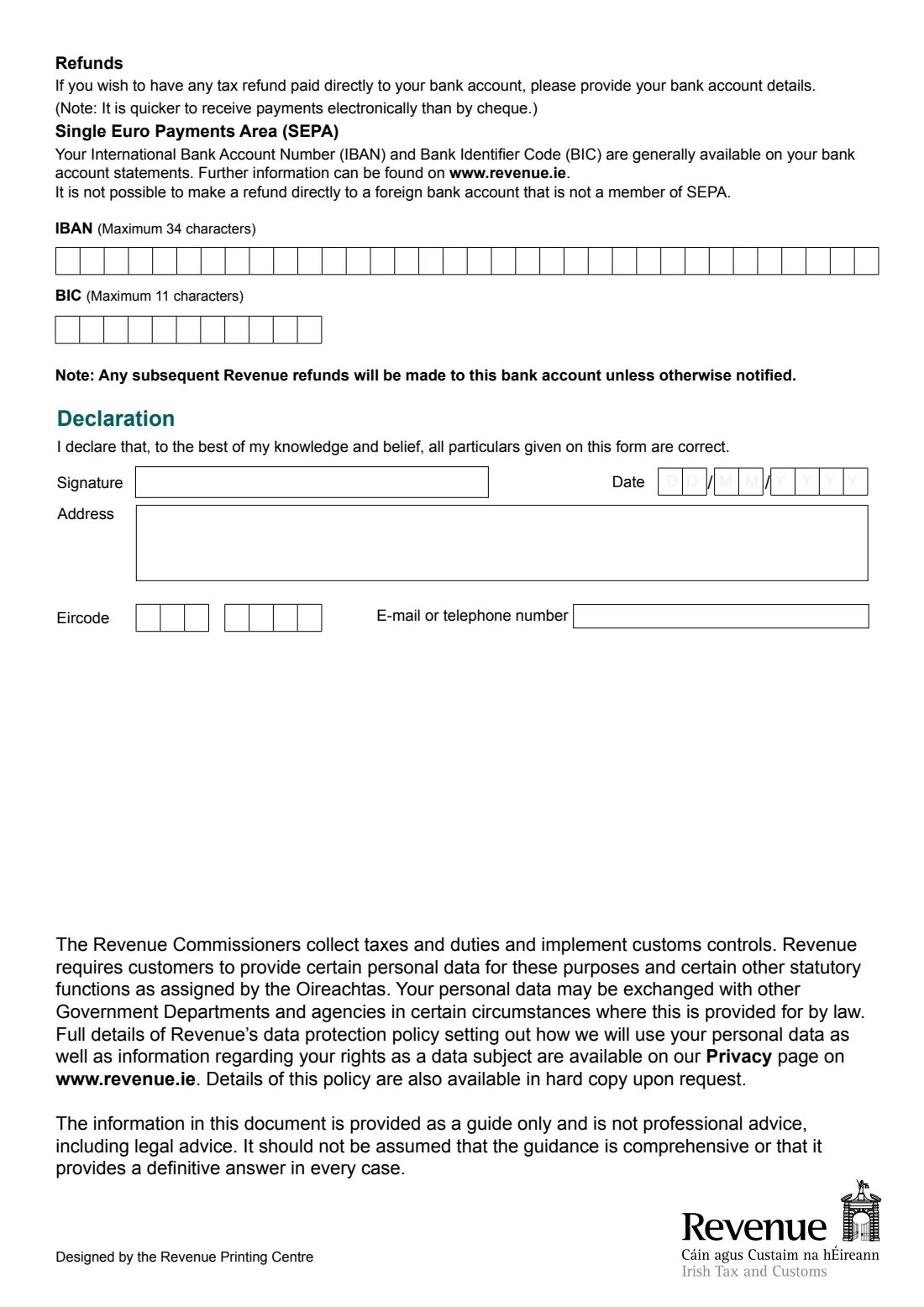
The 2020 edition has 2 pages. FileIt asks for it in 7 parts, and it is signed by Claimant:
- You, the claimant (the person who paid the fees)Claimant
- The studentClaimant
- The course and the feesClaimant
- Grants, scholarships or employer paymentsClaimant
- About the courseClaimant
- Refunds: your bank account (SEPA)Claimant
- DeclarationClaimant
How to fill out Form IT31 (tuition fees tax relief), step by step
1 Claimant and student
Give the name and PPSN of the person who paid the fees, then the student's name and PPSN. If you are the student, your own details go in both places.
2 Institution, course and fees
Enter the college, the course title and its intended duration in years. Then the amount of fees paid in whole euros, the academic year the claim refers to and the tax year you are claiming for. Only tuition fees and the student contribution count.
3 Grants, scholarships or employer payments
If any part of the fees has been or will be met by a grant, a scholarship, an employer or otherwise, state the nature of the payment and the amount. Revenue doesn't give relief on fees funded that way.
4 About the course
For third level education: is the course on Revenue's approved list, is it full-time or part-time, and for a postgraduate course, has the student been conferred with an undergraduate degree? For a foreign language or IT course: is it on the approved list, and did the student receive a Certificate of Competence?
5 Refunds and declaration
Optionally give your IBAN and BIC for any refund (SEPA accounts only). Then add your address, Eircode, e-mail or phone and the date, and sign the declaration that the particulars are correct.
Common mistakes to avoid
- Including fees that don't qualify, such as registration or administration fees and student levies.
- Claiming as someone who didn't actually pay the fees: only the payer can claim.
- Leaving out a grant, scholarship or employer contribution towards the fees.
- Using the paper form when you could claim in myAccount, which Revenue treats as the main route.
- Not telling Revenue within 21 days if the college refunds fees you claimed relief on. The form warns of a penalty of €3,000.
After you fill it out
Print the IT31, sign it and send it to your Revenue office (Revenue's Contact us page lists the addresses).
Keep your fee receipts for six years. You don't send them, but Revenue may ask to see them if your claim is checked.
If you gave bank details, any refund goes to that account, as will later Revenue refunds unless you tell them otherwise. A copy of the filled form stays in your FileIt vault.
Fill out Form IT31 (tuition fees tax relief) online with FileIt
- Pick the person. Choose someone from People and FileIt fills in their name, date of birth, address and other details it already knows.
- Answer plain-language questions. One part of the form at a time, with the official help text beside each question — 25 fields in all. Your answers save as you go.
- Check the live preview. Watch your answers land on the real Office of the Revenue Commissioners (Revenue) form, and let FileIt do any worksheet arithmetic.
- Generate the official PDF. FileIt prints your answers into the agency’s own PDF and files it in that person’s folder in your vault. Sign it, or send it for e-signature.
FileIt fills the form — it never files or submits anything for you. Deliver the finished form to whoever asked for it, the way the form’s instructions say.
Start Form IT31 (tuition fees tax relief) now — it’s freeForm IT31 (tuition fees tax relief): frequently asked questions
How much tuition fee relief will I get?
Revenue gives relief at 20% on qualifying fees after subtracting the disregard amount: €3,000 for a full-time course or €1,500 for part-time. The qualifying fee is capped at €7,000 per course per academic year. For example, Revenue shows fees of €7,000 for a full-time course giving €800 relief.
Can parents claim tax relief on college fees?
Yes. You can claim if you paid the fees on the student's behalf, but only the person who actually paid them can claim.
Does the student contribution qualify?
Yes. Revenue counts tuition fees including the student contribution as qualifying fees. Other charges such as administration fees and student levies don't qualify.
What if I paid fees for two children?
Fill in one IT31 for each student. Revenue applies the disregard amount only once to your claim for the year.
Can I fill out Form IT31 online?
FileIt lets you fill in the IT31 online and prints your answers into Revenue's official PDF. You then sign and post it. Revenue's own online route is the tuition fees credit in myAccount.
Do postgraduate courses qualify?
Per Revenue, a postgraduate course at an approved college qualifies if it lasts one to four academic years and leads to a postgraduate award, and the student already has an undergraduate degree or equivalent.
Official sources
- Blank form (PDF), published by Office of the Revenue Commissioners (Revenue): https://www.revenue.ie/en/personal-tax-credits-reliefs-and-exemptions/documents/education/form-it31.pdf
- Official instructions and guidance: https://www.revenue.ie/en/personal-tax-credits-reliefs-and-exemptions/education/tuition-fees-paid-for-third-level-education/index.aspx
- Edition shown on this page: RPC014460_EN_WB_L_1 (October 2020) (checked 2026-09-28).
FileIt is not affiliated with or endorsed by Office of the Revenue Commissioners (Revenue) or any government. This page explains the form in general terms and is not legal, tax or immigration advice. Always read the official instructions, and check that you are using the edition the recipient accepts. Page last reviewed 2026-09-28.