What is PREM Reg (register as an employer)?
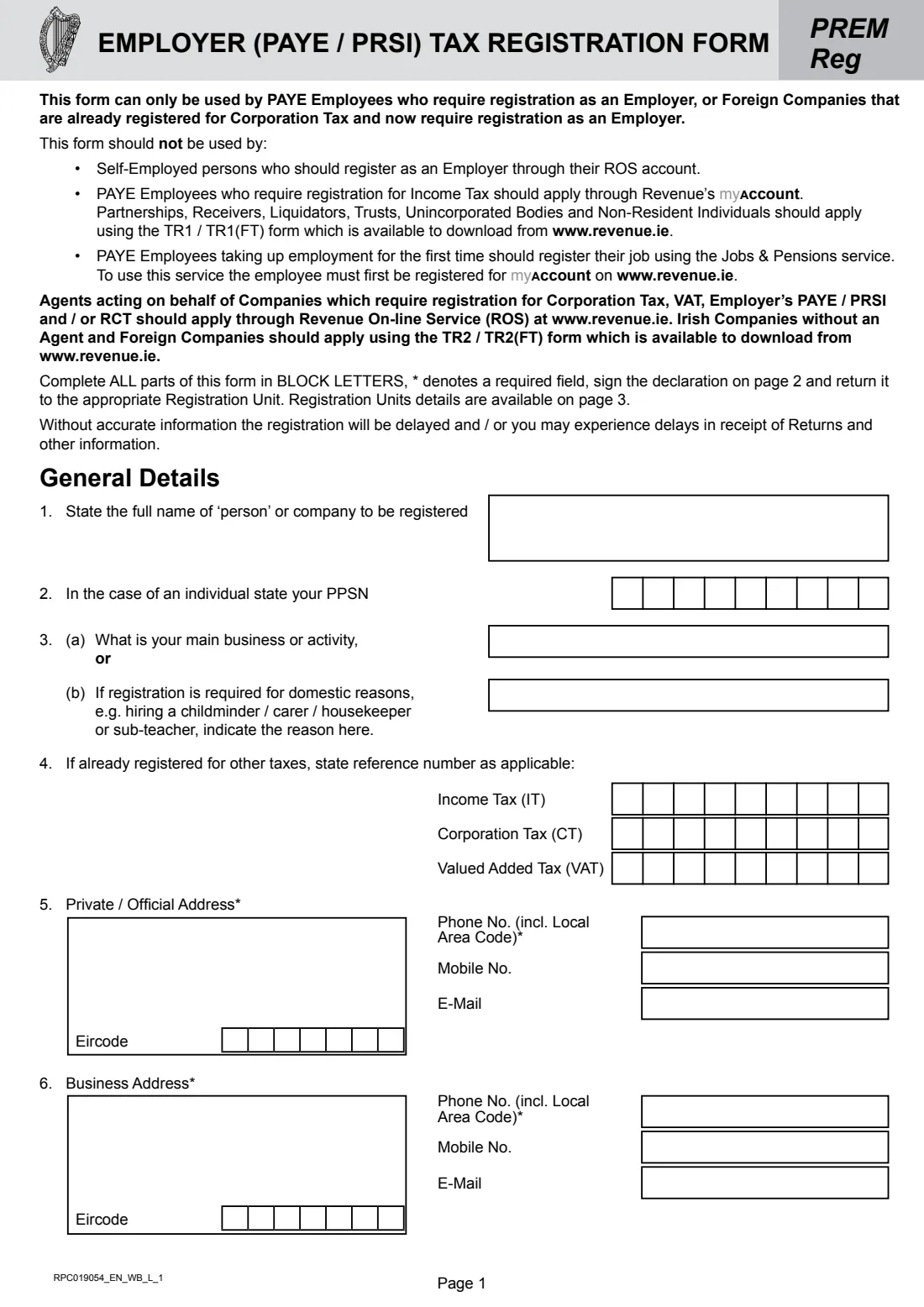
PREM Reg is the Irish Revenue Commissioners' Employer (PAYE / PRSI) Tax Registration Form. Revenue's guidance says that if you hire an employee you must register as an employer before you pay them, and then deduct Income Tax, PRSI, USC and, where applicable, Local Property Tax from their pay. The form itself says it can only be used by PAYE employees who need to register as an employer and by foreign companies already registered for Corporation Tax.
A typical case is a household taking on a nanny, childminder, carer or housekeeper: question 3(b) asks for exactly that domestic reason. Revenue's guidance adds that you don't need to register for a domestic employee you pay less than €40 a week, if they are your only such employee. Revenue prefers eRegistration through ROS or myAccount, and the form sends self-employed people to their ROS account and partnerships, trusts and non-resident individuals to form TR1 / TR1(FT).
FileIt asks each question in plain language, prints your answers in the block capitals the form asks for, puts PPSNs, tax references and Eircodes into their boxes, and can copy your private address into the business address. Your name can come from your FileIt People record, and the finished form is saved in your vault. FileIt doesn't submit it: you sign it and send it to the Registration Unit listed on the form.
- Who fills it
- A PAYE employee (or a foreign company registered for Corporation Tax) who needs to register as an employer
- Given to
- The Revenue Registration Unit listed on page 3 of the form
- When
- Before you pay your first employee
- Signatures
- The person registering signs the declaration
- Edition
- RPC019054_EN_WB_L_1 (October 2024)
Who needs to fill out PREM Reg (register as an employer)?
- Households employing a nanny, childminder, carer, housekeeper or similar domestic employee.
- PAYE employees starting to employ someone for a business or activity.
- Foreign companies already registered for Corporation Tax that now need to register as an employer.
- Anyone who can't use Revenue's eRegistration in ROS or myAccount.
When to use PREM Reg (register as an employer)
- Before paying your first employee: Revenue says to register before you pay them.
- When you are already registered for Income Tax (as an employee) or Corporation Tax.
- Not when you are self-employed (register through ROS) or a partnership, trust, receiver, liquidator, unincorporated body or non-resident individual (form TR1 / TR1(FT)).
- Not for a single domestic employee paid less than €40 a week, per Revenue's guidance.
What you need before you start
- The full name of the person or company registering, and your PPSN if you are an individual.
- Your main business activity, or the domestic reason (e.g. hiring a childminder).
- Any existing Income Tax, Corporation Tax or VAT reference numbers.
- Your private (or official) address, business address, phone numbers and e-mail.
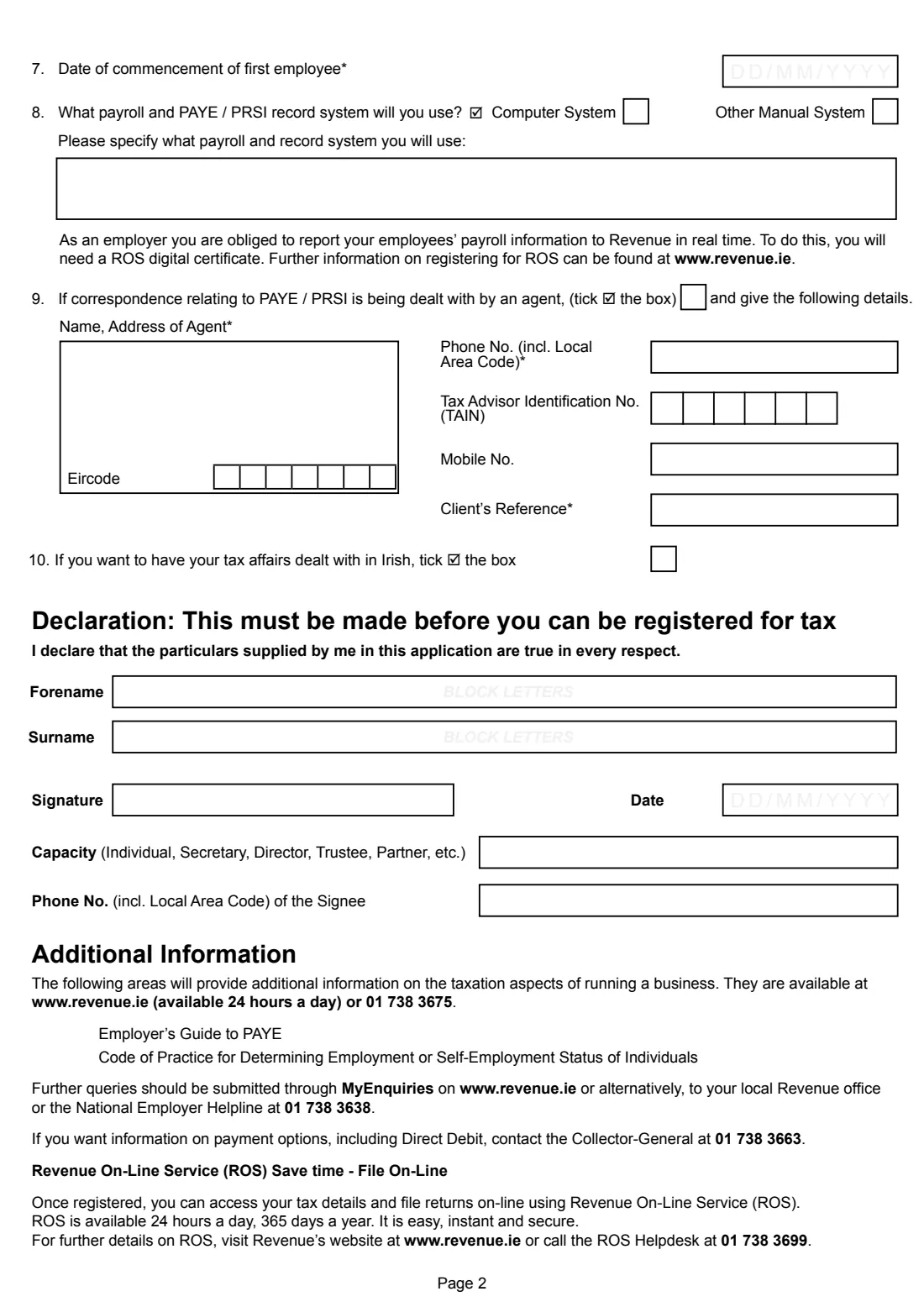
- The date your first employee starts.
- The payroll and record system you will use.
- Your agent's details, TAIN and client reference, if an agent deals with PAYE / PRSI correspondence.
What’s on PREM Reg (register as an employer)
The 2024 edition has 3 pages. FileIt asks for it in 5 parts, and it is signed by Employer registering:
- General detailsEmployer registering
- Addresses and contact detailsEmployer registering
- Employees and payrollEmployer registering
- 9. An agent deals with PAYE / PRSI correspondenceEmployer registering
- DeclarationEmployer registering
How to fill out PREM Reg (register as an employer), step by step
1 1-4. General details
The full name of the person or company, the PPSN (individuals), your main business or activity or the domestic reason for registering, and any Income Tax, Corporation Tax or VAT reference numbers you already have.
2 5-6. Addresses
Your private or official address with Eircode, phone, mobile and e-mail, then the business address and contact details. Starred items (addresses and phone numbers) are required. For a household employer the two are usually the same, and FileIt can copy one into the other.
3 7-8. Employees and payroll
The date of commencement of your first employee, and whether you'll use a computer system or another manual system for payroll and PAYE / PRSI records, with a description. The form reminds you that employers report payroll to Revenue in real time, which needs a ROS digital certificate.
4 9-10. Agent and Irish language
Tick question 9 and give the agent's name, address, phone, TAIN and your client reference if an agent deals with PAYE / PRSI correspondence. Tick question 10 to have your tax affairs dealt with in Irish.
5 Declaration
Your forename and surname in block letters, the date, your capacity (individual, secretary, director, trustee, partner and so on) and a phone number. The declaration must be made before you can be registered.
Common mistakes to avoid
- Using PREM Reg when you are self-employed: Revenue's form says to register as an employer through ROS instead.
- Paying your employee before registering.
- Leaving out required items (marked * on the form). The form warns that inaccurate information delays registration.
- Forgetting that real-time payroll reporting needs a ROS digital certificate once you are registered.
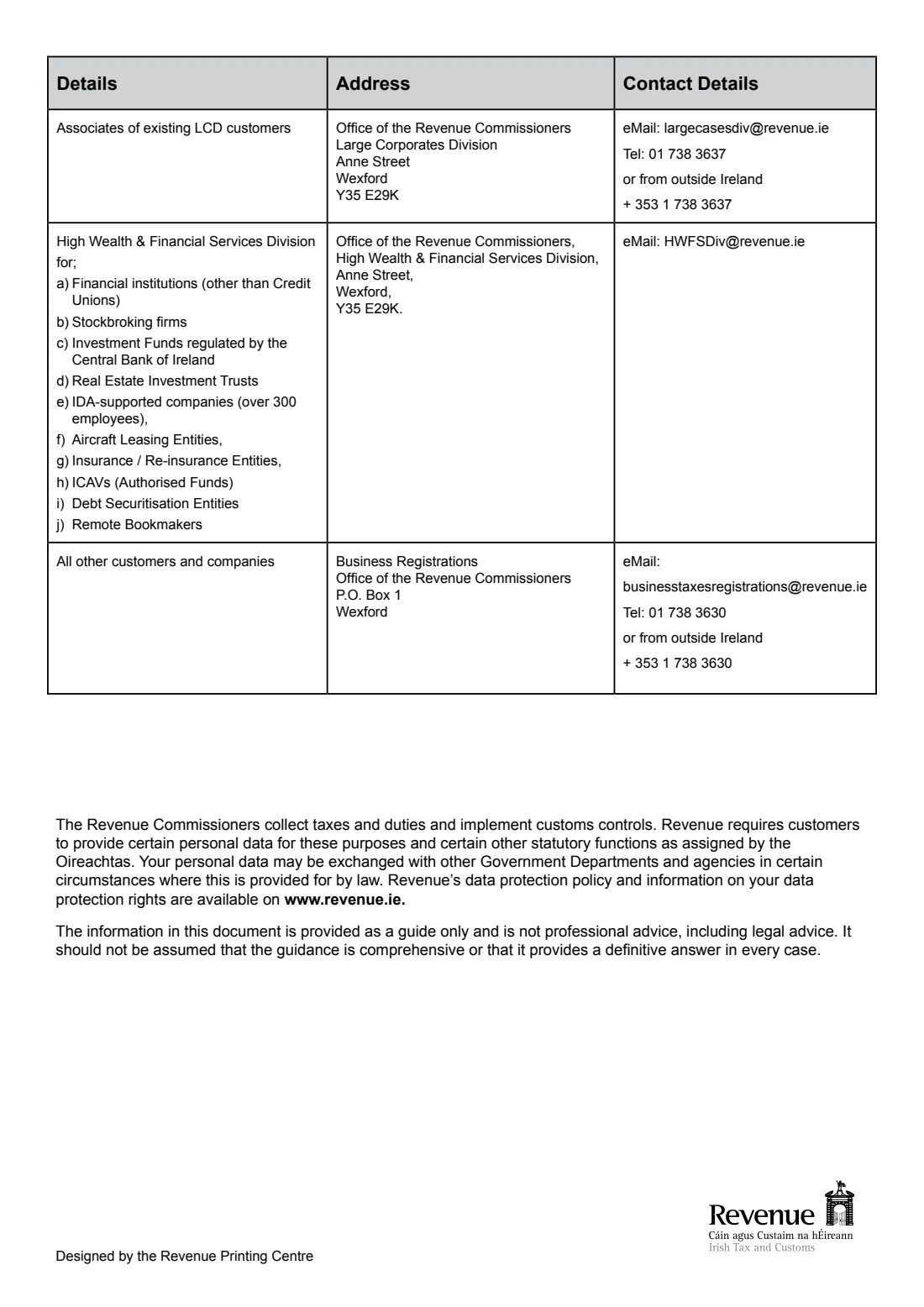
- Sending it to the wrong Registration Unit: page 3 of the form lists which unit deals with which customers.
After you fill it out
Print the form, sign the declaration and send it to the Registration Unit on page 3 of the form. For most customers that is Business Registrations, Office of the Revenue Commissioners, P.O. Box 1, Wexford.
Once registered, report your employee's pay and deductions to Revenue on or before each payday, per Revenue's guidance. You'll need ROS for that.
A copy of the filled form stays in your FileIt vault.
Fill out PREM Reg (register as an employer) online with FileIt
- Pick the person. Choose someone from People and FileIt fills in their name, date of birth, address and other details it already knows.
- Answer plain-language questions. One part of the form at a time, with the official help text beside each question — 36 fields in all. Your answers save as you go.
- Check the live preview. Watch your answers land on the real Office of the Revenue Commissioners (Revenue) form, and let FileIt do any worksheet arithmetic.
- Generate the official PDF. FileIt prints your answers into the agency’s own PDF and files it in that person’s folder in your vault. Sign it, or send it for e-signature.
FileIt fills the form — it never files or submits anything for you. Deliver the finished form to whoever asked for it, the way the form’s instructions say.
Start PREM Reg (register as an employer) now — it’s freePREM Reg (register as an employer): frequently asked questions
Do I need to register as an employer to hire a nanny?
Generally yes. Revenue says anyone who hires an employee must register as an employer. Its guidance exempts only a domestic employee paid less than €40 a week, where they are your only such employee.
Who can use the PREM Reg form?
The form says: PAYE employees who need to register as an employer, and foreign companies already registered for Corporation Tax. Self-employed people register through ROS, and partnerships, trusts and non-resident individuals use form TR1 / TR1(FT).
Can I register as an employer online instead?
Yes. Revenue's eRegistration in ROS or myAccount is its preferred route and, per Revenue, cheaper and more efficient than a paper application.
Where do I send PREM Reg?
To the Registration Unit listed on page 3 of the form. Most customers send it to Business Registrations, Office of the Revenue Commissioners, P.O. Box 1, Wexford.
Can I fill out PREM Reg online?
FileIt lets you fill in PREM Reg online and prints your answers into Revenue's official PDF, in the block capitals the form asks for. You then sign it and send it yourself.
Official sources
- Blank form (PDF), published by Office of the Revenue Commissioners (Revenue): https://www.revenue.ie/en/self-assessment-and-self-employment/documents/form-premreg.pdf
- Official instructions and guidance: https://www.revenue.ie/en/employing-people/becoming-an-employer-and-ongoing-obligations/registration-of-employers-for-paye-purposes/how-to-register.aspx
- Edition shown on this page: RPC019054_EN_WB_L_1 (October 2024) (checked 2026-09-28).
FileIt is not affiliated with or endorsed by Office of the Revenue Commissioners (Revenue) or any government. This page explains the form in general terms and is not legal, tax or immigration advice. Always read the official instructions, and check that you are using the edition the recipient accepts. Page last reviewed 2026-09-28.