What is Form IR1317 (TRC bank autopay)?
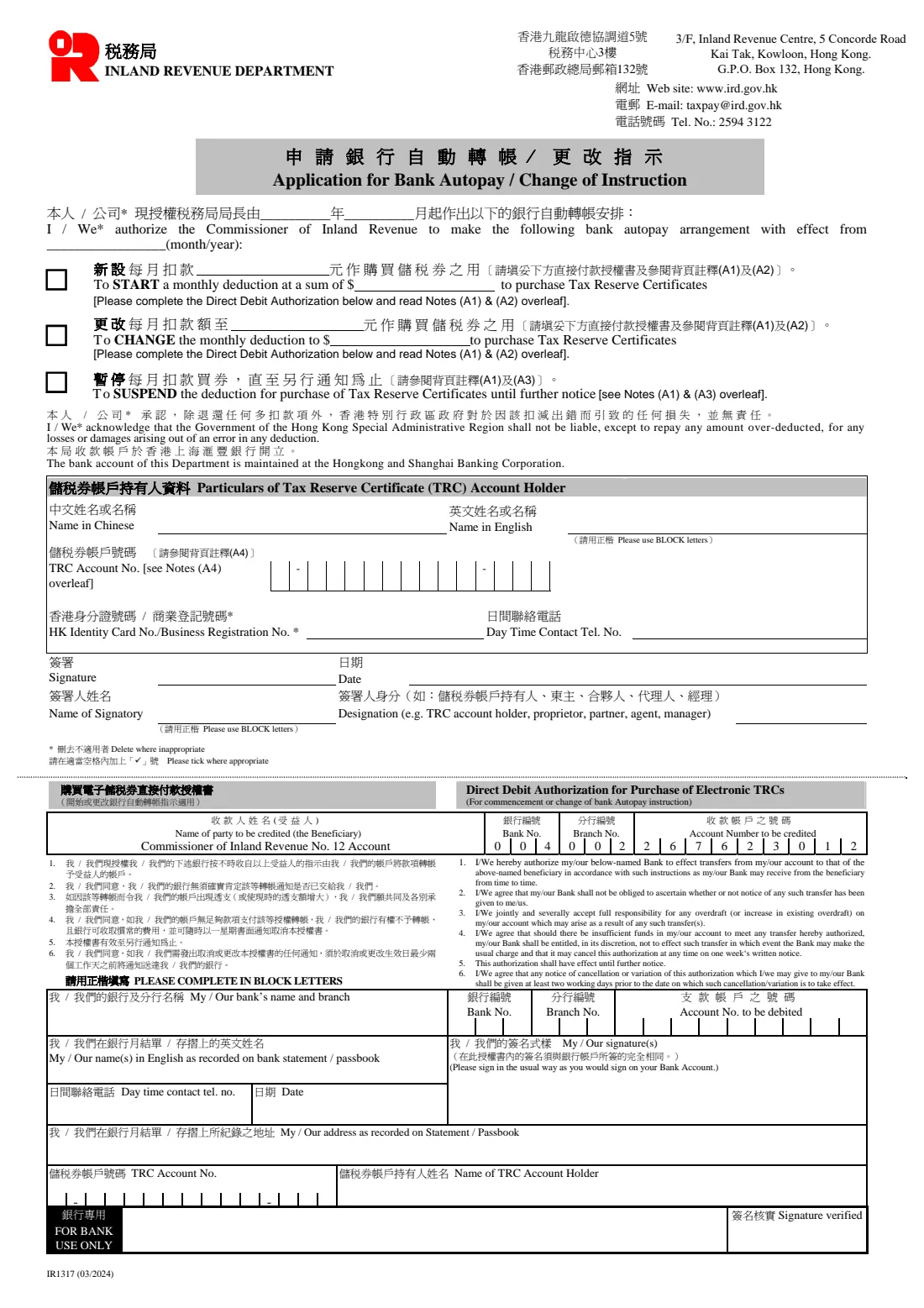
Tax Reserve Certificates (TRCs) let you save towards a future Hong Kong tax bill. The IRD can redeem them automatically on the tax due date through its Auto Tax Payment Service. Form IR1317 tells the IRD to start a monthly bank autopay into your TRC account, to change the monthly amount, or to suspend it until further notice.
The top half covers the instruction and the TRC account holder: the 13-digit TRC account number, an HKID or business registration number, and the signatory. The lower half is a Direct Debit Authorization for your bank, needed when you start or change an autopay, with the bank, branch and account numbers to be debited.
FileIt fills the 03/2024 edition. It prints the account number into every box, strikes out 'I' or 'We' and the ID caption you don't use, and checks the amount against the IRD's rule ($300 or more, in multiples of $50). The finished PDF goes into your vault, ready to sign.
- Who fills it
- A TRC account holder (an individual or a business)
- Sent to
- TRCs Section, Inland Revenue Department, 3/F Inland Revenue Centre, 5 Concorde Road, Kai Tak (G.P.O. Box 132)
- Amounts
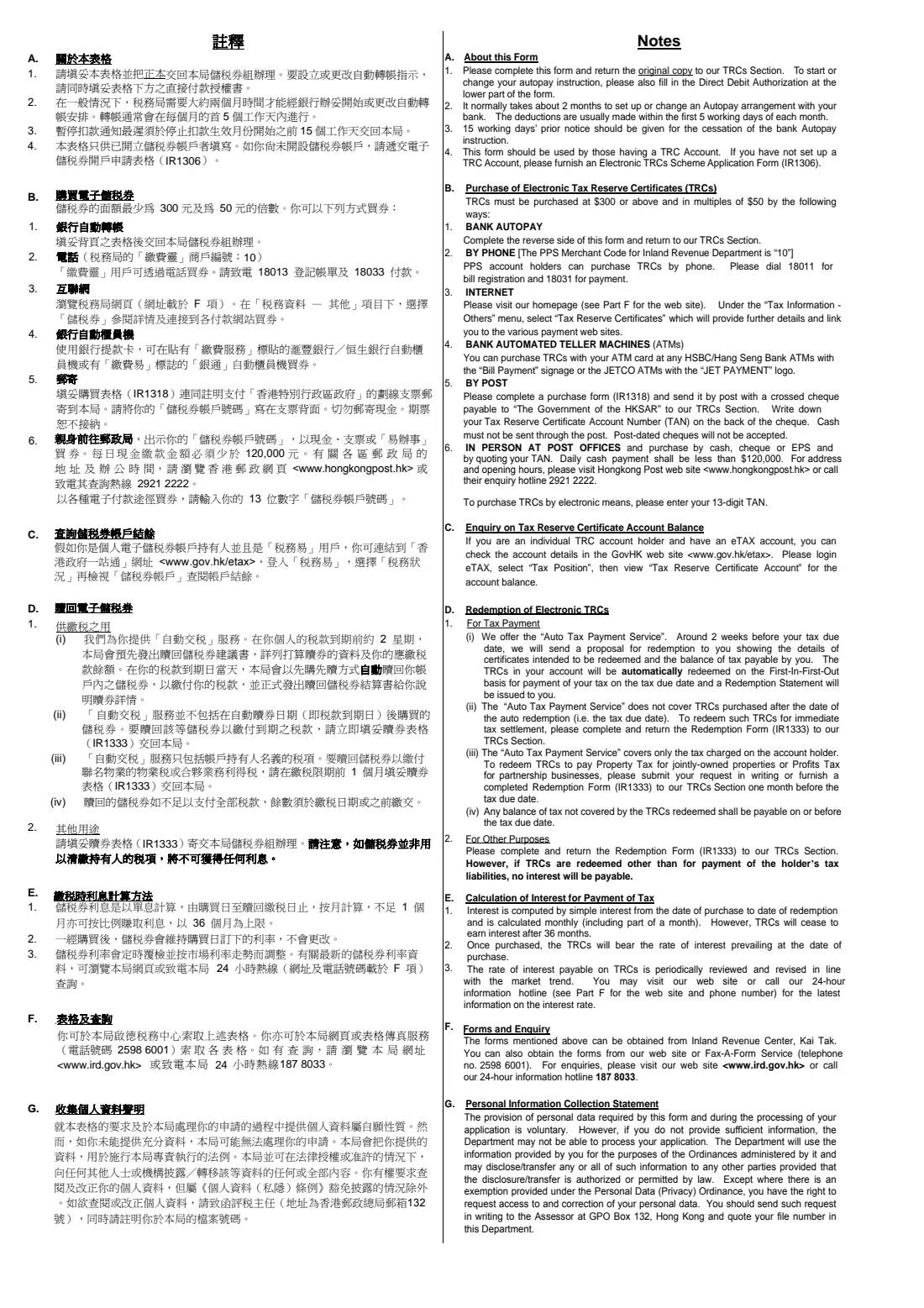
- At least $300 a month, in multiples of $50
- Timing
- About 2 months to set up or change; deductions in the first 5 working days of each month; 15 working days' notice to stop
- Edition
- IR1317 (03/2024), 2 pages
Who needs to fill out Form IR1317 (TRC bank autopay)?
- Salaried taxpayers who prefer to save for their tax bill month by month.
- Sole proprietors and partnerships who want a steady fund for profits tax.
- Existing TRC autopay users who want to raise, lower or pause their monthly deduction.
- Anyone opening a TRC autopay after setting up a TRC account on form IR1306.
When to use Form IR1317 (TRC bank autopay)
- After you already have a TRC account (if not, apply on IR1306 first).
- About 2 months before you want the first deduction or the change to take effect.
- At least 15 working days before you want an autopay to stop.
What you need before you start
- Your 13-digit TRC account number (TAN).
- The account holder's English name and HKID or business registration number.
- The monthly amount, and the month and year it should take effect.
- To start or change: your bank's name and branch, the 3-digit bank and branch numbers and the account number, plus the account name and address exactly as on your statement.
- The name and position of the person signing.
What’s on Form IR1317 (TRC bank autopay)
The 2024 edition has 2 pages. FileIt asks for it in 4 parts, and it is signed by Trc account holder:
- Your autopay instructionTrc account holder
- Particulars of TRC account holderTrc account holder
- Direct Debit AuthorizationTrc account holder
- Crossings-out on the printed formTrc account holder
How to fill out Form IR1317 (TRC bank autopay), step by step
1 The instruction
Choose I or We, the month and year it takes effect, and whether to start a deduction, change it to a new amount, or suspend it.
2 Particulars of the TRC account holder
English name, TRC account number, HKID or business registration number, a day-time phone number, then the signatory's name, designation, signature and date.
3 Direct Debit Authorization
For a start or change: your bank and branch, bank and branch numbers, the account to debit, your name and address as on the bank statement, a phone number and date. Sign it the same way you sign for that bank account. The beneficiary account (Commissioner of Inland Revenue No. 12 Account) is already printed.
Common mistakes to avoid
- Choosing an amount under $300 or not a multiple of $50.
- Leaving out the Direct Debit Authorization when starting or changing an autopay.
- Signing the authorization with a signature that doesn't match the bank's records.
- Using this form without a TRC account, which you open on IR1306 first.
- Expecting the change next month: the IRD says it normally takes about 2 months.
After you fill it out
Print the form, sign both signature places and return the original to the IRD's TRCs Section.
Keep paying your tax as usual until the IRD confirms the autopay is running.
Watch your statements: deductions normally come out in the first 5 working days of each month.
FileIt keeps a copy in your vault, which helps when you later change or stop the instruction.
Fill out Form IR1317 (TRC bank autopay) online with FileIt
- Pick the person. Choose someone from People and FileIt fills in their name, date of birth, address and other details it already knows.
- Answer plain-language questions. One part of the form at a time, with the official help text beside each question — 36 fields in all. Your answers save as you go.
- Check the live preview. Watch your answers land on the real Inland Revenue Department, the Government of the Hong Kong Special Administrative Region (IRD), Tax Reserve Certificates Section form, and let FileIt do any worksheet arithmetic.
- Generate the official PDF. FileIt prints your answers into the agency’s own PDF and files it in that person’s folder in your vault. Sign it, or send it for e-signature.
FileIt fills the form — it never files or submits anything for you. Deliver the finished form to whoever asked for it, the way the form’s instructions say.
Start Form IR1317 (TRC bank autopay) now — it’s freeForm IR1317 (TRC bank autopay): frequently asked questions
What is a Tax Reserve Certificate?
An electronic certificate bought from the Hong Kong government to save towards future tax. The IRD can redeem TRCs automatically to pay your tax on the due date.
What's the minimum monthly amount?
The notes say TRCs are bought at $300 or above and in multiples of $50.
How do I stop my autopay?
Tick 'suspend' on IR1317 and give at least 15 working days' notice. You don't need the bank authorization for a suspension.
Can I buy TRCs in other ways?
Yes. The notes list PPS by phone, the internet, bank ATMs, post with a cheque on form IR1318, and post offices.
Can FileIt print my Chinese name?
No. The Chinese name box is left blank for you to write in by hand. Every other answer prints in English.
Does FileIt contact my bank?
No. FileIt fills in the IRD's PDF. You sign it and send it to the IRD, which deals with your bank.
Official sources
- Blank form (PDF), published by Inland Revenue Department, the Government of the Hong Kong Special Administrative Region (IRD), Tax Reserve Certificates Section: https://www.ird.gov.hk/eng/pdf/ir1317.pdf
- Official instructions and guidance: https://www.ird.gov.hk/eng/paf/for.htm
- Edition shown on this page: IR1317 (03/2024) (checked 2026-10-19).
FileIt is not affiliated with or endorsed by Inland Revenue Department, the Government of the Hong Kong Special Administrative Region (IRD), Tax Reserve Certificates Section or any government. This page explains the form in general terms and is not legal, tax or immigration advice. Always read the official instructions, and check that you are using the edition the recipient accepts. Page last reviewed 2026-10-19.