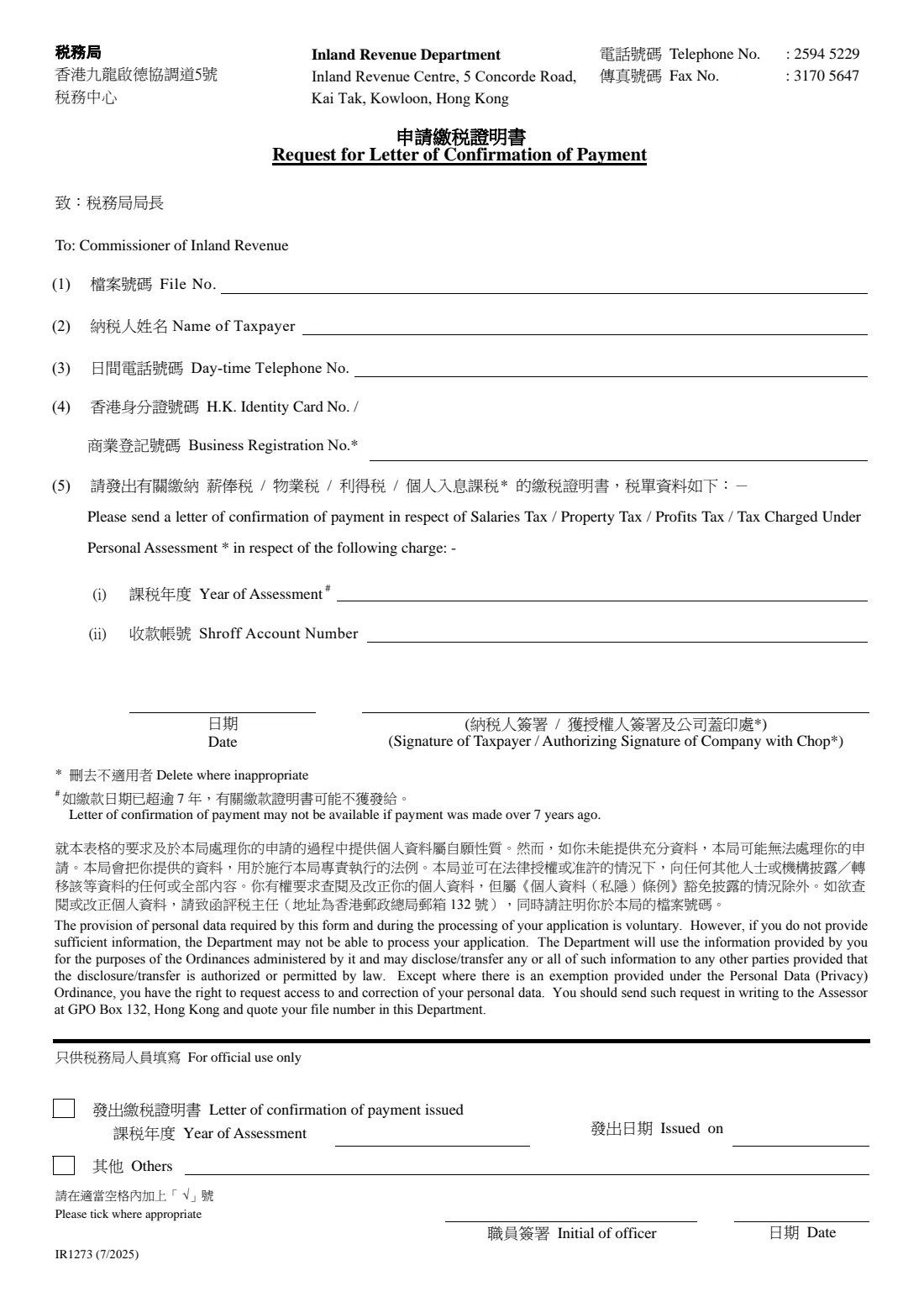
What is Form IR1273 (confirmation of tax paid)?
Banks, landlords, visa offices and employers abroad sometimes want official proof that you have paid your Hong Kong tax. Form IR1273 asks the Inland Revenue Department for that proof: a letter of confirmation of payment for one charge, identified by your file number, the year of assessment and the shroff account number from the demand note.
The form is bilingual and asks you to delete wording that doesn't apply: whether you give an HKID or a Business Registration number, which tax the charge is for (Salaries Tax, Property Tax, Profits Tax or Personal Assessment), and whether the taxpayer or a company's authorised signatory signs. FileIt rules a line through the options you don't need, in Chinese and in English, just as you would with a pen.
The form notes that a letter may not be available if the payment was made more than 7 years ago. FileIt fills the 7/2025 edition and saves it in your vault, ready to sign.
- Who fills it
- The taxpayer, or an authorised signatory of a business
- Sent to
- Inland Revenue Department, Inland Revenue Centre, 5 Concorde Road, Kai Tak, Kowloon (post or fax: 3170 5647)
- Enquiries
- Telephone 2594 5229, as printed on the form
- One form per
- Tax charge (one year of assessment and shroff account number)
- Edition
- IR1273 (7/2025), 1 page
Who needs to fill out Form IR1273 (confirmation of tax paid)?
- Employees who need proof of salaries tax paid for a mortgage, loan or visa application.
- Property owners who need confirmation that property tax was settled.
- Businesses asked by a bank or a counterparty to show that profits tax was paid.
- People who elected Personal Assessment and need proof of payment of that charge.
When to use Form IR1273 (confirmation of tax paid)
- After the charge on a demand note has been paid in full and someone asks you for official confirmation.
- When your own payment receipt isn't accepted as proof.
- Within about 7 years of the payment, as the form warns older records may not be available.
What you need before you start
- Your IRD file number.
- The taxpayer's name and a day-time telephone number.
- An HKID number with its check digit, or the business registration number.
- Which tax the charge was for.
- The year of assessment and the shroff account number, both printed on the demand note.
What’s on Form IR1273 (confirmation of tax paid)
The 2025 edition has 1 page. FileIt asks for it in 3 parts, and it is signed by Taxpayer:
- Your requestTaxpayer
- SigningTaxpayer
- Crossings-out on the printed formTaxpayer
How to fill out Form IR1273 (confirmation of tax paid), step by step
1 (1)–(4) Who you are
File number, name of taxpayer, day-time telephone number, and an HKID or Business Registration number. FileIt strikes out the caption you don't use.
2 (5) The charge
Choose the tax: Salaries Tax, Property Tax, Profits Tax or Tax Charged Under Personal Assessment. The other three are struck out in both languages. Then give the year of assessment and the shroff account number.
3 Signing
Date it and sign above the caption that applies: the taxpayer, or an authorised signatory with the company chop. The other caption is struck out.
Common mistakes to avoid
- Giving the wrong shroff account number. Copy it exactly from the demand note for the charge you mean.
- Asking about more than one charge on a single form.
- Writing a calendar year where the form wants a year of assessment, such as 2024/25.
- Leaving every tax type and caption undeleted, so it's unclear what's being asked.
- Forgetting the company chop when signing for a business.
After you fill it out
Print and sign the form (add the company chop for a business).
Post it or fax it to the Inland Revenue Department at the number printed at the top.
The IRD sends the letter of confirmation to you. Keep it with the demand note.
FileIt keeps your filled form in your vault in case you need another letter later.
Fill out Form IR1273 (confirmation of tax paid) online with FileIt
- Pick the person. Choose someone from People and FileIt fills in their name, date of birth, address and other details it already knows.
- Answer plain-language questions. One part of the form at a time, with the official help text beside each question — 25 fields in all. Your answers save as you go.
- Check the live preview. Watch your answers land on the real Inland Revenue Department, the Government of the Hong Kong Special Administrative Region (IRD) form, and let FileIt do any worksheet arithmetic.
- Generate the official PDF. FileIt prints your answers into the agency’s own PDF and files it in that person’s folder in your vault. Sign it, or send it for e-signature.
FileIt fills the form — it never files or submits anything for you. Deliver the finished form to whoever asked for it, the way the form’s instructions say.
Start Form IR1273 (confirmation of tax paid) now — it’s freeForm IR1273 (confirmation of tax paid): frequently asked questions
What does Form IR1273 get me?
A letter from the Inland Revenue Department confirming that the tax charge you identify has been paid.
Where do I find the shroff account number?
It's printed on the demand note for the charge, next to the payment details.
Can I ask about a payment from years ago?
You can ask, but the form warns that a letter may not be available if the payment was made more than 7 years ago.
How does FileIt handle 'delete where inappropriate'?
It rules a line through each option you don't choose, in Chinese and English, so the printed form reads like one you'd mark by hand.
Can I fax the form?
The form prints the IRD's fax number, 3170 5647, so you can fax or post it.
Is it free to fill in with FileIt?
Yes. Filling official forms works on every FileIt account, including the free plan.
Official sources
- Blank form (PDF), published by Inland Revenue Department, the Government of the Hong Kong Special Administrative Region (IRD): https://www.ird.gov.hk/eng/pdf/ir1273.pdf
- Official instructions and guidance: https://www.ird.gov.hk/eng/paf/for.htm
- Edition shown on this page: IR1273 (7/2025) (checked 2026-10-19).
FileIt is not affiliated with or endorsed by Inland Revenue Department, the Government of the Hong Kong Special Administrative Region (IRD) or any government. This page explains the form in general terms and is not legal, tax or immigration advice. Always read the official instructions, and check that you are using the edition the recipient accepts. Page last reviewed 2026-10-19.