What is Form IR831?
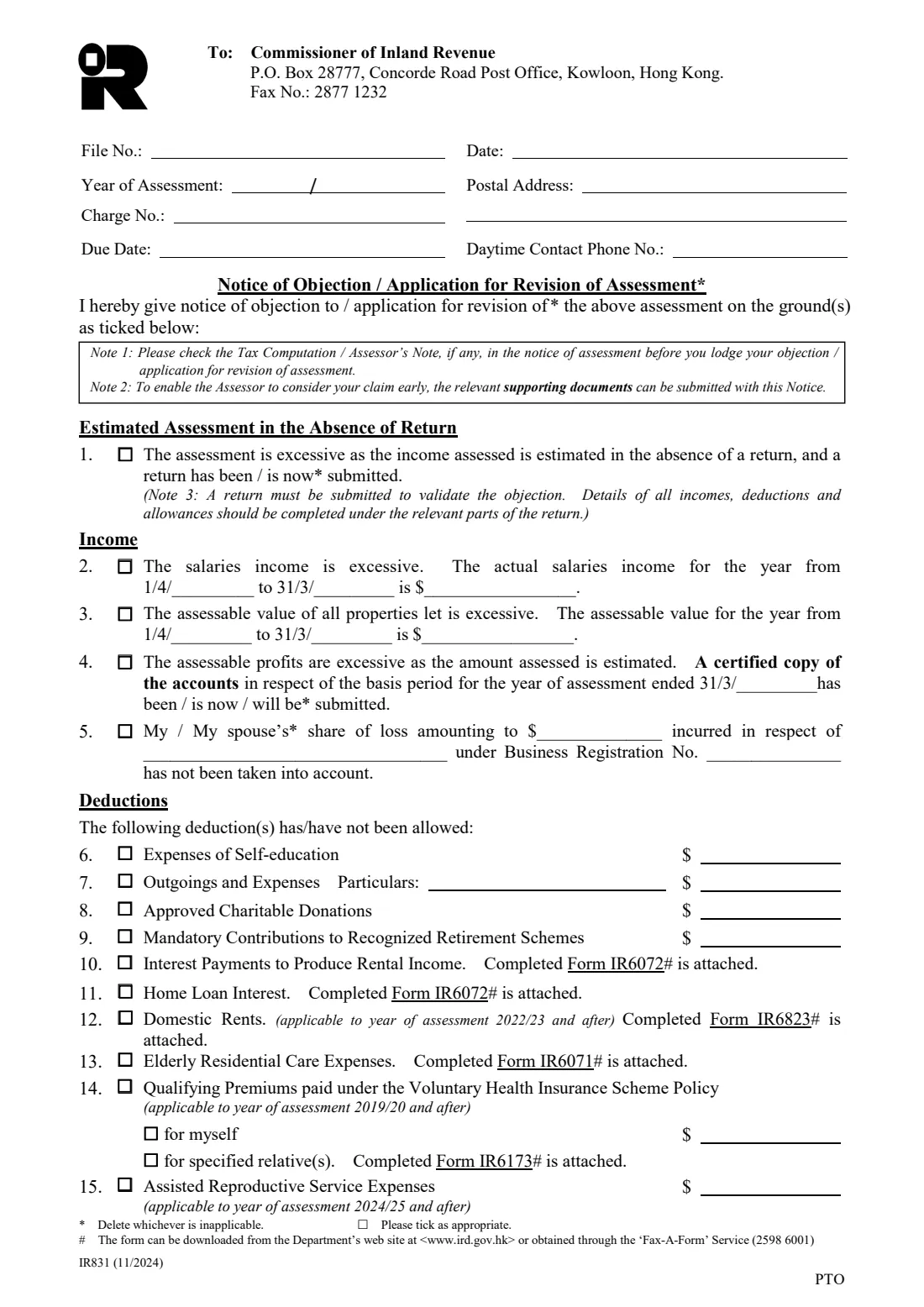
Form IR831 is how a Hong Kong taxpayer disputes a notice of assessment. If you disagree with an assessment you must lodge a notice of objection in writing, stating precisely the grounds, and it must be received by the Inland Revenue Department (IRD) within one month after the date of issue of the notice of assessment. The same form also serves as an application for revision of assessment under section 70A of the Inland Revenue Ordinance.
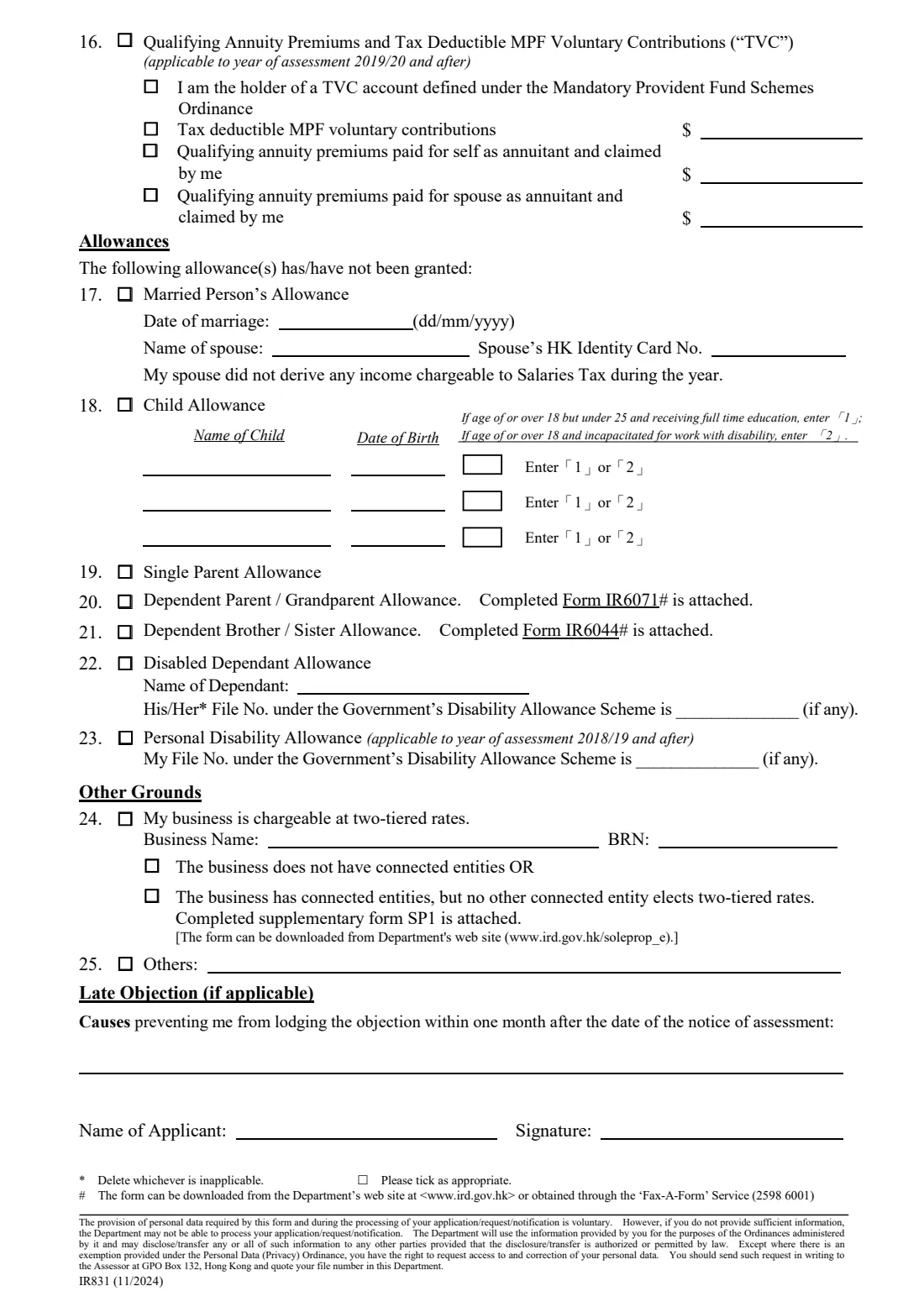
The form is a checklist of grounds. On income: an estimated assessment issued because no return was filed, salaries income or the assessable value of let property that is too high, estimated profits, or a share of a business loss not taken into account. On deductions: self-education, outgoings, donations, MPF contributions, home loan interest, domestic rents, elderly residential care, VHIS premiums, assisted reproductive services, annuity premiums and TVC contributions. On allowances: married person's, child, single parent, dependent parent or grandparent, dependent brother or sister, disabled dependant and personal disability. There is room for other grounds and for the causes of a late objection.
FileIt walks you through the parts that apply and prints your answers into the IRD's own PDF (the 11/2024 edition). It strikes out the wording that doesn't apply, fills in the year from your year of assessment, checks that items such as domestic rents or VHIS premiums apply to that year, and files the finished PDF in your vault. You then sign it and send it to the IRD yourself — FileIt never files anything with the IRD.
- Who fills it
- A taxpayer who disagrees with a notice of assessment (Salaries Tax, Property Tax, Profits Tax or personal assessment)
- Given to
- The Commissioner of Inland Revenue, P.O. Box 28777, Concorde Road Post Office, Kowloon, Hong Kong — or by fax to 2877 1232; e-objection is also possible through eTAX
- When
- Received by the IRD within one month after the date of issue of the notice of assessment
- Tax still due?
- Yes — pay by the date(s) on the notice unless the Commissioner orders the tax held over
- Signatures
- Yours, with your name, on page 2
- Edition
- IR831 (11/2024), 2 pages
Who needs to fill out Form IR831?
- Taxpayers whose notice of assessment over-states their salaries income, the assessable value of a let property, or business profits.
- Anyone who was refused a deduction or allowance they believe they are entitled to — for example domestic rents, home loan interest, a child or dependent parent allowance.
- People who received an estimated assessment because they didn't file a tax return in time (a properly completed return must go with the objection).
- Sole proprietors whose business should be charged at the two-tiered profits tax rates.
When to use Form IR831
- After you have checked the tax computation and any Assessor's Note in the notice of assessment and still disagree.
- Within one month after the date of issue of the notice of assessment. A late objection is only considered if the Commissioner is satisfied that absence from Hong Kong, sickness or another reasonable cause prevented you — give the causes in the late-objection box.
- To apply for revision of an assessment under section 70A instead, choose 'Application for Revision of Assessment'.
What you need before you start
- The notice of assessment: your file number, the year of assessment, the charge number and the due date.
- Your postal address and a daytime contact phone number.
- The correct figures for each ground — actual salaries income, assessable value, share of loss, or the deduction amounts.
- Any claim forms the form asks you to attach (IR6072, IR6823, IR6071, IR6173, IR6044) and supporting documents.
- For an estimated assessment: a properly completed tax return (and accounts, where applicable).
What’s on Form IR831
The 2024 edition has 2 pages. FileIt asks for it in 8 parts, and it is signed by Taxpayer:
- The assessmentTaxpayer
- Estimated assessment in the absence of a return (item 1)Taxpayer
- Income (items 2–5)Taxpayer
- Deductions not allowed (items 6–16)Taxpayer
- Allowances not granted (items 17–23)Taxpayer
- Other grounds (items 24–25)Taxpayer
- Late objection (if applicable)Taxpayer
- Name and signatureTaxpayer
How to fill out Form IR831, step by step
1 The assessment
Give your file number, the year of assessment, the charge number and the due date from the notice of assessment, the date, your postal address and a daytime phone number. Choose whether this is a notice of objection or an application for revision of assessment — FileIt strikes out the wording that doesn't apply in the heading and in the opening sentence.
2 Estimated assessment (item 1)
If the assessment was estimated because no return was filed, tick item 1 and say whether the return has been or is now submitted. The form's Note 3 says a return must be submitted to validate the objection.
3 Income (items 2–5)
Give the actual salaries income or the assessable value of let property for the year from 1 April to 31 March (FileIt fills in the years). For estimated profits, say whether a certified copy of the accounts has been, is now or will be submitted. For a share of loss, give whose share, the amount, the business and its business registration number.
4 Deductions (items 6–16)
Tick each deduction not allowed and give the amount where there is a $ box. For interest, domestic rents, elderly residential care, VHIS premiums for relatives and the dependant allowances, attach the completed claim form the item names. Some items apply only from a given year of assessment — FileIt checks this.
5 Allowances (items 17–23)
For married person's allowance, give the date of marriage and your spouse's name and HKID number. For child allowance, list up to three children with dates of birth, entering 1 or 2 for a child aged 18 or over as the form explains. For a disabled dependant, give the name and any file number under the Government's Disability Allowance Scheme.
6 Other grounds, late objection and signature
Item 24 is for a business chargeable at two-tiered rates, item 25 for any other ground. If the objection is late, give the causes that prevented you lodging it in time. Then print your name and sign on page 2.
Common mistakes to avoid
- Missing the one-month time limit — it runs from the date of issue of the notice of assessment.
- Not stating the grounds precisely, or ticking a ground without the figure the form asks for.
- Objecting to an estimated assessment without submitting a properly completed tax return.
- Forgetting to attach the claim form an item names (for example IR6823 for domestic rents).
- Not paying the tax by the due date — an objection doesn't stop payment unless the Commissioner holds the tax over.
- Leaving both 'Notice of Objection' and 'Application for Revision of Assessment' unstruck.
After you fill it out
Sign the form and send it, with any attachments, to the Commissioner of Inland Revenue, P.O. Box 28777, Concorde Road Post Office, Kowloon, Hong Kong, or fax it to 2877 1232. You can lodge an e-objection through eTAX instead.
Pay the tax by the date(s) on the notice of assessment unless the Commissioner orders that it be held over pending the objection.
An assessor may ask for further information and may then revise the assessment or propose a basis to revise it. Where no agreement is possible, the Commissioner determines the objection; an appeal against that determination goes to the Board of Review within 1 month after the written determination is sent.
FileIt keeps the completed PDF in your vault with the notice of assessment.
Fill out Form IR831 online with FileIt
- Pick the person. Choose someone from People and FileIt fills in their name, date of birth, address and other details it already knows.
- Answer plain-language questions. One part of the form at a time, with the official help text beside each question — 83 fields in all. Your answers save as you go.
- Check the live preview. Watch your answers land on the real Inland Revenue Department (IRD), Hong Kong form, and let FileIt do any worksheet arithmetic.
- Generate the official PDF. FileIt prints your answers into the agency’s own PDF and files it in that person’s folder in your vault. Sign it, or send it for e-signature.
FileIt fills the form — it never files or submits anything for you. Deliver the finished form to whoever asked for it, the way the form’s instructions say.
Start Form IR831 now — it’s freeForm IR831: frequently asked questions
What is the deadline for a tax objection in Hong Kong?
The notice of objection must be received by the IRD within one month after the date of issue of the notice of assessment. Late objections are only considered if the Commissioner is satisfied that absence from Hong Kong, sickness or another reasonable cause prevented you.
Do I still have to pay the tax?
Yes. You must pay by the date(s) on the notice of assessment unless the Commissioner orders that the payment, or part of it, be held over pending the result of the objection.
Can I object online instead?
Yes. If you have an eTAX Individual Tax Portal account you can lodge an e-objection there. Form IR831 is the paper route, by post or fax.
Can I fax Form IR831?
Yes — gov.hk says to complete the relevant parts, sign it and return it by post or by fax to 2877 1232. FileIt can prepare it for e-signature, or you can download it and sign by hand.
What is an application for revision of assessment?
It is an application under section 70A of the Inland Revenue Ordinance to correct an assessment that is excessive because of an error or omission. The same form is used; choose 'Application for Revision of Assessment' and FileIt strikes out the objection wording.
Does FileIt send the objection to the IRD?
No. FileIt fills in the IRD's official PDF and files it in your vault. You sign it and send it to the IRD yourself.
Official sources
- Blank form (PDF), published by Inland Revenue Department (IRD), Hong Kong: https://www.ird.gov.hk/eng/pdf/ir831e.pdf
- Official instructions and guidance: https://www.gov.hk/en/residents/taxes/taxfiling/object/objections.htm
- Edition shown on this page: IR831 (11/2024) (checked 2026-10-01).
FileIt is not affiliated with or endorsed by Inland Revenue Department (IRD), Hong Kong or any government. This page explains the form in general terms and is not legal, tax or immigration advice. Always read the official instructions, and check that you are using the edition the recipient accepts. Page last reviewed 2026-10-01.