What is Form IR6044 (child / dependent sibling allowance claim)?
Hong Kong taxpayers normally claim their allowances in Part 12 of the Tax Return – Individuals (BIR60). If you left out a child, brother or sister you maintained, GovHK explains that you can still lodge the claim afterwards in writing, no later than 6 years after the end of the year of assessment the claim relates to. Form IR6044 is the Inland Revenue Department's (IRD) own form for that claim.
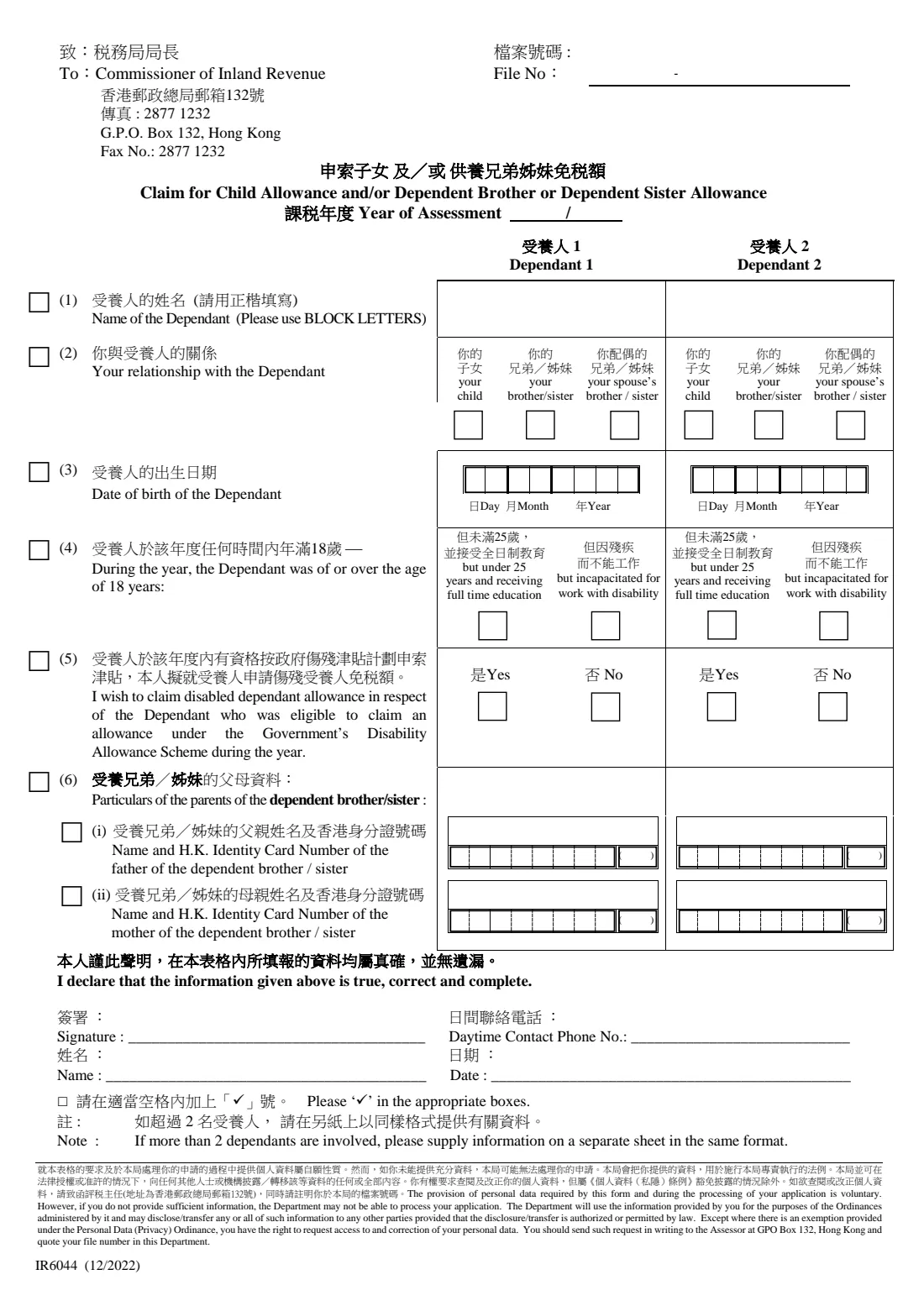
The form covers one year of assessment and two dependants, side by side. For each one it asks the name, your relationship (your child, your brother or sister, or your spouse's brother or sister), the date of birth, whether a dependant aged 18 or over was in full-time education or unable to work because of a disability, and whether you also claim the disabled dependant allowance. For a brother or sister it also asks for their parents' names and Hong Kong identity card numbers.
FileIt asks these questions in plain English, prints every answer into the IRD's own bilingual PDF (the 12/2022 edition), ticks the item boxes down the left side for you, checks the identity card check digits and checks item (4) against the dependant's age in that year. It never sends anything to the IRD: you sign the printed form and post or fax it yourself.
- Who fills it
- A taxpayer under salaries tax or personal assessment who maintains the child, brother or sister
- Given to
- The Commissioner of Inland Revenue, G.P.O. Box 132, Hong Kong, or by fax to 2877 1232 (as printed on the form)
- When
- When an allowance was not claimed in the tax return: in writing no later than 6 years after the end of the year of assessment
- Dependants per form
- Two; for more, the form asks for a separate sheet in the same format
- Signature
- Signed by the taxpayer, with name, daytime phone number and date
- Edition
- IR6044 (12/2022), 1 page, Chinese and English
Who needs to fill out Form IR6044 (child / dependent sibling allowance claim)?
- A parent who forgot to claim the child allowance for a child in their tax return, or who needs to add a child born during the year.
- A taxpayer who maintains an unmarried brother or sister (of full or half blood, adopted or step, or their spouse's) and did not claim the dependent brother or dependent sister allowance.
- A taxpayer whose child, brother or sister was eligible under the Government's Disability Allowance Scheme and who also wants the disabled dependant allowance for them.
- Married couples who have agreed which of them claims the child allowances, when the one claiming did not include them in the return.
When to use Form IR6044 (child / dependent sibling allowance claim)
- After you filed your tax return and realised a child or dependent brother or sister was left out.
- Within 6 years after the end of the year of assessment concerned; one form per year of assessment.
- When the IRD asks you for the details of a dependant you claimed for.
- Not needed if you are still completing the tax return for the year: claim the allowance in Part 12 of the return instead.
What you need before you start
- Your IRD file number (from your tax return or notice of assessment), if you have one.
- The year of assessment you are claiming for (1 April to 31 March).
- Each dependant's full name in English and date of birth.
- For a dependant aged 18 or over during the year: whether they were under 25 and in full-time education, or unable to work because of a physical or mental disability.
- Whether the dependant was eligible to claim an allowance under the Government's Disability Allowance Scheme during the year.
- For a brother or sister: the names and Hong Kong identity card numbers of their father and mother.
- Your daytime contact phone number. Keep birth certificates, school letters or medical proof ready in case the IRD asks for them.
What’s on Form IR6044 (child / dependent sibling allowance claim)
The 2022 edition has 1 page. FileIt asks for it in 4 parts, and it is signed by Taxpayer:
- Your file and the year of assessmentTaxpayer
- Dependant 1Taxpayer
- Dependant 2Taxpayer
- DeclarationTaxpayer
How to fill out Form IR6044 (child / dependent sibling allowance claim), step by step
1 File number and year of assessment
Enter your IRD file number in its two parts, as printed on your tax return or assessment, and choose the year of assessment. A year of assessment runs from 1 April to 31 March, so 2025/26 covers 1 April 2025 to 31 March 2026. Use one form for each year you are claiming.
2 (1) and (2) The dependant and your relationship
Give the dependant's name in block letters (FileIt prints capitals) and tick whether they are your child, your brother or sister, or your spouse's brother or sister. GovHK's definitions are broad: a child includes an adopted child or stepchild and the child of your spouse or former spouse; a brother or sister can be of full or half blood, adopted or step, yours or your spouse's, or a brother or sister of your deceased spouse. The dependant must be unmarried.
3 (3) and (4) Date of birth and the over-18 conditions
The date of birth goes into day, month and year boxes. If the dependant was 18 or over at any time during the year, tick either 'under 25 and receiving full time education' (at a university, college, school or similar) or 'incapacitated for work with disability'. A dependant under 18 for the whole year needs neither box. FileIt works out the age from the date of birth and the year you chose and tells you if item (4) doesn't match.
4 (5) Disabled dependant allowance
Tick Yes if the dependant was eligible to claim an allowance under the Government's Disability Allowance Scheme during the year and you want the disabled dependant allowance for them; otherwise tick No. GovHK explains that it is granted in addition to the child allowance or the dependent brother or sister allowance.
5 (6) Parents of a dependent brother or sister
Only for a brother or sister: give the father's and mother's names and Hong Kong identity card numbers. FileIt puts the letter(s) and six digits into the right boxes and the check digit inside the brackets, and checks that the check digit matches the number.
6 Declaration
You declare that the information is true, correct and complete, then give your name, a daytime phone number and the date. Print the form and sign on the Signature line. The row boxes beside items (1) to (6) are ticked for each item you completed, as the form asks.
Common mistakes to avoid
- Claiming the child allowance twice: GovHK says all child allowances are claimed by either you or your spouse (unless you live apart), and people entitled for the same child must agree who claims.
- Leaving item (4) blank for a dependant who turned 18 during the year.
- Ticking full-time education for a dependant who was 25 or over for the whole year.
- Claiming for a married brother or sister, or one you or your spouse did not maintain.
- Using one form for two different years of assessment.
- Getting a parent's identity card check digit wrong; FileIt checks it.
After you fill it out
Print the form and sign it on the Signature line.
Send it to the Commissioner of Inland Revenue by post or fax, using the address and fax number printed on the form, and quote your file number.
Keep your copy and the supporting documents; you don't attach them, but the IRD may ask for them to verify the claim.
The IRD will consider the claim for the year of assessment you gave.
Fill out Form IR6044 (child / dependent sibling allowance claim) online with FileIt
- Pick the person. Choose someone from People and FileIt fills in their name, date of birth, address and other details it already knows.
- Answer plain-language questions. One part of the form at a time, with the official help text beside each question — 36 fields in all. Your answers save as you go.
- Check the live preview. Watch your answers land on the real Inland Revenue Department, the Government of the Hong Kong Special Administrative Region (IRD) form, and let FileIt do any worksheet arithmetic.
- Generate the official PDF. FileIt prints your answers into the agency’s own PDF and files it in that person’s folder in your vault. Sign it, or send it for e-signature.
FileIt fills the form — it never files or submits anything for you. Deliver the finished form to whoever asked for it, the way the form’s instructions say.
Start Form IR6044 (child / dependent sibling allowance claim) now — it’s freeForm IR6044 (child / dependent sibling allowance claim): frequently asked questions
How much is the child allowance?
GovHK's table gives HK$140,000 for each of the 1st to 9th child from 2026/27, HK$130,000 for 2023/24 to 2025/26 and HK$120,000 for 2020/21 to 2022/23, with the same amount again in the year a child is born. The dependent brother or dependent sister allowance is HK$37,500 in each of those years, and the disabled dependant allowance HK$75,000.
How late can I claim?
GovHK says a claim left out of the tax return can be lodged in writing no later than 6 years after the end of the year of assessment it relates to.
Can I use the notice of objection form instead?
GovHK also mentions completing the relevant parts of form IR831, the notice of objection or application for revision of assessment. IR6044 is the IRD's dedicated claim form for these two allowances.
What if I have more than two dependants?
The form has two columns. For a third or later dependant it asks you to supply the information on a separate sheet in the same format.
Can FileIt print the dependant's name in Chinese?
No. The form asks for the name in block letters, so FileIt prints the English name. FileIt can't print Chinese characters.
Does FileIt send the claim to the IRD?
No. FileIt fills in the IRD's own PDF and saves it in your vault. You sign it and post or fax it to the IRD yourself.
Official sources
- Blank form (PDF), published by Inland Revenue Department, the Government of the Hong Kong Special Administrative Region (IRD): https://www.ird.gov.hk/eng/pdf/ir6044e.pdf
- Official instructions and guidance: https://www.gov.hk/en/residents/taxes/salaries/allowances/allowances/claim.htm
- Edition shown on this page: IR6044 (12/2022) (checked 2026-09-28).
FileIt is not affiliated with or endorsed by Inland Revenue Department, the Government of the Hong Kong Special Administrative Region (IRD) or any government. This page explains the form in general terms and is not legal, tax or immigration advice. Always read the official instructions, and check that you are using the edition the recipient accepts. Page last reviewed 2026-09-28.