What is GRA G0005 partnership return?
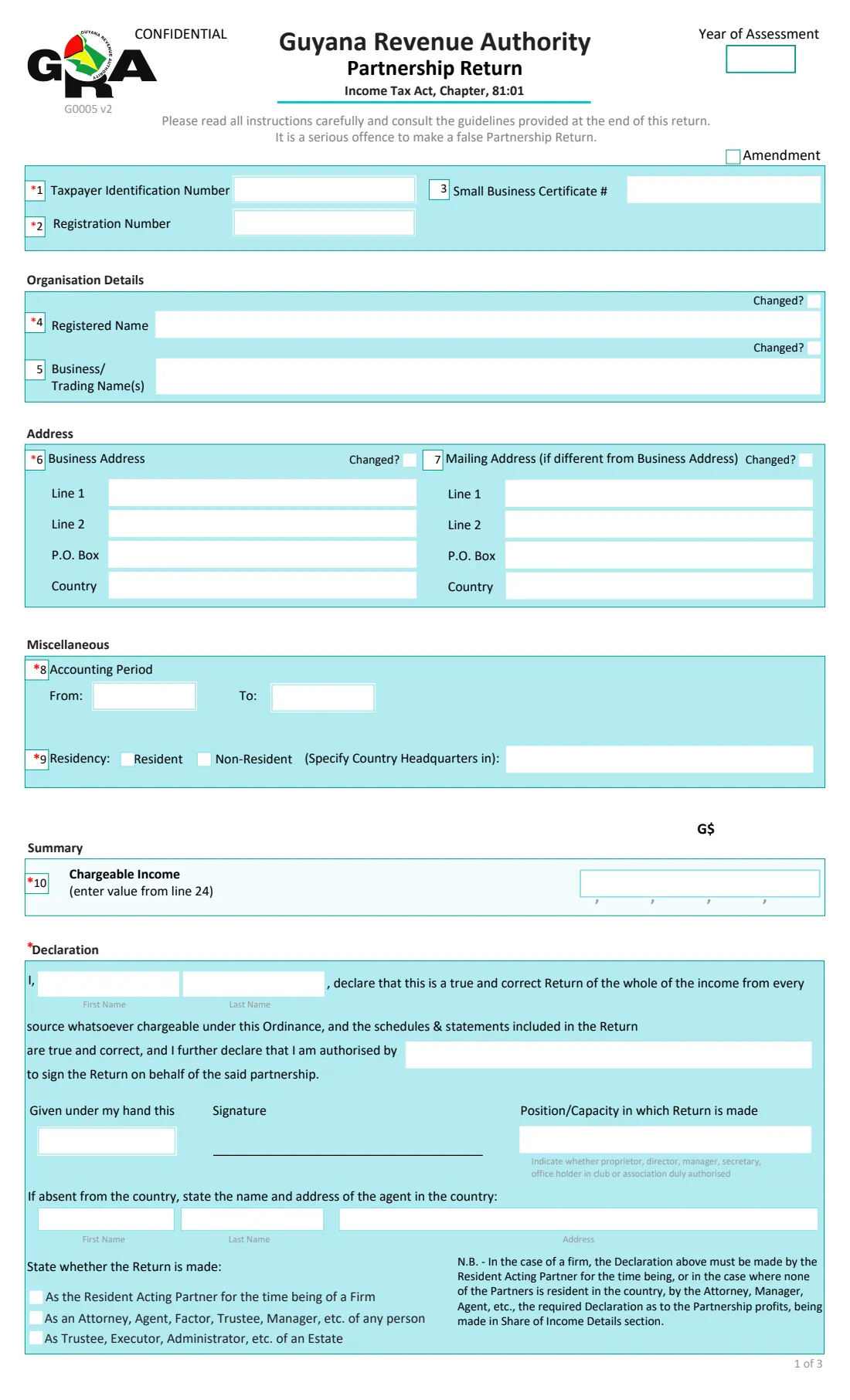
A partnership in Guyana files a joint return of the full profits of the firm each year on form G0005, under the Income Tax Act, Chapter 81:01. Tax is charged on each partner in their own capacity, so the return also shows how the profits are shared between the partners.
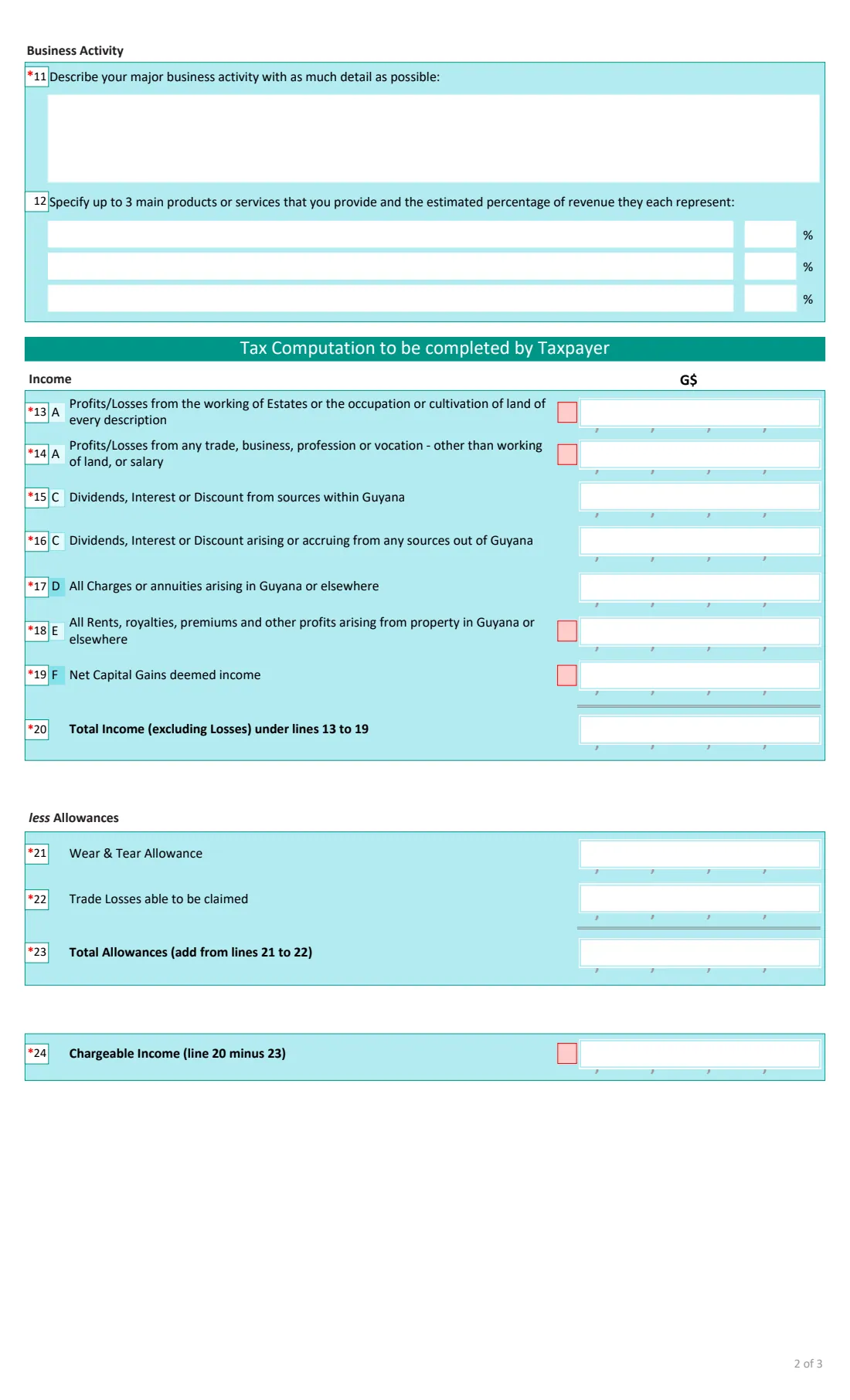
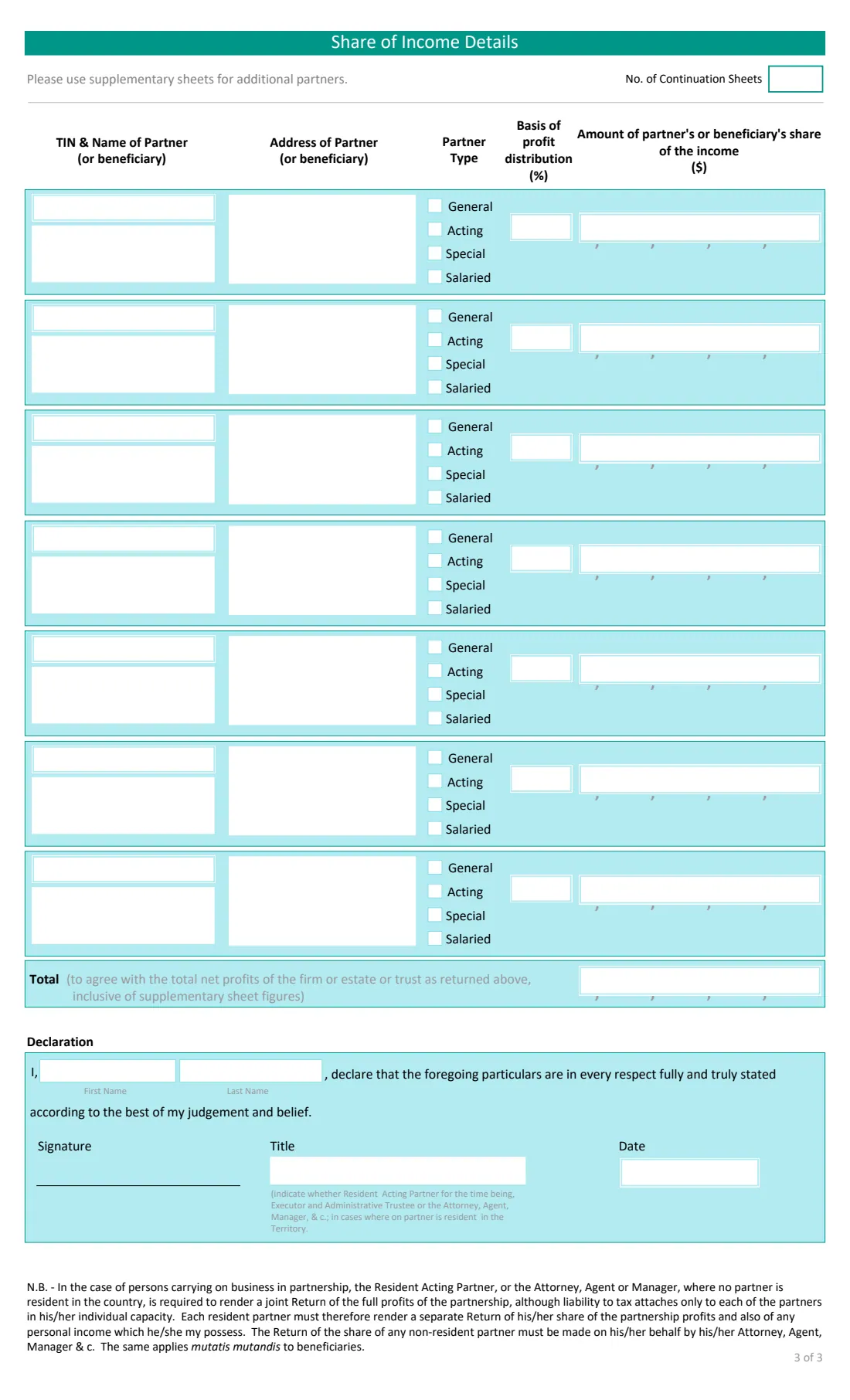
The return has the firm's identification and addresses, the accounting period, residency and a description of the business, then the income by type (land, trade or business, dividends and interest, charges, rents, capital gains), the wear and tear allowance and trade losses, and the chargeable income. Page 3 lists each partner's TIN, name, address, type, profit percentage and share.
FileIt adds up the totals, prints losses with their minus sign in the form's small sign boxes, and fills GRA's own PDF. You sign it by hand and hand it in to the GRA yourself. FileIt never submits it.
- Who fills it
- The Resident Acting Partner, or the attorney, agent or manager when no partner is resident
- Due
- 30 April each year, or the next business day (GRA's guide)
- Handed in to
- The Commissioner General, at a GRA office or by post to P.O. Box 10406
- Partners on the form
- Seven; more go on the Partnership Supplementary sheet (G0005b)
- Signatures
- By hand, on page 1 and page 3
- Edition
- G0005 v2, 3 pages
Who needs to fill out GRA G0005 partnership return?
- Partnerships (firms) carrying on business in Guyana.
- The Resident Acting Partner, who makes the return for the firm.
- An attorney, agent or manager making the return where no partner is resident in Guyana.
- Trustees, executors and administrators returning an estate's or trust's share of income to beneficiaries.
When to use GRA G0005 partnership return
- Once a year, for the year of assessment that follows the year the income was earned.
- Again, with Amendment ticked, to correct a return already submitted.
- Alongside each resident partner's own return of their share, which the form's note says they must also file.
What you need before you start
- The partnership's TIN, registration number and any Small Business Certificate number.
- The registered and trading names, business and mailing addresses.
- The accounting period (start and end month).
- The year's figures for each type of income, the wear and tear allowance and trade losses claimed.
- Each partner's TIN, name, address, type (general, acting, special or salaried), profit percentage and share of the income.
What’s on GRA G0005 partnership return
The 2022 edition has 3 pages. FileIt asks for it in 17 parts:
- Identification and yearPartnership
- Organisation details and addressPartnership
- MiscellaneousPartnership
- Business activityPartnership
- IncomePartnership
- Allowances and chargeable incomePartnership
- Share of income: partner 1Partnership
- Share of income: partner 2Partnership
- Share of income: partner 3Partnership
- Share of income: partner 4Partnership
- Share of income: partner 5Partnership
- Share of income: partner 6Partnership
- Share of income: partner 7Partnership
- Share of income: total and declarationPartnership
- DeclarationPartnership
- Agent in Guyana (if you are absent)Partnership
- Signs printed for lossesPartnership
How to fill out GRA G0005 partnership return, step by step
1 Identification and organisation
Year of assessment, TIN, registration number, registered name and trading names, business and mailing addresses. Tick 'Changed?' where the details differ from GRA's records.
2 Miscellaneous and business activity
The accounting period, whether the partnership is resident (or the country of its headquarters), a description of the main business activity and up to three products or services with their share of revenue.
3 Income and allowances
Lines 13 to 19 by type of income, with a minus for a loss on the land, trade, rents and capital gains lines. FileIt works out line 20 (income excluding losses), line 23 (allowances) and line 24 (chargeable income), which also prints on page 1.
4 Share of income
One block per partner: TIN, name, address, partner type, profit percentage and amount. FileIt adds the total, including any total you carry from continuation sheets.
5 Declarations
Your name, who authorised you to sign, your position, the date and the capacity in which you make the return, plus an agent in Guyana if you are absent. The same name and date print on the page 3 declaration.
Common mistakes to avoid
- Leaving lines blank. GRA's guide asks for 0, None or a dash where a line does not apply.
- Profit percentages that don't add up to 100%.
- A partners' total that does not agree with the firm's net profits returned on the form.
- Typing losses as positive numbers.
- Signing only one of the two declarations.
After you fill it out
Check the printed return, sign both declarations by hand and hand it in to the GRA with the supporting documents.
Use GRA's Partnership Supplementary sheet (G0005b) for any partners beyond seven.
Keep a copy in your vault with the partnership's accounts.
Fill out GRA G0005 partnership return online with FileIt
- Pick the person. Choose someone from People and FileIt fills in their name, date of birth, address and other details it already knows.
- Answer plain-language questions. One part of the form at a time, with the official help text beside each question — 104 fields in all. Your answers save as you go.
- Check the live preview. Watch your answers land on the real Guyana Revenue Authority (GRA) form, and let FileIt do any worksheet arithmetic.
- Generate the official PDF. FileIt prints your answers into the agency’s own PDF and files it in that person’s folder in your vault.
FileIt fills the form — it never files or submits anything for you. Deliver the finished form to whoever asked for it, the way the form’s instructions say.
Start GRA G0005 partnership return now — it’s freeGRA G0005 partnership return: frequently asked questions
Who signs the partnership return?
The Resident Acting Partner for the time being. Where none of the partners is resident in Guyana, the attorney, agent or manager makes it.
Does the partnership pay the tax?
The form's note says liability to tax attaches to each partner individually, so each resident partner also files their own return of their share.
Does FileIt work out the tax?
No. The partnership return shows chargeable income and its split between the partners. FileIt only adds up the form's own lines.
What are the partner types?
GRA's guide describes a general partner as one who takes part in daily operations and is personally liable, a special partner as a limited partner, and a salaried partner as one paid without owning equity.
Official sources
- Blank form (PDF), published by Guyana Revenue Authority (GRA): https://gra.gov.gy/storage/2022/08/G0005-Partnership-v2.pdf
- Official instructions and guidance: https://gra.gov.gy/storage/2020/10/Partnership-Return-Guide.pdf
- Edition shown on this page: G0005 v2 (PDF dated 11 July 2022, GRA upload 2022/08) (checked 2026-10-25).
FileIt is not affiliated with or endorsed by Guyana Revenue Authority (GRA) or any government. This page explains the form in general terms and is not legal, tax or immigration advice. Always read the official instructions, and check that you are using the edition the recipient accepts. Page last reviewed 2026-10-25.