What is GRA G0004 income tax return?
Individuals in Guyana with income to report file the G0004 Individual Income Tax Return for each year of assessment, by 30 April. It covers income earned in the previous calendar year. Many employees only need one to claim a refund or report other income, while the self-employed file one every year.
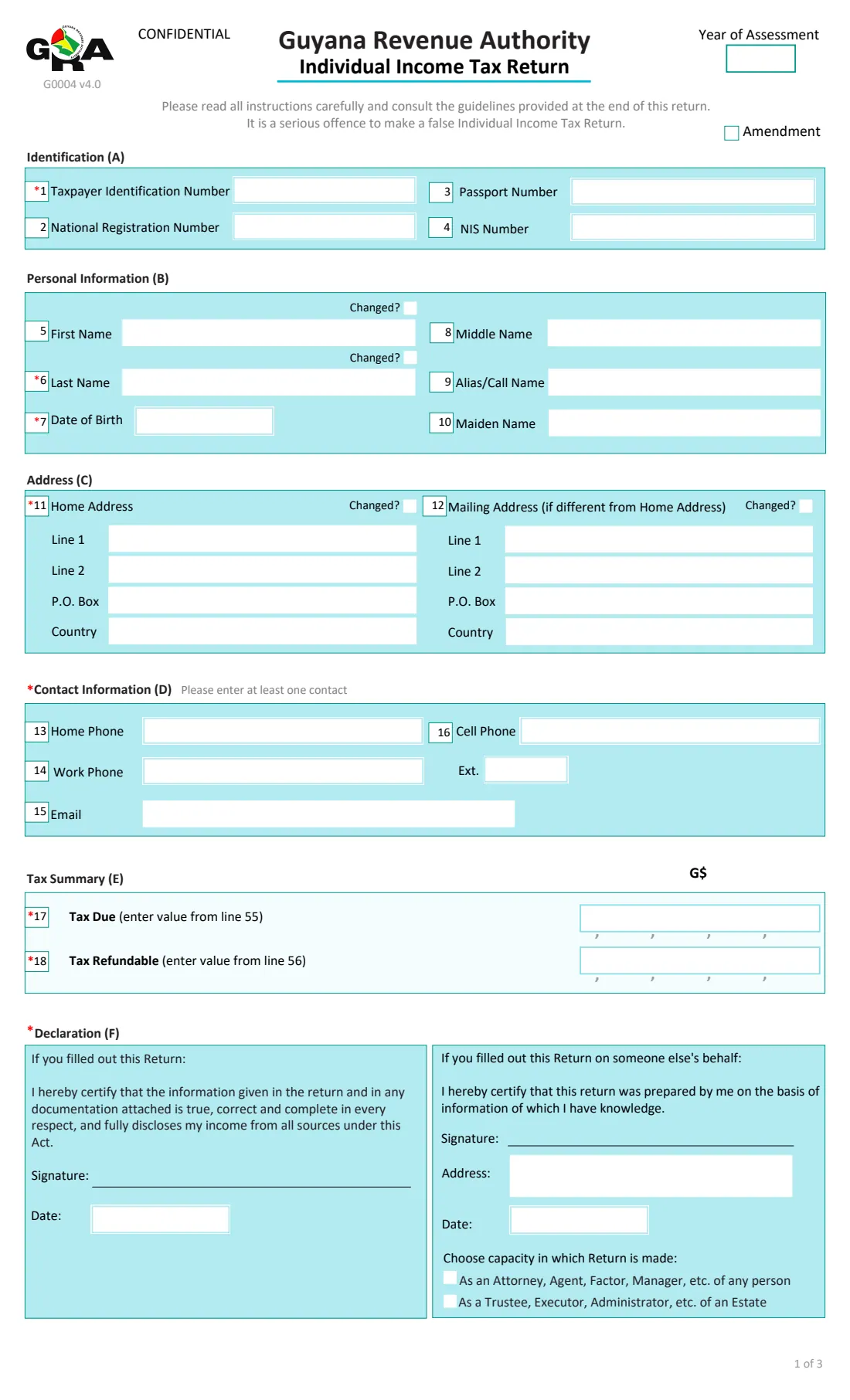
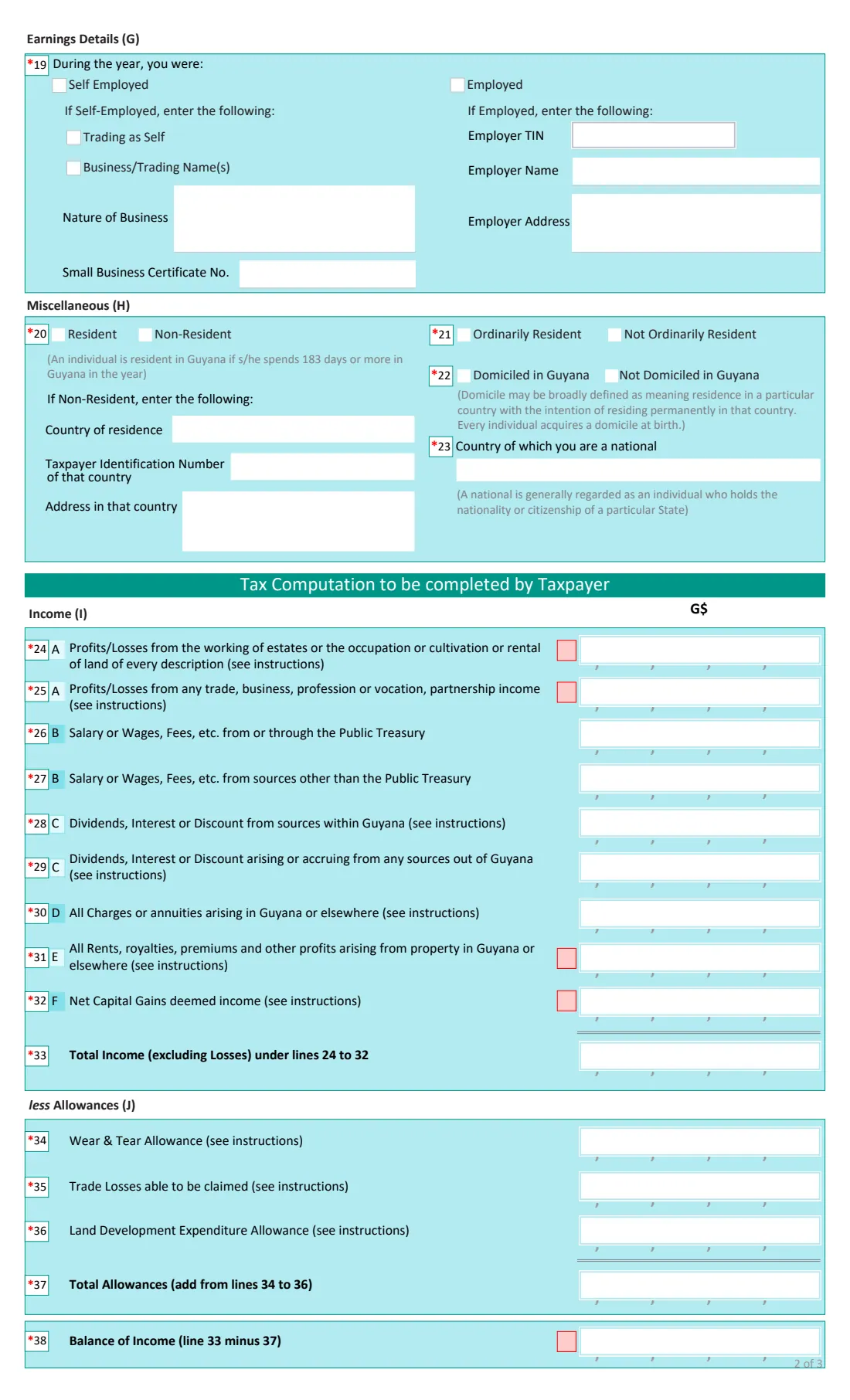
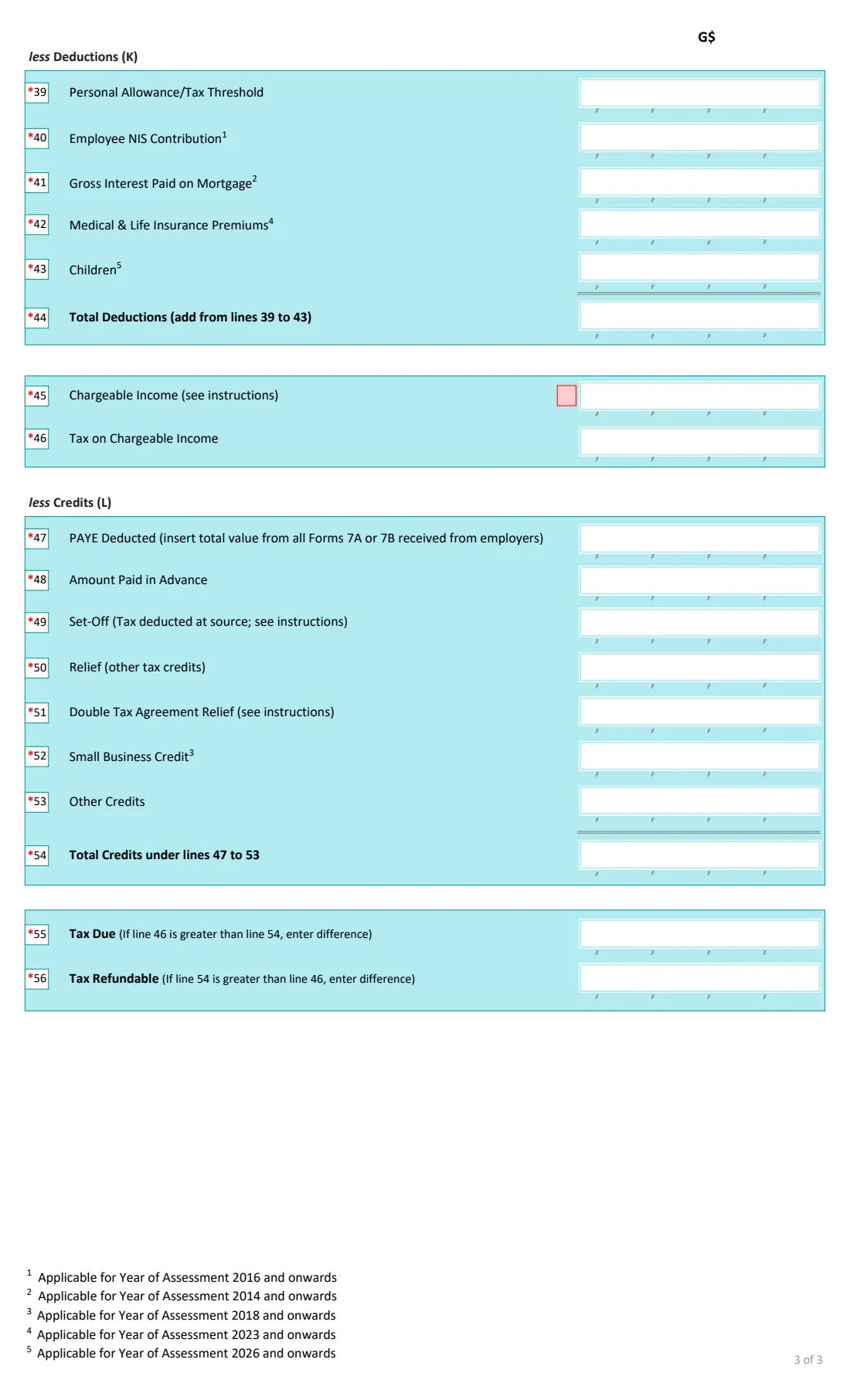
Page 1 has your identification, personal details, address, contact information, a tax summary and the declaration. Page 2 asks how you earned your income, your residence and domicile, then the income lines (24 to 33) and allowances (34 to 38). Page 3 has the deductions, chargeable income, tax, credits such as PAYE, and finally the tax due or refundable.
FileIt does the return's own arithmetic, the totals and the difference between tax and credits, and prints every figure right-aligned in GRA's digit boxes. It keeps the return in your vault next to your Forms 7A or 7B. You enter the personal allowance and the tax using the GRA's guide for the year, sign the return and file it yourself.
- Who files it
- Individuals with income to report, including the self-employed and employees claiming refunds
- Due
- 30 April of the year of assessment
- Filed with
- The Guyana Revenue Authority
- Signatures
- The taxpayer, or a preparer acting as attorney, agent, trustee or executor
- Edition
- G0004 v4.0
- Pages
- 3
Who needs to fill out GRA G0004 income tax return?
- Self-employed people and sole traders.
- Employees with income besides their salary, such as rent or interest.
- Employees who had too much PAYE deducted and want a refund.
- People with income from abroad who are resident in Guyana.
- Agents, attorneys and executors filing for someone else or for an estate.
When to use GRA G0004 income tax return
- Between January and 30 April for the previous year's income.
- To amend a return already filed: tick Amendment.
- When claiming deductions such as mortgage interest, insurance premiums or children.
What you need before you start
- Your TIN and national registration, passport and NIS numbers.
- Your Forms 7A or 7B from each employer, for salary and PAYE deducted.
- Records of business profit or loss, rents, dividends, interest and any capital gains.
- Your NIS contributions, mortgage interest, medical and life insurance premiums, and the children you claim for.
- The GRA's guide for the year, for the personal allowance and the tax rates.
- Advance payments and any tax deducted at source.
What’s on GRA G0004 income tax return
The 2026 edition has 3 pages. FileIt asks for it in 12 parts:
- Identification (A) and yearTaxpayer
- Personal information (B)Taxpayer
- Address (C)Taxpayer
- Contact information (D)Taxpayer
- Earnings details (G)Taxpayer
- Miscellaneous (H)Taxpayer
- Income (I)Taxpayer
- Allowances (J)Taxpayer
- Deductions (K)Taxpayer
- Credits (L) and resultTaxpayer
- Declaration (F)Taxpayer
- Signs printed for lossesTaxpayer
How to fill out GRA G0004 income tax return, step by step
1 Identification, personal and contact details
Your TIN and other numbers, names (with a tick if one has changed), date of birth, home and mailing addresses, and at least one phone number or email.
2 Earnings and residence
Tick self-employed, employed or both, with the business details or the employer's TIN, name and address. Then say whether you were resident, ordinarily resident and domiciled in Guyana, and give your nationality.
3 Income (lines 24 to 33)
Enter each kind of income in whole Guyana dollars. A loss on lines 24, 25, 31 or 32 is typed with a minus and prints in the sign box. Line 33 adds the positive amounts.
4 Allowances and deductions (lines 34 to 45)
Wear and tear, trade losses and land development allowances, then the personal allowance, NIS, mortgage interest, insurance premiums and children. FileIt works out the balance of income and the chargeable income.
5 Tax and credits (lines 46 to 56)
Enter the tax on your chargeable income, then PAYE, advance payments, set-offs and other credits. FileIt totals the credits and shows the tax due or refundable, which also prints on page 1.
6 Declaration
Say who filled out the return. A preparer gives their address and capacity. Sign by hand. The date prints in the right block.
Common mistakes to avoid
- Entering cents. The boxes take whole dollars.
- Leaving out PAYE from one of several employers' Forms 7A or 7B.
- Counting a loss in line 33, which totals income excluding losses.
- Using last year's personal allowance or rates.
- Not ticking 'employed' or 'self-employed' to match the income entered.
After you fill it out
Check the printed return against your Forms 7A or 7B, sign it and file it with the GRA by 30 April, with any attachments it asks for.
If tax is due, pay it by the deadline. If a refund is shown, the GRA processes it after review.
FileIt keeps the return in your vault, so next year's figures are easy to compare.
Fill out GRA G0004 income tax return online with FileIt
- Pick the person. Choose someone from People and FileIt fills in their name, date of birth, address and other details it already knows.
- Answer plain-language questions. One part of the form at a time, with the official help text beside each question — 89 fields in all. Your answers save as you go.
- Check the live preview. Watch your answers land on the real Guyana Revenue Authority (GRA) form, and let FileIt do any worksheet arithmetic.
- Generate the official PDF. FileIt prints your answers into the agency’s own PDF and files it in that person’s folder in your vault.
FileIt fills the form — it never files or submits anything for you. Deliver the finished form to whoever asked for it, the way the form’s instructions say.
Start GRA G0004 income tax return now — it’s freeGRA G0004 income tax return: frequently asked questions
Does FileIt calculate my income tax?
It does the return's arithmetic: the totals, balance, chargeable income and the difference between tax and credits. You enter the personal allowance and the tax on line 46 from the GRA's guide for the year.
How do I enter a loss?
Type it with a minus, for example -150000, on line 24, 25, 31 or 32. The minus prints in the small sign box beside the line.
What are Forms 7A and 7B?
The annual statements of pay and PAYE your employers give you. Line 47 is the total PAYE from all of them.
Can I claim the child deduction here?
Line 43 is for children, from year of assessment 2026. The Children Declaration Form (G0025) records which children you claim for.
Can FileIt file the return for me?
No. FileIt prepares GRA's official PDF. You sign it and file it with the GRA yourself.
Official sources
- Blank form (PDF), published by Guyana Revenue Authority (GRA): https://gra.gov.gy/storage/2026/06/G0004-IIT-v4-2.pdf
- Official instructions and guidance: https://www.gra.gov.gy/storage/2025/10/IIT-Return-Guide-v5.pdf
- Edition shown on this page: G0004 v4.0 (PDF dated 27 March 2025, GRA upload 2026/06) (checked 2026-10-19).
FileIt is not affiliated with or endorsed by Guyana Revenue Authority (GRA) or any government. This page explains the form in general terms and is not legal, tax or immigration advice. Always read the official instructions, and check that you are using the edition the recipient accepts. Page last reviewed 2026-10-19.