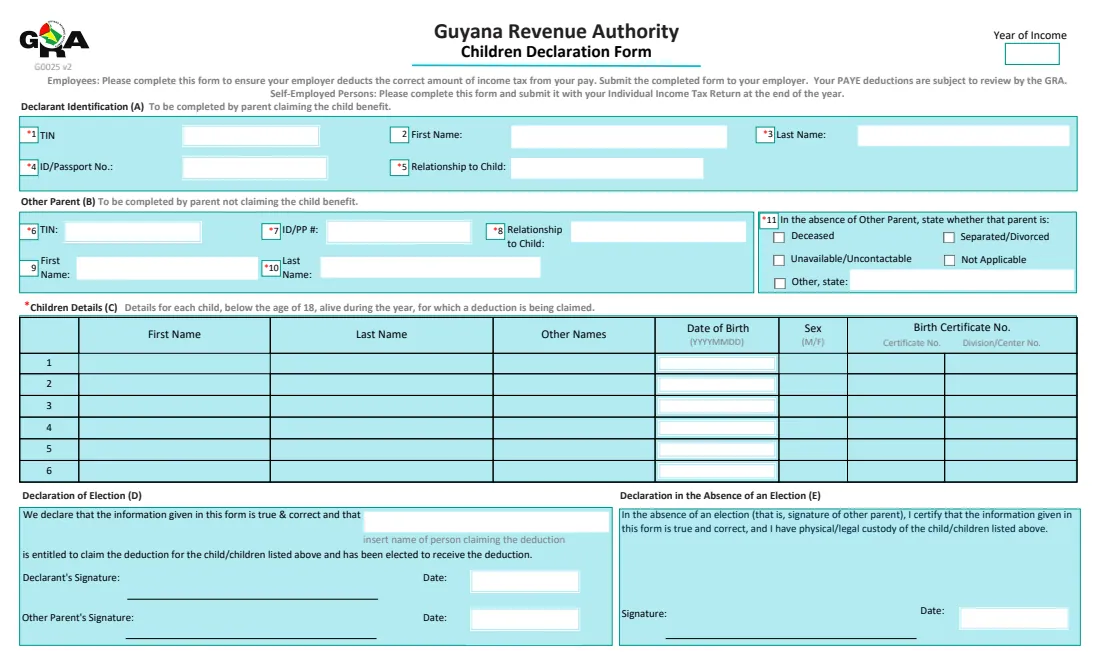
What is GRA Children Declaration (G0025)?
Guyana allows an income tax deduction for each eligible child under 18. GRA's guidance quotes G$120,000 a year, or G$10,000 a month, per child under section 20(1)(b) of the Income Tax Act. Only one person can claim it for each child. Employees give the Children Declaration Form to their employer, who then reduces the tax taken from their pay. Self-employed people send it with their income tax return.
The form has five parts: (A) the parent or person claiming, (B) the other parent, (C) up to six children with their birth certificate details, (D) a Declaration of Election that both parents sign, and (E) a declaration for when the other parent can't take part, where the claimant certifies that they have physical or legal custody.
FileIt walks you through it, prints your answers on GRA's own G0025 PDF and keeps a copy in your vault with the children's birth certificates. You sign it by hand and give it to your employer, or to the GRA with your return. FileIt never sends it anywhere.
- Who fills it
- A parent, step-parent, adoptive parent, guardian or person treating the child as a child of the family
- Given to
- Your employer (government employees: the Personnel Division), or the GRA with a self-employed return by 30 April
- Children
- Under 18 and alive during the year, up to six on one form
- Attach
- Birth certificates, and adoption certificates or custody orders where they apply
- Edition
- G0025 v2
- Pages
- 1
Who needs to fill out GRA Children Declaration (G0025)?
- Employees with children under 18 who want the child deduction in their monthly PAYE.
- Self-employed parents claiming the deduction in their annual return.
- Step-parents, adoptive parents and guardians who have the children in their care.
- A parent whose former partner has died, is uncontactable, or can't sign for another reason.
- Government employees, who hand it in through their Personnel Division.
When to use GRA Children Declaration (G0025)
- When you first claim the child deduction.
- Straight away after a change: the birth or adoption of a child, or the death of a child.
- With a self-employed income tax return, by 30 April.
- Separately for each other parent, if you have children with different people.
What you need before you start
- Your TIN, ID card or passport number, and your relationship to the children.
- The other parent's TIN, ID or passport number and name, if they are taking part.
- Each child's name, date of birth, sex, and birth certificate and division or centre number.
- Copies of the birth certificates, plus adoption certificates or custody orders where they apply.
What’s on GRA Children Declaration (G0025)
The 2026 edition has 1 page. FileIt asks for it in 9 parts:
- Declarant identification (A)Declarant
- Other parent (B)Declarant
- Child 1 (C)Declarant
- Child 2Declarant
- Child 3Declarant
- Child 4Declarant
- Child 5Declarant
- Child 6Declarant
- Declaration (D or E)Declarant
How to fill out GRA Children Declaration (G0025), step by step
1 Year of income and you (A)
The year the deduction is for, then your TIN, name, ID card or passport number and relationship to the children.
2 The other parent (B)
If the other parent signs the election, give their TIN, ID or passport number, relationship and name. If they can't, say why: deceased, separated or divorced, unavailable, not applicable, or another reason.
3 Children (C)
Each child under 18 who was alive during the year, with first, last and other names, date of birth (printed YYYYMMDD), sex and birth certificate details. There is room for six.
4 Declarations (D or E)
When the other parent takes part, you both sign the Declaration of Election, which names you as the person entitled to the deduction. Otherwise you alone sign the Declaration in the Absence of an Election, certifying custody. FileIt prints the date in whichever applies.
Common mistakes to avoid
- Both parents claiming the same child. Only the person elected can claim.
- Listing a child who was 18 for the whole year.
- Forgetting the birth certificates or custody papers, which employers must check before granting the deduction.
- Not handing in a new form after a birth, adoption or death.
- Putting children with different other parents on one form. The guide asks for a separate form for each.
After you fill it out
Sign the form by hand, and have the other parent sign and date the election if they are taking part.
Give it, with the attachments, to your employer, or attach it to your self-employed return. Your employer then adjusts your monthly PAYE.
FileIt keeps the form in your vault, so it is easy to update when your family changes.
Fill out GRA Children Declaration (G0025) online with FileIt
- Pick the person. Choose someone from People and FileIt fills in their name, date of birth, address and other details it already knows.
- Answer plain-language questions. One part of the form at a time, with the official help text beside each question — 59 fields in all. Your answers save as you go.
- Check the live preview. Watch your answers land on the real Guyana Revenue Authority (GRA) form, and let FileIt do any worksheet arithmetic.
- Generate the official PDF. FileIt prints your answers into the agency’s own PDF and files it in that person’s folder in your vault.
FileIt fills the form — it never files or submits anything for you. Deliver the finished form to whoever asked for it, the way the form’s instructions say.
Start GRA Children Declaration (G0025) now — it’s freeGRA Children Declaration (G0025): frequently asked questions
How much is the child deduction?
GRA's guidance on the form quotes G$120,000 a year (G$10,000 a month) for each eligible child under 18, apportioned to the period you earn. Check the GRA for the current figure.
Can both parents claim?
No. Only one person is entitled to claim the allowance for each child. The election names who it is.
What if the other parent won't or can't sign?
Tick the reason in item 11 and sign the Declaration in the Absence of an Election, certifying that you have physical or legal custody of the children.
Does a step-child or adopted child count?
The guidance defines a child to include a step-child, a child adopted by law and a child of the family. Attach the adoption certificate or custody order.
I'm self-employed. When do I hand it in?
With your income tax return, on or before 30 April.
Official sources
- Blank form (PDF), published by Guyana Revenue Authority (GRA): https://gra.gov.gy/storage/2026/02/child-declaration-standardpdf.pdf
- Official instructions and guidance: https://www.gra.gov.gy/storage/2025/04/Children-Declaration-Form-revised-nbs-RS.pdf
- Edition shown on this page: G0025 v2 (PDF dated 4 August 2025, GRA upload 2026/02) (checked 2026-10-19).
FileIt is not affiliated with or endorsed by Guyana Revenue Authority (GRA) or any government. This page explains the form in general terms and is not legal, tax or immigration advice. Always read the official instructions, and check that you are using the edition the recipient accepts. Page last reviewed 2026-10-19.