What is GRA Tax Relief Application?
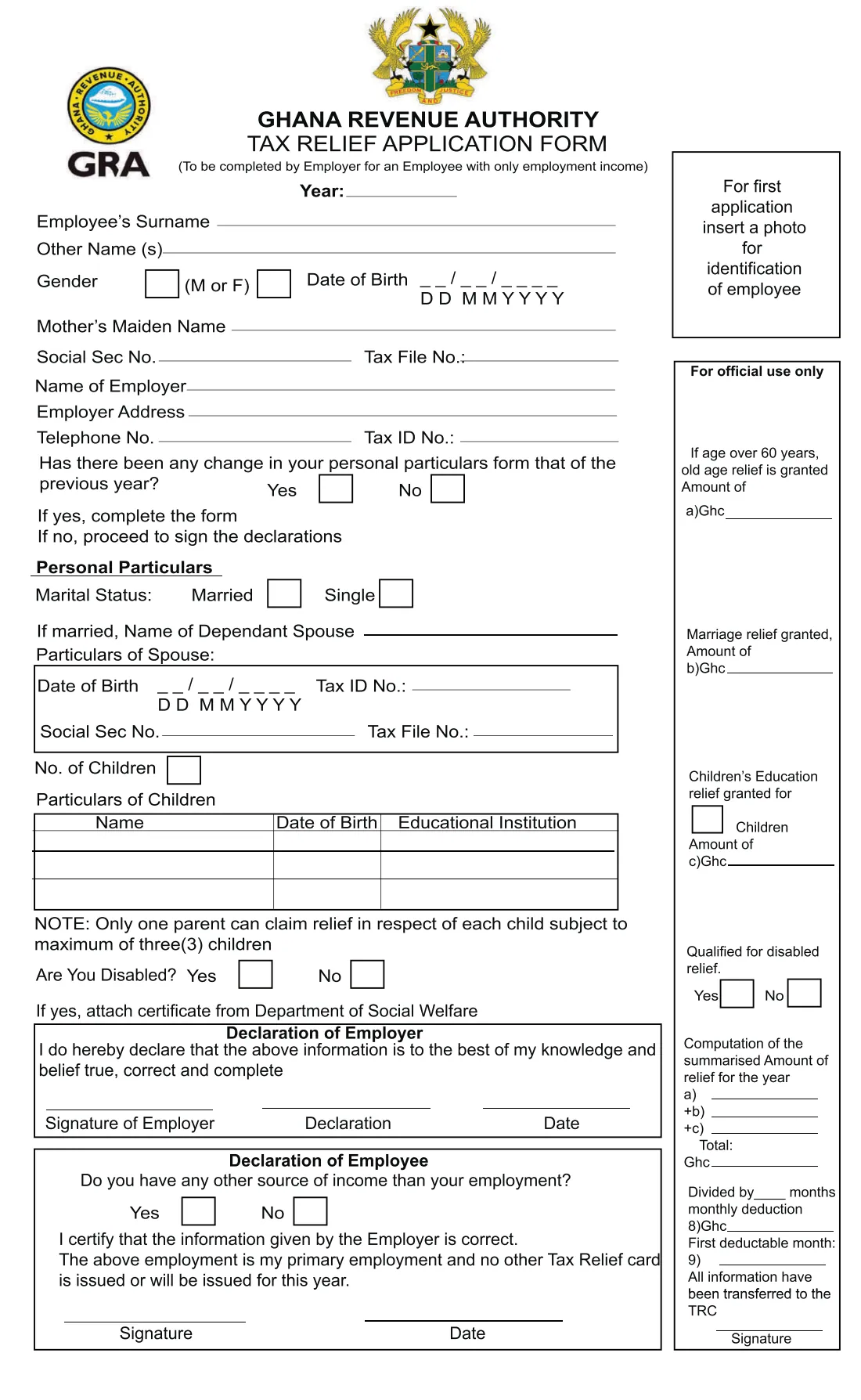
The Tax Relief Application Form is the Ghana Revenue Authority's (GRA) one-page form for personal reliefs on employment income. The heading says it is 'to be completed by Employer for an Employee with only employment income'. It records the employee's name, gender, date of birth, mother's maiden name, Social Security and tax file numbers, the employer's details, marital status and the dependant spouse's particulars, up to three children with their schools, and whether the employee is disabled.
The right-hand column is for official use only. That is where the GRA records the reliefs it grants: old age relief if the employee is over 60, marriage relief, children's education relief, disabled relief, the total for the year and the monthly deduction. The employee's declaration refers to a Tax Relief card, so only one relief claim is made per year, through the employee's primary employment.
FileIt walks you through each line of the form, prints names in capitals, puts the dates of birth in the DD/MM/YYYY blanks and ticks the right boxes. It also checks the form's own rules: no more than three children on the form, only one parent claiming for each child, and only employment income. The filled official PDF is saved in your FileIt vault. FileIt never submits anything to the GRA. You print the form, attach a photo on the first application, sign it by hand and hand it in yourself.
- Who fills it
- The employer, for an employee whose only income is their employment; the employee then signs a declaration
- Given to
- The Ghana Revenue Authority, which completes the 'For official use only' column
- When
- For the year of assessment printed at the top: on the first application, and when the employee's particulars change
- Signatures
- The employer and the employee sign by hand. No electronic signature
- Attachments
- A photo of the employee on the first application; a Department of Social Welfare certificate if disabled
- Edition
- No edition date printed; the copy on gra.gov.gh was uploaded in May 2026
Who needs to fill out GRA Tax Relief Application?
- Employers in Ghana whose employees want their personal reliefs applied to PAYE.
- A married employee whose spouse is a dependant, for marriage relief.
- A parent with children in an educational institution, for children's education relief (at most three children, and only one parent per child).
- An employee over 60, for old age relief, which the GRA works out from the date of birth.
- An employee with a disability, who attaches a certificate from the Department of Social Welfare.
- Household employers, such as a family employing a driver or housekeeper on PAYE.
When to use GRA Tax Relief Application
- When an employee first applies for tax relief through their employment.
- Each year, to confirm whether the employee's personal particulars have changed since the previous year.
- After a marriage, the birth of a child, a child starting school, or a change in disability status.
- Only for the employee's primary employment, because no other Tax Relief card may be issued for the same year.
What you need before you start
- The year the relief is claimed for.
- The employee's full name, gender, date of birth and mother's maiden name.
- The employee's Social Security number and tax file number.
- The employer's name, address, telephone number and tax ID number.
- If married: the dependant spouse's name, date of birth, tax ID, Social Security and tax file numbers.
- Each child's name, date of birth and educational institution (up to three).
- A passport photo of the employee for a first application.
- A Department of Social Welfare certificate if the employee is disabled.
What’s on GRA Tax Relief Application
The 2026 edition has 1 page. FileIt asks for it in 4 parts:
- Employee and employerEmployer
- Personal particularsEmployer
- Declaration of employerEmployer
- Declaration of employeeEmployee
How to fill out GRA Tax Relief Application, step by step
1 Year and employee details
Enter the year at the top, then the employee's surname, other names, gender, date of birth and mother's maiden name. FileIt writes M or F in the gender boxes and splits the date of birth across the DD / MM / YYYY blanks.
2 Numbers and employer
Give the employee's Social Security number and tax file number, then the employer's name, address, telephone number and tax ID number. FileIt pre-fills the employer from the entity the person belongs to in your vault.
3 Any change since last year?
The form asks whether the employee's personal particulars have changed since the previous year. If yes, complete the personal particulars. If no, go straight to the declarations. On a first application, choose 'First application' in FileIt and complete the particulars too.
4 Marital status and spouse
Tick Married or Single. A married employee gives the name of the dependant spouse and the spouse's date of birth, tax ID, Social Security and tax file numbers in the boxed area.
5 Children
Enter the number of children in the box, then up to three children with name, date of birth and educational institution. The form notes that only one parent can claim relief for each child, up to three children.
6 Disability
Answer 'Are you disabled?'. If yes, attach a certificate from the Department of Social Welfare.
7 Declarations
The employer declares the information is true, correct and complete, and signs with a name or position and a date. The employee then says whether they have any other income, certifies the employer's information, and confirms this is their primary employment and no other Tax Relief card is or will be issued for the year. Both sign by hand.
Common mistakes to avoid
- Using the form for an employee with other income. It is only for employees with employment income alone.
- Listing more than three children, or claiming for a child the other parent already claims for.
- Forgetting the photo on a first application, or the Social Welfare certificate when claiming disability.
- Giving spouse particulars without naming the dependant spouse.
- Filling in the 'For official use only' column. The GRA completes it.
- Claiming through two employers in the same year. The declaration confirms there is only one Tax Relief card.
After you fill it out
Print the filled form from your FileIt vault, attach the employee's photo in the top-right box on a first application, and add any Social Welfare certificate.
The employer and the employee each sign their declaration by hand. Give the form to the GRA. The GRA records the reliefs granted in the official-use column.
Keep a copy in your vault. FileIt files it under the employee, so next year you can answer the 'any change' question from this year's copy.
Fill out GRA Tax Relief Application online with FileIt
- Pick the person. Choose someone from People and FileIt fills in their name, date of birth, address and other details it already knows.
- Answer plain-language questions. One part of the form at a time, with the official help text beside each question — 35 fields in all. Your answers save as you go.
- Check the live preview. Watch your answers land on the real Ghana Revenue Authority (GRA) form, and let FileIt do any worksheet arithmetic.
- Generate the official PDF. FileIt prints your answers into the agency’s own PDF and files it in that person’s folder in your vault.
FileIt fills the form — it never files or submits anything for you. Deliver the finished form to whoever asked for it, the way the form’s instructions say.
Start GRA Tax Relief Application now — it’s freeGRA Tax Relief Application: frequently asked questions
Who completes the GRA Tax Relief Application Form?
The employer, for an employee whose only income is their employment. The employee then answers the other-income question and signs a declaration confirming the employer's information.
Which reliefs does the form cover?
The official-use column lists old age relief (for an employee over 60), marriage relief, children's education relief and disabled relief. The GRA works out the amounts; the form asks only for the facts.
How many children can I claim for?
The form says only one parent can claim relief for each child, up to a maximum of three children. It has three lines for children.
Do I have to fill in everything every year?
No. If the employee's personal particulars haven't changed since the previous year, the form says to answer No and go straight to the declarations.
Can I sign it electronically?
FileIt does not offer e-signature for this form. Print it and have the employer and the employee sign it by hand.
Does FileIt send the form to the GRA?
No. FileIt fills in the official PDF and saves it in your vault. You print, sign and hand it in yourself.
Official sources
- Blank form (PDF), published by Ghana Revenue Authority (GRA): https://gra.gov.gh/wp-content/uploads/2026/05/Tax-Relief-Form-GRA.pdf
- Official instructions and guidance: https://gra.gov.gh/forms/
- Edition shown on this page: Tax Relief Application Form (no edition date printed; GRA upload 2026/05) (checked 2026-10-01).
FileIt is not affiliated with or endorsed by Ghana Revenue Authority (GRA) or any government. This page explains the form in general terms and is not legal, tax or immigration advice. Always read the official instructions, and check that you are using the edition the recipient accepts. Page last reviewed 2026-10-01.