What is SSNIT Form iSS3A?
Form iSS3A is the Social Security and National Insurance Trust's (SSNIT) Nominee(s) Details Form. On it, a SSNIT member declares that the people they list are to receive any benefits due to them in the event of their death, and allots each nominee a percentage. The form states that the total percentages allotted to the nominees should sum up to 100%.
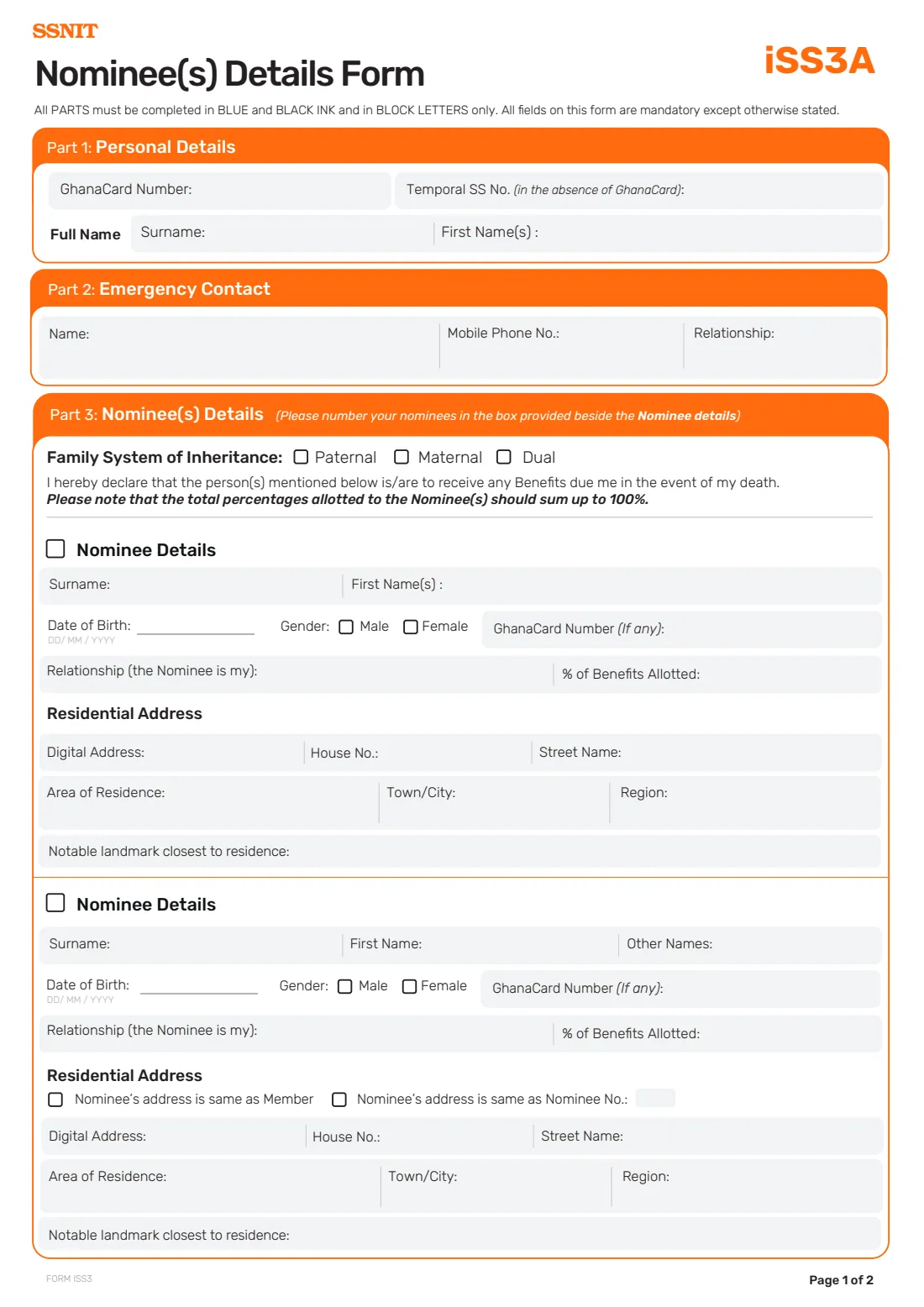
The form has room for two nominees. For each one it asks for their name, date of birth, gender, Ghana Card number if they have one, their relationship to you, their percentage of benefits and their residential address, including a GhanaPost GPS digital address and a notable landmark near their home. It also asks for your family system of inheritance (paternal, maternal or dual) and an emergency contact. SSNIT publishes a separate Nominee(s) Details Supplementary Form for members with more nominees.
FileIt helps you fill in Form iSS3A online in plain English. It pre-fills your name from the People records in your vault, numbers your nominees in the boxes provided, checks that the shares add up to exactly 100% (including any nominees on the supplementary form), and places every answer on SSNIT's own official PDF. The finished form is saved in your vault folder. FileIt never submits anything to SSNIT: you print the form and take it to a SSNIT branch to sign and give your thumbprints.
- Who fills it
- A SSNIT member naming nominees for the benefits due on their death.
- Handed in to
- A SSNIT branch, where an enrolment officer completes the official-use section.
- Nominees
- Up to 2 on this form; more on SSNIT's Nominee(s) Details Supplementary Form. Shares must total 100%.
- Signatures
- Your wet-ink signature plus left and right thumbprints, taken at the branch. No electronic signature.
- Identity
- Your Ghana Card number, or a Temporal SS number only if you have no Ghana Card.
- Cost
- Filling it in with FileIt is free.
Who needs to fill out SSNIT Form iSS3A?
- SSNIT members who want to name the people who receive the benefits due to them after their death.
- Members whose family has changed, such as a marriage, a new child or the death of a nominee, and who want their nominee details to match.
- Members who want to change the percentage each nominee receives.
- Members with more than two nominees, who complete this form together with SSNIT's supplementary nominee form.
- Members without a Ghana Card, who give their Temporal SS number instead.
When to use SSNIT Form iSS3A
- Soon after you enrol with SSNIT, so your nominees are on record.
- When your family situation changes and your current nominees or shares no longer reflect your wishes.
- When a nominee's details change, for example a new address or a Ghana Card number they did not have before.
- Together with the Nominee(s) Details Supplementary Form when you want to name more than two people.
What you need before you start
- Your Ghana Card number, or your Temporal SS number if you do not have a Ghana Card.
- Your surname and first names as on your Ghana Card, and your family system of inheritance: paternal, maternal or dual.
- An emergency contact's name, mobile number and relationship to you.
- Each nominee's full name, date of birth and gender, and their Ghana Card number if they have one.
- How each nominee is related to you, and the percentage of benefits you want each to receive, totalling 100%.
- Each nominee's residential address: GhanaPost GPS digital address, house number, street, area of residence, town or city, region and the nearest notable landmark.
- Whether any of your fingers is amputated, since fingerprints are taken at the branch.
What’s on SSNIT Form iSS3A
The 2026 edition has 2 pages. FileIt asks for it in 6 parts:
- Part 1: Personal DetailsSsnit member
- Part 2: Emergency ContactSsnit member
- Part 3: Nominee(s) DetailsSsnit member
- More nominees (Supplementary Form)Ssnit member
- Declaration (page 2)Ssnit member
- Jurat (if you cannot read and write English)Witness
How to fill out SSNIT Form iSS3A, step by step
1 Part 1: Personal Details
Give your Ghana Card number and your full name. The 'Temporal SS No.' box is only for members who do not have a Ghana Card, so fill in one or the other, not both. FileIt prints whichever you give again at the top of page 2.
2 Part 2: Emergency Contact
Name one person SSNIT can contact in an emergency, with their mobile number and how they are related to you. This can be one of your nominees or someone else.
3 Part 3: Nominee(s) Details — family system and declaration
Tick your family system of inheritance: paternal, maternal or dual. Below it, the form declares that the people you list are to receive any benefits due to you in the event of your death, and reminds you that the percentages allotted to all nominees should add up to 100%.
The form asks you to number your nominees in the small box beside each 'Nominee Details' heading. FileIt prints 1 and 2 there for you.
4 Nominee Details (first nominee)
Enter the nominee's surname and first name(s), date of birth, gender and, if they have one, Ghana Card number. Then state the relationship ('the Nominee is my' wife, son, mother and so on) and the percentage of benefits you allot to them.
The residential address has three rows: digital address, house number and street name; area of residence, town or city and region; and the notable landmark closest to the residence. Landmarks help SSNIT find the nominee where street addresses are informal, so be specific, for example 'behind the Methodist church'.
5 Nominee Details (second nominee)
The second nominee's name is split into surname, first name and other names. The rest mirrors the first nominee, with one difference: two boxes let you say that this nominee's address is the same as yours (the member's) or the same as another nominee's, instead of writing it out again. FileIt fills in the nominee number for you when you choose the second option.
6 More than two nominees
The form only has room for two nominees. If you want to name more, SSNIT publishes a Nominee(s) Details Supplementary Form. In FileIt, switch on 'More nominees' and enter the total percentage you give to the nominees on the supplementary form, so FileIt can check that the shares on both forms add up to exactly 100%. Hand both forms in together.
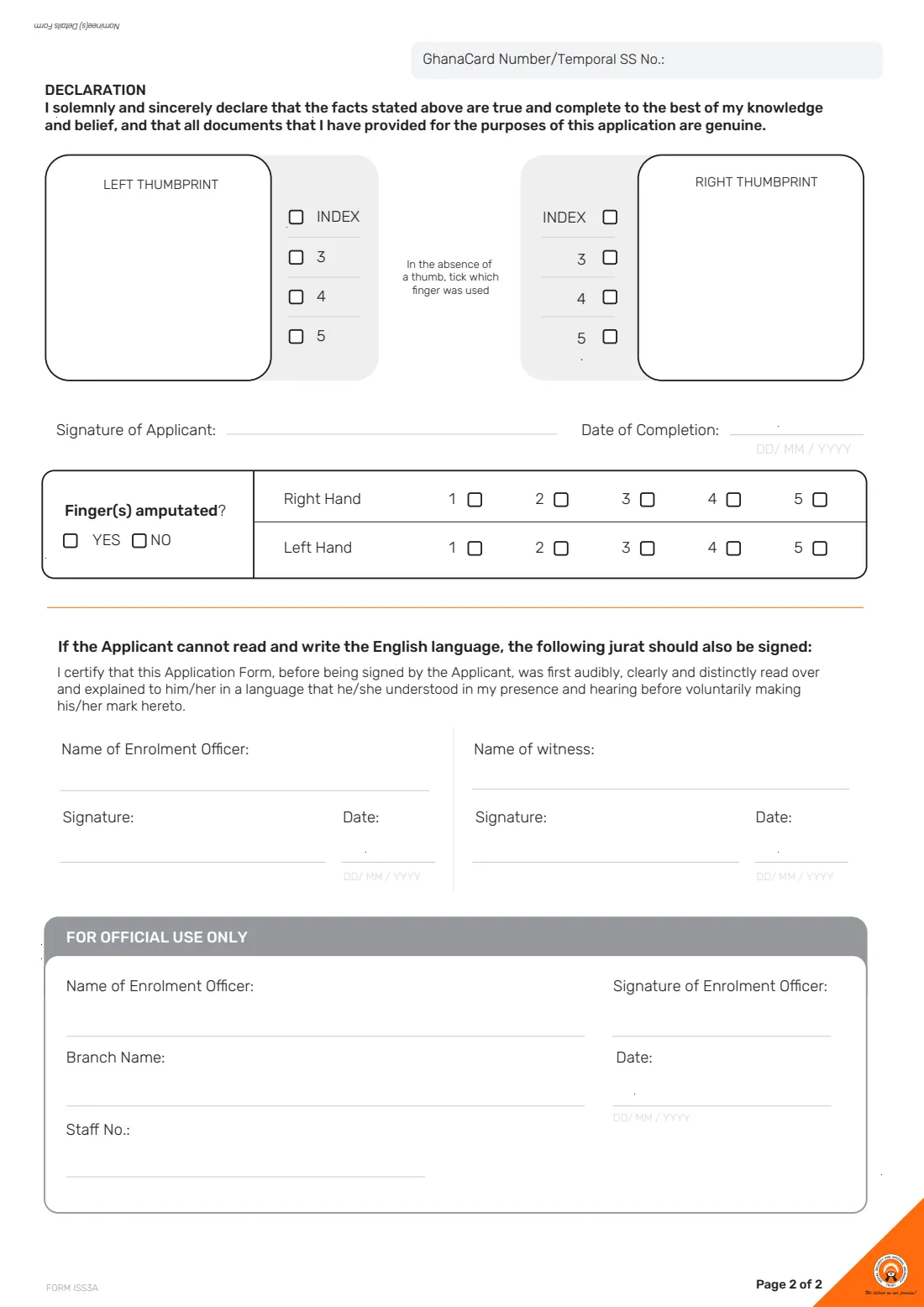
7 Declaration, signature and thumbprints (page 2)
You declare that the facts on the form are true and complete to the best of your knowledge and belief, and that all documents you have provided are genuine. You sign on 'Signature of Applicant', and your left and right thumbprints are taken in the boxes provided. If a thumb is missing, the finger used instead is ticked. You can also say in advance whether any finger is amputated, and which ones.
8 Jurat (if the member cannot read and write English)
If you cannot read and write English, the form must be read over and explained to you in a language you understand before you sign or make your mark. A witness and the enrolment officer then sign the jurat. FileIt can print the witness's name; the signatures and dates are added by hand.
Common mistakes to avoid
- Shares that do not add up to 100%. For example, 50% and 40% leaves 10% unallotted. FileIt flags this before you print.
- Filling in both the Ghana Card number and a Temporal SS number. The Temporal SS number is only for members without a Ghana Card.
- Leaving out the family system of inheritance at the top of Part 3.
- Giving a vague address for a nominee. Include the digital address if they have one and a notable landmark near their home.
- Trying to squeeze a third nominee onto this form instead of using the Nominee(s) Details Supplementary Form.
- Listing the same person twice, or yourself as a nominee.
- Signing before you reach the branch. Your signature and thumbprints are taken with the enrolment officer.
After you fill it out
Print the completed form from FileIt and check each nominee's details and the percentages. Leave the signature, thumbprint boxes, jurat signatures and FOR OFFICIAL USE ONLY section blank.
Take the form, your Ghana Card and any supplementary nominee form to a SSNIT branch. There you sign, your thumbprints are taken, and the enrolment officer completes the official-use section.
The filled form stays in your FileIt vault, so you and your family know who you named and in what shares. Review your nominees whenever your family changes, and complete a new form if you want to change them.
Fill out SSNIT Form iSS3A online with FileIt
- Pick the person. Choose someone from People and FileIt fills in their name, date of birth, address and other details it already knows.
- Answer plain-language questions. One part of the form at a time, with the official help text beside each question — 56 fields in all. Your answers save as you go.
- Check the live preview. Watch your answers land on the real Social Security and National Insurance Trust (SSNIT) form, and let FileIt do any worksheet arithmetic.
- Generate the official PDF. FileIt prints your answers into the agency’s own PDF and files it in that person’s folder in your vault.
FileIt fills the form — it never files or submits anything for you. Deliver the finished form to whoever asked for it, the way the form’s instructions say.
Start SSNIT Form iSS3A now — it’s freeSSNIT Form iSS3A: frequently asked questions
What is SSNIT Form iSS3A?
It is SSNIT's Nominee(s) Details Form. A SSNIT member uses it to name the people who are to receive any benefits due to them if they die, and the percentage each should receive.
Can I fill in Form iSS3A online?
Yes. FileIt guides you through the questions, checks that your nominees' shares add up to 100%, and prints your answers into SSNIT's official PDF. You then print it and sign it, with your thumbprints, at a SSNIT branch. FileIt does not send the form to SSNIT.
Where do I hand in Form iSS3A?
At a SSNIT branch. The enrolment officer there completes the section for official use, and your thumbprints are taken on page 2.
Do the percentages have to add up to 100%?
Yes. The form says the total percentages allotted to the nominees should sum up to 100%. If you also use the supplementary form, the shares on both forms together should total 100%.
How many nominees can I name?
Form iSS3A has room for two nominees. SSNIT's Nominee(s) Details Supplementary Form is for additional nominees.
What does 'family system of inheritance' mean?
It asks whether your family follows a paternal (father's line), maternal (mother's line) or dual system of inheritance. Tick the one that applies to your family.
My nominee doesn't have a Ghana Card. Is that a problem?
No. The nominee's Ghana Card number is marked 'if any', so you can leave it blank. Give their name, date of birth and address in full.
Can I sign Form iSS3A electronically?
No. You sign by hand and your thumbprints are taken on page 2 at the branch, so FileIt does not offer e-signature for this form.
Official sources
- Blank form (PDF), published by Social Security and National Insurance Trust (SSNIT): https://www.ssnit.org.gh/wp-content/uploads/2024/04/ISS3A.pdf
- Official instructions and guidance: https://www.ssnit.org.gh/forms/
- Edition shown on this page: Form iSS3A (no edition date printed; SSNIT upload 2024/04) (checked 2026-09-26).
FileIt is not affiliated with or endorsed by Social Security and National Insurance Trust (SSNIT) or any government. This page explains the form in general terms and is not legal, tax or immigration advice. Always read the official instructions, and check that you are using the edition the recipient accepts. Page last reviewed 2026-09-26.