What is SSNIT Form iSS1A?
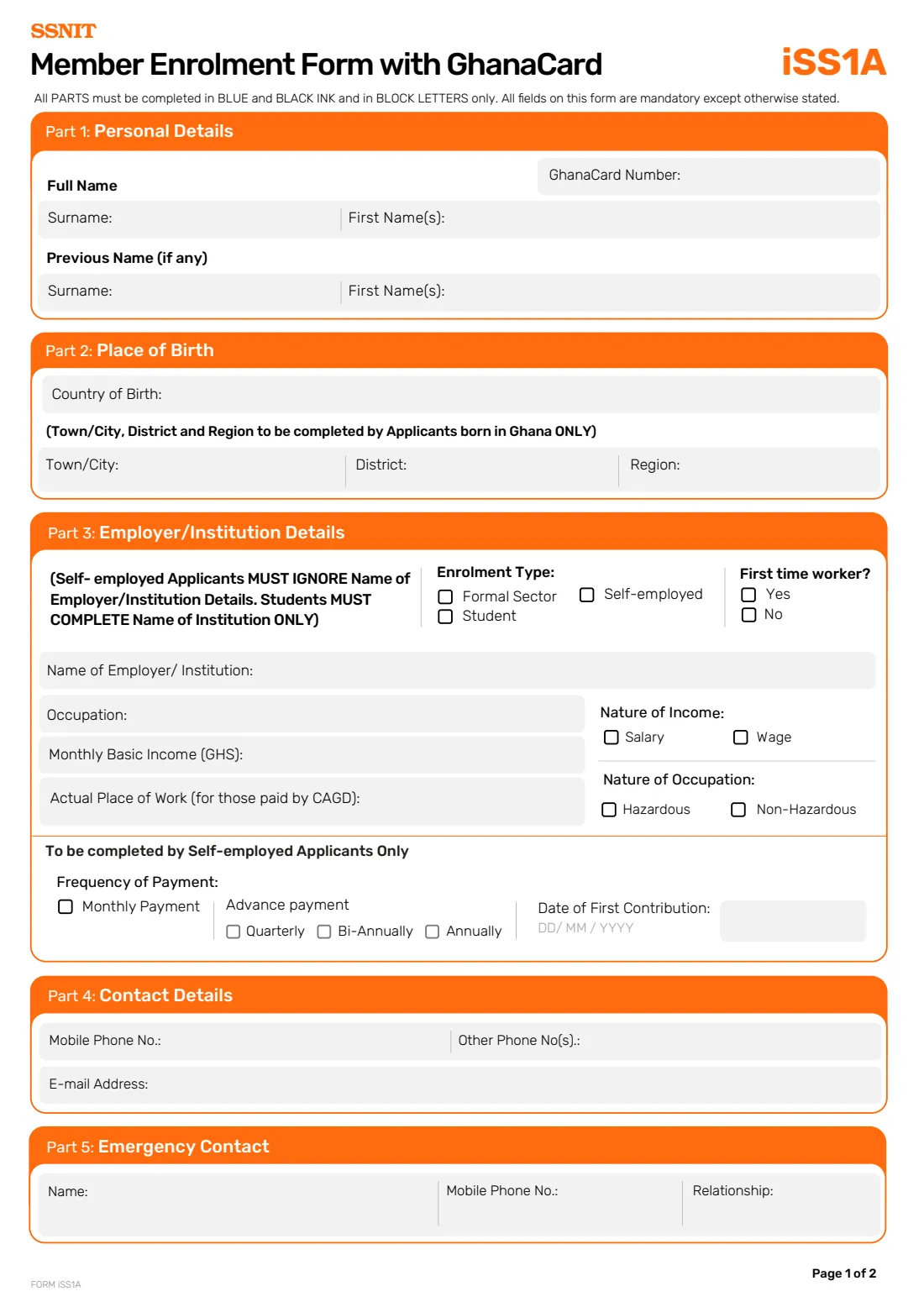
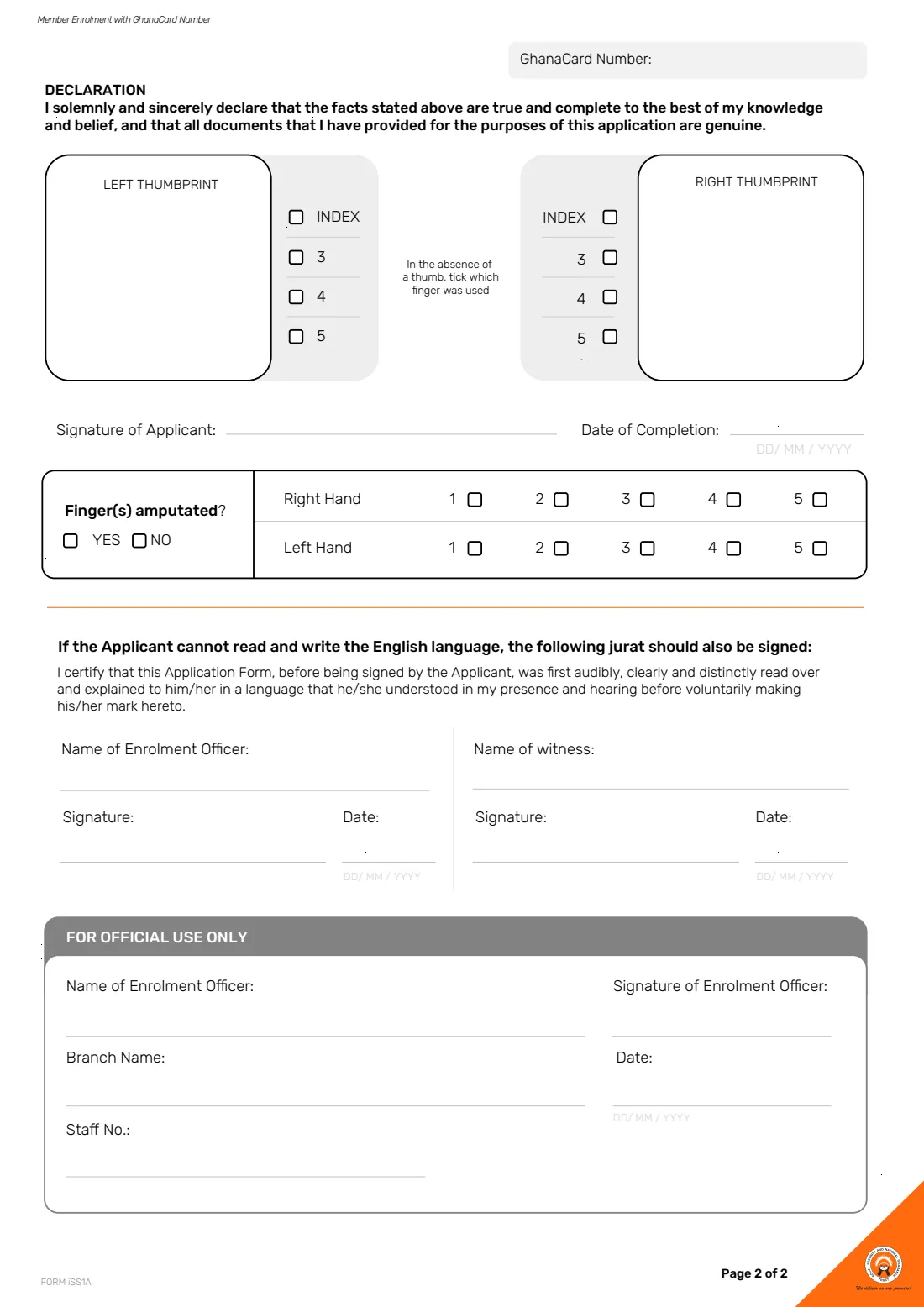
Form iSS1A is the Social Security and National Insurance Trust's (SSNIT) Member Enrolment Form with GhanaCard. It registers you as a SSNIT member: your Ghana Card number and full name, where you were born, whether you are enrolling as a formal-sector employee, a self-employed person or a student, your income and occupation, your contact details and an emergency contact. Page 2 carries the declaration, your signature, your thumbprints and a jurat for applicants who cannot read and write English.
The form is two pages long and has no fillable fields, so it is normally completed by hand in blue or black ink and in block letters. Every field is mandatory unless the form says otherwise. If you do not have a Ghana Card, SSNIT has a separate form for that case, the Member Enrolment Form without GhanaCard (iSS1B).
FileIt lets you fill in Form iSS1A online in plain English. It pre-fills your name, email address and employer from the People records in your vault, prints names in capitals as the form asks, shows only the parts that apply to your enrolment type, checks formats such as the Ghana Card number, and places every answer in the right box on SSNIT's own official PDF. The finished form is saved in your vault folder. FileIt never submits anything to SSNIT: you print the form and take it to a SSNIT branch, where you sign it and your thumbprints are taken.
- Who fills it
- A person enrolling as a SSNIT member who has a Ghana Card: an employee, a self-employed person or a student.
- Handed in to
- A SSNIT branch, where an enrolment officer completes the official-use section.
- When
- When you first join SSNIT, for example on starting your first job or starting to contribute as a self-employed person.
- Signatures
- Your wet-ink signature plus left and right thumbprints, taken at the branch. No electronic signature.
- Pages
- 2 pages: Parts 1 to 5 on page 1; declaration, thumbprints and jurat on page 2.
- Cost
- Filling it in with FileIt is free.
Who needs to fill out SSNIT Form iSS1A?
- Employees in the formal sector who are joining SSNIT and have a Ghana Card.
- Self-employed people who want to contribute to SSNIT, and choose to pay monthly or in advance.
- Students enrolling with SSNIT, who give the name of their institution only.
- Public-sector workers paid through the Controller and Accountant-General's Department (CAGD), who also give their actual place of work.
- First-time workers, who tick 'Yes' to 'First time worker?' in Part 3.
- Anyone helping a relative who cannot read and write English to enrol, since the form has a jurat for that situation.
When to use SSNIT Form iSS1A
- When you start work and need to be registered with SSNIT for the first time.
- When you become self-employed and decide to start paying SSNIT contributions yourself.
- When you are a student enrolling with SSNIT through your institution.
- Only if you have a Ghana Card; without one, SSNIT's Member Enrolment Form without GhanaCard (iSS1B) is the form to use.
What you need before you start
- Your Ghana Card, with its Personal ID Number (for example GHA-123456789-0).
- Your surname and first names exactly as on your Ghana Card, and any previous name you were known by.
- Your country of birth and, if you were born in Ghana, the town or city, district and region of birth.
- Your employer's or institution's name, your occupation and your monthly basic income in Ghana cedis (employees and self-employed).
- For self-employed applicants: how often you will pay (monthly, quarterly, bi-annually or annually) and the date of your first contribution.
- Your mobile number, any other phone numbers and your email address.
- The name, mobile number and relationship of an emergency contact.
- Whether any of your fingers is amputated, since fingerprints are taken at the branch.
What’s on SSNIT Form iSS1A
The 2026 edition has 2 pages. FileIt asks for it in 8 parts:
- Part 1: Personal DetailsApplicant
- Part 2: Place of BirthApplicant
- Part 3: Employer/Institution DetailsApplicant
- To be completed by Self-employed Applicants OnlyApplicant
- Part 4: Contact DetailsApplicant
- Part 5: Emergency ContactApplicant
- Declaration (page 2)Applicant
- Jurat (if you cannot read and write English)Witness
How to fill out SSNIT Form iSS1A, step by step
1 Part 1: Personal Details
Enter your Ghana Card number and your full name, split into surname and first name(s), exactly as they appear on your Ghana Card. The Ghana Card number is printed again at the top of page 2, so you only type it once in FileIt.
The 'Previous Name (if any)' row is optional. Use it if you were known by another name before, for example a maiden name, and give both the previous surname and first names.
2 Part 2: Place of Birth
Everyone gives their country of birth. Town/City, District and Region are completed only by applicants born in Ghana. FileIt offers the country as a simple choice (Ghana or another country) and, for Ghana, lets you pick the region from a list, so the spelling is consistent.
3 Part 3: Employer/Institution Details
Choose your enrolment type: Formal Sector, Self-employed or Student, and say whether you are a first-time worker. The form's own note matters here: self-employed applicants must ignore the name of employer/institution, and students must complete the name of their institution only.
Employees and self-employed applicants then give their occupation, monthly basic income in Ghana cedis, the nature of their income (salary or wage) and the nature of their occupation (hazardous or non-hazardous). If your salary is paid by the Controller and Accountant-General's Department (CAGD), also give your actual place of work, such as the school or office where you work.
4 To be completed by Self-employed Applicants Only
Self-employed applicants choose a frequency of payment: monthly, or an advance payment made quarterly, bi-annually or annually. They also give the date of their first contribution. FileIt hides this part for employees and students so it stays blank on their form.
5 Part 4: Contact Details
Give your mobile phone number, any other phone numbers and your email address. SSNIT uses these to reach you about your membership, so use numbers and an address you check regularly.
6 Part 5: Emergency Contact
Name one person SSNIT can contact in an emergency, with their mobile number and how they are related to you. Choose someone other than yourself; FileIt warns you if you enter your own mobile number here.
7 Declaration, signature and thumbprints (page 2)
By signing you solemnly and sincerely declare that the facts on the form are true and complete to the best of your knowledge and belief, and that all documents you have provided are genuine. You sign on 'Signature of Applicant', and your left and right thumbprints go in the two boxes. If a thumb is missing, the finger used instead is ticked beside the box.
The 'Finger(s) amputated?' box asks whether any finger is missing and, if so, which ones on each hand. FileIt lets you answer this in advance. The date of completion can be printed by FileIt or left blank to write by hand on the day you sign.
8 Jurat (if the applicant cannot read and write English)
If you cannot read and write English, the form must first be read over and explained to you in a language you understand, before you sign or make your mark. A witness and the enrolment officer then sign the jurat. FileIt can print the witness's name; the witness signs and dates by hand, and the enrolment officer completes their own details.
Common mistakes to avoid
- Using this form without a Ghana Card. Form iSS1A is for enrolment with a Ghana Card; without one, use SSNIT's Member Enrolment Form without GhanaCard.
- Writing a name that differs from the Ghana Card, for example a nickname or a shortened first name.
- Filling in the employer's name as a self-employed applicant. The form says self-employed applicants must ignore that box.
- Students completing the whole of Part 3. Students give the name of their institution only.
- Leaving the Town/City, District and Region boxes empty when you were born in Ghana. They are required for applicants born in Ghana.
- Giving your own phone number as your emergency contact's number.
- Signing before you reach the branch. Your signature and thumbprints are taken with the enrolment officer, so wait until you are there.
After you fill it out
Print the completed form from FileIt and check every answer against your Ghana Card. Leave the signature, the thumbprint boxes, the jurat signatures and the FOR OFFICIAL USE ONLY section blank.
Take the form and your Ghana Card to a SSNIT branch. There you sign on 'Signature of Applicant', your thumbprints are taken, and the enrolment officer completes the official-use section with their name, branch, staff number and date. If you need the jurat, bring your witness with you.
Your filled form stays in the person's folder in your FileIt vault, so you have a copy of exactly what you gave SSNIT. If your details change later, for example your phone number or employer, contact SSNIT to update your record.
Fill out SSNIT Form iSS1A online with FileIt
- Pick the person. Choose someone from People and FileIt fills in their name, date of birth, address and other details it already knows.
- Answer plain-language questions. One part of the form at a time, with the official help text beside each question — 39 fields in all. Your answers save as you go.
- Check the live preview. Watch your answers land on the real Social Security and National Insurance Trust (SSNIT) form, and let FileIt do any worksheet arithmetic.
- Generate the official PDF. FileIt prints your answers into the agency’s own PDF and files it in that person’s folder in your vault.
FileIt fills the form — it never files or submits anything for you. Deliver the finished form to whoever asked for it, the way the form’s instructions say.
Start SSNIT Form iSS1A now — it’s freeSSNIT Form iSS1A: frequently asked questions
What is SSNIT Form iSS1A?
It is SSNIT's Member Enrolment Form with GhanaCard. You use it to register as a member of the Social Security and National Insurance Trust using your Ghana Card number, as an employee, a self-employed person or a student.
Can I fill in Form iSS1A online?
Yes. With FileIt you answer the questions in a guided web form, and FileIt prints your answers into SSNIT's official PDF. You then print it, and sign it and give your thumbprints at a SSNIT branch. FileIt does not send the form to SSNIT.
Where do I submit Form iSS1A?
At a SSNIT branch. The page 2 section for official use is completed by an enrolment officer, who records your details, and your thumbprints are taken there.
What if I don't have a Ghana Card?
Form iSS1A needs your Ghana Card number. SSNIT publishes a separate Member Enrolment Form without GhanaCard (iSS1B) for applicants without one.
Do students fill in the whole of Part 3?
No. The form says students must complete the name of their institution only. FileIt shows students just that question and the enrolment type.
What do self-employed applicants fill in?
Self-employed applicants skip the employer's name but give their occupation, monthly basic income, the nature of their income and occupation, how often they will pay (monthly, or in advance quarterly, bi-annually or annually) and the date of their first contribution.
Can I sign Form iSS1A electronically?
No. You sign by hand and your left and right thumbprints are taken on page 2 at the branch, so FileIt does not offer e-signature for this form.
What is the jurat on page 2 for?
It is for applicants who cannot read and write English. The form is read over and explained to them in a language they understand before they sign or make their mark, and a witness and the enrolment officer sign to confirm this.
Official sources
- Blank form (PDF), published by Social Security and National Insurance Trust (SSNIT): https://www.ssnit.org.gh/wp-content/uploads/2024/04/ISS1A.pdf
- Official instructions and guidance: https://www.ssnit.org.gh/forms/
- Edition shown on this page: Form iSS1A (no edition date printed; SSNIT upload 2024/04) (checked 2026-09-26).
FileIt is not affiliated with or endorsed by Social Security and National Insurance Trust (SSNIT) or any government. This page explains the form in general terms and is not legal, tax or immigration advice. Always read the official instructions, and check that you are using the edition the recipient accepts. Page last reviewed 2026-09-26.