What is UDK 350 — Specific bank account for family benefits?
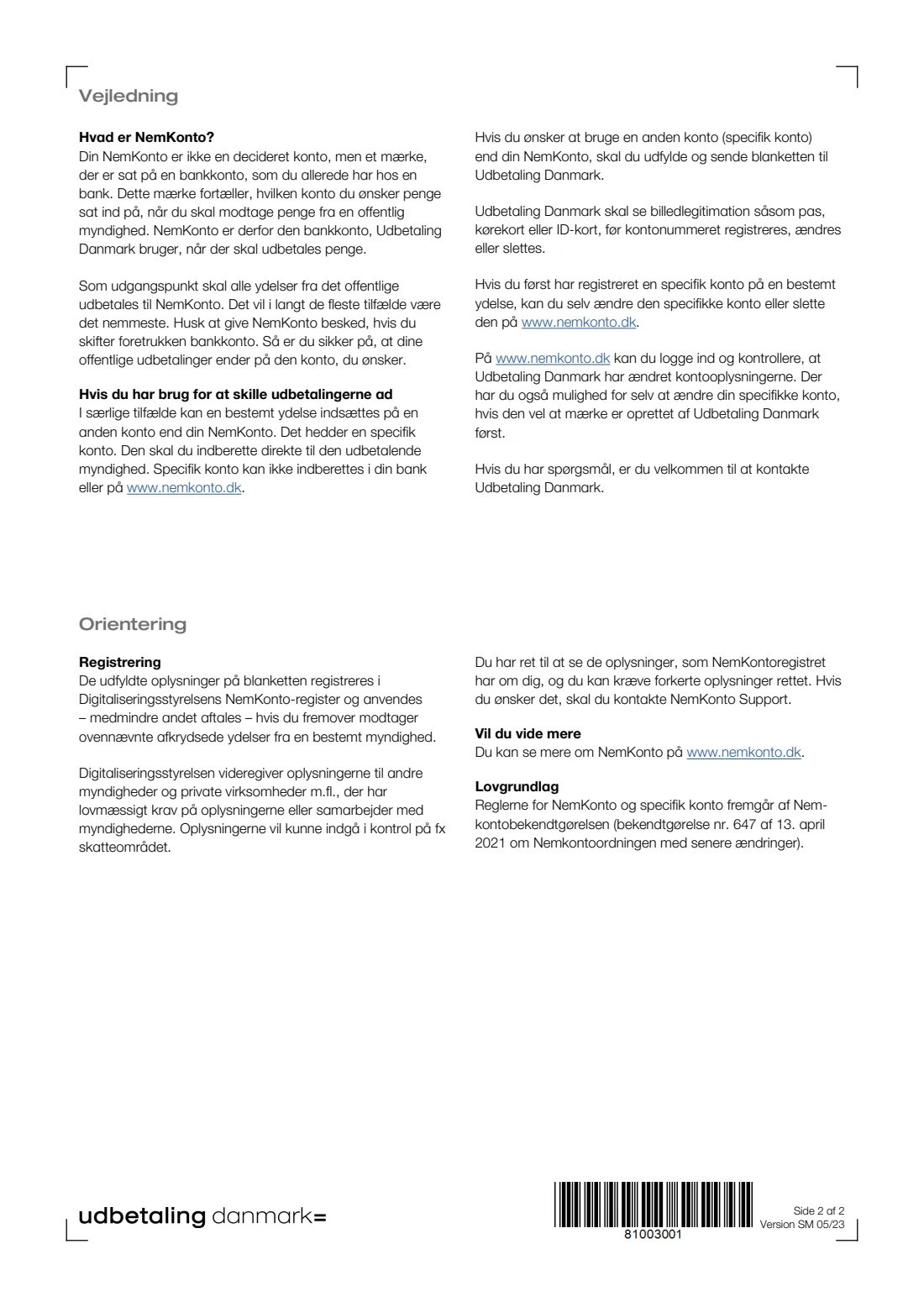
In Denmark every public payment goes to your NemKonto by default. The form's guidance explains that NemKonto isn't a separate account but a marker on an account you already have, and that it is normally the easiest choice. In special cases one particular benefit can be paid somewhere else. That other account is called a specific account (specifik konto), and it has to be reported straight to the authority that pays the benefit. Your bank and nemkonto.dk can't register it for you.
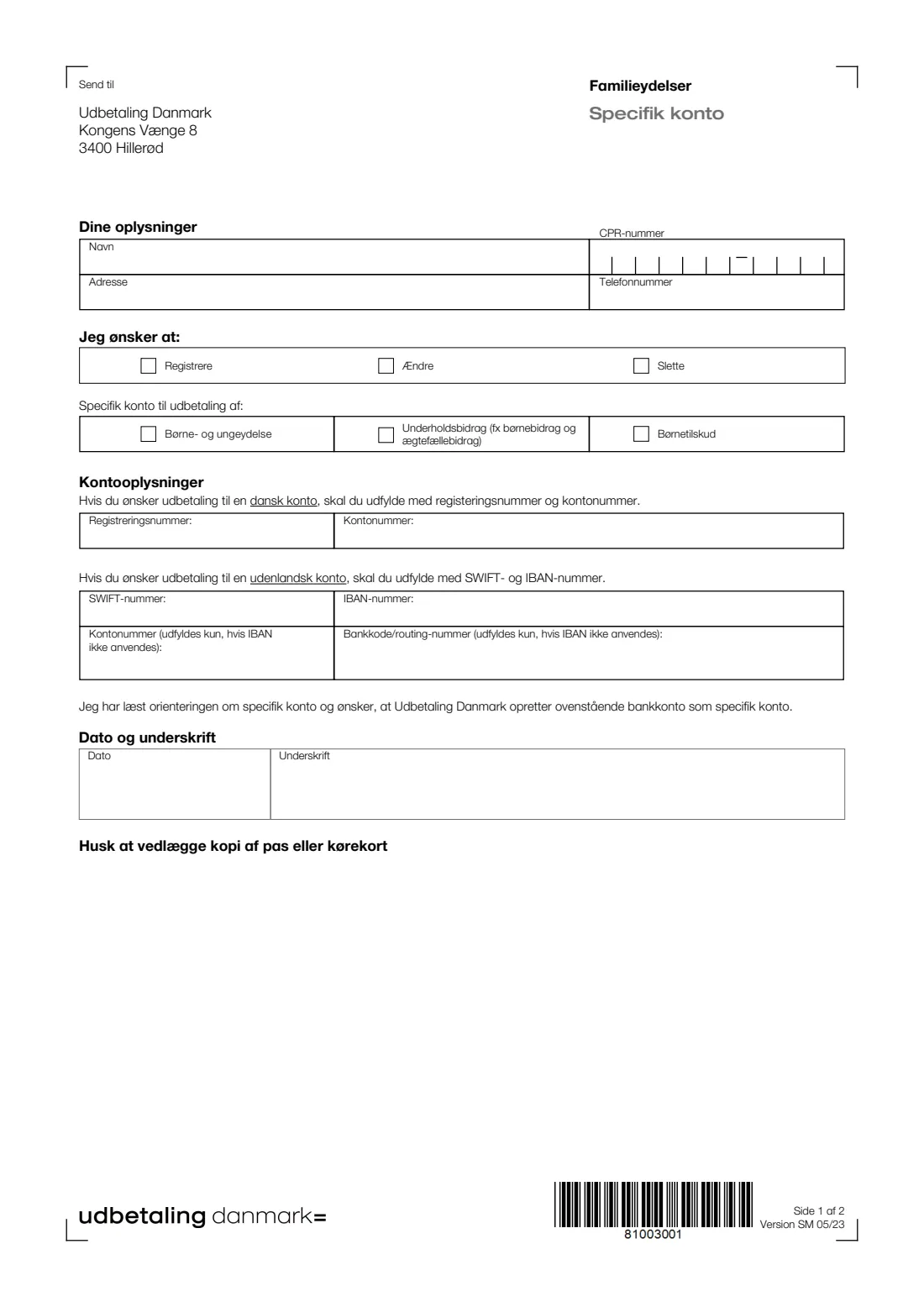
UDK 350 is how you do that for three family benefits paid by Udbetaling Danmark: the child and youth benefit (børne- og ungeydelse), maintenance such as child or spousal support (underholdsbidrag), and child allowance (børnetilskud). You tick whether you want to register, change or delete a specific account, choose the benefit, and give either a Danish registration and account number or a foreign SWIFT and IBAN.
FileIt walks you through the form in English with the Danish wording alongside, checks the IBAN's check digits, types your answers into Udbetaling Danmark's own PDF and saves it in your vault. You print it, sign it by hand and post it with a copy of your passport or driving licence. FileIt doesn't send anything to Udbetaling Danmark.
- Who fills it
- A parent or other recipient of a Danish family benefit who wants it paid to an account other than their NemKonto
- Given to
- Udbetaling Danmark, by post to Kongens Vænge 8, 3400 Hillerød
- Enclose
- A copy of your passport or driving licence
- Signatures
- You date and sign page 1 by hand
- Edition
- UDK 350, Version SM 05/23
- Pages
- 2 (1 to fill in, 1 of guidance)
Who needs to fill out UDK 350 — Specific bank account for family benefits?
- Parents who want the child and youth benefit kept apart from their everyday NemKonto, for example in an account set aside for the children.
- Someone receiving child or spousal support through Udbetaling Danmark who wants it paid into a separate account.
- Families who have moved abroad, or have a bank abroad, and want a family benefit paid into a foreign account.
- Anyone who set up a specific account earlier and now wants to change it, or delete it so the payments go back to the NemKonto.
When to use UDK 350 — Specific bank account for family benefits
- When you want one family benefit paid to a different account from the one marked as your NemKonto.
- When your specific account changes, for example after switching banks.
- When you no longer want the specific account and would rather have the benefit go to your NemKonto again.
- Once per benefit. The PDF lets you tick only one benefit, so a second benefit needs a second form.
What you need before you start
- Your name, CPR number, address and phone number.
- Which benefit the account is for: the child and youth benefit, maintenance, or child allowance.
- For a Danish account: the 4-digit registration number and the account number.
- For a foreign account: the bank's SWIFT (BIC) code and the IBAN. If the bank doesn't use IBAN, the account number and the bank code or routing number instead.
- A copy of your passport or driving licence to post with the form.
What’s on UDK 350 — Specific bank account for family benefits
The 2023 edition has 2 pages. FileIt asks for it in 4 parts, and it is signed by Applicant:
- Your details (Dine oplysninger)Applicant
- What you want to do (Jeg ønsker at)Applicant
- Account details (Kontooplysninger)Applicant
- Date and signature (Dato og underskrift)Applicant
How to fill out UDK 350 — Specific bank account for family benefits, step by step
1 Dine oplysninger (your details)
Your name, CPR number, address and phone number. The CPR number goes digit by digit into the ten boxes, six before the printed dash and four after.
2 Jeg ønsker at (I want to)
Tick one: register a new specific account (Registrere), change it (Ændre) or delete it (Slette).
3 Specifik konto til udbetaling af (the benefit)
Tick the one benefit the account is for: børne- og ungeydelse, underholdsbidrag (for example child or spousal support), or børnetilskud.
4 Kontooplysninger (account details)
For a Danish account, the registration number and account number. For a foreign account, the SWIFT number and IBAN. The two bottom boxes, account number and bank code or routing number, are only for a foreign bank that doesn't use IBAN.
5 Dato og underskrift (date and signature)
The line above the date says you have read the notice about specific accounts and want Udbetaling Danmark to set up the account as your specific account. Date the form, sign it by hand, and remember the copy of your passport or driving licence.
Common mistakes to avoid
- Forgetting the copy of your passport or driving licence. The guidance says Udbetaling Danmark must see photo ID before it registers, changes or deletes an account number.
- Ticking two benefits. The boxes work as one group, so use one form per benefit.
- Filling in both an IBAN and the 'no IBAN' account number and bank code. The bottom two boxes are only for banks without IBAN.
- Asking your bank to set up the specific account. The guidance says a specific account can't be reported through your bank or nemkonto.dk the first time.
- Typing a wrong digit in the IBAN. FileIt checks the IBAN's check digits before you print.
After you fill it out
Print the PDF from your FileIt vault, check the account details, then date and sign it by hand.
Post it with a copy of your passport or driving licence to Udbetaling Danmark, Kongens Vænge 8, 3400 Hillerød, the 'Send til' address on the form.
The guidance says you can log in at nemkonto.dk to check that Udbetaling Danmark has changed the account details, and that once Udbetaling Danmark has created the specific account you can change or delete it there yourself. Keep the filled form in your FileIt vault as a record.
Fill out UDK 350 — Specific bank account for family benefits online with FileIt
- Pick the person. Choose someone from People and FileIt fills in their name, date of birth, address and other details it already knows.
- Answer plain-language questions. One part of the form at a time, with the official help text beside each question — 14 fields in all. Your answers save as you go.
- Check the live preview. Watch your answers land on the real Udbetaling Danmark form, and let FileIt do any worksheet arithmetic.
- Generate the official PDF. FileIt prints your answers into the agency’s own PDF and files it in that person’s folder in your vault. Sign it, or send it for e-signature.
FileIt fills the form — it never files or submits anything for you. Deliver the finished form to whoever asked for it, the way the form’s instructions say.
Start UDK 350 — Specific bank account for family benefits now — it’s freeUDK 350 — Specific bank account for family benefits: frequently asked questions
What is a specific account (specifik konto)?
A bank account other than your NemKonto that one particular public payment goes to. The guidance on UDK 350 explains that it has to be reported to the authority that pays the benefit, here Udbetaling Danmark.
Can I fill in UDK 350 online?
Yes. FileIt lets you fill it in online, in English with the Danish terms, and types your answers into the official PDF saved in your vault. You still print, sign and post it.
Can family benefits be paid into a foreign bank account?
The form has boxes for a foreign account: the SWIFT number and IBAN, or, for a bank without IBAN, the account number and bank code or routing number.
Which benefits does UDK 350 cover?
The child and youth benefit (børne- og ungeydelse), maintenance such as child or spousal support (underholdsbidrag), and child allowance (børnetilskud). One form covers one of them.
Why do I need to send a copy of my passport?
The guidance says Udbetaling Danmark must see photo ID, such as a passport, driving licence or ID card, before an account number is registered, changed or deleted. The form itself asks for a copy of a passport or driving licence.
Can I change the specific account later without a new form?
The guidance says that once Udbetaling Danmark has registered a specific account for a benefit, you can change or delete it yourself on nemkonto.dk.
Official sources
- Blank form (PDF), published by Udbetaling Danmark: https://www.klxml.dk/KLB/Blanket/Gaelder/udk350.pdf
- Official instructions and guidance: https://www.nemkonto.dk/
- Edition shown on this page: UDK 350, Version SM 05/23 (checked 2026-10-19).
FileIt is not affiliated with or endorsed by Udbetaling Danmark or any government. This page explains the form in general terms and is not legal, tax or immigration advice. Always read the official instructions, and check that you are using the edition the recipient accepts. Page last reviewed 2026-10-19.