What is Änderungsscheck (Minijob im Privathaushalt)?
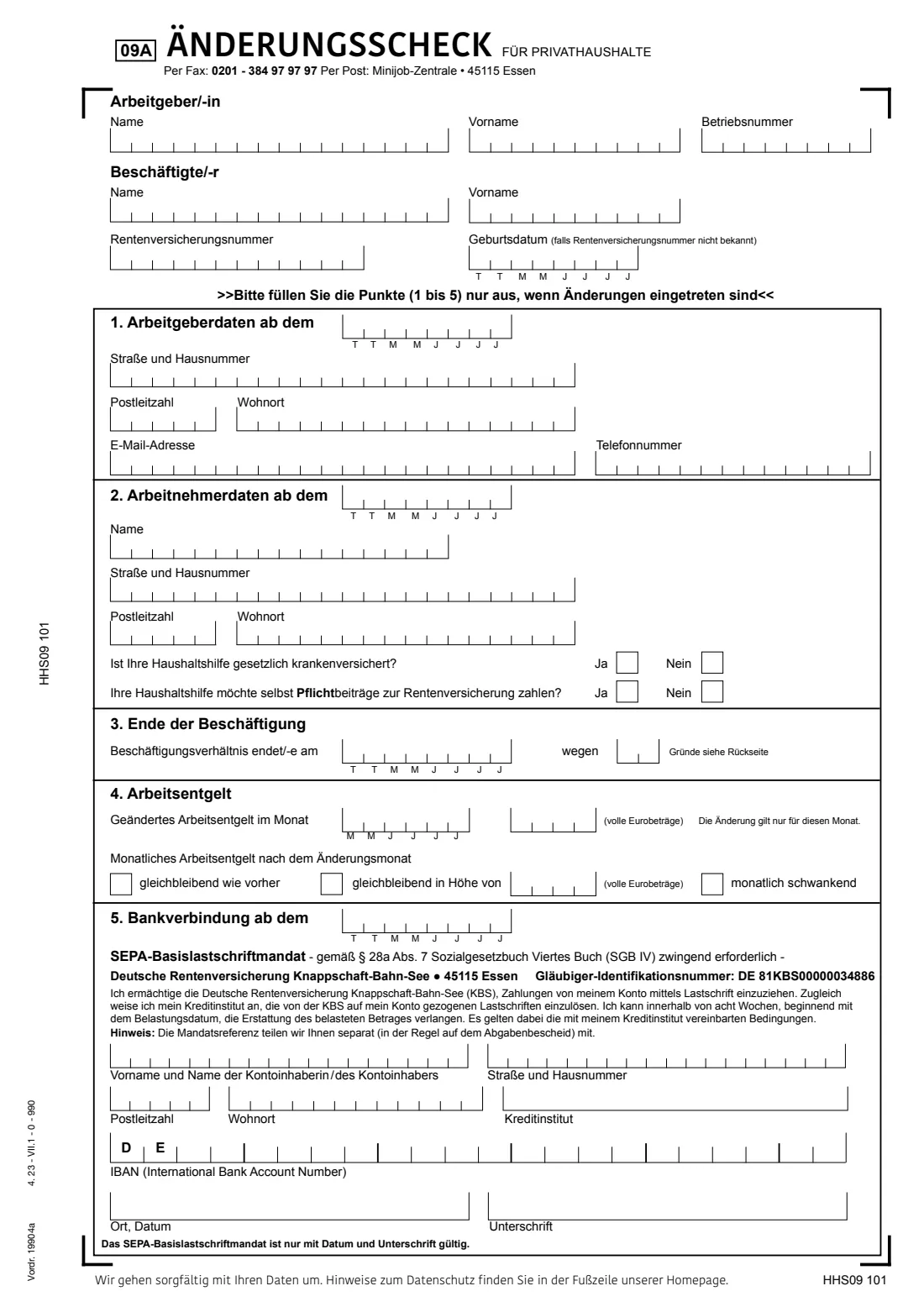
Once you have registered a cleaner, nanny, gardener or carer with the Minijob-Zentrale using the Haushaltsscheck, later changes go on a different form: the Änderungsscheck für Privathaushalte (form 09A, Vordruck 19904a). Its notes say it can report changes but can't be used to register anyone.
The single page has five parts, and you fill in only those that changed: your own address or contact details, your helper's new name, address, health insurance or pension choice, the end of the job or a long break with a reason code, a new fixed monthly pay, and a new bank account with a fresh SEPA direct-debit mandate.
FileIt explains every box in English with the German term next to it, prints one character per box on the official PDF — dates as TTMMJJJJ, pay as four whole-euro digits, the IBAN after the printed DE — and saves the result in your vault. You print it, sign it by hand and post or fax it to the Minijob-Zentrale yourself.
- Who fills it
- A private household that already employs a registered mini-job helper
- Given to
- Minijob-Zentrale, 45115 Essen — by post or by fax to 0201-384 97 97 97
- When
- Whenever an address, the pay, the bank account or the job itself changes
- Signatures
- You sign by hand under place and date; the SEPA mandate needs it
- Edition
- Form 09A, Vordruck 19904a, 4.23
Who needs to fill out Änderungsscheck (Minijob im Privathaushalt)?
- Private households whose cleaner, babysitter, gardener or carer is already registered with the Minijob-Zentrale.
- Employers who moved, changed phone or email, or want contributions taken from a different bank account.
- Employers whose helper changed their name or address, their health insurance, or their decision about paying pension contributions.
When to use Änderungsscheck (Minijob im Privathaushalt)
- When your helper stops working for you — part 3, with reason code 01.
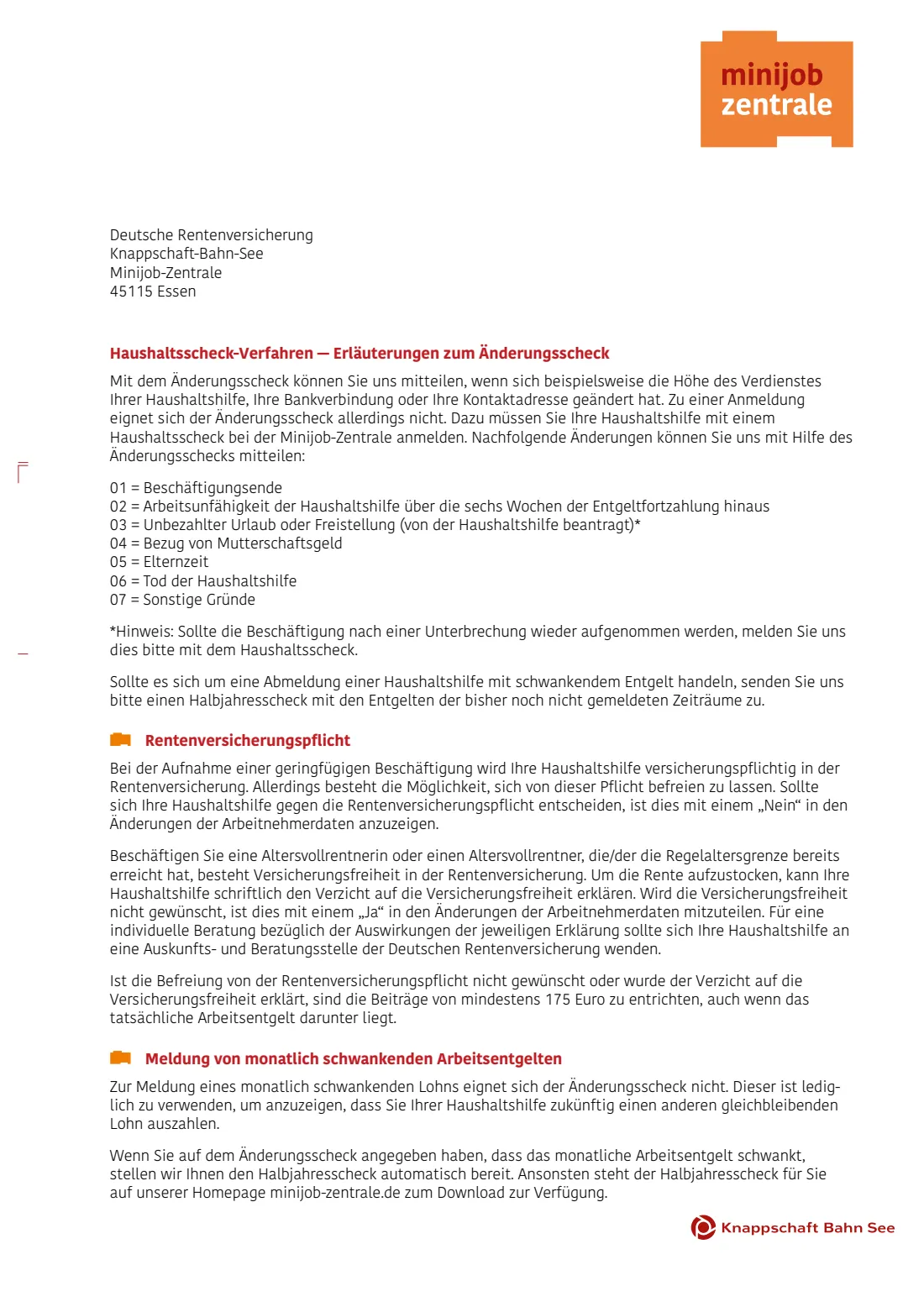
- When the job pauses for long: illness beyond the six weeks of continued pay, unpaid leave, maternity pay or parental leave (codes 02 to 05).
- When you agree a new fixed monthly pay, or pay differs in a single month.
- When your pay changes from fixed to varying — you then report each month on the Halbjahresscheck.
- When your bank account for the direct debit changes.
What you need before you start
- Your household employer number (Betriebsnummer), from the Minijob-Zentrale's letters.
- Your helper's pension insurance number, or their date of birth if it isn't known.
- The date each change applies from.
- The new pay in whole euros, if the pay changed.
- The account holder's details and the German IBAN, if the bank account changed.
- The reason code from page 2, if the job ends or pauses.
What’s on Änderungsscheck (Minijob im Privathaushalt)
The 2023 edition has 2 pages. FileIt asks for it in 7 parts, and it is signed by Household employer (arbeitgeber/-in):
- You and your household helperHousehold employer (arbeitgeber/-in)
- 1 · Your new details (Arbeitgeberdaten)Household employer (arbeitgeber/-in)
- 2 · Your helper's new details (Arbeitnehmerdaten)Household employer (arbeitgeber/-in)
- 3 · End of the job (Ende der Beschäftigung)Household employer (arbeitgeber/-in)
- 4 · Pay (Arbeitsentgelt)Household employer (arbeitgeber/-in)
- 5 · New bank account (Bankverbindung) and SEPA mandateHousehold employer (arbeitgeber/-in)
- Place and date (Ort, Datum)Household employer (arbeitgeber/-in)
How to fill out Änderungsscheck (Minijob im Privathaushalt), step by step
1 Arbeitgeber/-in and Beschäftigte/-r
The boxes at the top identify you and your helper: names, your Betriebsnummer, and the helper's pension insurance number (Rentenversicherungsnummer) or date of birth. Each box takes one letter, so surnames over 16 letters must be shortened.
2 1. Arbeitgeberdaten ab dem
Your new street, postcode, town, email or phone, with the date they apply from. Leave the part empty if nothing about you changed.
3 2. Arbeitnehmerdaten ab dem
Your helper's new surname or address, and the two yes/no questions: are they in the statutory health insurance, and do they want to pay their own compulsory pension contributions. Answer these only if something changed.
4 3. Ende der Beschäftigung
The date the job ends or ended and a two-digit reason (wegen) from the list on page 2: 01 end of the job, 02 long illness, 03 unpaid leave, 04 maternity pay, 05 parental leave, 06 death, 07 other reasons.
5 4. Arbeitsentgelt
A pay that differs in one month only goes in the first line with the month (MMJJJJ). Below, you tick how the pay continues: as before, a new fixed amount, or varying from month to month.
6 5. Bankverbindung ab dem
A new account for the direct debit, with a new SEPA mandate for the Deutsche Rentenversicherung Knappschaft-Bahn-See. The IBAN box has DE printed already, so only a German account fits.
7 Ort, Datum and Unterschrift
Place and date, and your handwritten signature. The form says the SEPA mandate is only valid with date and signature.
Common mistakes to avoid
- Using the Änderungsscheck to register a new helper — that needs the Haushaltsscheck.
- Reporting pay that changes every month here instead of on the Halbjahresscheck.
- Forgetting the Betriebsnummer, which links the form to your household.
- Writing a foreign IBAN — the box after the printed DE only takes a German one.
- Leaving out the date a change applies from.
- Not signing, so the new direct-debit mandate isn't valid.
After you fill it out
Print the form, sign it by hand under place and date, and keep a copy.
Post it to the Minijob-Zentrale, 45115 Essen, or fax it to 0201-384 97 97 97. FileIt doesn't send it.
A copy stays in your FileIt vault. If the job ended and the pay varied, the notes ask you to send a Halbjahresscheck for the months not yet reported.
Fill out Änderungsscheck (Minijob im Privathaushalt) online with FileIt
- Pick the person. Choose someone from People and FileIt fills in their name, date of birth, address and other details it already knows.
- Answer plain-language questions. One part of the form at a time, with the official help text beside each question — 42 fields in all. Your answers save as you go.
- Check the live preview. Watch your answers land on the real Deutsche Rentenversicherung Knappschaft-Bahn-See — Minijob-Zentrale form, and let FileIt do any worksheet arithmetic.
- Generate the official PDF. FileIt prints your answers into the agency’s own PDF and files it in that person’s folder in your vault. Sign it, or send it for e-signature.
FileIt fills the form — it never files or submits anything for you. Deliver the finished form to whoever asked for it, the way the form’s instructions say.
Start Änderungsscheck (Minijob im Privathaushalt) now — it’s freeÄnderungsscheck (Minijob im Privathaushalt): frequently asked questions
What is the Änderungsscheck?
It is the Minijob-Zentrale's form for telling them about changes in a household mini-job that is already registered: addresses, pay, the bank account for the direct debit, or the end of the job.
Can I deregister my household helper with it?
Yes. Part 3 takes the end date and reason code 01 (end of the job). Other codes report a long break such as parental leave.
Can I register a new helper with the Änderungsscheck?
No. Its notes say it isn't suitable for registration. New helpers, and jobs that restart after a break, are registered with the Haushaltsscheck.
My helper's pay is different every month. Which form do I use?
The Halbjahresscheck, once per half-year. On the Änderungsscheck you can tick that the pay now varies, and the notes say the Minijob-Zentrale then sends you the Halbjahresscheck.
Do I have to sign it?
Yes, by hand under place and date. Without a signature, a new SEPA mandate in part 5 isn't valid.
Does FileIt send the form for me?
No. FileIt fills the official PDF and saves it in your vault. You print, sign and post or fax it yourself.
Official sources
- Blank form (PDF), published by Deutsche Rentenversicherung Knappschaft-Bahn-See — Minijob-Zentrale: https://www.minijob-zentrale.de/SharedDocs/Downloads/DE/Formulare/privat/Aenderungsscheck.pdf?__blob=publicationFile
- Official instructions and guidance: https://www.minijob-zentrale.de/DE/service/formulare/formulare_node.html
- Edition shown on this page: Vordr. 19904a (09A), 4.23 (HHS09 101) (checked 2026-10-19).
FileIt is not affiliated with or endorsed by Deutsche Rentenversicherung Knappschaft-Bahn-See — Minijob-Zentrale or any government. This page explains the form in general terms and is not legal, tax or immigration advice. Always read the official instructions, and check that you are using the edition the recipient accepts. Page last reviewed 2026-10-19.