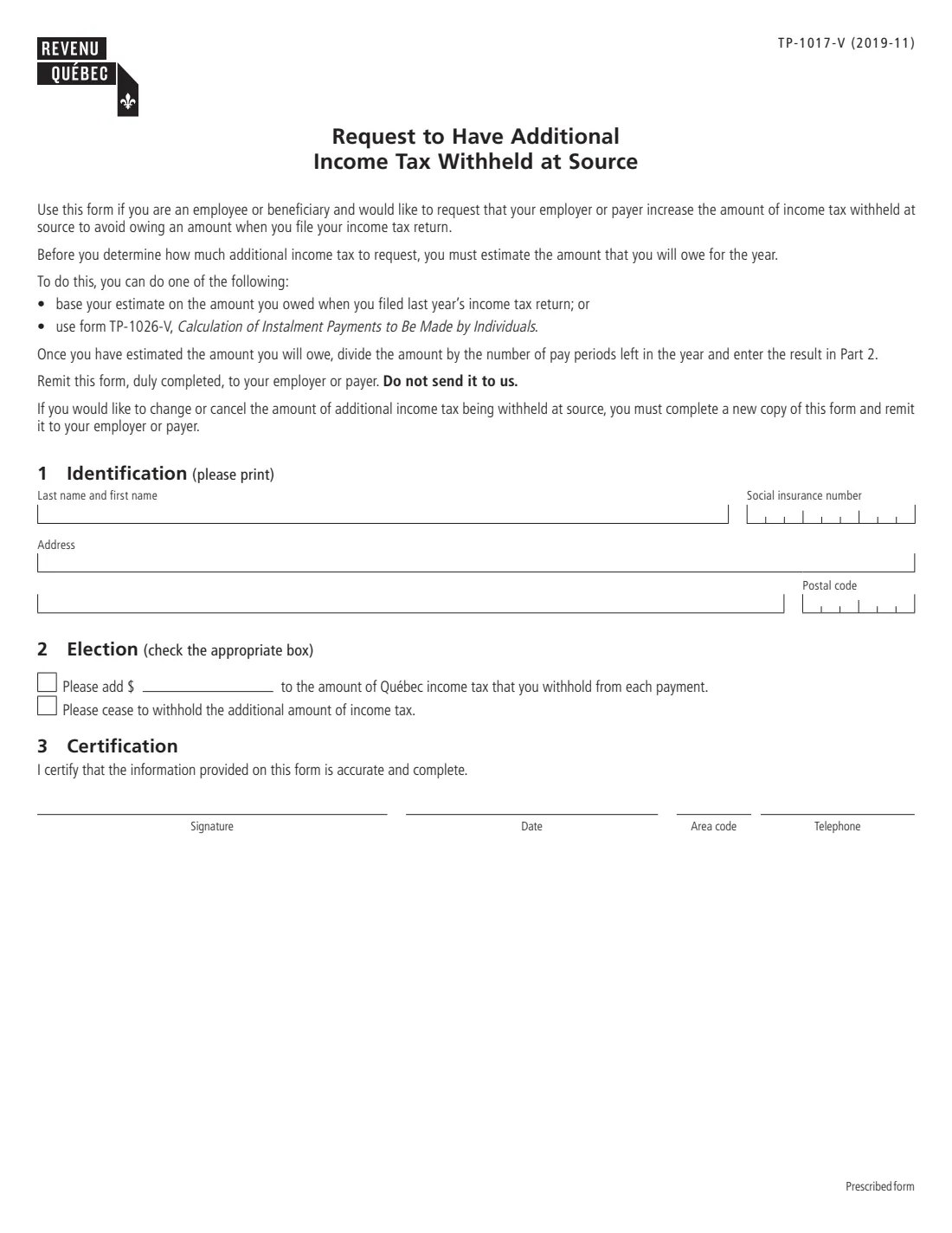
What is Form TP-1017-V?
Form TP-1017-V lets an employee or a beneficiary (for example, someone receiving a pension) ask their employer or payer to increase the Québec income tax withheld at source. The point is to avoid owing an amount when you file your Québec income tax return: you estimate what you will owe for the year, divide it by the number of pay periods left, and ask for that amount to be added to each payment.
The same form is used to change or cancel an earlier request. You fill out a new copy and give it to your employer or payer; the form says not to send it to Revenu Québec. The V at the end marks Revenu Québec's English version of the prescribed form TP-1017.
FileIt asks the questions in plain English and prints your answers onto Revenu Québec's own PDF (edition 2019-11, still the current version). Your name can come from People records in your vault, and the finished PDF is saved to the person's vault folder, with optional e-signature. You hand it to your employer or payer yourself; FileIt never sends anything to Revenu Québec. Filling forms is free on every plan.
- Who fills it
- An employee or a beneficiary paid by a payer that withholds Québec income tax
- Given to
- Your employer or payer, not Revenu Québec
- Length
- One page: identification, election, certification
- Signature
- You sign and date Part 3; Revenu Québec's page says the form can be signed electronically
- Edition
- TP-1017-V (2019-11)
- To change or cancel
- Fill out a new copy
Who needs to fill out Form TP-1017-V?
- Employees who owed Québec income tax when they filed last year's return and want to avoid a balance due this year.
- Pension and other beneficiaries whose payer withholds too little Québec tax for their situation.
- People with more than one employer or payer, or with income that has no tax withheld, who want to cover the tax through their paycheques.
- Anyone who asked for extra withholding before and now wants to change the amount or stop it.
When to use Form TP-1017-V
- When you expect to owe Québec income tax for the year and prefer to pay it through source deductions.
- When your estimate of the tax you will owe changes and you want a different extra amount per payment.
- When you no longer need the extra amount withheld and want your employer or payer to stop.
What you need before you start
- Your social insurance number, name and address.
- An estimate of the Québec income tax you will owe for the year, based on what you owed last year or worked out with form TP-1026-V, Calculation of Instalment Payments to Be Made by Individuals.
- The number of pay periods left in the year, to divide that estimate into an amount per payment.
- A telephone number where your employer or payer can reach you.
What’s on Form TP-1017-V
The 2019 edition has 1 page. FileIt asks for it in 3 parts, and it is signed by Employee:
- 1. IdentificationEmployee
- 2. ElectionEmployee
- 3. CertificationEmployee
How to fill out Form TP-1017-V, step by step
1 Part 1 – Identification
Print your last name and first name on one line, your social insurance number in the boxes, your address and your postal code.
2 Part 2 – Election
Tick the first box and enter the extra amount to add to the Québec income tax withheld from each payment. Or tick the second box to ask your employer or payer to stop withholding the additional amount you asked for before. Tick only one box.
The form suggests estimating what you will owe for the year and dividing it by the number of pay periods left in the year.
3 Part 3 – Certification
Sign and date to certify that the information is accurate and complete, and give your area code and telephone number.
Common mistakes to avoid
- Sending the form to Revenu Québec: it goes to your employer or payer.
- Entering the whole year's balance instead of dividing it by the number of pay periods left.
- Ticking both boxes in Part 2.
- Using this form for federal tax: it only covers Québec income tax withheld at source.
- Forgetting to fill out a new copy when you want to change or stop the extra amount.
After you fill it out
Review the PDF, sign and date it with FileIt's optional e-signature or by hand, and give it to your employer or payer. FileIt never submits it anywhere.
Check your next pay stubs to confirm the extra Québec income tax is being withheld.
Your copy stays in the person's FileIt vault folder. To change or cancel the extra amount later, fill out a new copy.
Fill out Form TP-1017-V online with FileIt
- Pick the person. Choose someone from People and FileIt fills in their name, date of birth, address and other details it already knows.
- Answer plain-language questions. One part of the form at a time, with the official help text beside each question — 10 fields in all. Your answers save as you go.
- Check the live preview. Watch your answers land on the real Revenu Québec (RQ) form, and let FileIt do any worksheet arithmetic.
- Generate the official PDF. FileIt prints your answers into the agency’s own PDF and files it in that person’s folder in your vault. Sign it, or send it for e-signature.
FileIt fills the form — it never files or submits anything for you. Deliver the finished form to whoever asked for it, the way the form’s instructions say.
Start Form TP-1017-V now — it’s freeForm TP-1017-V: frequently asked questions
Can I fill out the TP-1017-V online?
Yes. FileIt guides you through the three parts and prints your answers onto Revenu Québec's official PDF, saved to your vault. It is free on every FileIt plan.
Where do I send the TP-1017-V?
Give it to your employer or payer. The form says not to send it to Revenu Québec.
How much extra should I ask for?
The form suggests estimating what you will owe for the year, from last year's return or with form TP-1026-V, then dividing it by the number of pay periods left in the year.
How do I stop the extra withholding?
Fill out a new copy, tick the box asking your employer or payer to cease withholding the additional amount, and give it to them.
Does this change my federal tax deductions?
No. TP-1017-V only covers Québec income tax. For extra federal tax, you use the federal TD1 form's additional tax line with your employer.
Can I sign it electronically?
Revenu Québec's page for the form says it can be signed electronically. FileIt offers optional e-signature, or you can print and sign by hand; ask your employer or payer what they accept.
What does the V in TP-1017-V mean?
It marks Revenu Québec's English version. The French form is TP-1017; both are the same prescribed form.
Official sources
- Blank form (PDF), published by Revenu Québec (RQ): https://www.revenuquebec.ca/documents/en/formulaires/tp/TP-1017-V%282019-11%29.pdf
- Official instructions and guidance: https://www.revenuquebec.ca/en/online-services/forms-and-publications/current-details/tp-1017-v/
- Edition shown on this page: TP-1017-V (2019-11) (checked 2026-09-28).
FileIt is not affiliated with or endorsed by Revenu Québec (RQ) or any government. This page explains the form in general terms and is not legal, tax or immigration advice. Always read the official instructions, and check that you are using the edition the recipient accepts. Page last reviewed 2026-09-28.