What is Form TP-1015.3-V?
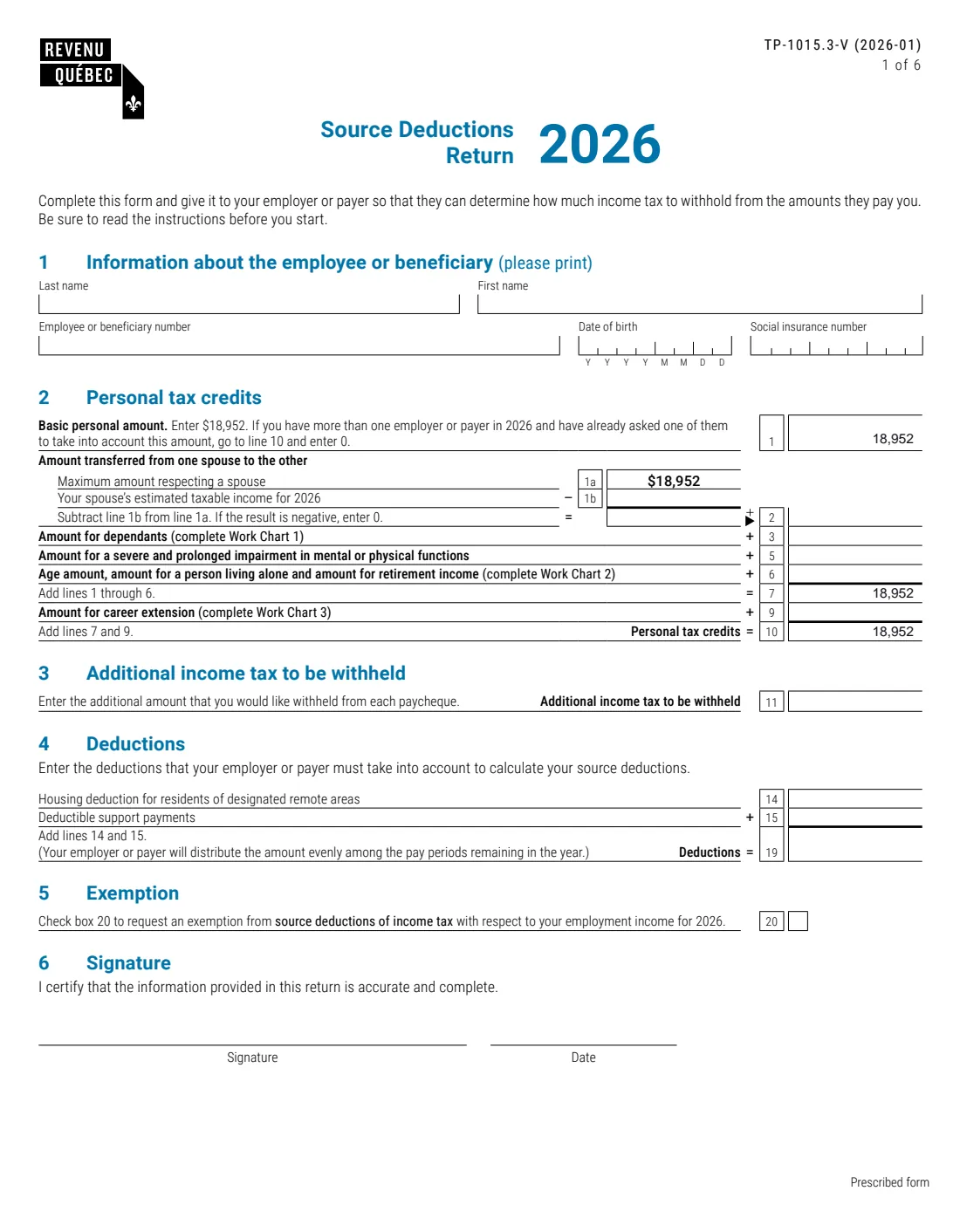
Form TP-1015.3-V, the Source Deductions Return, is the Revenu Québec form you give your employer or payer so they can work out how much Québec income tax to withhold from your salary, wages, commissions, pension income, parental insurance benefits, Employment Insurance benefits, wage loss replacement benefits or other remuneration. It plays the role in Québec that the provincial TD1 forms play elsewhere in Canada; you normally fill out the federal TD1 as well for federal tax. The V at the end marks the English version of the prescribed form TP-1015.3.
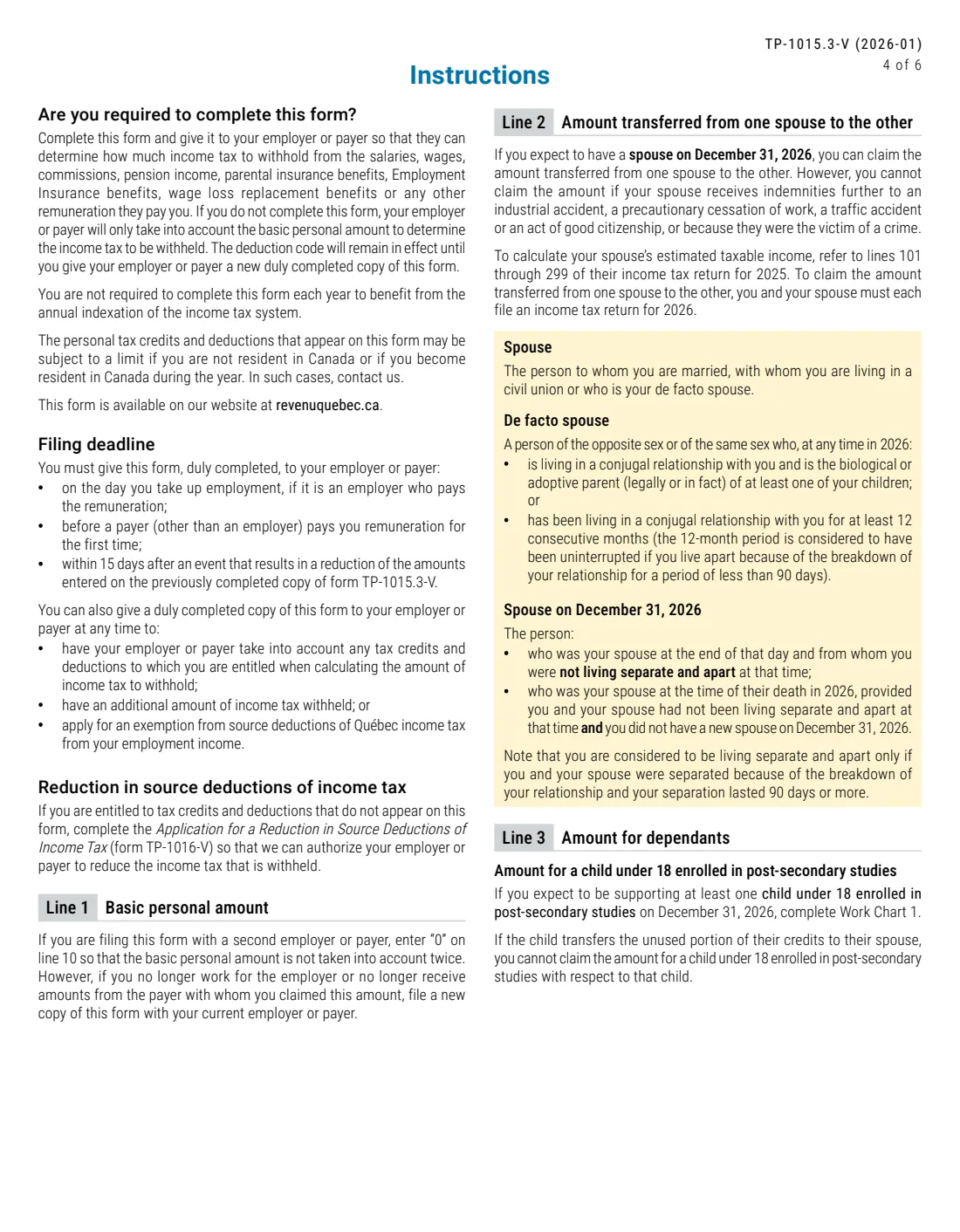
If you don't fill it out, the form says your employer or payer will only take into account the basic personal amount. The deduction code it sets stays in effect until you give them a new copy, and you don't need to redo it each year just for indexation.
FileIt asks the questions in plain English and prints your answers onto Revenu Québec's own PDF (edition 2026-01). Names and dates of birth can come from People records in your vault, and FileIt fills in Work Charts 1 to 3 — amounts for dependants, the age, living-alone and retirement income amounts with the net family income reduction, and the career extension amount — and carries the results to lines 1 to 10 and 19. The PDF is saved to the person's vault folder, with optional e-signature. You give it to your employer or payer yourself — FileIt never sends anything to Revenu Québec. Filling forms is free on every plan.
- Who fills it
- Employees and other people paid remuneration subject to Québec income tax withholding
- Given to
- Your employer or payer — not Revenu Québec
- When
- On the day you start work, before a payer first pays you, or within 15 days after an event that reduces your amounts
- Signatures
- You sign and date Part 6 on page 1
- Edition
- TP-1015.3-V (2026-01)
- Basic personal amount
- $18,952 on the 2026 edition
Who needs to fill out Form TP-1015.3-V?
- Anyone starting a job with an employer that withholds Québec income tax.
- People who start receiving a pension, parental insurance benefits, Employment Insurance benefits or other remuneration from a payer.
- People whose spouse has a low taxable income and who want to claim the amount transferred from one spouse to the other.
- Parents supporting a child under 18 in post-secondary studies, and people supporting another dependant aged 18 or older.
- Seniors, people living alone and people with retirement income who qualify for the Work Chart 2 amounts.
- Workers aged 65 or older who qualify for the amount for career extension.
- Anyone who wants extra tax withheld, has deductions such as support payments, or wants an exemption from source deductions for the year.
When to use Form TP-1015.3-V
- On the day you take up employment with a new employer.
- Before a payer other than an employer pays you remuneration for the first time.
- Within 15 days after an event that reduces the amounts you entered on your previous copy.
- At any time you want your employer or payer to take other credits or deductions into account, withhold additional tax, or stop withholding under box 20.
- When you no longer work for the employer where you claimed the basic personal amount — file a new copy with your current employer or payer.
What you need before you start
- Your social insurance number, name, date of birth and employee or beneficiary number.
- Your spouse's estimated 2026 taxable income, if you claim the amount transferred from one spouse to the other.
- For each dependant: terms of study started in 2026 (children under 18), birthday month if they turned 18 in 2026, and their estimated net income.
- Your and your spouse's estimated net income (net family income) for 2026.
- Any income you expect that qualifies for the retirement income amount, for you and your spouse.
- The number of months you are entitled to the Family Allowance, if you claim the single-parent supplement.
- Your estimated eligible work income and net income, if you are 65 or older and still working.
- Amounts for the housing deduction for designated remote areas or deductible support payments, if they apply.
What’s on Form TP-1015.3-V
The 2026 edition has 6 pages. FileIt asks for it in 7 parts, and it is signed by Employee:
- 1. Information about the employee or beneficiaryEmployee
- 2. Personal tax credits (lines 1–10)Employee
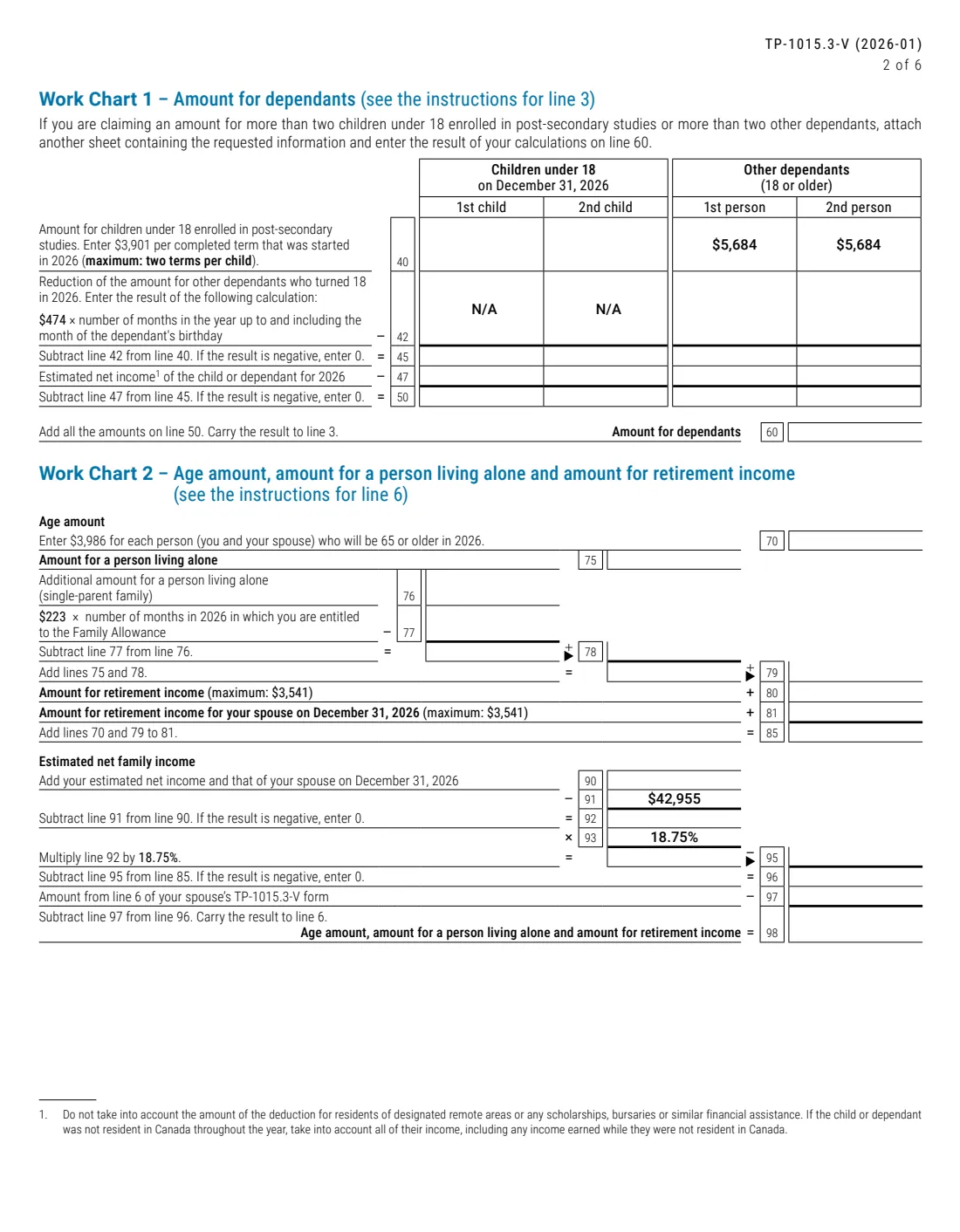
- Work Chart 1 — Amount for dependants (line 3)Employee
- Work Chart 2 — Age, living alone and retirement income (line 6)Employee
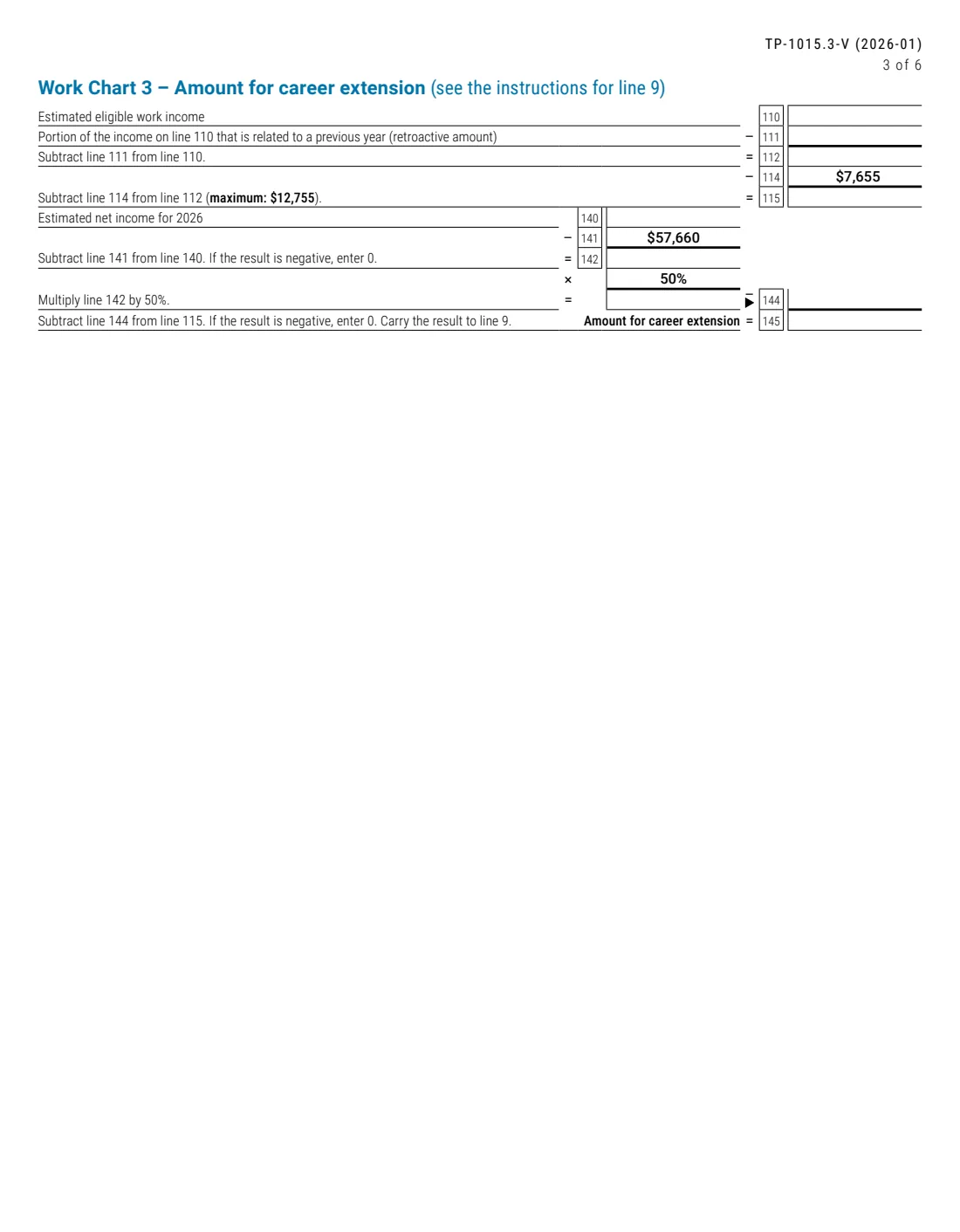
- Work Chart 3 — Amount for career extension (line 9)Employee
- 3–5. Additional tax, deductions and exemptionEmployee
- 6. SignatureEmployee
How to fill out Form TP-1015.3-V, step by step
1 Part 1 – Information about the employee or beneficiary
Print your last name, first name, employee or beneficiary number, date of birth (in the YYYYMMDD boxes) and social insurance number.
2 Part 2 – Line 1: Basic personal amount
Enter $18,952. If you have more than one employer or payer in 2026 and already asked one of them to take this amount into account, the form tells you to go to line 10 and enter 0, so the amount isn't counted twice.
3 Line 2 – Amount transferred from one spouse to the other
If you expect to have a spouse on December 31, 2026, subtract your spouse's estimated taxable income (line 1b) from the $18,952 maximum (line 1a). You can't claim it if your spouse receives certain indemnities, such as for an industrial or traffic accident, and you both must file a 2026 return.
The instructions define spouse broadly — married, civil union, or a de facto spouse living with you in a conjugal relationship.
4 Line 3 and Work Chart 1 – Amount for dependants
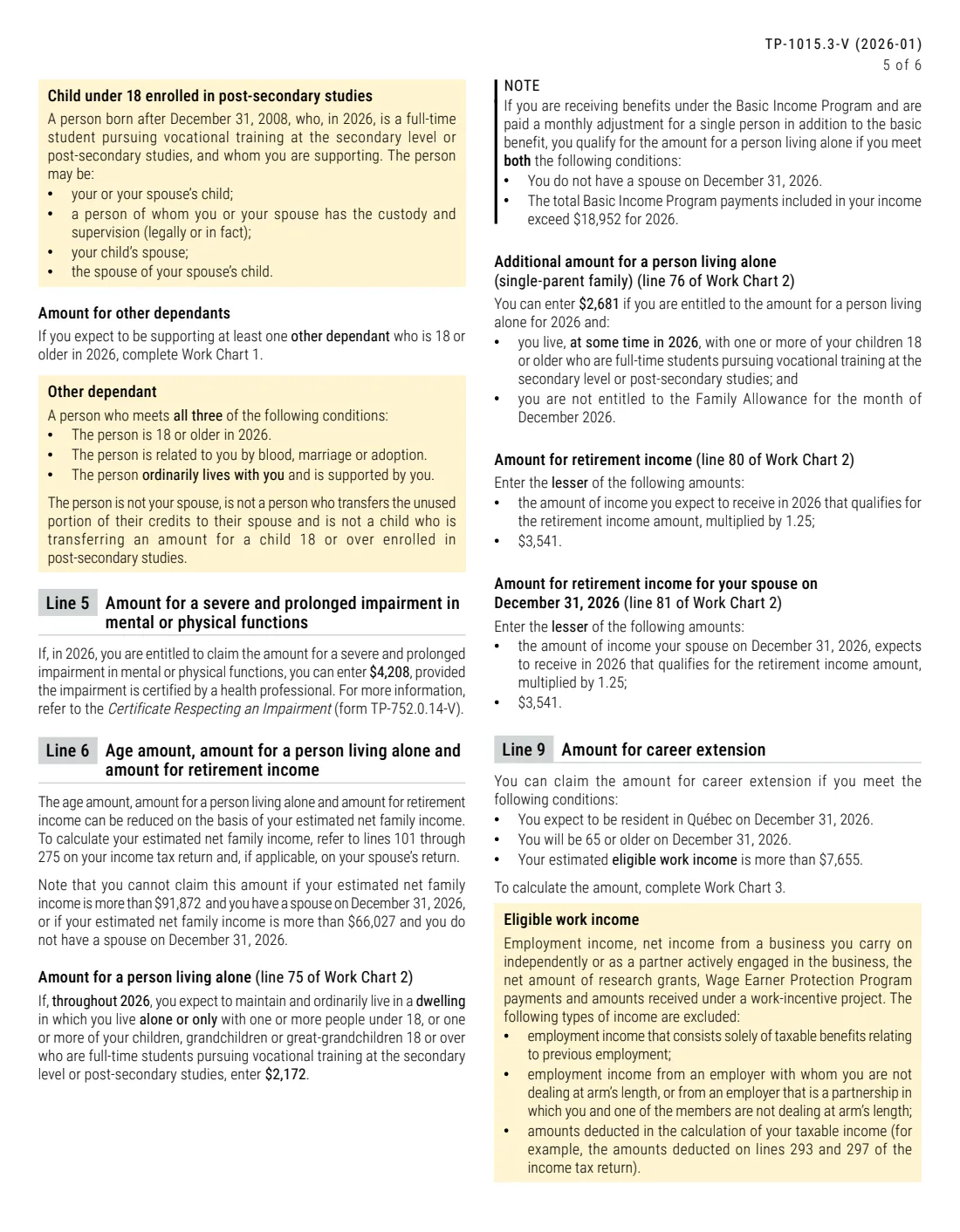
For a child under 18 on December 31, 2026 enrolled full time in vocational training at the secondary level or post-secondary studies, enter $3,901 per completed term started in 2026, up to two terms. For another dependant aged 18 or older who is related to you and lives with you, the chart starts from $5,684, reduced by $474 for each month up to their 18th birthday if they turned 18 in 2026.
Each column then subtracts the dependant's estimated net income, and line 60 adds them up. FileIt does this for two children and two other dependants; for more, you attach a sheet and FileIt adds its total.
5 Line 5 – Severe and prolonged impairment
If you're entitled to the amount for a severe and prolonged impairment in mental or physical functions, certified by a health professional (form TP-752.0.14-V), enter $4,208.
6 Line 6 and Work Chart 2 – Age, living alone and retirement income
Work Chart 2 adds $3,986 for each of you and your spouse who will be 65 or older in 2026, $2,172 if you live alone, a $2,681 single-parent supplement less $223 for each month of Family Allowance, and retirement income amounts of up to $3,541 each (1.25 times qualifying income). The total is then reduced by 18.75% of net family income above $42,955, and by the amount on line 6 of your spouse's TP-1015.3-V.
The instructions say you can't claim these amounts if net family income is more than $91,872 with a spouse, or $66,027 without one. FileIt runs the whole chart.
7 Line 9 and Work Chart 3 – Amount for career extension
If you'll be resident in Québec and 65 or older on December 31, 2026, with eligible work income over $7,655, Work Chart 3 takes your eligible work income less any retroactive part, subtracts $7,655 (maximum $12,755), then reduces it by 50% of net income above $57,660. FileIt calculates each line.
8 Line 10 – Personal tax credits
Lines 1 to 6 add up on line 7, and line 9 is added to give line 10, the personal tax credits your employer or payer uses.
9 Part 3 – Additional income tax to be withheld
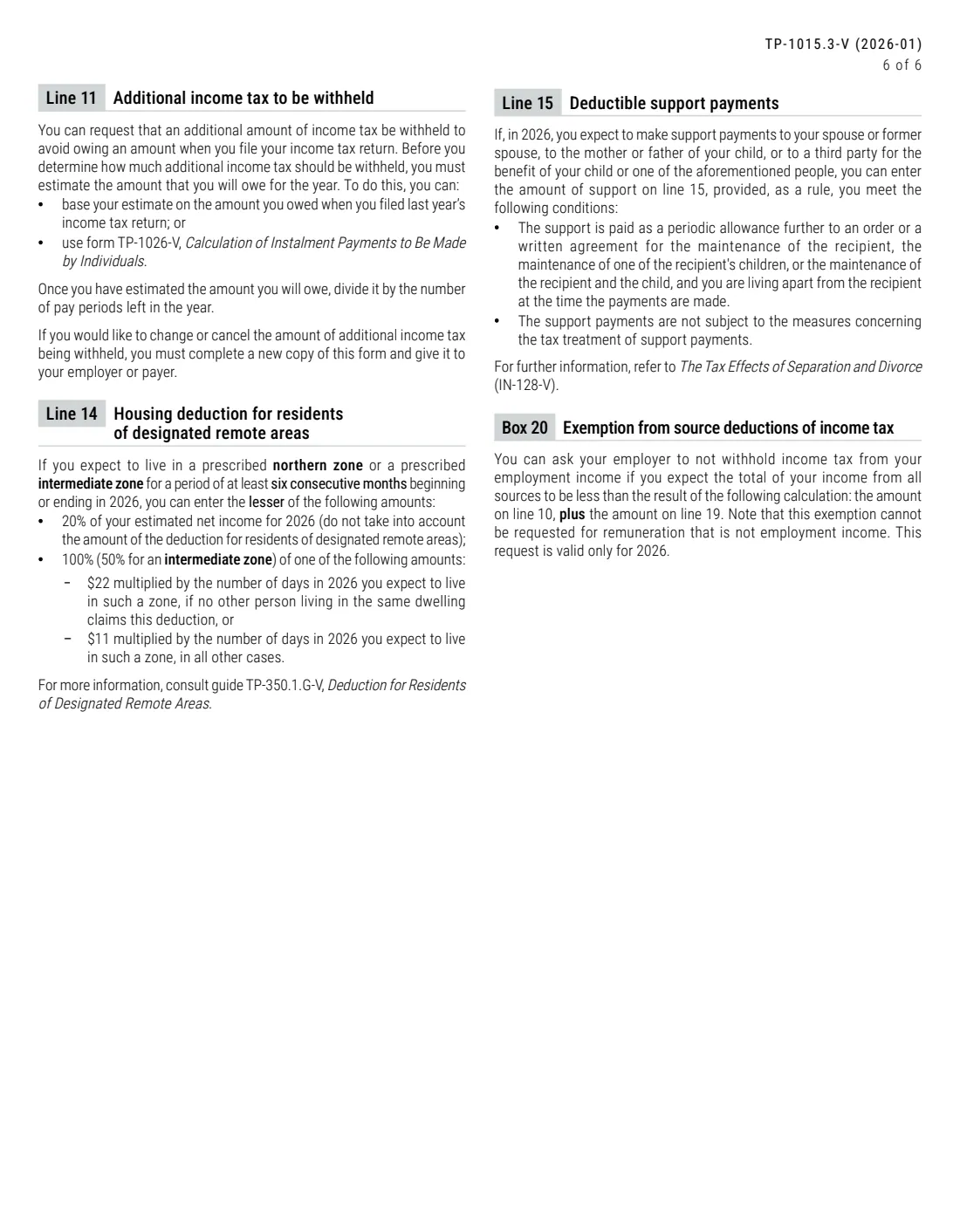
On line 11, enter any extra amount you want withheld from each paycheque. The instructions suggest estimating what you'll owe (from last year's return or form TP-1026-V) and dividing it by the pay periods left.
10 Part 4 – Deductions
Line 14 is the housing deduction for residents of designated remote areas; line 15 is deductible support payments. Line 19 adds them, and your employer or payer spreads the total evenly over the remaining pay periods.
11 Part 5 – Exemption
Tick box 20 to ask for no Québec income tax to be withheld from your 2026 employment income, if you expect your total income from all sources to be less than line 10 plus line 19. It applies to employment income only and is valid for 2026 only.
12 Part 6 – Signature
Sign and date to certify that the information is accurate and complete.
Common mistakes to avoid
- Claiming the basic personal amount with two employers or payers at once — on the second one, enter 0 on line 10.
- Counting scholarships or bursaries in a dependant's net income — the form's footnote says to leave them out.
- Claiming more than two terms for a child under 18 in post-secondary studies.
- Forgetting the 18.75% net family income reduction in Work Chart 2.
- Ticking box 20 for pension or other non-employment income — the exemption covers employment income only.
- Sending the form to Revenu Québec instead of giving it to your employer or payer.
- Not giving a new copy within 15 days after an event that reduces your amounts.
After you fill it out
Review the PDF, then sign and date Part 6 on page 1 with FileIt's optional e-signature or by hand. Give it to your employer or payer; Revenu Québec doesn't receive it, and FileIt never sends it anywhere.
If you're entitled to credits or deductions not on this form, the instructions point you to form TP-1016-V, Application for a Reduction in Source Deductions of Income Tax, so Revenu Québec can authorize your employer or payer to withhold less.
Your copy stays in the person's FileIt vault folder. It remains in effect until you give a new one, so update it when your situation changes — for example when a dependant's situation changes, you turn 65, or you want to change or cancel the extra tax on line 11.
Fill out Form TP-1015.3-V online with FileIt
- Pick the person. Choose someone from People and FileIt fills in their name, date of birth, address and other details it already knows.
- Answer plain-language questions. One part of the form at a time, with the official help text beside each question — 84 fields in all. Your answers save as you go.
- Check the live preview. Watch your answers land on the real Revenu Québec (RQ) form, and let FileIt do any worksheet arithmetic.
- Generate the official PDF. FileIt prints your answers into the agency’s own PDF and files it in that person’s folder in your vault. Sign it, or send it for e-signature.
FileIt fills the form — it never files or submits anything for you. Deliver the finished form to whoever asked for it, the way the form’s instructions say.
Start Form TP-1015.3-V now — it’s freeForm TP-1015.3-V: frequently asked questions
Can I fill out the TP-1015.3-V online?
Yes. FileIt guides you through the questions, calculates Work Charts 1 to 3 and lines 1 to 10 and 19, and prints everything onto Revenu Québec's official 2026-01 PDF, saved to your vault. It is free on every FileIt plan.
Where do I send the TP-1015.3-V?
Give it to your employer or payer. It doesn't go to Revenu Québec, and FileIt never submits it.
What is the Québec basic personal amount for 2026?
The 2026-01 edition of TP-1015.3-V says to enter $18,952 on line 1.
Is TP-1015.3-V the Québec version of the TD1?
It does the same job for Québec income tax. In Québec you generally give your employer the federal TD1 for federal tax and the TP-1015.3-V for Québec tax.
Do I need to fill it out every year?
No. The form says you don't need to complete it each year to benefit from annual indexation; your deduction code stays in effect until you give a new copy. You do need a new copy within 15 days after an event that reduces your amounts.
Can I stop Québec tax being withheld altogether?
You can tick box 20 if you expect your total income from all sources to be less than line 10 plus line 19. It applies only to employment income and only for 2026.
What if I have credits or deductions that aren't on the form?
Use form TP-1016-V, Application for a Reduction in Source Deductions of Income Tax, so Revenu Québec can authorize a lower withholding.
What does the V in TP-1015.3-V mean?
It marks Revenu Québec's English version. The French form is TP-1015.3, Déclaration pour la retenue d'impôt; both are the same prescribed form.
Can I sign it electronically?
FileIt offers optional e-signature, or you can print and sign by hand. Ask your employer or payer what they accept.
Official sources
- Blank form (PDF), published by Revenu Québec (RQ): https://www.revenuquebec.ca/documents/en/formulaires/tp/TP-1015.3-V(2026-01).pdf
- Official instructions and guidance: https://www.revenuquebec.ca/en/online-services/forms-and-publications/current-details/tp-1015.3-v/
- Edition shown on this page: TP-1015.3-V (2026-01) (checked 2026-09-26).
FileIt is not affiliated with or endorsed by Revenu Québec (RQ) or any government. This page explains the form in general terms and is not legal, tax or immigration advice. Always read the official instructions, and check that you are using the edition the recipient accepts. Page last reviewed 2026-09-26.