What is Form T2057?
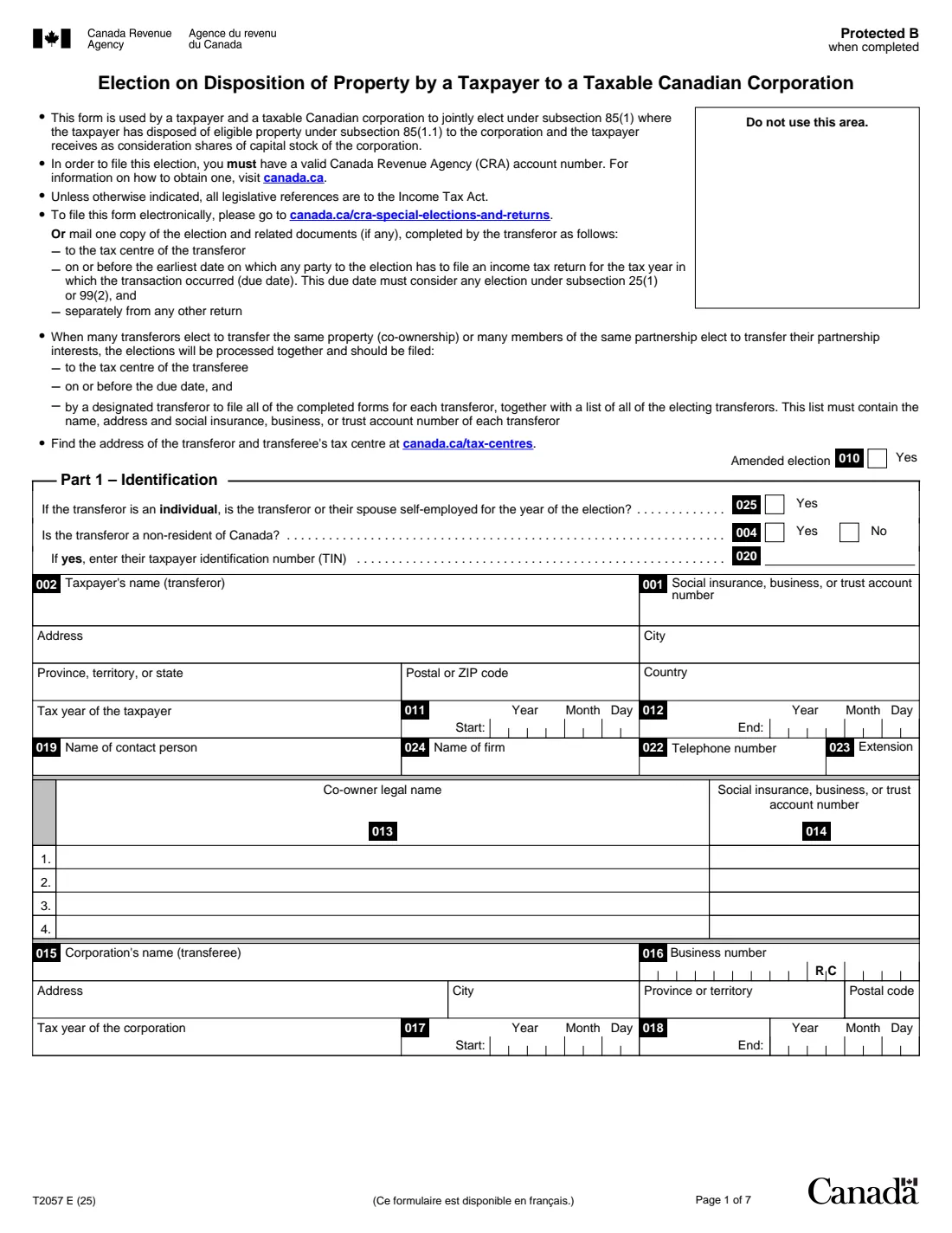
Form T2057 is the Canada Revenue Agency (CRA) form a taxpayer and a taxable Canadian corporation use to jointly elect under subsection 85(1) of the Income Tax Act. It applies when the taxpayer has disposed of eligible property to the corporation and received shares of the corporation as consideration. The agreed amount they elect becomes the taxpayer's proceeds and the corporation's cost, which is how a section 85 "rollover" can defer the gain.
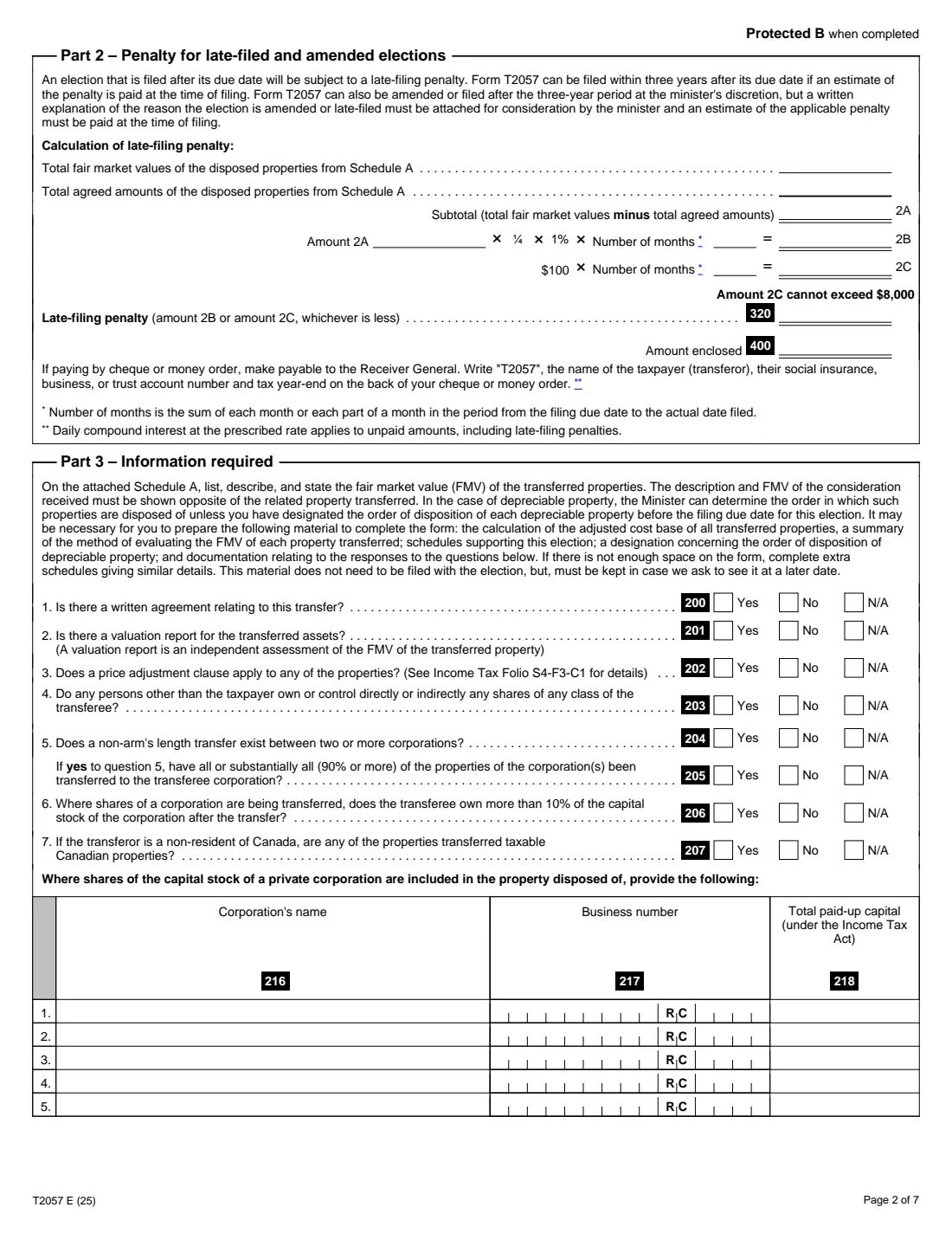
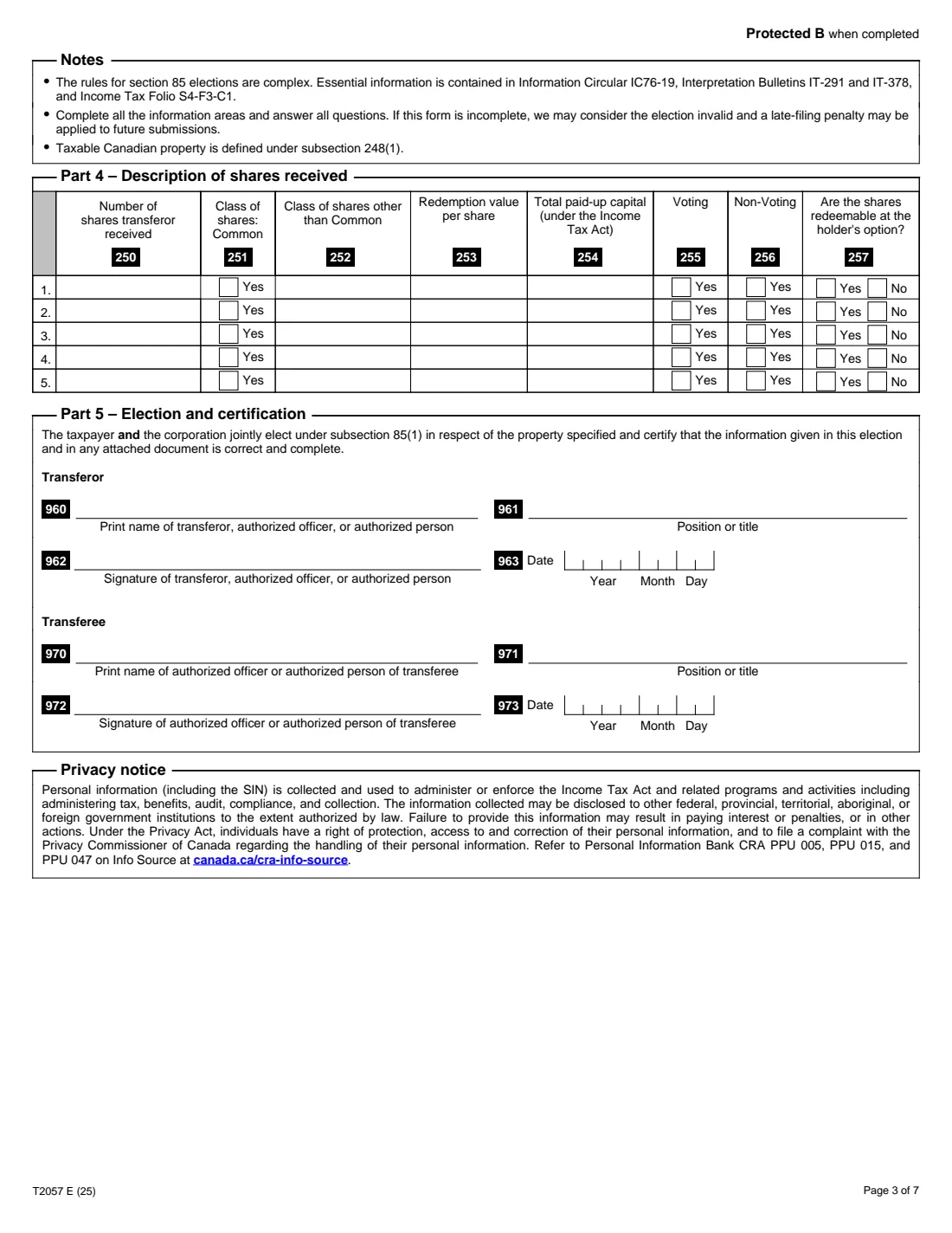
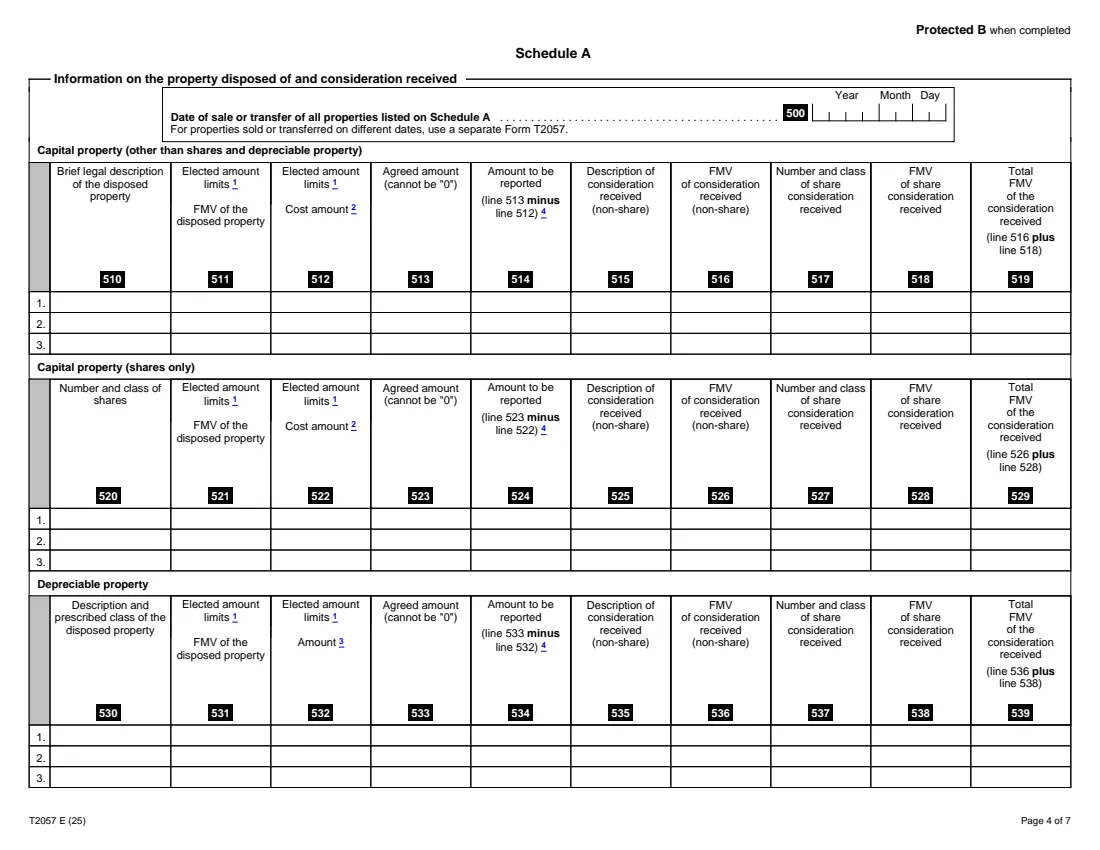
Part 1 identifies the transferor, any co-owners and the corporation. Part 3 asks seven questions about the transfer and lists shares of private corporations included in the property. Part 4 describes the shares received. Schedule A lists each property by kind (capital property, shares, depreciable property, inventory, resource property and more) with its fair market value, cost, agreed amount and the consideration received. Part 2 works out the late-filing penalty if the election is late or amended.
FileIt walks you through the election and prints it into the CRA's own fillable PDF (edition T2057 E (25)). It works out the amount to be reported and the total consideration on every Schedule A row, the totals, and the Part 2 penalty. The transferor and the corporation sign it by hand. FileIt never files anything for you: you can file the election through the CRA's special elections service or by mail.
- Who files it
- The transferor (an individual, trust or corporation) and the transferee, a taxable Canadian corporation, jointly
- Due
- On or before the earliest date any party to the election has to file an income tax return for the tax year of the transaction
- Where
- Electronically at canada.ca/cra-special-elections-and-returns, or one copy by mail to the transferor's tax centre, separately from any other return
- Late filing
- Within three years with an estimate of the penalty paid; Part 2 works it out (2C is capped at $8,000)
- Signatures
- The transferor (or authorized person) and an authorized officer of the corporation, by hand
- Pages
- 7, including Schedule A
- Edition
- T2057 E (25)
Who needs to fill out Form T2057?
- Business owners incorporating a sole proprietorship and moving its assets into a new corporation for shares.
- Shareholders transferring shares of one corporation to a holding corporation.
- Taxpayers moving real estate, depreciable property, inventory or other eligible property to a corporation they control.
- Co-owners of the same property, or members of a partnership, transferring it together. Each files a form, and a designated transferor files them all.
When to use Form T2057
- In the tax year the property is transferred, by the due date the form gives.
- For properties sold or transferred on different dates, use a separate Form T2057 for each date.
- Late, within three years after the due date, with an estimate of the penalty paid. After that, or to amend an election, it's at the minister's discretion, with a written explanation attached.
What you need before you start
- The transferor's name, address, tax year, and social insurance, business or trust account number. You must have a valid CRA account number.
- The corporation's name, business number, address and tax year.
- For each property: a description, its fair market value, its cost amount (adjusted cost base, or for depreciable property the lesser of the class's undepreciated capital cost and the cost) and the agreed amount.
- The consideration received for each property: shares (number and class, and their value) and any non-share consideration such as cash or a note.
- Details of the shares received: number, class, redemption value, paid-up capital, voting rights and whether they're redeemable at the holder's option.
- Answers to the seven Part 3 questions: written agreement, valuation report, price adjustment clause and more.
What’s on Form T2057
The 2025 edition has 7 pages. FileIt asks for it in 20 parts:
- Part 1 – Identification: transferorTransferor (taxpayer)
- Co-ownersTransferor (taxpayer)
- Part 1 – Identification: corporation (transferee)Transferor (taxpayer)
- Part 3 – Information requiredTransferor (taxpayer)
- Part 3 – Shares of a private corporation included in the property disposed ofTransferor (taxpayer)
- Part 4 – Description of shares receivedTransferor (taxpayer)
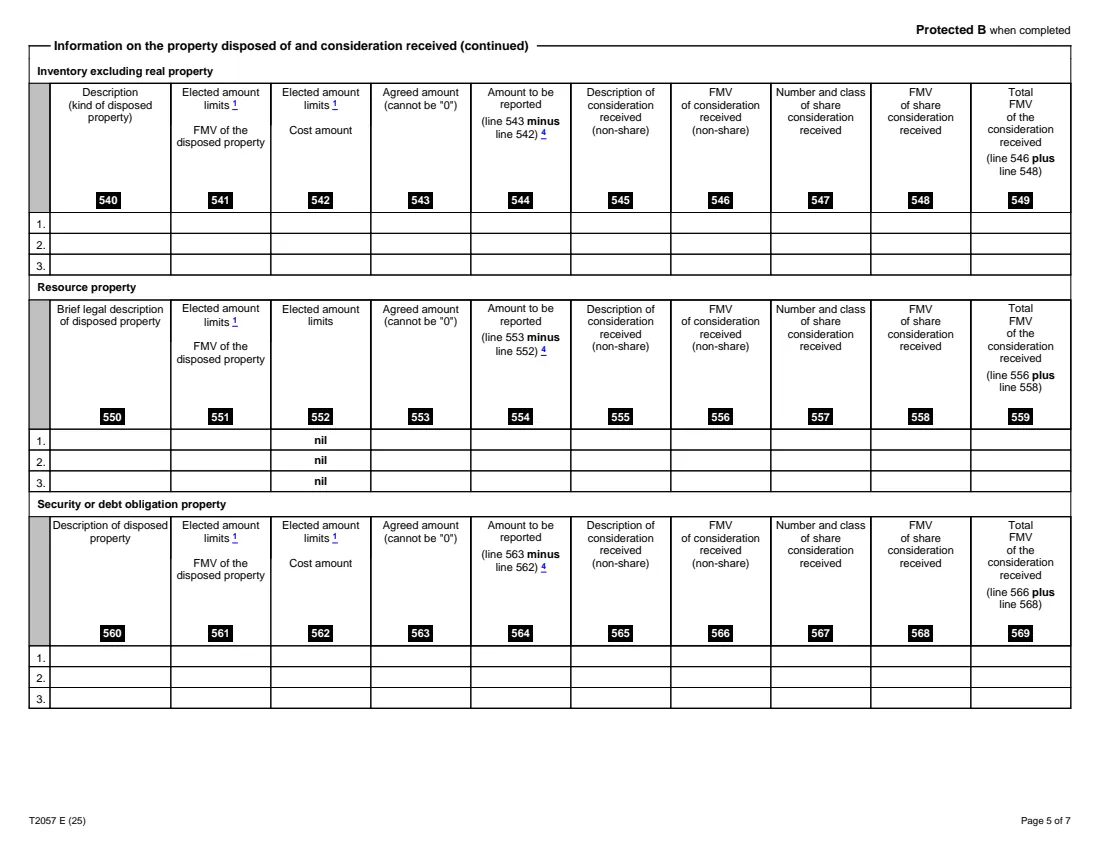
- Schedule A – Information on the property disposed of and consideration receivedTransferor (taxpayer)
- Schedule A – Capital property (other than shares and depreciable property)Transferor (taxpayer)
- Schedule A – Capital property (shares only)Transferor (taxpayer)
- Schedule A – Depreciable propertyTransferor (taxpayer)
- Schedule A – Inventory excluding real propertyTransferor (taxpayer)
- Schedule A – Resource propertyTransferor (taxpayer)
- Schedule A – Security or debt obligation propertyTransferor (taxpayer)
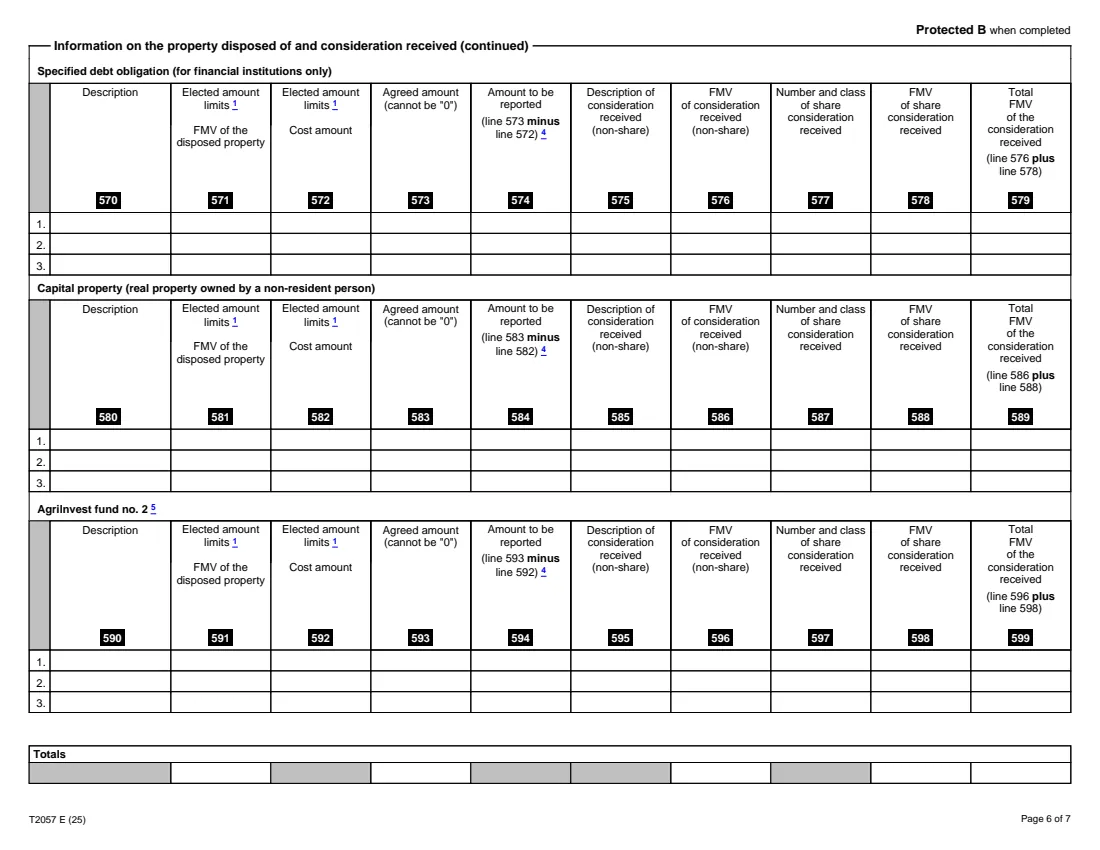
- Schedule A – Specified debt obligation (for financial institutions only)Transferor (taxpayer)
- Schedule A – Capital property (real property owned by a non-resident person)Transferor (taxpayer)
- Schedule A – AgriInvest fund no. 2Transferor (taxpayer)
- Schedule A – TotalsTransferor (taxpayer)
- Part 2 – Penalty for late-filed and amended electionsTransferor (taxpayer)
- Part 5 – Election and certification: transferorTransferor (taxpayer)
- Part 5 – Election and certification: transfereeTransferee (corporation)
How to fill out Form T2057, step by step
1 Part 1 – Identification
Tick "Amended election" if this replaces an election already filed. Answer whether the transferor or their spouse is self-employed and whether the transferor is a non-resident (with their TIN if so). Then give the transferor's and the corporation's names, numbers, addresses and tax years, a contact person, and any co-owners.
2 Part 3 – Information required
Answer the seven questions (Yes, No or N/A), for example whether there's a written agreement, a valuation report or a price adjustment clause. If shares of a private corporation are among the properties, list that corporation, its business number and its paid-up capital. Keep the supporting material, such as cost base calculations and how the values were set, in case the CRA asks.
3 Part 4 – Shares received
Describe the shares the transferor received: how many, which class, the redemption value per share, the paid-up capital, whether they vote, and whether the holder can redeem them.
4 Schedule A
Enter the date of the transfer, then each property under its kind with its fair market value, cost and agreed amount. The agreed amount can't be 0. Put the consideration received opposite the property. FileIt works out the amount to be reported (agreed amount minus cost) and the total consideration, and the totals row. If the amount to be reported is more than 0, it is reported as a capital gain or as income.
5 Part 2 – Late or amended elections
Enter the number of months (each month or part of a month from the due date to the date filed). FileIt works out 2A (total fair market value minus total agreed amounts), 2B (¼ of 1% of 2A per month) and 2C ($100 per month, at most $8,000), and line 320 as the lesser. Pay that estimate when you file.
6 Part 5 – Election and certification
The transferor (or an authorized officer or person) and an authorized officer of the corporation print their names and titles and sign and date the election by hand.
Common mistakes to avoid
- Entering 0 as the agreed amount. The form says it can't be 0.
- Electing an agreed amount above the property's fair market value.
- Leaving out the share consideration. The election requires shares of the corporation as consideration.
- Listing properties transferred on different dates on one form instead of one form per date.
- Filing late without the estimated penalty, or leaving questions unanswered. The form warns that an incomplete election may be considered invalid.
- Mailing the election with a return instead of separately.
After you fill it out
Print the PDF from your FileIt vault. The transferor and the corporation's authorized officer sign and date Part 5 by hand.
File it through canada.ca/cra-special-elections-and-returns, or mail one copy with any related documents to the transferor's tax centre, separately from any other return, by the due date. Co-owners' elections go together to the transferee's tax centre.
If late, pay the estimated penalty (line 320) with it, to the Receiver General. Write "T2057", the transferor's name, account number and tax year-end on the back of the cheque.
Keep the valuations, cost base calculations and agreements in case the CRA asks to see them.
Fill out Form T2057 online with FileIt
- Pick the person. Choose someone from People and FileIt fills in their name, date of birth, address and other details it already knows.
- Answer plain-language questions. One part of the form at a time, with the official help text beside each question — 378 fields in all. Your answers save as you go.
- Check the live preview. Watch your answers land on the real Canada Revenue Agency (CRA) form, and let FileIt do any worksheet arithmetic.
- Generate the official PDF. FileIt prints your answers into the agency’s own PDF and files it in that person’s folder in your vault.
FileIt fills the form — it never files or submits anything for you. Deliver the finished form to whoever asked for it, the way the form’s instructions say.
Start Form T2057 now — it’s freeForm T2057: frequently asked questions
What is a section 85 rollover?
Under subsection 85(1), a taxpayer and a taxable Canadian corporation can jointly elect an agreed amount for eligible property the taxpayer transfers to the corporation for shares. Form T2057 is how they make that election.
When is Form T2057 due?
The form says on or before the earliest date on which any party to the election has to file an income tax return for the tax year in which the transaction occurred.
What if it's late?
It can be filed within three years after the due date if an estimate of the penalty is paid with it. Part 2 calculates the penalty: the lesser of ¼ of 1% of the excess of fair market value over the agreed amount per month, and $100 per month up to $8,000.
Can I file it electronically?
Yes. The form says you can file it at canada.ca/cra-special-elections-and-returns, or mail one copy to the transferor's tax centre. FileIt prepares the official PDF but doesn't file it.
Can it be signed electronically in FileIt?
No. The CRA accepts electronic signatures only on the forms it lists, and T2057 isn't one, so the printed form is signed by hand.
Official sources
- Blank form (PDF), published by Canada Revenue Agency (CRA): https://www.canada.ca/content/dam/cra-arc/formspubs/pbg/t2057/t2057-fill-25e.pdf
- Official instructions and guidance: https://www.canada.ca/en/revenue-agency/services/forms-publications/forms/t2057.html
- Edition shown on this page: T2057 E (25) (checked 2026-10-25).
FileIt is not affiliated with or endorsed by Canada Revenue Agency (CRA) or any government. This page explains the form in general terms and is not legal, tax or immigration advice. Always read the official instructions, and check that you are using the edition the recipient accepts. Page last reviewed 2026-10-25.