
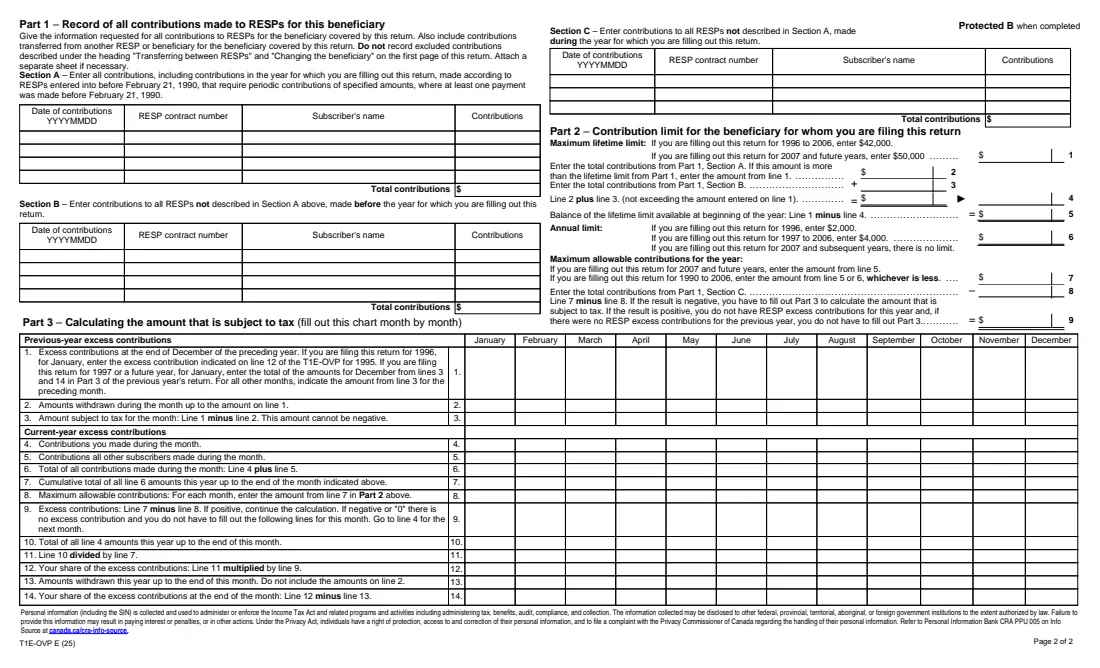
What is Form T1E-OVP?
Form T1E-OVP, Individual Tax Return for RESP Excess Contributions, is the Canada Revenue Agency (CRA) return for registered education savings plan (RESP) subscribers. An excess contribution exists when the total contributed for a beneficiary, by all subscribers to all RESPs, is more than the lifetime limit, which is $50,000 for 2007 and later years. Each subscriber owes a 1% per-month tax on their share of the excess at the end of each month it isn't withdrawn.
The return lists every RESP for the beneficiary (Area 2), every contribution in three sections by when and how it was made (Part 1), the limit left at the start of the year (Part 2) and then, month by month, the excess and your share of it (Part 3). Area 3 adds up the amounts subject to tax and applies the 1% rate. Government grants such as the Canada Education Savings Grant don't count toward the limit.
FileIt does the running totals, the ratio of your contributions to everyone's and the month-by-month excess, and prints it all into the CRA's own fillable T1E-OVP PDF (edition T1E-OVP E (25)). The finished return is saved in your vault. FileIt doesn't send it or pay the tax: you mail the return with your payment.
- Who files
- Each RESP subscriber who contributed to an over-contribution for a beneficiary, one return per beneficiary per year
- Lifetime limit
- $50,000 per beneficiary for 2007 and later years; no annual limit
- Tax
- 1% per month on your share of the excess at each month-end
- Due
- Within 90 days after the end of the year the excess existed
- Signature
- The subscriber signs by hand
- Edition
- T1E-OVP E (25), landscape, 2 pages
Who needs to fill out Form T1E-OVP?
- Parents or grandparents who, between them, put more than $50,000 into RESPs for the same child.
- Subscribers of a family plan where transfers or a change of beneficiary pushed one beneficiary over the limit.
- A subscriber who still had excess contributions left at the end of last year.
- Each of several subscribers whose combined contributions created the excess. Each files their own return for their own share.
When to use Form T1E-OVP
- For each year in which there were excess RESP contributions for a beneficiary at the end of any month.
- Within 90 days after the end of that year, with your payment.
- When excess contributions from an earlier year haven't all been withdrawn yet.
What you need before you start
- The year the return is for (2007 or later in FileIt).
- Your and the beneficiary's names, SINs and addresses.
- Every RESP for the beneficiary: plan name, contract number, subscriber and subscriber's SIN.
- Every contribution, with its date, contract number, subscriber and amount, sorted into Sections A, B and C.
- Each month's contributions by you and by other subscribers this year, and any withdrawals.
- Last year's T1E-OVP, if there was excess left at the end of December.
What’s on Form T1E-OVP
The 2025 edition has 2 pages. FileIt asks for it in 7 parts:
- Area 1 – IdentificationEmployee
- Area 2 – All RESPs and their subscribers for this beneficiaryEmployee
- Part 1 – Contributions made to RESPs for this beneficiaryEmployee
- Part 2 – Contribution limitEmployee
- Part 3 – Amount subject to tax, month by monthEmployee
- Area 3 – The 1% per-month taxEmployee
- Area 4 – CertificationEmployee
How to fill out Form T1E-OVP, step by step
1 Areas 1 and 2 – Who and which plans
Give your details and the beneficiary's, then list all RESPs for that beneficiary and their subscribers, including plans that aren't yours.
2 Part 1 – All contributions
Section A is for pre-1990 periodic plans, Section B for all other contributions made before this year, and Section C for contributions made this year. Include contributions transferred from another RESP or beneficiary, but leave out the excluded transfers described on page 1. FileIt totals each section.
3 Part 2 – The limit left
FileIt starts from the $50,000 lifetime limit, takes off the earlier contributions (Sections A and B) and compares what's left with this year's contributions (Section C). If line 9 is negative, there are excess contributions this year and Part 3 applies.
4 Part 3 – Month by month
For January, enter last year's excess still unwithdrawn. For each month, enter what was withdrawn against it, your contributions and other subscribers' contributions, and any current-year excess you withdrew. FileIt runs the cumulative totals, works out the excess for each month, your share (your contributions divided by everyone's) and what's left after withdrawals.
5 Areas 3 and 4 – Tax and certification
FileIt adds the monthly amounts subject to tax, applies 1% and shows the balance owing. Enter your phone number and date, then sign by hand.
Common mistakes to avoid
- Leaving out contributions made by other subscribers for the same beneficiary.
- Counting government grants (CESG, CLB or provincial programs) as contributions.
- Withdrawing current-year excess before last year's. Prior-year excess has to be withdrawn first.
- Assuming a withdrawal reduces the contributions counted toward the lifetime limit. It reduces the amount subject to tax only.
- Filing one return for several beneficiaries. You need one per beneficiary.
After you fill it out
Sign Area 4 and mail the return with your payment to the CRA's Registered Plans Directorate, 2215 Gladwin Cres, Ottawa ON K1B 4K9.
Pay within 90 days after the end of the year: arrears interest is charged on any unpaid amount after that. The CRA doesn't charge $2 or less.
Withdraw the excess from the RESP to stop the 1% tax building up, and keep this year's return for next year's January line 1. FileIt saves it in your vault.
The CRA can waive or cancel the tax in some cases. Guide RC4092 explains how to ask.
Fill out Form T1E-OVP online with FileIt
- Pick the person. Choose someone from People and FileIt fills in their name, date of birth, address and other details it already knows.
- Answer plain-language questions. One part of the form at a time, with the official help text beside each question — 267 fields in all. Your answers save as you go.
- Check the live preview. Watch your answers land on the real Canada Revenue Agency (CRA) form, and let FileIt do any worksheet arithmetic.
- Generate the official PDF. FileIt prints your answers into the agency’s own PDF and files it in that person’s folder in your vault.
FileIt fills the form — it never files or submits anything for you. Deliver the finished form to whoever asked for it, the way the form’s instructions say.
Start Form T1E-OVP now — it’s freeForm T1E-OVP: frequently asked questions
What is the RESP contribution limit?
For 2007 and later years there's no annual limit and the lifetime limit is $50,000 per beneficiary, counting all subscribers and all RESPs.
How much is the tax on RESP excess contributions?
1% per month on each subscriber's share of the excess contributions at the end of each month they aren't withdrawn.
Can I fill out Form T1E-OVP online?
Yes. FileIt totals the contributions, works out Part 2 and the month-by-month chart in Part 3, and prints the results into the CRA's fillable T1E-OVP PDF.
My spouse and I both contributed. Who files?
Each subscriber is liable for their own share of the tax, so each files their own T1E-OVP for the beneficiary.
Does FileIt handle years before 2007?
No. The 1996 to 2006 limits were different ($2,000 or $4,000 a year and $42,000 lifetime). FileIt fills the return for 2007 and later years.
Can I get the tax cancelled?
The CRA may waive or cancel all or part of it. See 'Waiver of liability' in Guide RC4092, as page 1 of the return suggests.
Official sources
- Blank form (PDF), published by Canada Revenue Agency (CRA): https://www.canada.ca/content/dam/cra-arc/formspubs/pbg/t1e-ovp/t1e-ovp-fill-25e.pdf
- Official instructions and guidance: https://www.canada.ca/en/revenue-agency/services/forms-publications/forms/t1e-ovp.html
- Edition shown on this page: T1E-OVP E (25) (checked 2026-10-19).
FileIt is not affiliated with or endorsed by Canada Revenue Agency (CRA) or any government. This page explains the form in general terms and is not legal, tax or immigration advice. Always read the official instructions, and check that you are using the edition the recipient accepts. Page last reviewed 2026-10-19.