What is T1-ADJ?
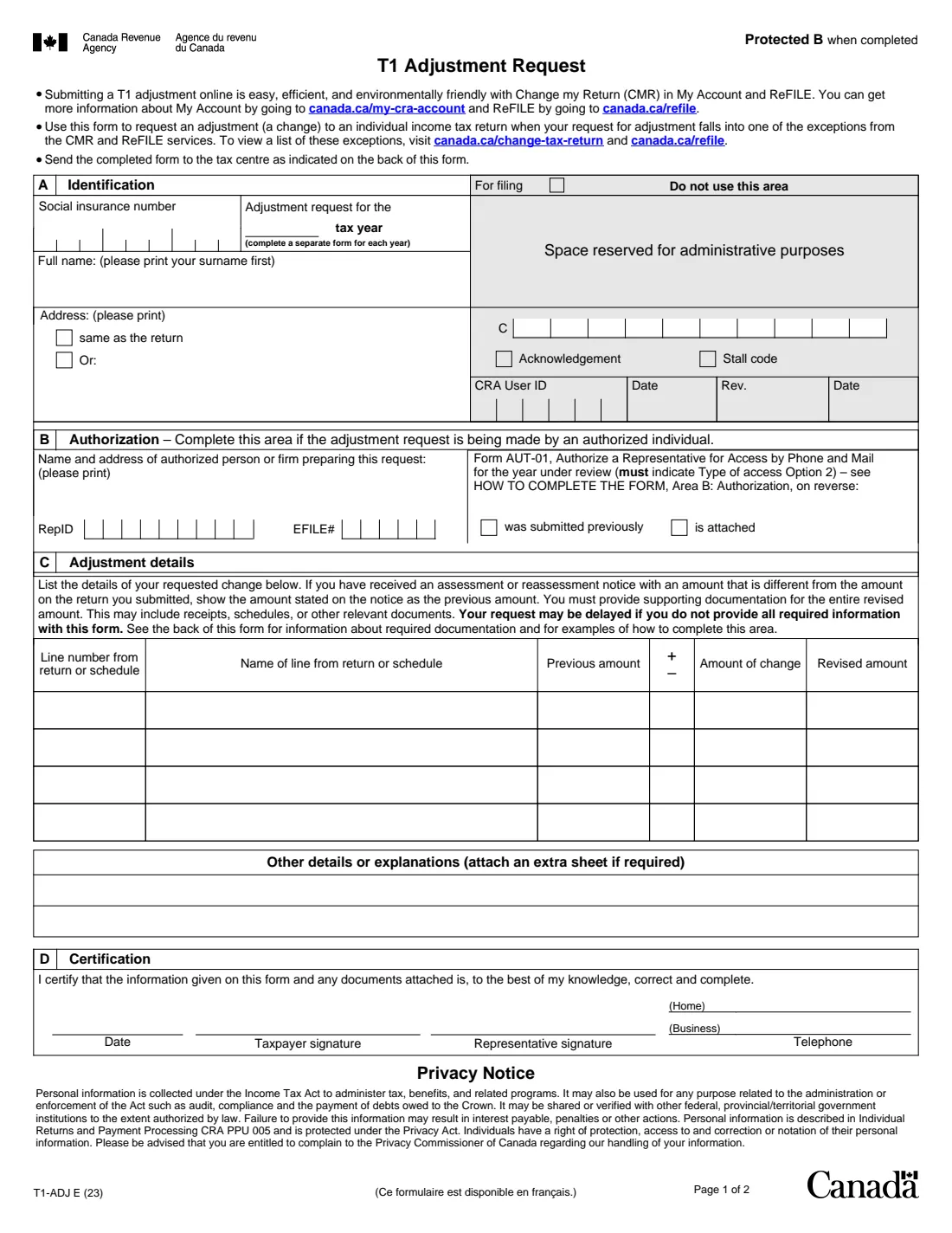
T1-ADJ, T1 Adjustment Request, is the Canada Revenue Agency (CRA) paper form for changing an individual income tax and benefit return after you have received its notice of assessment. The current edition is T1-ADJ E (23); a French version is available under the same number.
The form itself points you first to Change my return in My Account, or to ReFILE through your tax software or preparer. The paper form is for requests that fall into one of the exceptions those online services don't handle. You use one form per tax year, list each line you want changed with its previous amount, the change and the revised amount, and send supporting documents for the whole revised amount.
FileIt fills in T1-ADJ from a guided web form, works out each revised amount, and prints your answers on the CRA's own PDF. Your name can come from your People record in the vault, and the finished PDF is filed there. FileIt never sends anything to the CRA: you sign the form by hand and mail it yourself.
- Who fills it
- An individual (or their authorized representative) changing a filed T1 return
- Given to
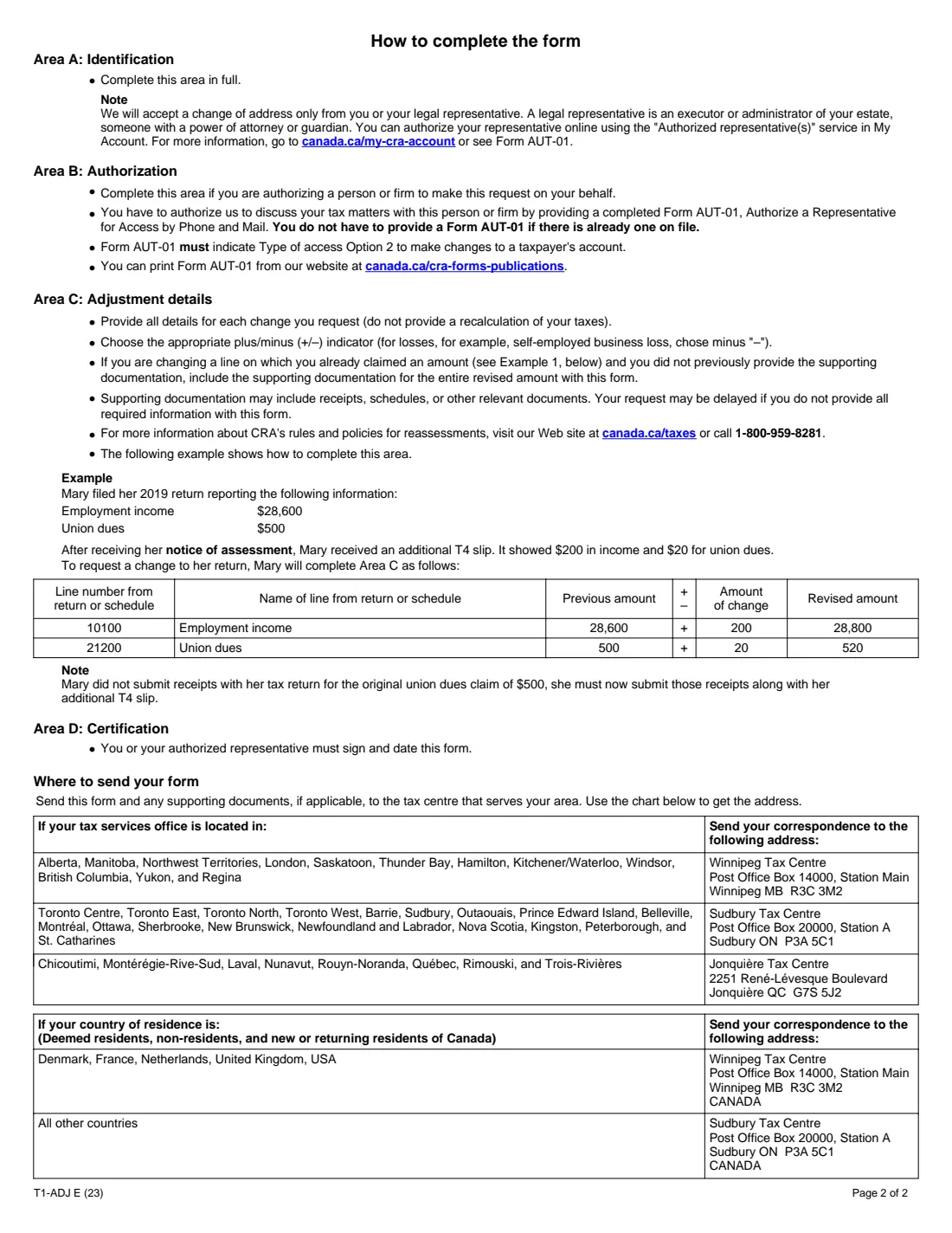
- The CRA tax centre listed for your area on page 2 (Winnipeg, Sudbury or Jonquière), by mail
- When
- After you receive the notice of assessment for the year; one form per tax year
- Signatures
- Signed and dated by hand by you or your representative
- Edition
- T1-ADJ E (23)
Who needs to fill out T1-ADJ?
- Individuals who need to correct an income tax and benefit return that the CRA has already assessed, such as a T4 slip that arrived after filing or a deduction left out.
- People whose change can't be made through Change my return in My Account or through ReFILE.
- Tax preparers and other representatives making the request for a client, with Form AUT-01 (Type of access Option 2) on file or attached.
When to use T1-ADJ
- After you have received the notice of assessment for the return you want changed.
- When you received an additional or amended slip, or found an error or omission on a filed return.
- Use a separate form for each tax year you want changed.
What you need before you start
- Your social insurance number, the tax year, and your address if it differs from the one on the return.
- Your notice of assessment or reassessment, so the previous amounts match what the CRA has on file.
- The line numbers and names for each line you want changed, with the previous amount, the amount of the change and whether it is an increase or a decrease.
- Supporting documents for the entire revised amount: slips, receipts, schedules or other relevant documents.
- If a representative is making the request: their name and address, their RepID or EFILE number if they have one, and Form AUT-01 with Type of access Option 2.
What’s on T1-ADJ
The 2023 edition has 2 pages. FileIt asks for it in 4 parts:
- Area A – IdentificationTaxpayer
- Area B – AuthorizationRepresentative
- Area C – Adjustment detailsTaxpayer
- Area D – CertificationTaxpayer
How to fill out T1-ADJ, step by step
1 Area A – Identification
Your SIN, the tax year the request is for, and your full name with your surname first. Tick 'same as the return' or give your new address; the CRA accepts a change of address only from you or your legal representative.
2 Area B – Authorization
Only if a person or firm is making the request for you: their name and address, RepID or EFILE number, and whether Form AUT-01 with Type of access Option 2 was submitted previously or is attached.
3 Area C – Adjustment details
One row per line: the line number, the name of the line, the previous amount (the amount on your notice of assessment if it differs from your return), plus or minus, the amount of change and the revised amount. Explain anything else in the box below and attach a sheet if you need more room. FileIt calculates each revised amount.
4 Area D – Certification
Sign and date the form, as the taxpayer or as the representative, and give a home and business telephone number.
Common mistakes to avoid
- Sending a recalculation of your tax instead of the details of each line you want changed.
- Using the amount from your return as the previous amount when your notice of assessment shows a different one.
- Leaving out supporting documents for the entire revised amount, including receipts for an amount already claimed that you didn't send before.
- Putting more than one tax year on one form.
- Choosing plus for a loss: the instructions say to choose minus for losses such as a self-employed business loss.
- A representative filing without Form AUT-01 showing Type of access Option 2 on file or attached.
After you fill it out
Print the PDF, sign and date Area D by hand, and mail it with your supporting documents to the tax centre for your area, using the chart on page 2. FileIt doesn't mail it for you.
Keep a copy of the form and of everything you sent.
The CRA reviews the request and sends you a notice of reassessment or a letter explaining its decision.
Fill out T1-ADJ online with FileIt
- Pick the person. Choose someone from People and FileIt fills in their name, date of birth, address and other details it already knows.
- Answer plain-language questions. One part of the form at a time, with the official help text beside each question — 41 fields in all. Your answers save as you go.
- Check the live preview. Watch your answers land on the real Canada Revenue Agency (CRA) form, and let FileIt do any worksheet arithmetic.
- Generate the official PDF. FileIt prints your answers into the agency’s own PDF and files it in that person’s folder in your vault.
FileIt fills the form — it never files or submits anything for you. Deliver the finished form to whoever asked for it, the way the form’s instructions say.
Start T1-ADJ now — it’s freeT1-ADJ: frequently asked questions
Can I change my return online instead?
Usually, yes. The form itself recommends Change my return in My Account or ReFILE, and says to use the paper T1-ADJ when your request falls into one of the exceptions those services don't accept.
Do I need a separate T1-ADJ for each year?
Yes. The form asks for one tax year and says to complete a separate form for each year.
What is the 'previous amount'?
The amount the CRA has for that line. If your notice of assessment or reassessment shows a different amount from your return, use the amount on the notice.
Where do I send T1-ADJ?
To the tax centre for your area, using the chart on page 2 of the form: Winnipeg, Sudbury or Jonquière. Non-residents and deemed residents use Winnipeg or Sudbury depending on their country.
Can my accountant send it for me?
Yes. They fill in Area B and can sign as your representative, but the CRA needs Form AUT-01 with Type of access Option 2, sent previously or attached.
Can I sign T1-ADJ electronically?
No. T1-ADJ is not on the CRA's list of forms that accept an electronic signature, so print it and sign by hand.
Official sources
- Blank form (PDF), published by Canada Revenue Agency (CRA): https://www.canada.ca/content/dam/cra-arc/formspubs/pbg/t1-adj/t1-adj-fill-23e.pdf
- Official instructions and guidance: https://www.canada.ca/en/revenue-agency/services/forms-publications/forms/t1-adj.html
- Edition shown on this page: T1-ADJ E (23) (checked 2026-10-01).
FileIt is not affiliated with or endorsed by Canada Revenue Agency (CRA) or any government. This page explains the form in general terms and is not legal, tax or immigration advice. Always read the official instructions, and check that you are using the edition the recipient accepts. Page last reviewed 2026-10-01.