What is Form T1A?
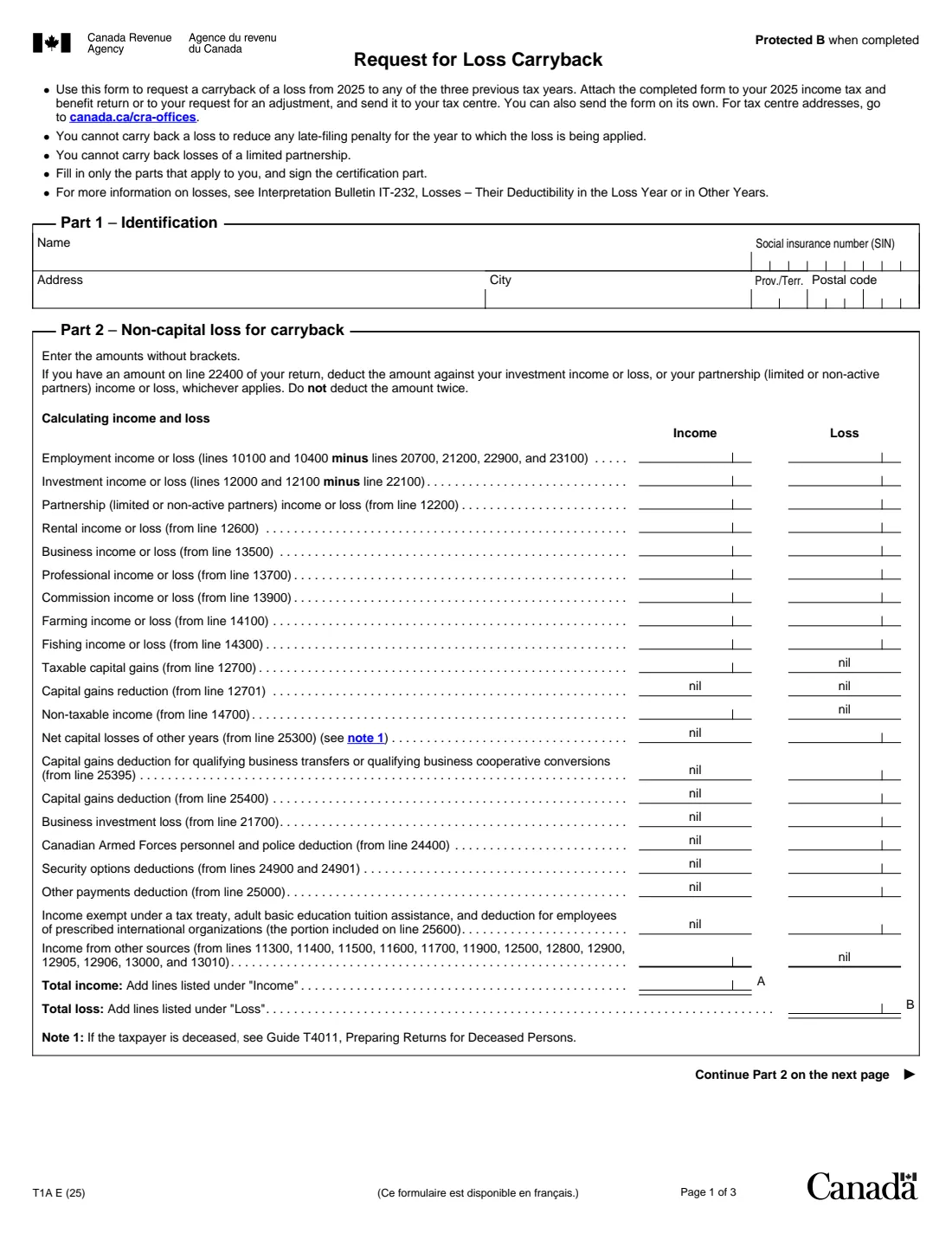
Form T1A, Request for Loss Carryback, is how an individual asks the Canada Revenue Agency (CRA) to carry a loss from 2025 back to 2022, 2023 or 2024. If your business, rental or other activity lost money this year, applying the loss to an earlier year lowers that year's taxable income, and the CRA reassesses the return.
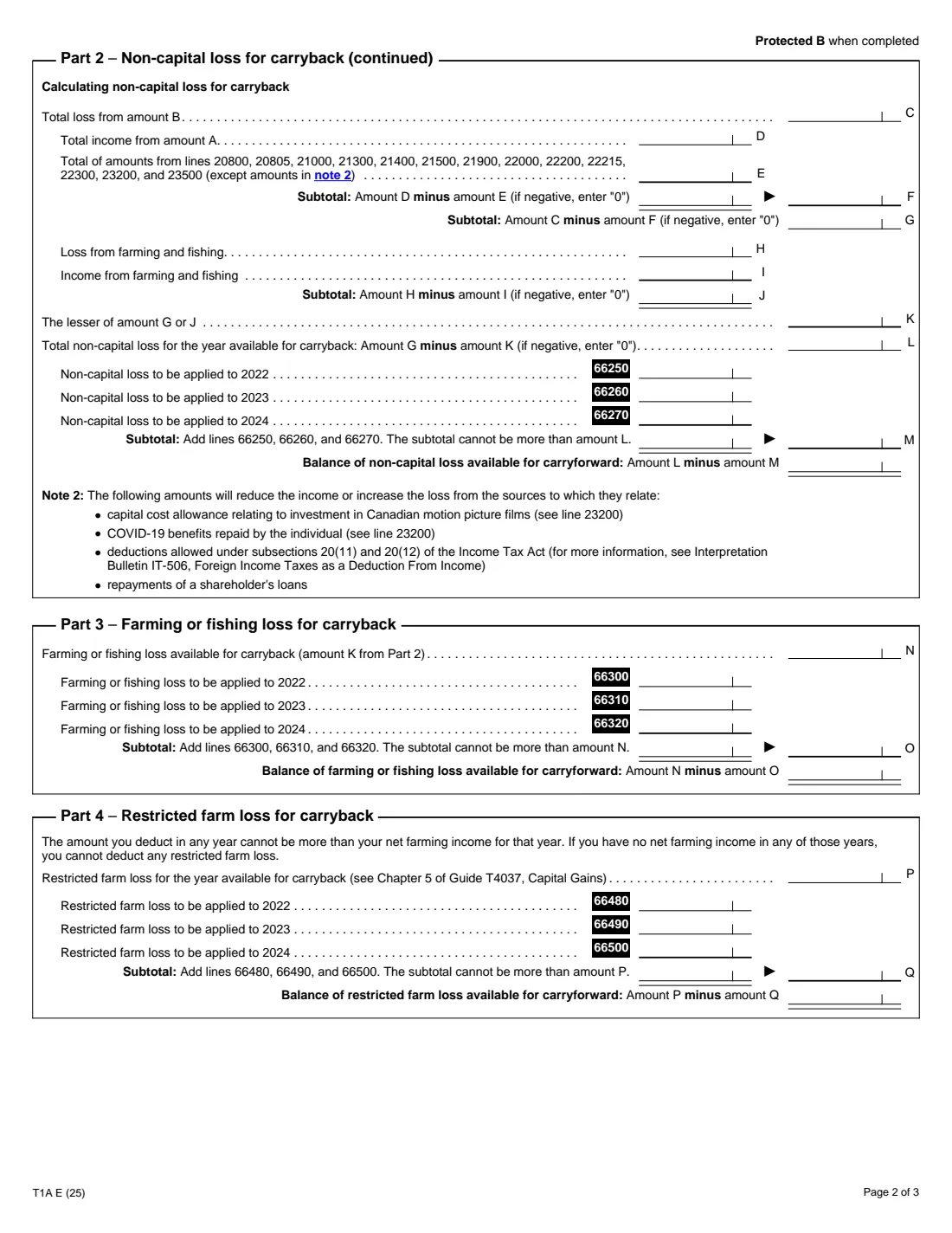
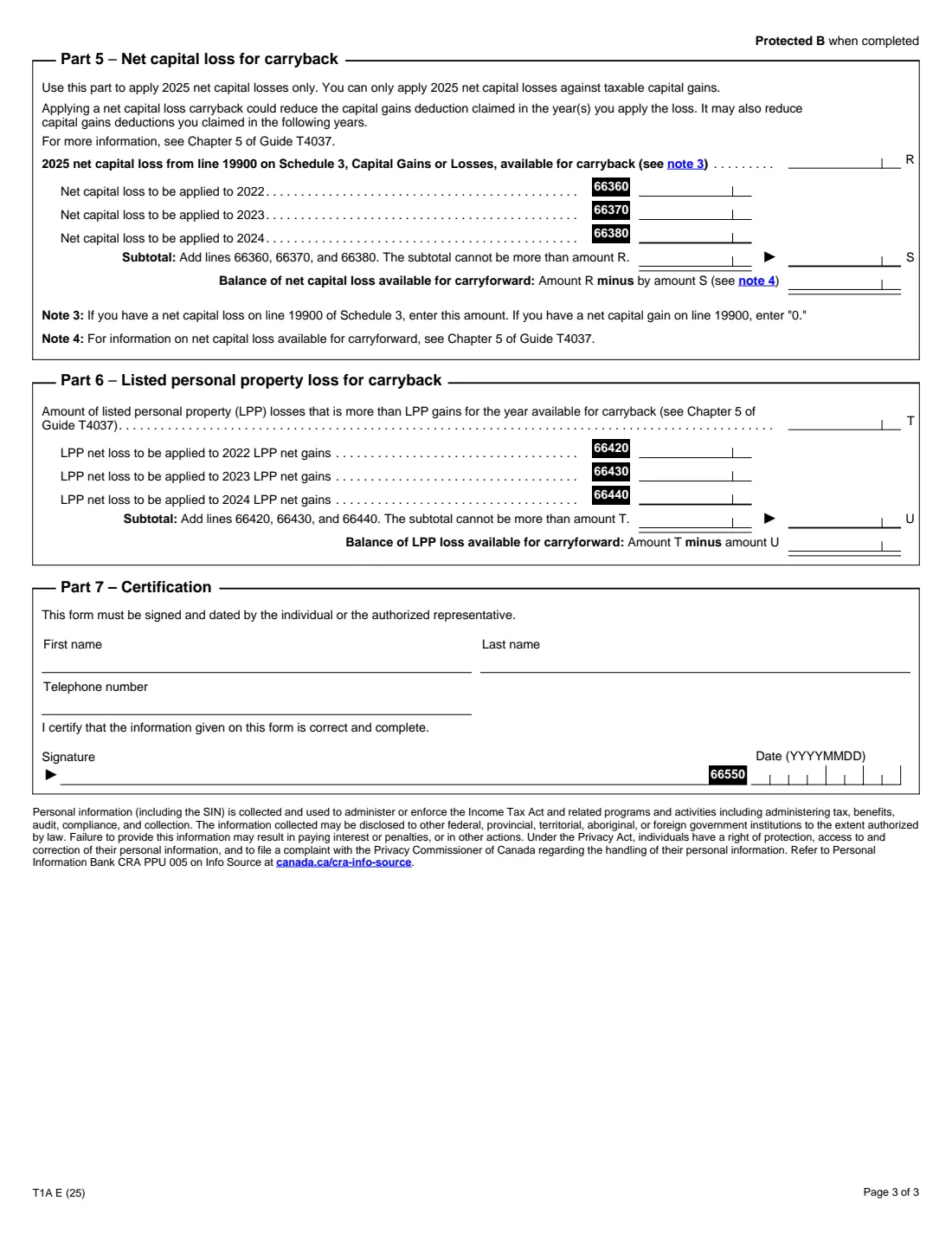
Part 2 works out your non-capital loss: income and loss from each source, the deductions the form lists, then the share that comes from farming or fishing. Parts 3 to 6 handle the other kinds of loss you can carry back: farming or fishing losses, restricted farm losses, 2025 net capital losses (against taxable capital gains only) and listed personal property losses (against LPP gains only). Each part shows what's left to carry forward.
FileIt asks for each amount, adds up the columns, works out amounts A to M and the subtotals in Parts 3 to 6, and checks that you don't apply more than is available. Your answers are printed into the CRA's own fillable T1A PDF (edition T1A E (25)) and saved in your vault. You sign the form yourself; FileIt doesn't send it.
- Who fills it
- Individuals with a 2025 loss they want to apply to 2022, 2023 or 2024
- Carryback years
- Up to three previous years: 2022, 2023 and 2024
- Kinds of loss
- Non-capital, farming or fishing, restricted farm, net capital, listed personal property
- Signature
- Signed and dated by the individual or an authorized representative (by hand)
- Pages
- 3
- Edition
- T1A E (25)
Who needs to fill out Form T1A?
- Self-employed people whose business or professional activity lost money in 2025 after a profitable earlier year.
- Landlords with a rental loss they want to apply against income from an earlier year.
- Farmers and fishers with a 2025 farming or fishing loss.
- Investors with a 2025 net capital loss and taxable capital gains in one of the three years before.
- Collectors with a listed personal property loss and LPP gains in earlier years.
When to use Form T1A
- With your 2025 return, or later with a request to adjust it.
- On its own, sent to your tax centre, if your 2025 return is already filed.
- When you decide after filing that you want to carry the loss back: the form can go with a request for an adjustment.
What you need before you start
- Your 2025 income tax and benefit return, for the income and deduction lines Part 2 lists.
- The amounts on lines 20800 to 23500 that make up amount E.
- Your 2025 net capital loss from line 19900 of Schedule 3, if you carry it back.
- Your restricted farm loss and listed personal property loss figures, if they apply (Guide T4037).
- How much of each loss you want to apply to each of 2022, 2023 and 2024.
What’s on Form T1A
The 2025 edition has 3 pages. FileIt asks for it in 8 parts:
- Part 1 – IdentificationEmployee
- Part 2 – Income and loss by sourceEmployee
- Part 2 – Non-capital loss for carrybackEmployee
- Part 3 – Farming or fishing lossEmployee
- Part 4 – Restricted farm lossEmployee
- Part 5 – Net capital lossEmployee
- Part 6 – Listed personal property lossEmployee
- Part 7 – CertificationEmployee
How to fill out Form T1A, step by step
1 Part 1 – Identification
Your name, SIN and address. The CRA uses them to find the earlier returns.
2 Part 2 – Income and loss by source
For each source (employment, investment, partnership, rental, business, professional, commission, farming and fishing) enter the result as either income or loss, without brackets. Add taxable capital gains, non-taxable income and other income, and the deductions that only go in the loss column, such as net capital losses of other years and the capital gains deduction. FileIt totals the two columns (amounts A and B).
3 Part 2 – Non-capital loss
Enter amount E, the listed deductions from your return. FileIt works out F (income after those deductions), G (the loss left), the farming and fishing part (H to K) and L, the non-capital loss you can carry back. Then split it across lines 66250, 66260 and 66270 for 2022 to 2024. Whatever isn't applied is the balance to carry forward.
4 Parts 3 to 6 – Other losses
Switch on only the parts that apply. Part 3 starts from amount K. Parts 4, 5 and 6 start from the restricted farm loss, the 2025 net capital loss and the LPP loss you enter. For each, enter what to apply to each year; FileIt adds them up and shows the carryforward.
5 Part 7 – Certification
The individual or authorized representative gives their name and phone number, and signs and dates the form by hand.
Common mistakes to avoid
- Entering a source as both income and loss.
- Deducting a line 22400 amount twice. The form says to take it once from investment or partnership income or loss.
- Applying more than the loss available (amounts L, N, P, R or T).
- Applying a net capital loss against anything other than taxable capital gains.
- Trying to reduce a late-filing penalty with a carryback, which the form doesn't allow.
- Carrying back losses of a limited partnership, which isn't allowed.
After you fill it out
Sign and date Part 7. The T1A isn't on the CRA's list of forms that accept electronic signatures, so sign the printed copy.
Attach it to your 2025 return or your adjustment request, or send it on its own to your tax centre (canada.ca/cra-offices).
Keep the filled PDF. FileIt saves it in your vault, and the balances to carry forward will be useful next year.
Fill out Form T1A online with FileIt
- Pick the person. Choose someone from People and FileIt fills in their name, date of birth, address and other details it already knows.
- Answer plain-language questions. One part of the form at a time, with the official help text beside each question — 86 fields in all. Your answers save as you go.
- Check the live preview. Watch your answers land on the real Canada Revenue Agency (CRA) form, and let FileIt do any worksheet arithmetic.
- Generate the official PDF. FileIt prints your answers into the agency’s own PDF and files it in that person’s folder in your vault.
FileIt fills the form — it never files or submits anything for you. Deliver the finished form to whoever asked for it, the way the form’s instructions say.
Start Form T1A now — it’s freeForm T1A: frequently asked questions
What does Form T1A do?
It asks the CRA to apply a 2025 loss to your 2022, 2023 or 2024 return. That year's taxable income goes down and the CRA reassesses the return.
Can I fill out Form T1A online?
Yes. FileIt works out the non-capital loss and the subtotals in every part, checks the limits, and prints your answers into the CRA's fillable T1A PDF for you to sign.
Which years can I carry a 2025 loss back to?
Any of the three previous years: 2022, 2023 and 2024. You choose how much goes to each.
Can I carry back a capital loss?
A 2025 net capital loss can be carried back (Part 5), but only against taxable capital gains in those years. It can also reduce the capital gains deduction claimed in those or later years.
What happens to the part I don't carry back?
The form shows it as the balance available to carry forward to future years.
Do I need to file it with my return?
You can attach it to your 2025 return, include it with a request for an adjustment, or send it on its own to your tax centre.
Official sources
- Blank form (PDF), published by Canada Revenue Agency (CRA): https://www.canada.ca/content/dam/cra-arc/formspubs/pbg/t1a/t1a-fill-25e.pdf
- Official instructions and guidance: https://www.canada.ca/en/revenue-agency/services/forms-publications/forms/t1a.html
- Edition shown on this page: T1A E (25) (checked 2026-10-19).
FileIt is not affiliated with or endorsed by Canada Revenue Agency (CRA) or any government. This page explains the form in general terms and is not legal, tax or immigration advice. Always read the official instructions, and check that you are using the edition the recipient accepts. Page last reviewed 2026-10-19.