What is T1157?
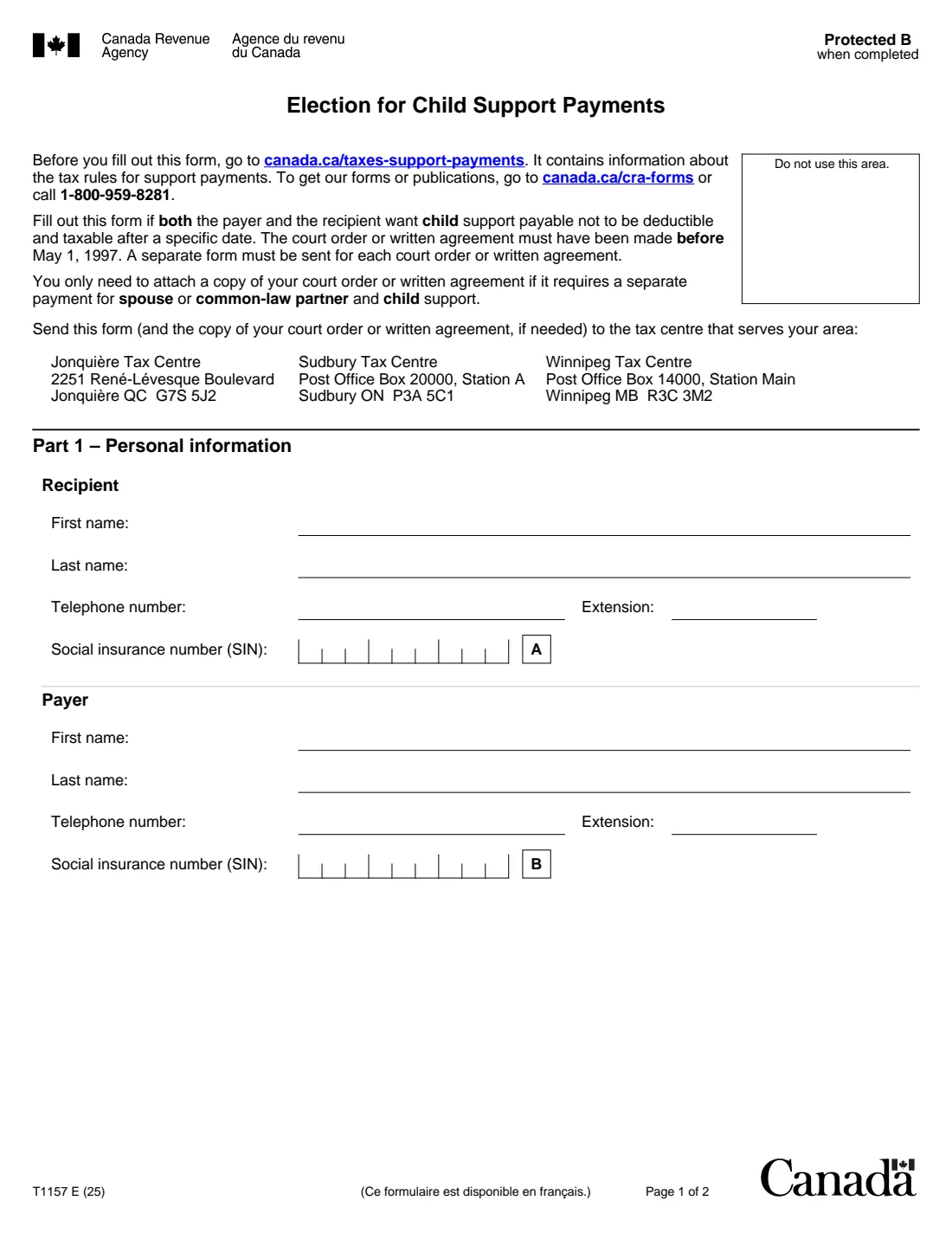
T1157, Election for Child Support Payments, is the Canada Revenue Agency (CRA) form a payer and a recipient sign together when both want child support to stop being deductible for the payer and taxable for the recipient after a specific date. It only applies to a court order or written agreement made before May 1, 1997. The current edition is T1157 E (25).
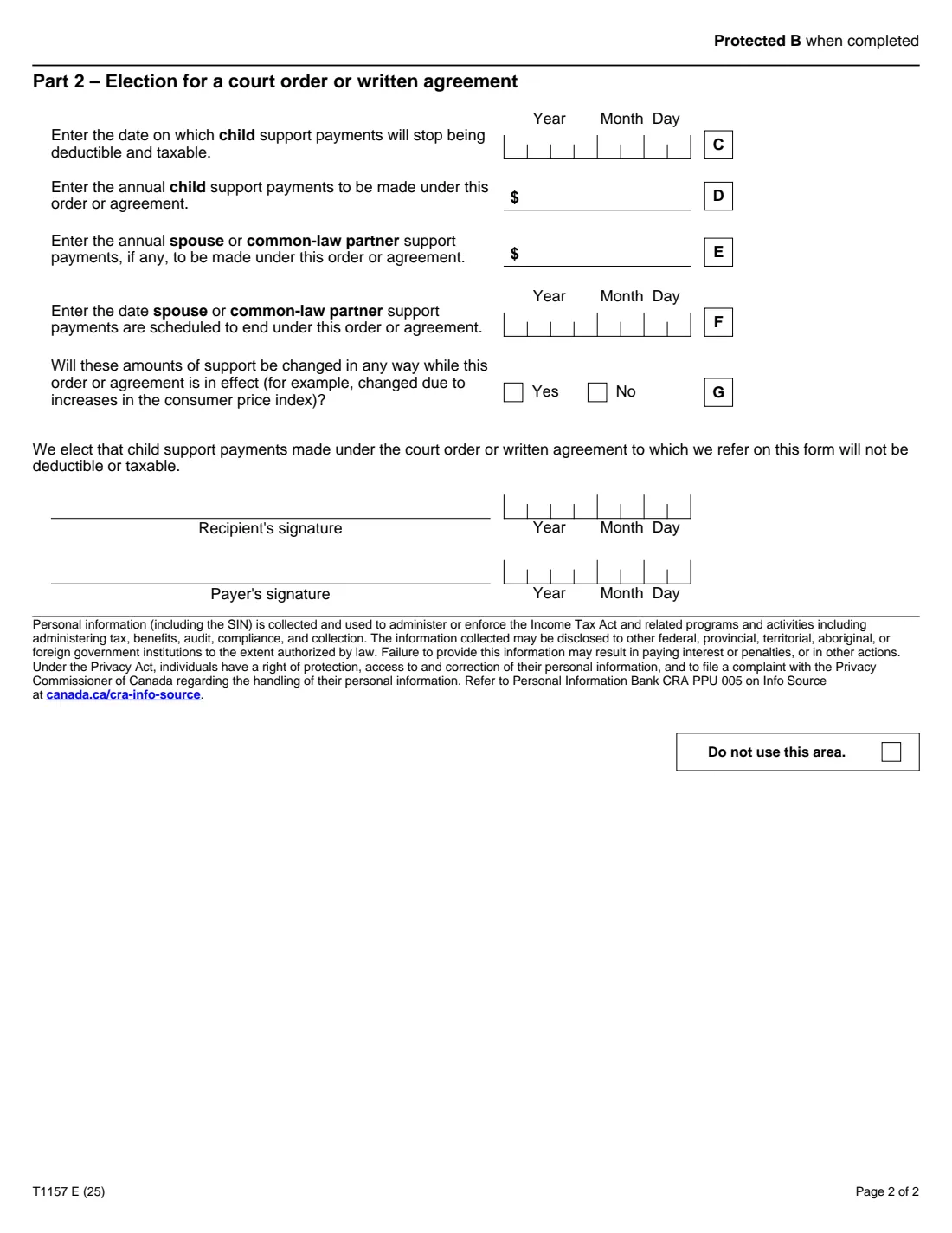
It records both people's details, the date the change takes effect, the annual child support, any spousal support and when it ends, and whether the amounts will change. A separate form is needed for each order or agreement, and a copy of the order or agreement is attached only if it requires separate payments for spousal and child support.
FileIt fills in T1157 from a guided web form and prints your answers on the CRA's own PDF, including the comb boxes for SINs and dates. The finished PDF is filed in your vault. FileIt never sends anything to the CRA: you both sign the form by hand and mail it.
- Who fills it
- The payer and the recipient of child support, together
- Given to
- The tax centre that serves your area (Jonquière, Sudbury or Winnipeg), by mail
- When
- When both of you choose a date after which child support under a pre-May 1997 order stops being deductible and taxable
- Signatures
- Signed and dated by hand by both the recipient and the payer
- Edition
- T1157 E (25)
Who needs to fill out T1157?
- Payers and recipients of child support under a court order or written agreement made before May 1, 1997, who both agree that the child support should no longer be deductible or taxable.
When to use T1157
- When you and the other party agree on a date from which the child support stops being deductible and taxable.
- Send a separate form for each court order or written agreement.
- If the order or agreement also specifies spousal support, it is registered with Form T1158 as well.
What you need before you start
- The recipient's and the payer's names, telephone numbers and social insurance numbers.
- The court order or written agreement made before May 1, 1997.
- The date the election takes effect, the annual child support, and any annual spousal support with its scheduled end date.
- A copy of the order or agreement, but only if it requires separate payments for spousal and child support.
What’s on T1157
The 2025 edition has 2 pages. FileIt asks for it in 3 parts:
- Part 1 – Personal informationRecipient
- Part 2 – ElectionRecipient
- SignaturesRecipient
How to fill out T1157, step by step
1 Part 1 – Personal information
Lines A and B: the recipient's and the payer's names, telephone numbers and SINs.
2 Part 2 – Election
Line C is the date child support stops being deductible and taxable; line D the annual child support; line E any annual spousal support; line F when spousal support is scheduled to end; line G whether the amounts will change while the order or agreement is in effect.
3 Signatures
Both the recipient and the payer sign and date the election.
Common mistakes to avoid
- Using T1157 for an order or agreement made on or after May 1, 1997.
- Only one of you signing; it is a joint election.
- Leaving out a copy of the order or agreement when it requires separate spousal and child support payments.
- Putting two orders or agreements on one form.
After you fill it out
Print the PDF, have both the recipient and the payer sign and date it by hand, and mail it to the tax centre that serves your area, listed on page 1. FileIt doesn't mail it for you.
If the order or agreement also has spousal support, register it with Form T1158.
Keep a copy with both of your tax records.
Fill out T1157 online with FileIt
- Pick the person. Choose someone from People and FileIt fills in their name, date of birth, address and other details it already knows.
- Answer plain-language questions. One part of the form at a time, with the official help text beside each question — 17 fields in all. Your answers save as you go.
- Check the live preview. Watch your answers land on the real Canada Revenue Agency (CRA) form, and let FileIt do any worksheet arithmetic.
- Generate the official PDF. FileIt prints your answers into the agency’s own PDF and files it in that person’s folder in your vault.
FileIt fills the form — it never files or submits anything for you. Deliver the finished form to whoever asked for it, the way the form’s instructions say.
Start T1157 now — it’s freeT1157: frequently asked questions
Who has to sign T1157?
Both the recipient and the payer. The election is made by both of you, and there is a signature line for each.
Does T1157 apply to a 2005 separation agreement?
No. The form is only for court orders or written agreements made before May 1, 1997.
Do I have to send my court order with T1157?
Only if it requires separate payments for spouse or common-law partner support and child support.
Can we sign T1157 electronically?
T1157 is not on the CRA's list of forms that accept an electronic signature, so print it and both sign by hand.
Official sources
- Blank form (PDF), published by Canada Revenue Agency (CRA): https://www.canada.ca/content/dam/cra-arc/formspubs/pbg/t1157/t1157-fill-25e.pdf
- Official instructions and guidance: https://www.canada.ca/en/revenue-agency/services/forms-publications/forms/t1157.html
- Edition shown on this page: T1157 E (25) (checked 2026-10-01).
FileIt is not affiliated with or endorsed by Canada Revenue Agency (CRA) or any government. This page explains the form in general terms and is not legal, tax or immigration advice. Always read the official instructions, and check that you are using the edition the recipient accepts. Page last reviewed 2026-10-01.