What is RC65?
RC65, Marital Status Change, is the Canada Revenue Agency (CRA) paper form for reporting a new marital status. The current edition is RC65 E (26); a French version is available under the same number. The form itself notes you can also make the change in My Account or by calling 1-800-387-1193.
Your marital status feeds into your child and family benefits and credits. When the CRA is told about the change, it recalculates them using your new status, your new adjusted family net income, the number and ages of the children in your care and your province or territory of residence. That includes the Canada child benefit and the Canada Groceries and Essentials Benefit (formerly the GST/HST credit), plus related provincial and territorial payments.
FileIt fills in RC65 from a guided web form and prints your answers on the CRA's own PDF, including the comb boxes for social insurance numbers and dates. Your name and date of birth can come from your People record in the vault, and the finished PDF is filed there. FileIt never sends anything to the CRA: you sign the form by hand and mail it yourself.
- Who fills it
- An individual whose marital status has changed
- Given to
- The CRA tax centre that serves your area (Winnipeg, Sudbury or Jonquière), by mail
- When
- By the end of the month after your status changes; for a separation, only after more than 90 consecutive days apart
- Signatures
- Signed and dated by hand
- Edition
- RC65 E (26)
Who needs to fill out RC65?
- People who got married or started living common-law.
- People who have been separated from a spouse or common-law partner for more than 90 consecutive days because the relationship broke down.
- People who were widowed or divorced, or whose status is now single.
- Parents receiving the Canada child benefit, and anyone getting the Canada Groceries and Essentials Benefit, whose payments depend on family income.
- Anyone who would rather use paper than My Account or the phone line to update their marital status.
When to use RC65
- By the end of the month after the month your marital status changed, so you get the amounts you are entitled to.
- For a separation, wait until you have been separated for more than 90 consecutive days — the form says not to report it earlier. The effective date is the day you started living apart.
- When your new status also changes how many children are in your care or starts a shared-custody arrangement, tell the CRA about that too.
- If you have moved from another province or territory in the last 12 months, the same form asks for that.
What you need before you start
- Your social insurance number (or temporary tax number), date of birth and phone numbers.
- Your mailing address, and your home address if it is different.
- If you moved from another province or territory in the last 12 months: which one, and the date you moved.
- The date your new status began.
- If you are now married or living common-law: your spouse's or partner's SIN (or TTN), name and date of birth, and their address if it is different from yours.
What’s on RC65
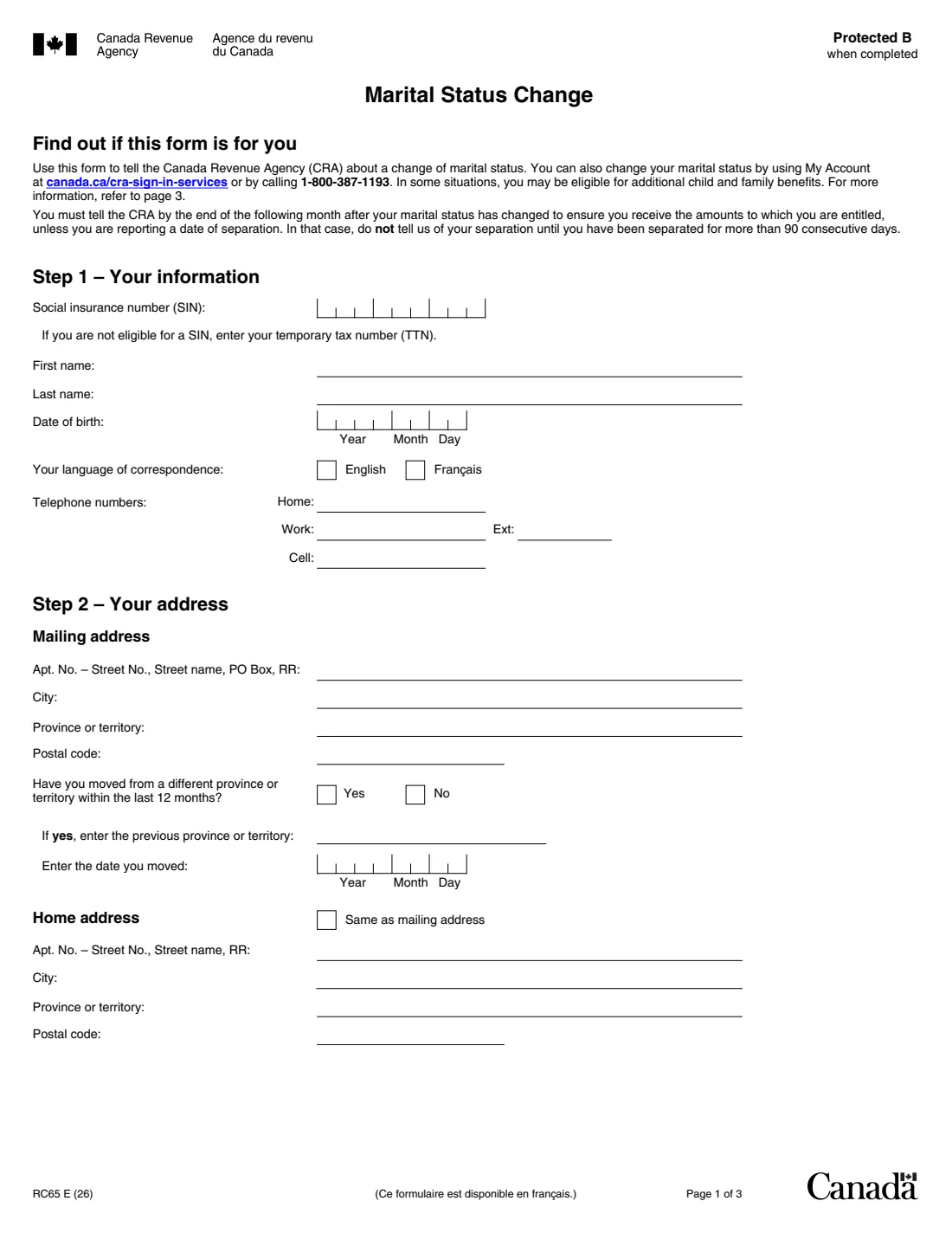
The 2026 edition has 3 pages. FileIt asks for it in 4 parts:
- Step 1 – Your informationTaxpayer
- Step 2 – Your addressTaxpayer
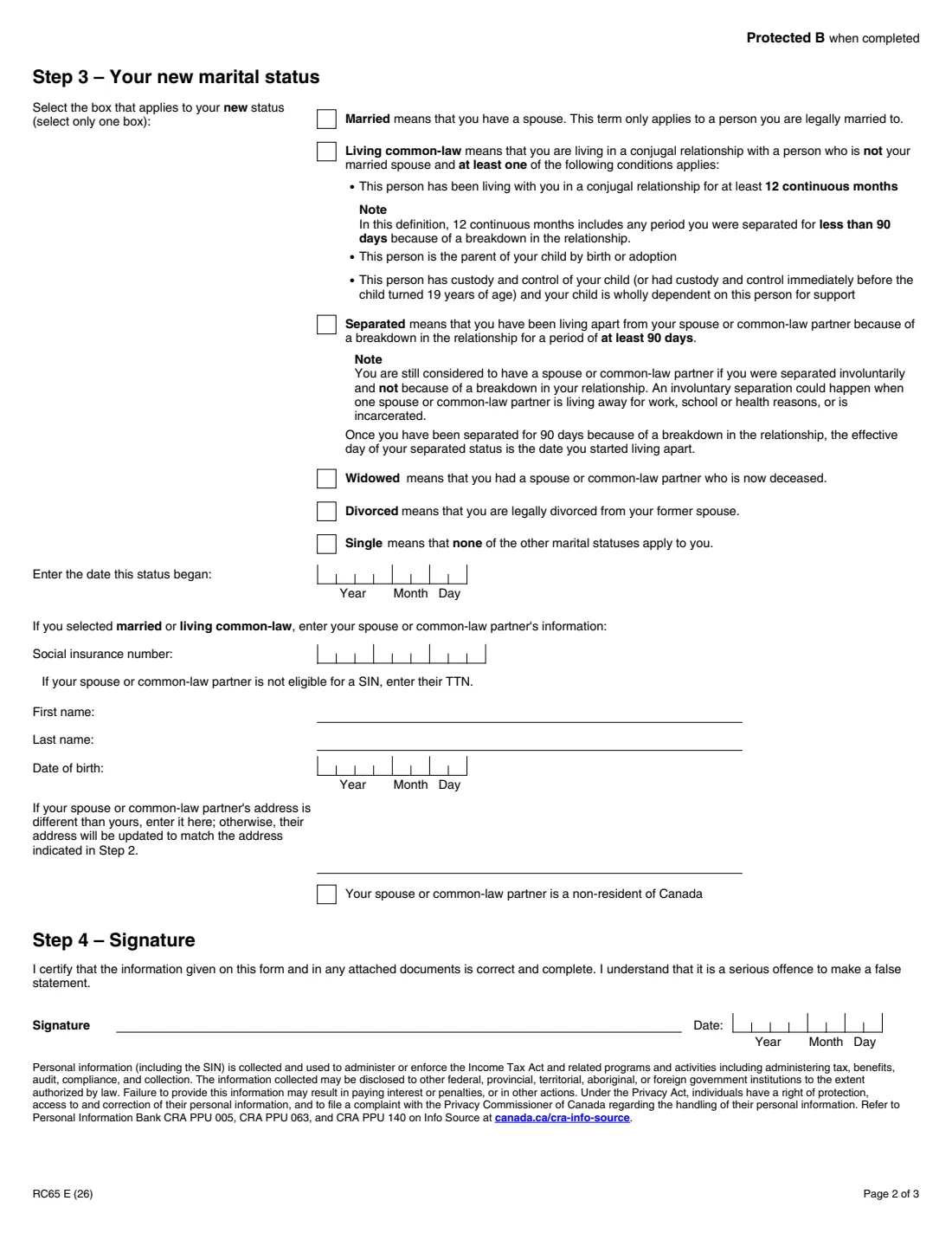
- Step 3 – Your new marital statusTaxpayer
- Step 4 – SignatureTaxpayer
How to fill out RC65, step by step
1 Step 1 – Your information
Your SIN (or temporary tax number if you aren't eligible for a SIN), first and last name, date of birth, language of correspondence (English or French) and your home, work and cell phone numbers. Dates go into year, month and day boxes.
2 Step 2 – Your address
Your mailing address with province or territory and postal code. Say whether you moved from a different province or territory within the last 12 months and, if so, which one and when. Tick 'Same as mailing address' or give your home address.
3 Step 3 – Your new marital status
Tick one box: married, living common-law, separated, widowed, divorced or single, and enter the date that status began. The form defines each one — for example, living common-law means at least 12 continuous months together, or a partner who is the parent of your child. If you are married or living common-law, add your spouse's or partner's SIN, name and date of birth, their address if it differs from yours, and tick the box if they are a non-resident of Canada.
4 Step 4 – Signature
Sign and date the certification that the information is correct and complete. There is one signature line, for you.
Common mistakes to avoid
- Reporting a separation before you have been apart for more than 90 consecutive days.
- Giving the date you're filling in the form instead of the date the status began (for a separation, the day you started living apart).
- Treating an involuntary separation — work, school, health or incarceration — as a separation; the form says you still have a spouse or common-law partner.
- Leaving out your spouse's or common-law partner's details when you are married or living common-law.
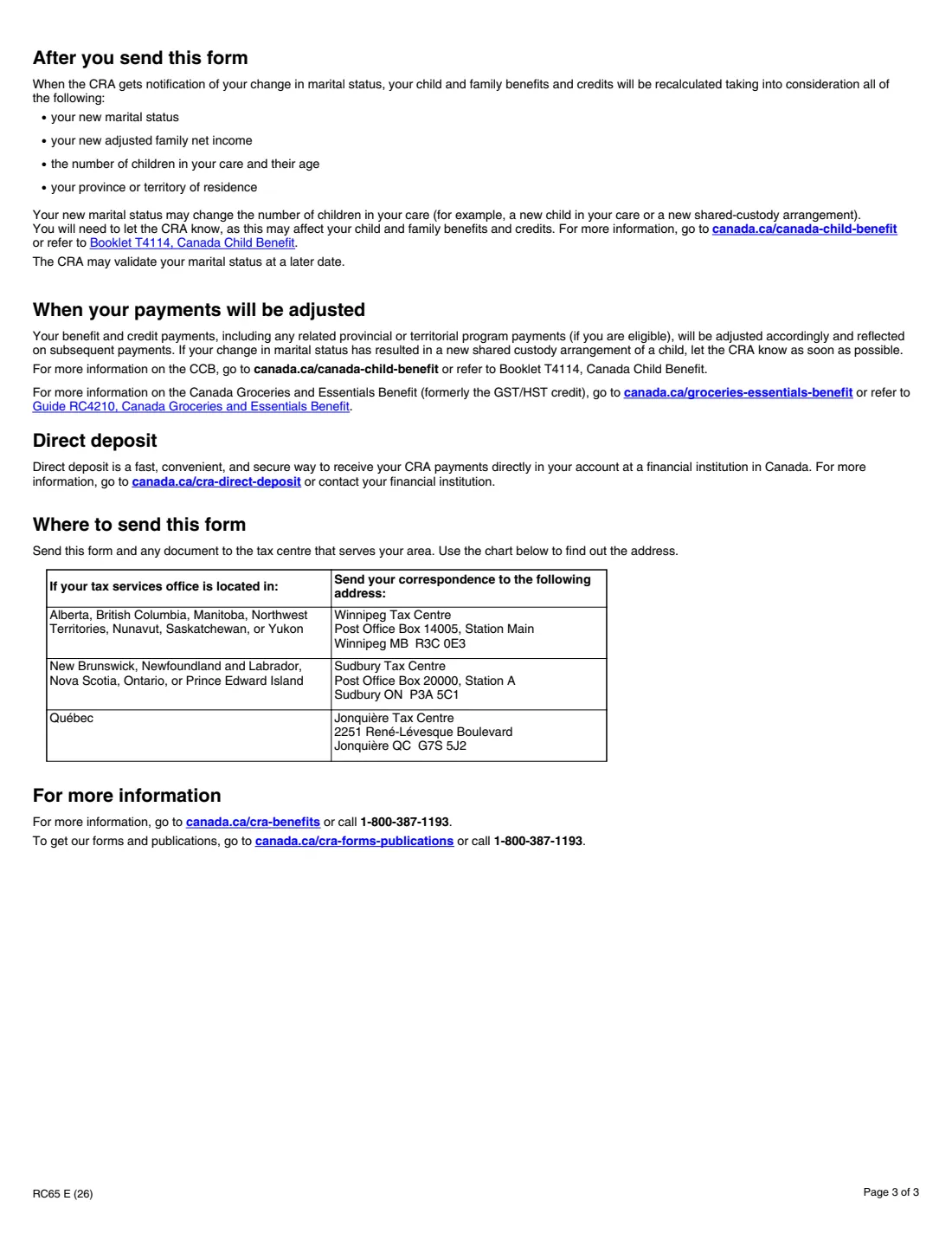
- Forgetting to sign, or mailing to the wrong tax centre; the chart on page 3 matches your area to Winnipeg, Sudbury or Jonquière.
After you fill it out
Print the PDF, sign and date Step 4 by hand, and mail it with any documents to the tax centre that serves your area, using the chart on page 3. FileIt doesn't mail it for you.
The CRA recalculates your benefits and credits and adjusts later payments. It may check your marital status at a later date.
If your new status changes the children in your care or starts shared custody, let the CRA know, as this can affect your child and family benefits.
Fill out RC65 online with FileIt
- Pick the person. Choose someone from People and FileIt fills in their name, date of birth, address and other details it already knows.
- Answer plain-language questions. One part of the form at a time, with the official help text beside each question — 32 fields in all. Your answers save as you go.
- Check the live preview. Watch your answers land on the real Canada Revenue Agency (CRA) form, and let FileIt do any worksheet arithmetic.
- Generate the official PDF. FileIt prints your answers into the agency’s own PDF and files it in that person’s folder in your vault.
FileIt fills the form — it never files or submits anything for you. Deliver the finished form to whoever asked for it, the way the form’s instructions say.
Start RC65 now — it’s freeRC65: frequently asked questions
How do I tell the CRA my marital status changed?
Online in My Account, by calling 1-800-387-1193, or on paper with Form RC65 mailed to your tax centre.
When should I send RC65?
By the end of the month after the month your status changed. For a separation, only once you have been separated for more than 90 consecutive days.
What counts as living common-law?
Living in a conjugal relationship with someone you are not married to, where they have lived with you for at least 12 continuous months, or are the parent of your child by birth or adoption, or have custody and control of your child who is wholly dependent on them.
Does my spouse have to sign RC65?
No. The form has a single signature line, for you. It does ask for your spouse's or common-law partner's SIN, name and date of birth if you are married or living common-law.
Where do I mail RC65?
To the tax centre for your area: Winnipeg for Alberta, British Columbia, Manitoba, the territories and Saskatchewan; Sudbury for New Brunswick, Newfoundland and Labrador, Nova Scotia, Ontario and Prince Edward Island; Jonquière for Quebec.
Can I fill out RC65 online?
You can fill it in with FileIt, which prints your answers on the official CRA PDF. You then sign it by hand and mail it.
Official sources
- Blank form (PDF), published by Canada Revenue Agency (CRA): https://www.canada.ca/content/dam/cra-arc/formspubs/pbg/rc65/rc65-fill-26e.pdf
- Official instructions and guidance: https://www.canada.ca/en/revenue-agency/services/forms-publications/forms/rc65.html
- Edition shown on this page: RC65 E (26) (checked 2026-09-28).
FileIt is not affiliated with or endorsed by Canada Revenue Agency (CRA) or any government. This page explains the form in general terms and is not legal, tax or immigration advice. Always read the official instructions, and check that you are using the edition the recipient accepts. Page last reviewed 2026-09-28.