What is RC66SCH?
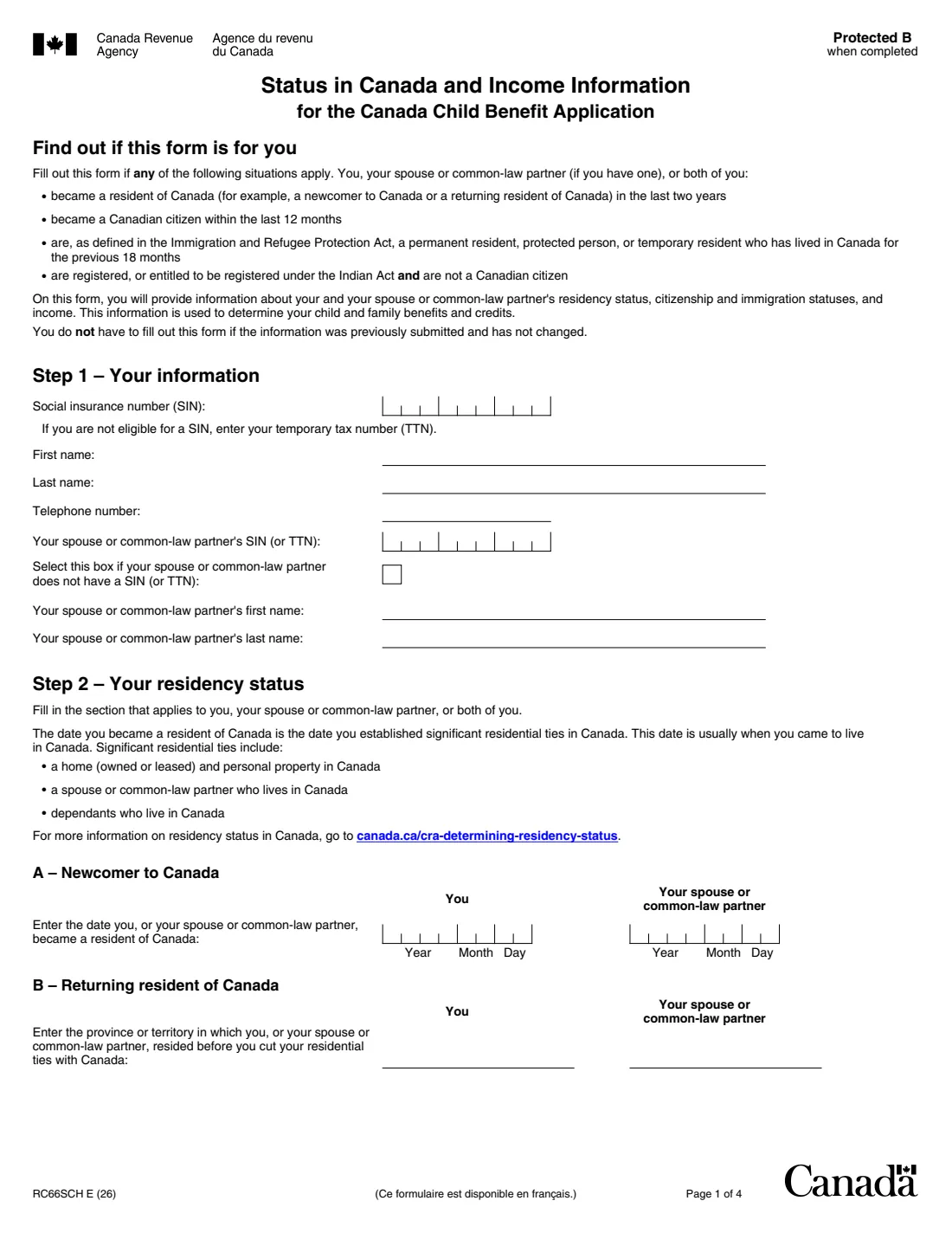
RC66SCH is the Canada Revenue Agency (CRA) schedule that goes with Form RC66, the Canada Child Benefit Application. It records your and your spouse's or common-law partner's residency status, citizenship or immigration status, and income from before you became a resident of Canada. The CRA uses it to work out your child and family benefits and credits. The current edition is RC66SCH E (26).
You fill it out if you, your spouse or common-law partner, or both of you became a resident of Canada in the last two years, became a Canadian citizen in the last 12 months, or are a permanent resident, protected person, or temporary resident who has lived in Canada for the previous 18 months. It also applies if you are registered, or entitled to be registered, under the Indian Act and are not a Canadian citizen. You don't need to send it again if the information was sent before and hasn't changed.
FileIt asks the questions in plain language, shows only the sections that apply to you, works out the section B and C years from the year you became a resident, and prints everything on the CRA's own PDF. The filled PDF is kept in your vault. FileIt doesn't send anything to the CRA.
- Who fills it
- A newcomer, returning resident, new citizen, permanent resident, protected person, eligible temporary resident, or non-citizen registered under the Indian Act
- Given to
- The CRA — attached to Form RC66, or mailed to your tax centre
- When
- With your Canada child benefit application, or when this information changes
- Signatures
- Signed and dated by hand by you
- Edition
- RC66SCH E (26)
Who needs to fill out RC66SCH?
- Newcomers to Canada, and people returning to Canada, who became residents in the last two years.
- People who became Canadian citizens within the last 12 months.
- Permanent residents and protected persons.
- Temporary residents (visitors, students, workers, permit holders) who have lived in Canada throughout the previous 18 months and hold a valid permit in the 19th month.
- People registered, or entitled to be registered, under the Indian Act who are not Canadian citizens.
- Any of the above applying for the Canada child benefit with Form RC66 — for yourself, your spouse or common-law partner, or both.
When to use RC66SCH
- Together with Form RC66 when you apply for the Canada child benefit.
- On its own, mailed to the tax centre that serves your area, if you already applied and this information is new or has changed.
- When your citizenship or immigration status changes or you get new documents from Immigration, Refugees and Citizenship Canada — the form asks you to send them right away to avoid payment delays.
What you need before you start
- Your SIN (or temporary tax number), and your spouse's or common-law partner's if they have one.
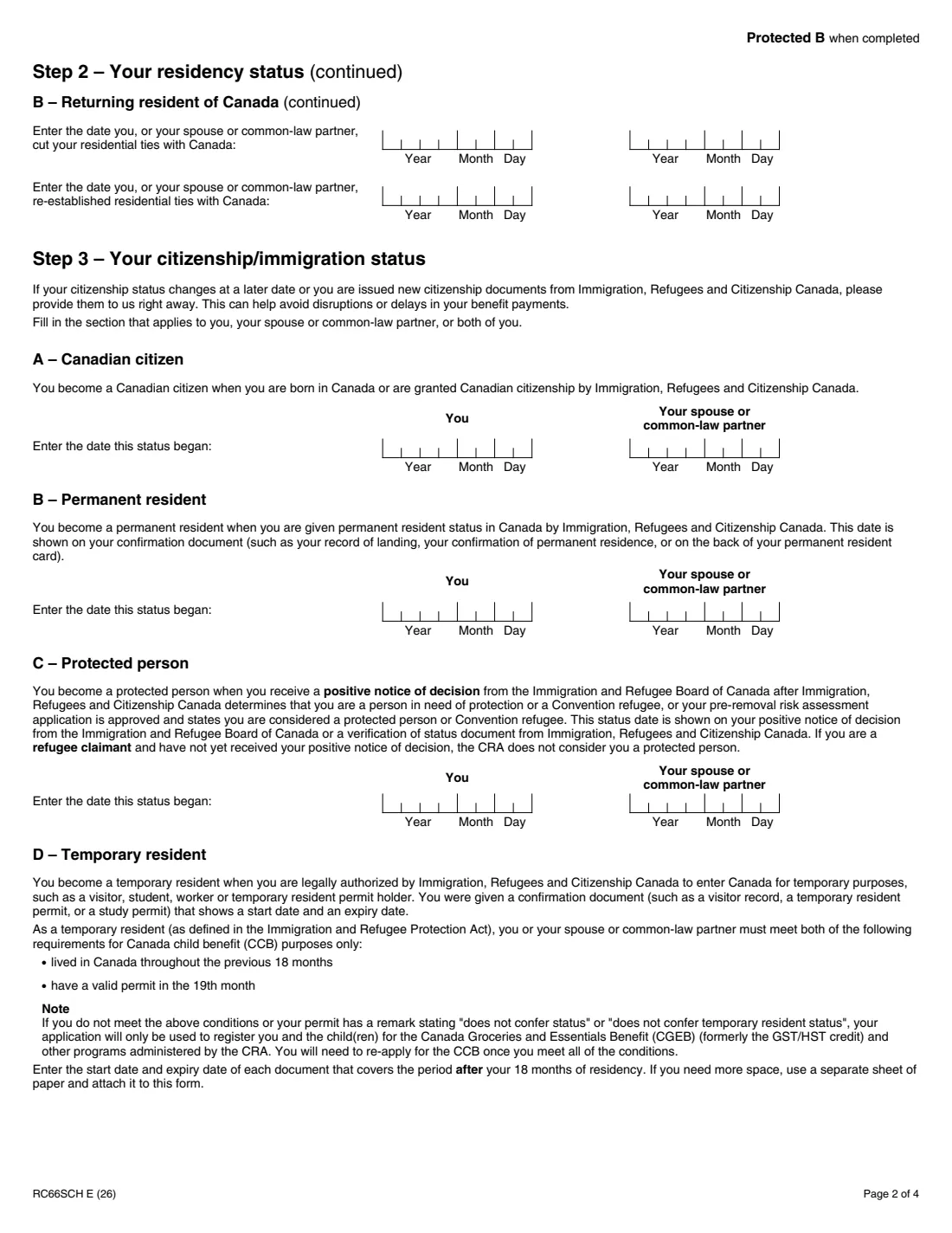
- The date you became a resident of Canada — or, if you are returning, the province or territory you lived in, the date you cut residential ties and the date you re-established them.
- The date your status began: citizenship, permanent residence (on your confirmation of permanent residence, record of landing or PR card), protected person decision, or registration with Indigenous Services Canada.
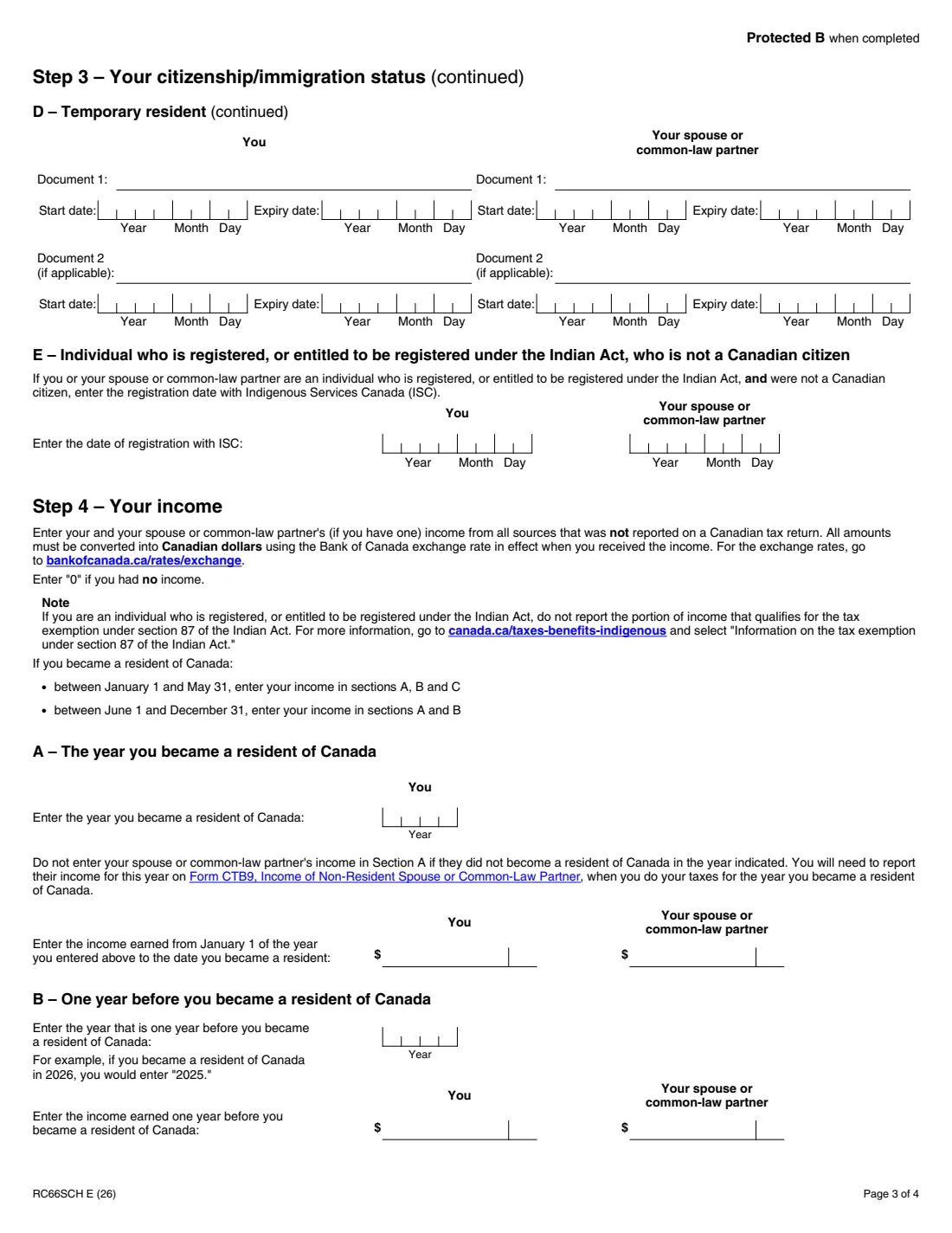
- For temporary residents: the name, start date and expiry date of each permit covering the period after your 18 months in Canada.
- Income from all sources not reported on a Canadian tax return, converted to Canadian dollars at the Bank of Canada exchange rate in effect when you received it.
What’s on RC66SCH
The 2026 edition has 4 pages. FileIt asks for it in 5 parts:
- Step 1 – Your informationApplicant
- Step 2 – Your residency statusApplicant
- Step 3 – Your citizenship/immigration statusApplicant
- Step 4 – Your incomeApplicant
- Step 5 – SignatureApplicant
How to fill out RC66SCH, step by step
1 Step 1 – Your information
Your SIN, name and phone number, and your spouse's or common-law partner's SIN (or tick that they don't have one) and name.
2 Step 2 – Your residency status
Section A for a newcomer: the date you became a resident — usually when you came to live in Canada and established significant residential ties such as a home, a spouse or dependants here. Section B for a returning resident: the province or territory you lived in before leaving, the date you cut your residential ties and the date you re-established them. There's a column for you and one for your spouse or partner.
3 Step 3 – Your citizenship/immigration status
Give the date for the status that applies: A Canadian citizen, B permanent resident, C protected person, E registered under the Indian Act. For D, temporary resident, list up to two permits with their start and expiry dates. A refugee claimant without a positive decision is not a protected person for the CRA.
4 Step 4 – Your income
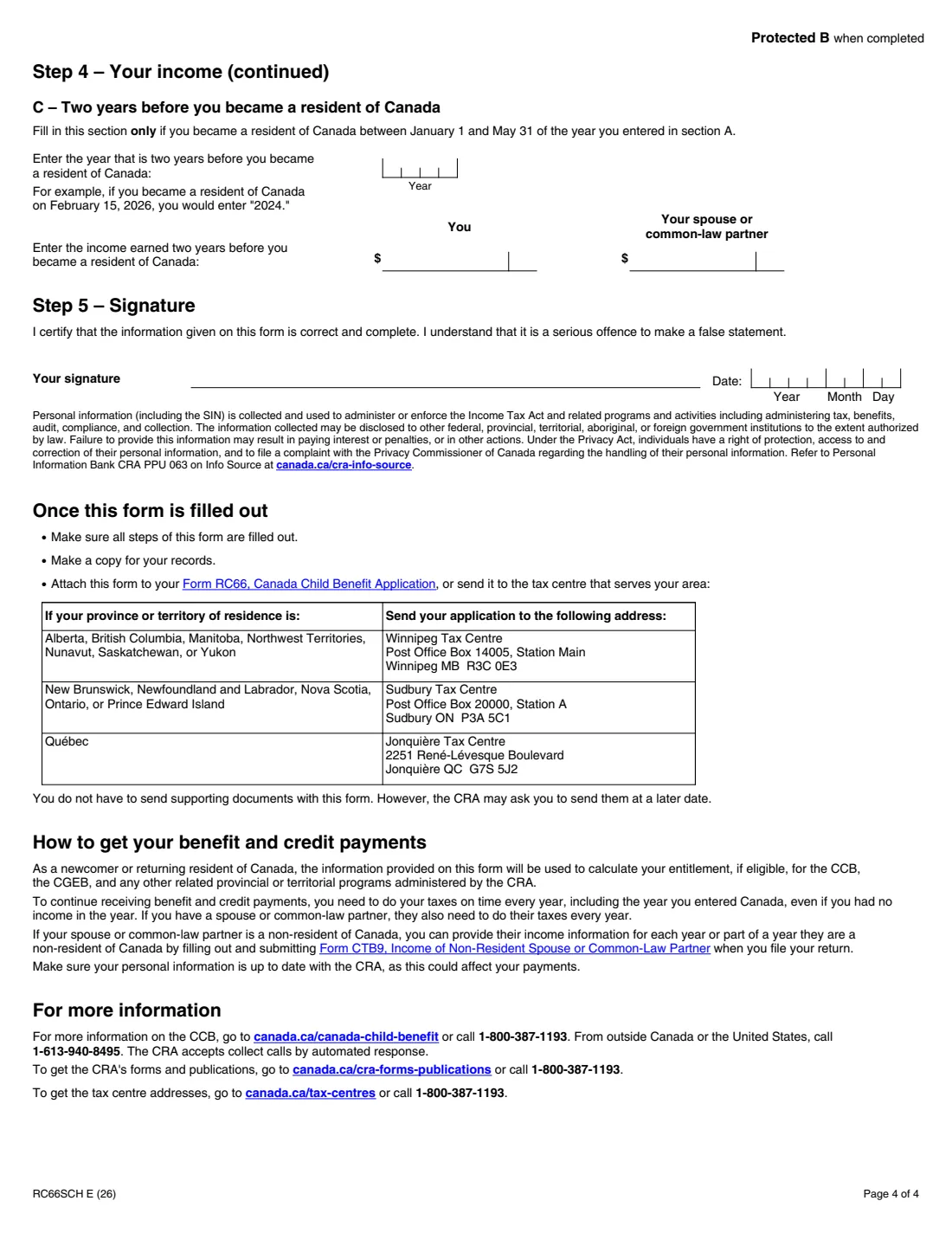
Section A: the year you became a resident and your income from January 1 of that year until that date. Section B: income in the year before. Section C, only if you became a resident between January 1 and May 31: income two years before. Amounts are in Canadian dollars; enter 0 if there was none. Leave out your spouse's section A income if they didn't become a resident that year — that goes on Form CTB9.
5 Step 5 – Signature
Sign and date the certification.
Common mistakes to avoid
- Reporting income that was already on a Canadian tax return — only income not reported on a Canadian return goes here.
- Not converting foreign income to Canadian dollars at the Bank of Canada rate in effect when it was received.
- Filling in section C when you became a resident after May 31.
- Including your spouse's section A income when they didn't become a resident in that year.
- As a temporary resident, listing permits that don't cover the period after your first 18 months in Canada.
- Including income that is tax-exempt under section 87 of the Indian Act.
After you fill it out
Print the PDF, sign and date it, and attach it to your Form RC66, Canada Child Benefit Application — or mail it to the tax centre that serves your area (Winnipeg, Sudbury or Jonquière, listed on page 4).
You don't have to send supporting documents with it, but the CRA may ask for them later.
To keep receiving benefit and credit payments, you and your spouse or common-law partner need to do your taxes every year, including the year you entered Canada, even with no income.
Fill out RC66SCH online with FileIt
- Pick the person. Choose someone from People and FileIt fills in their name, date of birth, address and other details it already knows.
- Answer plain-language questions. One part of the form at a time, with the official help text beside each question — 52 fields in all. Your answers save as you go.
- Check the live preview. Watch your answers land on the real Canada Revenue Agency (CRA) form, and let FileIt do any worksheet arithmetic.
- Generate the official PDF. FileIt prints your answers into the agency’s own PDF and files it in that person’s folder in your vault.
FileIt fills the form — it never files or submits anything for you. Deliver the finished form to whoever asked for it, the way the form’s instructions say.
Start RC66SCH now — it’s freeRC66SCH: frequently asked questions
Do I need RC66SCH if I'm a newcomer to Canada?
Yes, if you became a resident of Canada in the last two years and are applying for the Canada child benefit, the schedule records your residency date, immigration status and income before you arrived.
Which income do I report on RC66SCH?
Income from all sources that wasn't reported on a Canadian tax return, converted to Canadian dollars using the Bank of Canada exchange rate in effect when you received it. Enter 0 if you had none.
When do I fill in section C?
Only if you became a resident of Canada between January 1 and May 31 of the year you give in section A.
Can a temporary resident get the Canada child benefit?
For CCB purposes, a temporary resident must have lived in Canada throughout the previous 18 months and have a valid permit in the 19th month. Otherwise, or with a permit marked "does not confer status", the application only registers you and your children for the Canada Groceries and Essentials Benefit and other CRA programs.
Do I have to send documents with RC66SCH?
No. The form says you don't have to send supporting documents with it, but the CRA may ask for them later.
Where do I send RC66SCH?
Attach it to Form RC66, or send it to the tax centre for your province or territory: Winnipeg, Sudbury or Jonquière.
Official sources
- Blank form (PDF), published by Canada Revenue Agency (CRA): https://www.canada.ca/content/dam/cra-arc/formspubs/pbg/rc66sch/rc66sch-fill-26e.pdf
- Official instructions and guidance: https://www.canada.ca/en/revenue-agency/services/forms-publications/forms/rc66sch.html
- Edition shown on this page: RC66SCH E (26) (checked 2026-09-28).
FileIt is not affiliated with or endorsed by Canada Revenue Agency (CRA) or any government. This page explains the form in general terms and is not legal, tax or immigration advice. Always read the official instructions, and check that you are using the edition the recipient accepts. Page last reviewed 2026-09-28.