What is Form T1032?
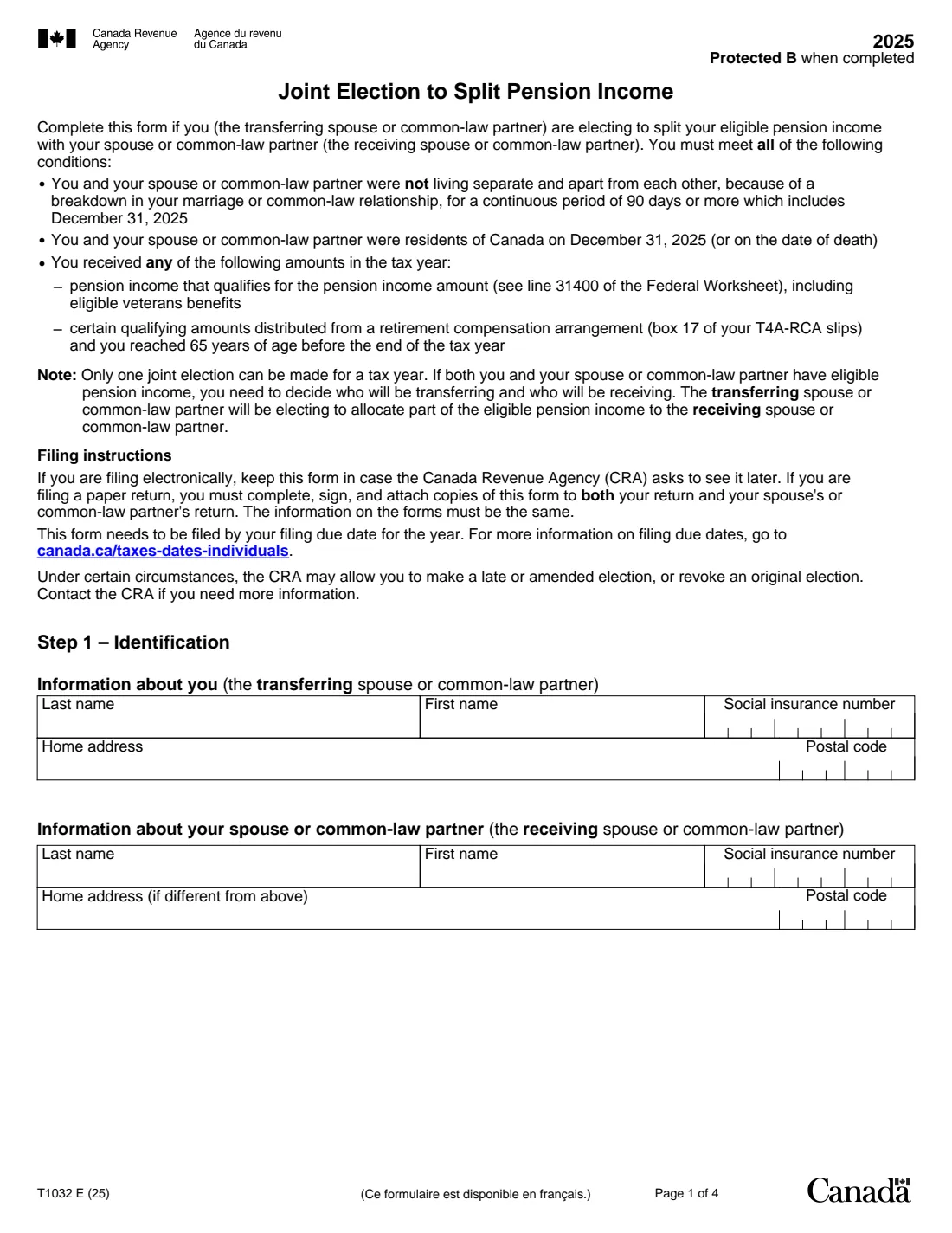
Form T1032, Joint Election to Split Pension Income, is how couples in Canada split eligible pension income for tax purposes. The transferring spouse or common-law partner elects to allocate part of their eligible pension income, up to 50%, to the receiving partner. The form then works out the maximum split-pension amount, the pension income amount each of you can claim on line 31400, and how the income tax already deducted from the pension is shared between your two returns.
It's a four-page calculation with 42 lines, including thresholds for retirement compensation arrangement (RCA) payments and veterans benefits, a proration for a change in marital status during the year, and an adjustment when part of the pension came from an RCA. The elected amount goes on line 21000 of the transferring partner's return and line 11600 of the receiving partner's. If you file electronically you keep the signed form in case the CRA asks for it; if you file on paper, you attach a signed copy to both returns, and the information must be the same on both.
FileIt asks only for the amounts you take from your slips and worksheets and calculates every other line, then prints them into the CRA's own fillable PDF for the 2025 tax year (edition T1032 E (25)). It shows the line 31400 amount each of you claims and checks that the split doesn't go over line 21. The completed PDF is saved in the vault; you both sign it by hand. FileIt never files anything. Filling forms is free on every FileIt plan.
- Who fills it
- Both spouses or common-law partners, jointly
- Tax year
- 2025
- Maximum split
- 50% of eligible pension income (line 21)
- Filing
- E-filers keep it; paper filers attach it to both returns
- Due
- By your filing due date for the year
- Signatures
- Both partners sign by hand
Who needs to fill out Form T1032?
- Retired couples where one partner has much more eligible pension income than the other.
- Pensioners receiving registered pension plan payments, or RRIF and annuity payments that qualify for the pension income amount (line 31400 of the Federal Worksheet).
- Veterans receiving eligible veterans benefits (box 128 of the T4A slip).
- Partners aged 65 or older at year-end receiving qualifying life annuity payments from a retirement compensation arrangement (box 17 of T4A-RCA slips).
When to use Form T1032
- When you prepare your returns for the year, after both of you have worked out line 31400 on your Federal Worksheets.
- Every year you want to split: only one joint election can be made for a tax year, and it's made again each year.
- By your filing due date. The form notes that in certain circumstances the CRA may allow a late or amended election, or let you revoke one.
What you need before you start
- Both partners' names, social insurance numbers, home addresses and postal codes.
- The transferring partner's eligible pension income (line 8 of the Federal Worksheet for line 31400).
- Box 128 of the transferring partner's T4A slip (veterans benefits) and box 17 of their T4A-RCA slips, if any.
- The number of months you were married or living common-law, if your marital status changed in the year.
- The receiving partner's own eligible pension income from their Federal Worksheet, if they reported pension income.
- The tax deducted on the transferring partner's pension slips, and the total tax deducted on each partner's slips.
What’s on Form T1032
The 2025 edition has 4 pages. FileIt asks for it in 6 parts:
- Step 1 – IdentificationTransferring spouse or common-law partner
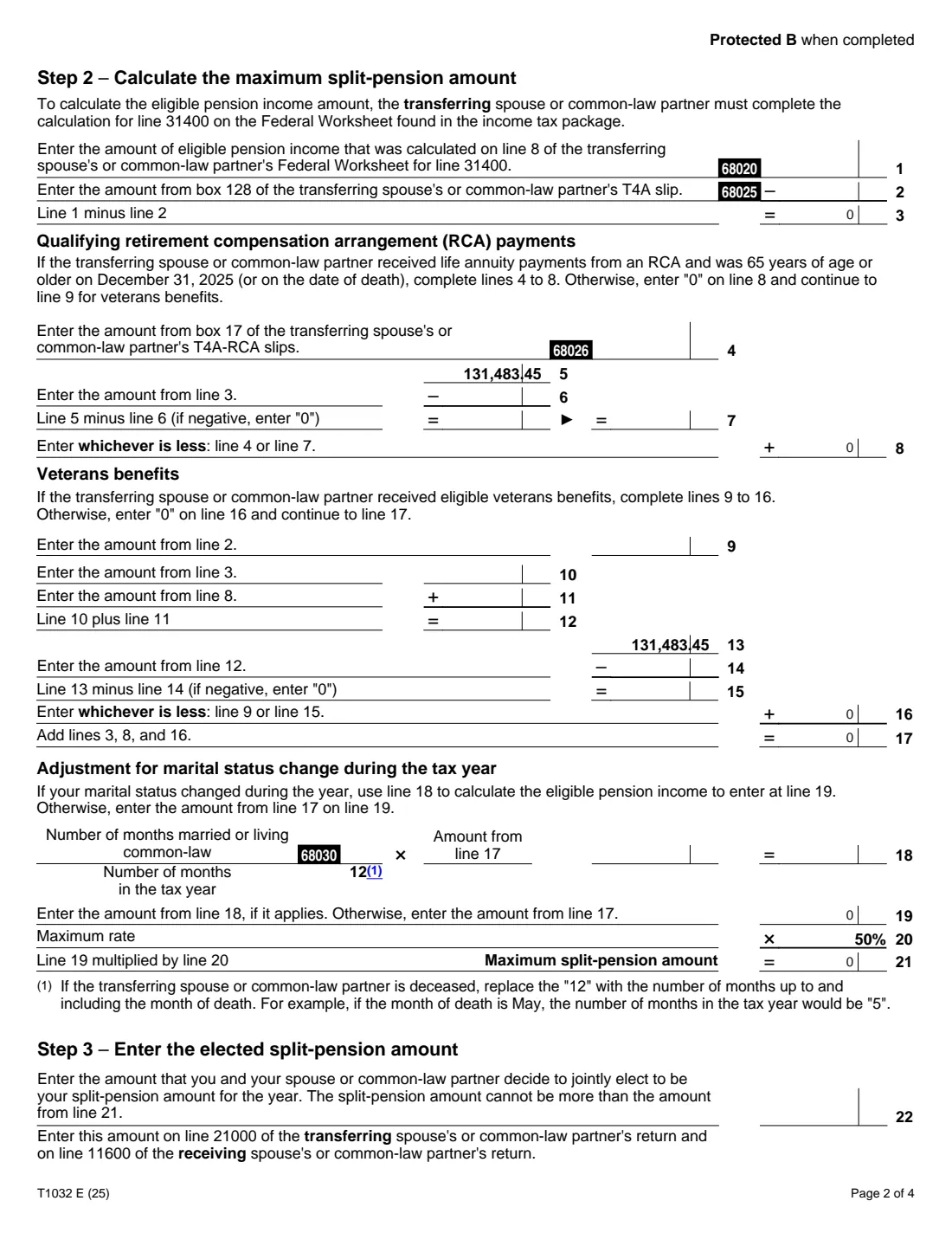
- Step 2 – Maximum split-pension amountTransferring spouse or common-law partner
- Step 3 – The elected split-pension amountTransferring spouse or common-law partner
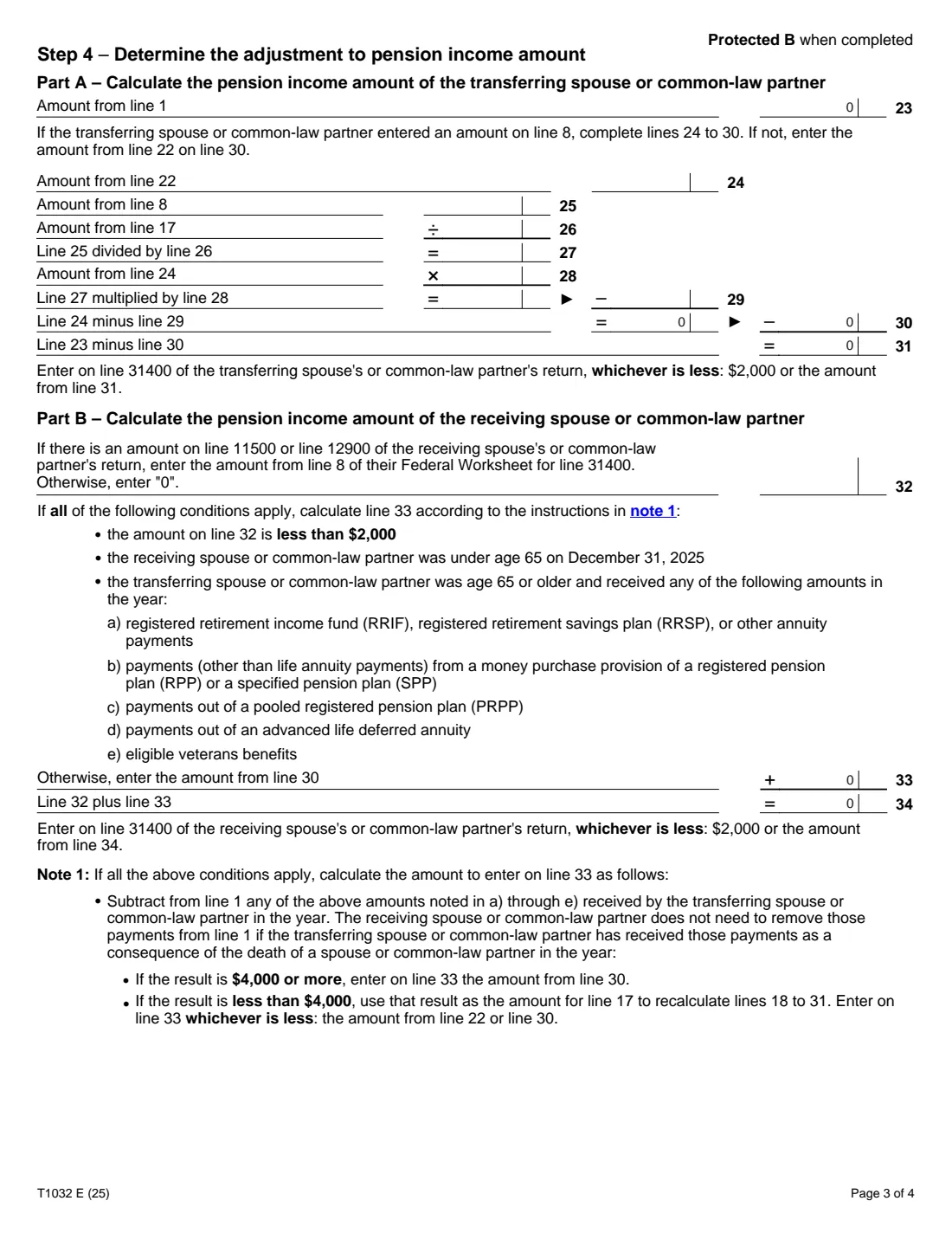
- Step 4 – Adjustment to the pension income amountTransferring spouse or common-law partner
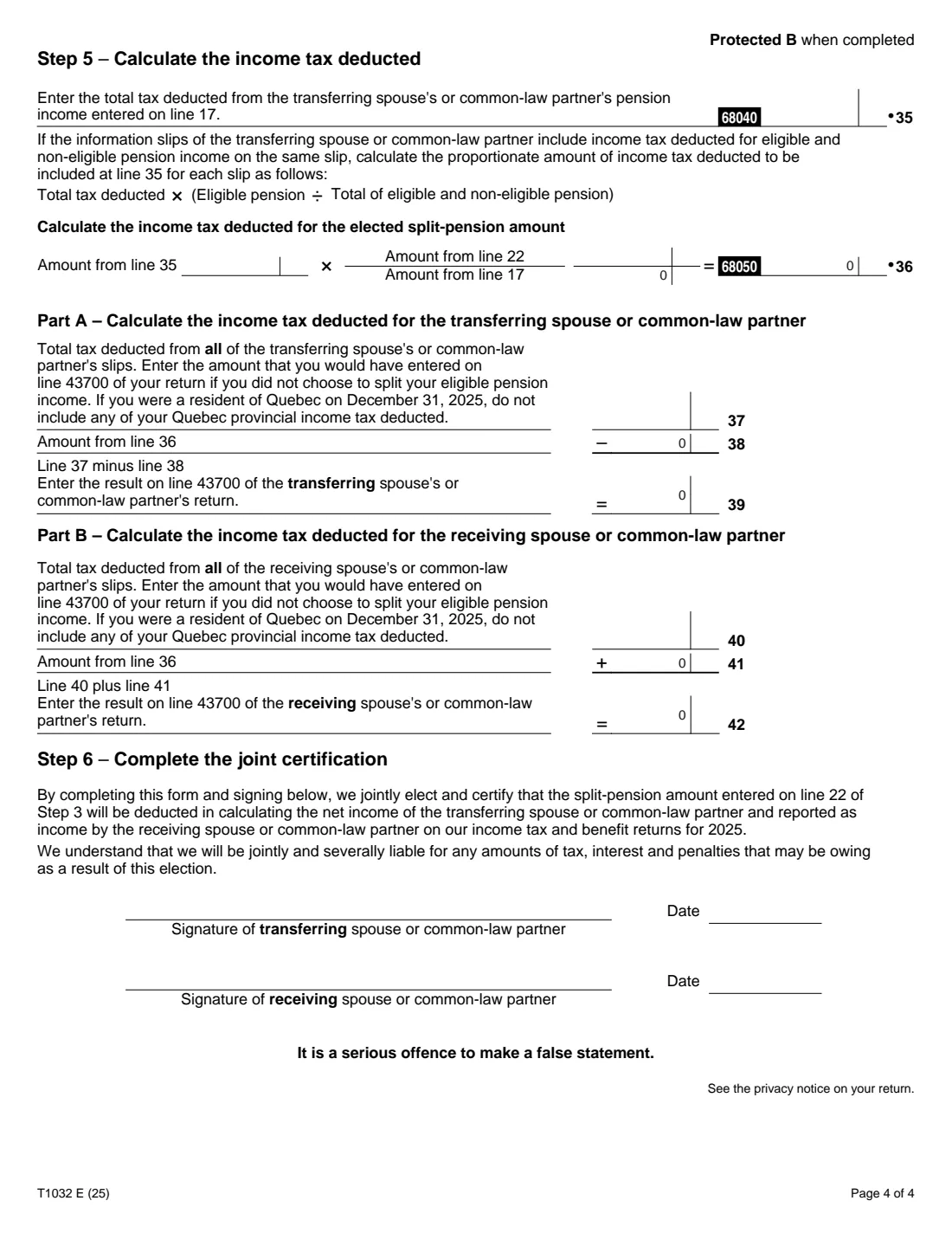
- Step 5 – Income tax deductedTransferring spouse or common-law partner
- Step 6 – Joint certificationTransferring spouse or common-law partner
How to fill out Form T1032, step by step
1 Step 1 – Identification
Name the transferring spouse or common-law partner (the one giving up pension income) and the receiving partner, with their SINs, home addresses and postal codes. If both of you have eligible pension income, decide which one transfers: only one joint election can be made for the year.
2 Step 2 – Maximum split-pension amount
Line 1 is the transferring partner's eligible pension income; line 2 is veterans benefits from box 128 of the T4A. Lines 4 to 8 add qualifying RCA payments up to the 131,483.45 limit printed on the form, and lines 9 to 16 add veterans benefits up to the same limit. Line 17 totals them.
If your marital status changed during the year, line 18 prorates line 17 by the months you were married or living common-law. The maximum split-pension amount on line 21 is half of line 19. FileIt calculates all of these lines.
3 Step 3 – The elected split-pension amount
Together, choose how much to split, up to line 21. This amount goes on line 21000 of the transferring partner's return (a deduction) and line 11600 of the receiving partner's return (income).
4 Step 4 – Pension income amounts
Part A works out the transferring partner's pension income amount after the split, with an adjustment (lines 24 to 29) when part of the pension came from an RCA. Part B adds the split to the receiving partner's own eligible pension income. Each of you claims whichever is less on line 31400: $2,000 or your result.
Note 1 covers a receiving partner under 65 whose partner, aged 65 or older, received RRIF, RRSP, annuity, money purchase, PRPP, advanced life deferred annuity or veterans amounts. If all its conditions apply, you work out line 33 yourself as the form explains.
5 Step 5 – Income tax deducted
The tax already withheld on the split pension moves with it. Line 36 is the tax deducted on line 17's pension income, prorated by the split (line 22 ÷ line 17). It's subtracted from the transferring partner's total tax deducted (line 39) and added to the receiving partner's (line 42). Those results go on line 43700 of each return. Quebec residents leave out Quebec provincial income tax deducted.
6 Step 6 – Joint certification
Both of you sign and date the form, electing the split and accepting that you're jointly and severally liable for any tax, interest and penalties that may be owing as a result.
Common mistakes to avoid
- Electing more than the maximum split-pension amount on line 21.
- Different amounts on the two partners' returns: paper filers attach copies to both returns and the information must be the same.
- Forgetting to move the tax deducted (Step 5), so one return shows tax withheld on income that was reported on the other.
- Claiming more than $2,000 on line 31400.
- Using income that doesn't qualify for the pension income amount on line 1; start from the Federal Worksheet for line 31400.
- Missing the filing due date. A late or amended election may be possible only in certain circumstances, by contacting the CRA.
After you fill it out
Print the completed PDF from your FileIt vault and have both partners sign and date Step 6.
If you file electronically, keep the signed form in case the CRA asks to see it; the vault is a good place for it. If you file on paper, attach a signed copy to both returns.
Enter the amounts on both returns: line 22 on line 21000 (transferring) and line 11600 (receiving); line 31400 as FileIt shows for each of you; and lines 39 and 42 on each partner's line 43700.
Fill out Form T1032 online with FileIt
- Pick the person. Choose someone from People and FileIt fills in their name, date of birth, address and other details it already knows.
- Answer plain-language questions. One part of the form at a time, with the official help text beside each question — 59 fields in all. Your answers save as you go.
- Check the live preview. Watch your answers land on the real Canada Revenue Agency (CRA) form, and let FileIt do any worksheet arithmetic.
- Generate the official PDF. FileIt prints your answers into the agency’s own PDF and files it in that person’s folder in your vault.
FileIt fills the form — it never files or submits anything for you. Deliver the finished form to whoever asked for it, the way the form’s instructions say.
Start Form T1032 now — it’s freeForm T1032: frequently asked questions
How much pension income can we split?
Up to 50% of the transferring partner's eligible pension income, worked out on lines 1 to 21 of the form. You choose any amount up to that maximum on line 22.
Do we have to send Form T1032 to the CRA?
Not if you file electronically: the form says to keep it in case the CRA asks to see it later. If you file on paper, you must complete, sign and attach copies to both returns.
Can we both split pension income to each other?
No. Only one joint election can be made for a tax year. If both of you have eligible pension income, you decide who transfers and who receives.
What if my spouse died during the year?
The form's footnote on line 18 says to replace the "12" with the number of months up to and including the month of death. FileIt calculates with that number; correct the printed 12 by hand.
Can we sign the T1032 electronically?
The CRA accepts electronic signatures only on the forms it lists, and the T1032 isn't one of them. Print it and both sign by hand.
Can I fill out Form T1032 online?
Yes. FileIt asks for the amounts from your slips and worksheets, calculates every other line, prints them into the CRA's official T1032 PDF and saves it in your vault, free on every plan.
Official sources
- Blank form (PDF), published by Canada Revenue Agency (CRA): https://www.canada.ca/content/dam/cra-arc/formspubs/pbg/t1032/t1032-fill-25e.pdf
- Official instructions and guidance: https://www.canada.ca/en/revenue-agency/services/tax/individuals/topics/pension-income-splitting.html
- Edition shown on this page: T1032 E (25) (checked 2026-09-28).
FileIt is not affiliated with or endorsed by Canada Revenue Agency (CRA) or any government. This page explains the form in general terms and is not legal, tax or immigration advice. Always read the official instructions, and check that you are using the edition the recipient accepts. Page last reviewed 2026-09-28.