What is Form RC435?
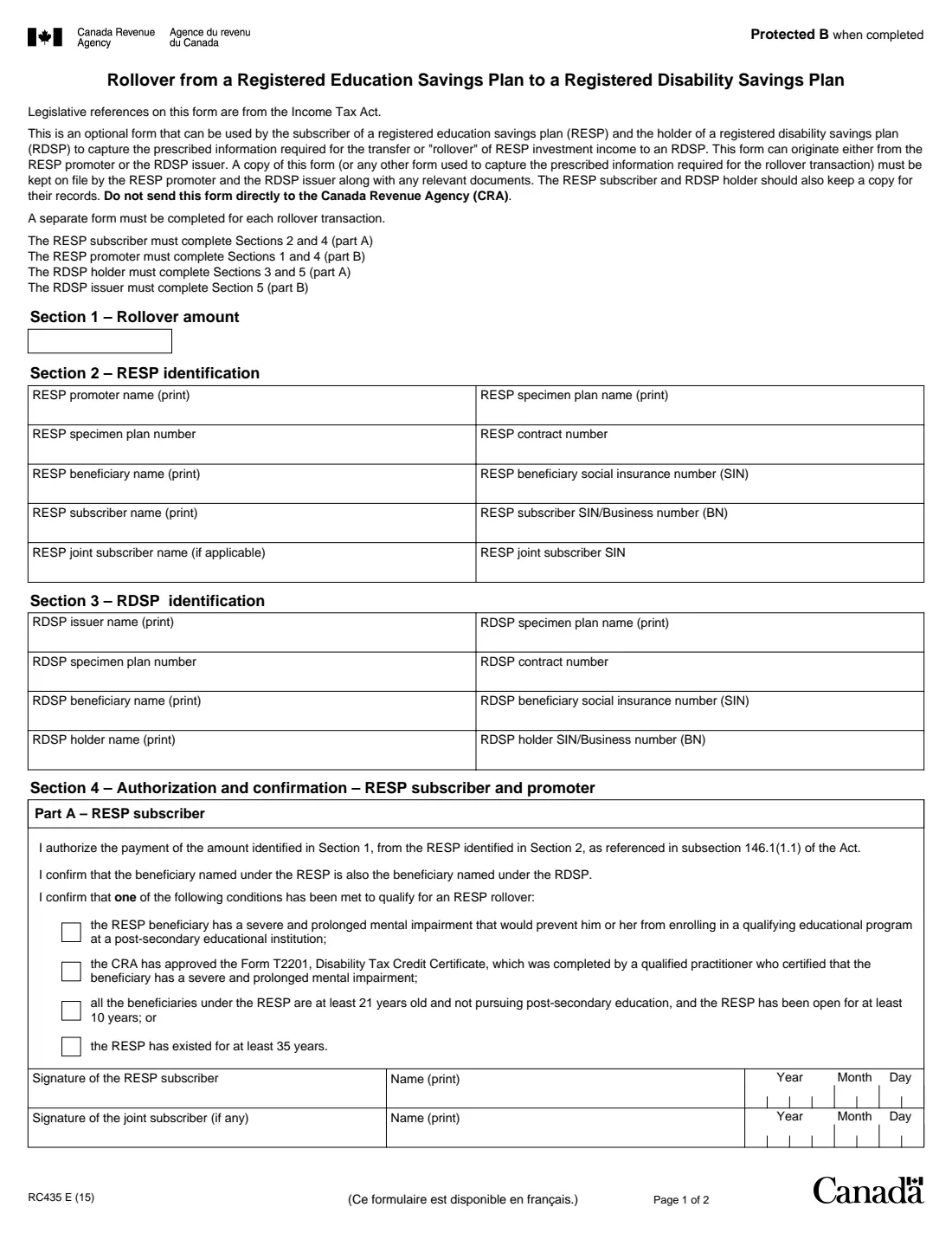
Form RC435 is the Canada Revenue Agency (CRA) form for a rollover of the investment income in a registered education savings plan (RESP), paid as an accumulated income payment, into a registered disability savings plan (RDSP) for the same beneficiary. It's optional: the RESP promoter or RDSP issuer may use it or their own document. The current edition, still the CRA's link, is RC435 E (15).
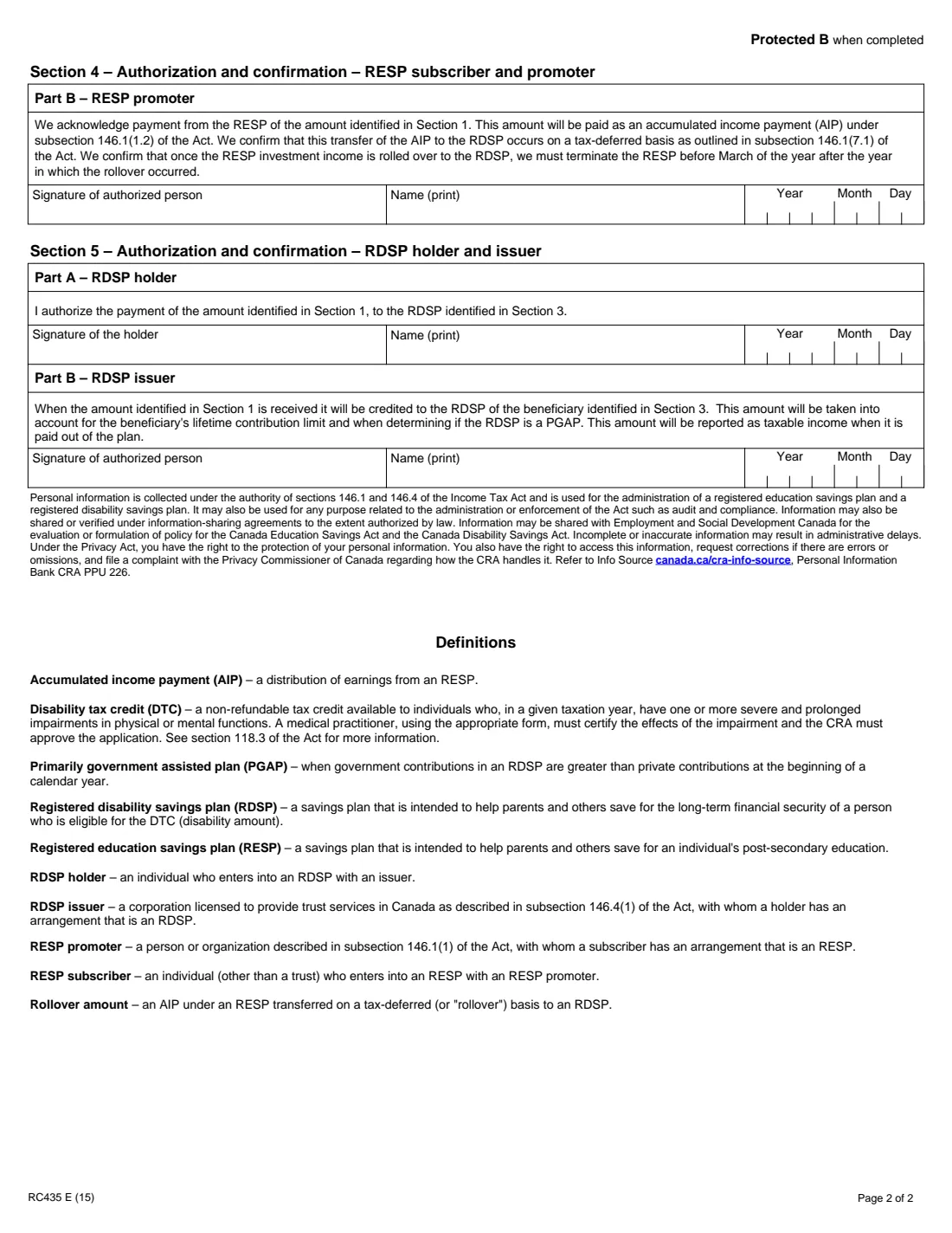
Four parties fill it out. The RESP subscriber completes Sections 2 and 4 Part A, confirming one of the conditions for the rollover, such as a severe and prolonged mental impairment, an approved Form T2201, or an RESP open for 35 years. The RDSP holder completes Sections 3 and 5 Part A. The RESP promoter completes Section 1 and Section 4 Part B, and the RDSP issuer Section 5 Part B.
FileIt asks for the beneficiary once and prints them in both plans' sections, keeps the promoter's and issuer's parts optional, and fills the CRA's official PDF. The completed form is saved in the person's vault folder. FileIt doesn't send it to either institution.
- Who fills it
- RESP subscriber, RDSP holder, RESP promoter and RDSP issuer
- Kept by
- The RESP promoter and RDSP issuer; not sent to the CRA
- One form per
- Rollover transaction
- Same beneficiary
- The RESP and RDSP must have the same beneficiary
- Edition
- RC435 E (15)
Who needs to fill out Form RC435?
- Parents and other RESP subscribers whose beneficiary has a disability and an RDSP, and who want the RESP's investment income rolled over instead of paid out.
- RDSP holders receiving that rollover.
- Joint subscribers of the RESP, who sign alongside the subscriber.
When to use Form RC435
- When the beneficiary has a severe and prolonged mental impairment that would keep them from post-secondary education.
- When the CRA has approved Form T2201 certifying such an impairment.
- When every beneficiary is at least 21, none is pursuing post-secondary education and the RESP has been open for at least 10 years, or the RESP has existed for at least 35 years.
What you need before you start
- The RESP promoter's name, specimen plan name and number, and the contract number.
- The beneficiary's name and social insurance number (SIN).
- The subscriber's name and SIN or business number, and any joint subscriber's name and SIN.
- The RDSP issuer, specimen plan name and number, contract number, and the holder's name and SIN or business number.
- Which of the four rollover conditions is met, and the rollover amount if you already know it.
What’s on Form RC435
The 2015 edition has 2 pages. FileIt asks for it in 7 parts, and it is signed by Resp subscriber and Joint subscriber and Rdsp holder and Resp promoter and Rdsp issuer:
- Section 2 – RESP identificationResp subscriber
- Section 3 – RDSP identificationRdsp holder
- Section 4, Part A – RESP subscriberResp subscriber
- Section 4, Part A – Joint subscriberJoint subscriber
- Section 5, Part A – RDSP holderRdsp holder
- Section 4, Part B – RESP promoterResp promoter
- Section 5, Part B – RDSP issuerRdsp issuer
How to fill out Form RC435, step by step
1 Section 1 – Rollover amount
Completed by the RESP promoter. If you know the amount, you can enter it yourself.
2 Section 2 – RESP identification
The promoter, specimen plan name and number, contract number, beneficiary and SIN, subscriber and SIN or BN, and any joint subscriber and SIN.
3 Section 3 – RDSP identification
The RDSP issuer, specimen plan name and number, contract number, beneficiary and SIN (the same person as in Section 2), and holder and SIN or BN.
4 Section 4 – RESP subscriber and promoter
Part A: the subscriber authorizes the payment, confirms the beneficiary is the same in both plans, ticks the condition met, and signs; a joint subscriber signs too. Part B: the promoter acknowledges paying the amount as an accumulated income payment and confirms it will close the RESP before March of the following year.
5 Section 5 – RDSP holder and issuer
Part A: the holder authorizes the payment into the RDSP and signs. Part B: the issuer confirms it will credit the amount and count it toward the beneficiary's lifetime contribution limit.
Common mistakes to avoid
- Using it when the RESP and RDSP beneficiaries are different people.
- Ticking more than one condition, or none.
- Leaving out the joint subscriber's signature when the RESP has one.
- Sending the form to the CRA; the form says not to.
- Combining two rollovers on one form.
After you fill it out
Print the PDF from your FileIt vault and sign Section 4 Part A and Section 5 Part A as they apply to you. FileIt doesn't send it.
Give it to the RESP promoter or RDSP issuer; both keep a copy on file with the relevant documents.
Keep your own copy, as the form asks the subscriber and holder to.
Fill out Form RC435 online with FileIt
- Pick the person. Choose someone from People and FileIt fills in their name, date of birth, address and other details it already knows.
- Answer plain-language questions. One part of the form at a time, with the official help text beside each question — 28 fields in all. Your answers save as you go.
- Check the live preview. Watch your answers land on the real Canada Revenue Agency (CRA) form, and let FileIt do any worksheet arithmetic.
- Generate the official PDF. FileIt prints your answers into the agency’s own PDF and files it in that person’s folder in your vault. Sign it, or send it for e-signature.
FileIt fills the form — it never files or submits anything for you. Deliver the finished form to whoever asked for it, the way the form’s instructions say.
Start Form RC435 now — it’s freeForm RC435: frequently asked questions
What happens to the RESP after the rollover?
Section 4 Part B has the promoter confirm it must terminate the RESP before March of the year after the year of the rollover.
Is the rollover taxable?
The promoter confirms in Part B that the transfer happens on a tax-deferred basis. The RDSP issuer's part says the amount will be reported as taxable income when it's paid out of the RDSP.
Do I have to use Form RC435?
No. It's an optional form; the promoter or issuer can capture the same information another way. Either way, a record has to be kept on file.
Can I fill out RC435 online?
Yes. FileIt guides each party through their sections and prints the answers on the CRA's official RC435 PDF, saved in your vault.
Official sources
- Blank form (PDF), published by Canada Revenue Agency (CRA): https://www.canada.ca/content/dam/cra-arc/formspubs/pbg/rc435/rc435-fill-15e.pdf
- Official instructions and guidance: https://www.canada.ca/en/revenue-agency/services/forms-publications/forms/rc435.html
- Edition shown on this page: RC435 E (15) (checked 2026-10-19).
FileIt is not affiliated with or endorsed by Canada Revenue Agency (CRA) or any government. This page explains the form in general terms and is not legal, tax or immigration advice. Always read the official instructions, and check that you are using the edition the recipient accepts. Page last reviewed 2026-10-19.