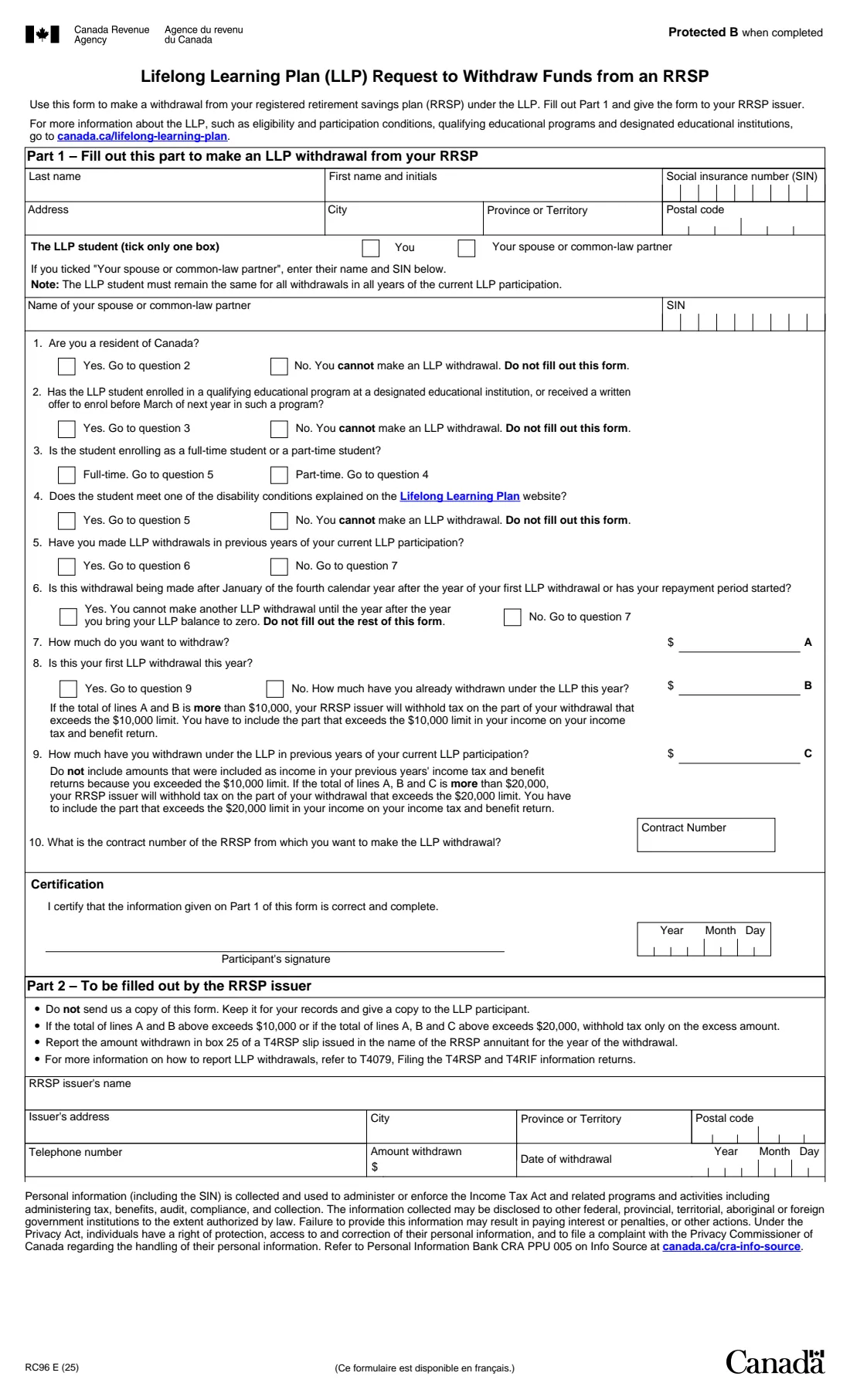
What is Form RC96?
Form RC96 is the Canada Revenue Agency (CRA) form for making a withdrawal from your registered retirement savings plan (RRSP) under the Lifelong Learning Plan (LLP). The LLP lets you use RRSP money to finance training or education for yourself or your spouse or common-law partner, and pay it back to your RRSPs over time. Part 1 is a short questionnaire that checks whether you can make an LLP withdrawal, followed by the amount and the RRSP contract you're withdrawing from.
The RC96 doesn't go to the CRA. You fill out Part 1, sign it and give it to your RRSP issuer, the bank, credit union or investment firm that holds the plan. The issuer fills out Part 2, keeps the form and gives you a copy. The form explains that the issuer withholds tax only on the part of a withdrawal that goes over the limits: $10,000 in a year (lines A and B together) or $20,000 over your whole participation (lines A, B and C together).
FileIt asks the RC96 questions in plain language, tells you straight away if an answer means you can't make an LLP withdrawal, adds up lines A, B and C against the limits for you, and prints your answers into the CRA's own fillable PDF (edition RC96 E (25)). Your name can be pre-filled from People records in your vault, and the finished PDF is saved in the person's vault folder. You sign it and hand it to your RRSP issuer yourself; FileIt never sends it. Filling forms is free on every FileIt plan.
- Who fills it
- The RRSP annuitant (the LLP participant); the RRSP issuer fills Part 2
- Given to
- Your RRSP issuer, not the CRA
- Student
- You or your spouse or common-law partner, the same for the whole participation
- Tax-free limits
- $10,000 a year and $20,000 in all, as stated on the form
- Signatures
- The participant signs the certification
- Edition
- RC96 E (25)
Who needs to fill out Form RC96?
- RRSP holders who want to use RRSP savings to pay for their own full-time training or education.
- RRSP holders paying for the education of their spouse or common-law partner (the partner is then the LLP student).
- Part-time students who meet one of the disability conditions described on the Lifelong Learning Plan page.
- Participants making a further withdrawal in a later year of the same LLP participation, before the cut-off the form describes in question 6.
When to use Form RC96
- Once the student has enrolled in a qualifying educational program at a designated educational institution, or has a written offer to enrol before March of next year.
- Each time you want to make an LLP withdrawal, including a second withdrawal in the same year (line B) or in a later year of the same participation (line C).
- Not after January of the fourth calendar year after the year of your first LLP withdrawal, or once your repayment period has started: question 6 says you then can't make another withdrawal until the year after you bring your LLP balance to zero.
What you need before you start
- Your name, social insurance number (SIN) and address.
- Your spouse's or common-law partner's name and SIN, if they're the student.
- Proof, or at least the details, of the student's enrolment or written offer from a designated educational institution.
- The amount you want to withdraw, and any LLP amounts already withdrawn this year and in earlier years of this participation.
- The contract number of the RRSP you're withdrawing from.
What’s on Form RC96
The 2025 edition has 1 page. FileIt asks for it in 5 parts, and it is signed by Participant:
- Part 1 – About youParticipant
- Part 1 – Can you make an LLP withdrawal?Participant
- Part 1 – How much and from which RRSPParticipant
- CertificationParticipant
- Part 2 – To be filled out by the RRSP issuerRrsp issuer
How to fill out Form RC96, step by step
1 Part 1 – About you and the student
Give your last name, first name and initials, SIN, address, city, province or territory and postal code. Then tick who the LLP student is: you, or your spouse or common-law partner. If it's your partner, give their name and SIN.
The form notes that the student must remain the same for all withdrawals in all years of the current LLP participation, so choose carefully the first time.
2 Questions 1 to 6 – Can you make an LLP withdrawal?
You must be a resident of Canada (question 1). The student must be enrolled in a qualifying educational program at a designated educational institution, or have a written offer to enrol before March of next year (question 2). A full-time student goes on to question 5; a part-time student must meet one of the disability conditions (question 4).
If you've made LLP withdrawals in earlier years of this participation (question 5), question 6 checks the timing: a withdrawal after January of the fourth calendar year after your first one, or after your repayment period has started, isn't allowed. FileIt stops you at any answer the form marks "Do not fill out this form".
3 Questions 7 to 9 – How much
Line A is the amount you want to withdraw now. If this isn't your first LLP withdrawal this year, line B is what you've already withdrawn this year. Line C is what you withdrew in earlier years of this participation, leaving out amounts already included in income because they went over the $10,000 limit.
If A and B add up to more than $10,000, or A, B and C to more than $20,000, the issuer withholds tax on the excess and you include it in your income. FileIt shows both totals as you type.
4 Question 10 and certification
Enter the contract number of the RRSP you're withdrawing from, then sign and date the certification that the information in Part 1 is correct and complete.
5 Part 2 – For the RRSP issuer
The issuer fills in its name, address, phone number, the amount withdrawn and the date. The form tells the issuer not to send it to the CRA, to give you a copy, and to report the amount in box 25 of a T4RSP slip in your name. FileIt keeps this part switched off unless the issuer is filling it.
Common mistakes to avoid
- Sending the form to the CRA; it goes to your RRSP issuer.
- Naming a different student from the one in earlier withdrawals of the same participation.
- Forgetting line B when this isn't your first LLP withdrawal of the year, which hides the $10,000 limit from the issuer.
- Including on line C amounts that were already taxed because they went over the $10,000 limit.
- Making a withdrawal after the cut-off in question 6, or once repayments have started.
- Leaving out the RRSP contract number, which the issuer needs to process the request.
After you fill it out
Print the completed PDF from your FileIt vault, sign the certification, and give the form to your RRSP issuer. The issuer completes Part 2, keeps the form and gives you a copy. FileIt doesn't submit anything for you.
Keep your copy, and the T4RSP slip the issuer sends you, in the same vault folder. You'll need the amounts for your income tax and benefit return and for your LLP repayments.
For the conditions, repayment rules and the list of designated educational institutions, see canada.ca/lifelong-learning-plan.
Fill out Form RC96 online with FileIt
- Pick the person. Choose someone from People and FileIt fills in their name, date of birth, address and other details it already knows.
- Answer plain-language questions. One part of the form at a time, with the official help text beside each question — 32 fields in all. Your answers save as you go.
- Check the live preview. Watch your answers land on the real Canada Revenue Agency (CRA) form, and let FileIt do any worksheet arithmetic.
- Generate the official PDF. FileIt prints your answers into the agency’s own PDF and files it in that person’s folder in your vault. Sign it, or send it for e-signature.
FileIt fills the form — it never files or submits anything for you. Deliver the finished form to whoever asked for it, the way the form’s instructions say.
Start Form RC96 now — it’s freeForm RC96: frequently asked questions
Where do I send Form RC96?
You don't send it to the CRA. You give it to your RRSP issuer, who fills out Part 2 and keeps it, and gives you a copy.
How much can I withdraw under the LLP without tax being withheld?
The form says your RRSP issuer withholds tax on the part of your withdrawals that goes over $10,000 in the year (lines A and B together) or over $20,000 for your whole participation (lines A, B and C together), and you include that part in your income.
Can I use the LLP for my spouse's education?
Yes. Part 1 lets you name yourself or your spouse or common-law partner as the LLP student. The student must stay the same for all withdrawals in all years of the current participation.
Can a part-time student use the LLP?
Only if the student meets one of the disability conditions explained on the Lifelong Learning Plan website; that's question 4 on the form.
Can I fill out Form RC96 online?
Yes. FileIt guides you through Part 1, prints your answers into the CRA's official fillable RC96 PDF and saves it in your vault, free on every plan. You then sign it and give it to your RRSP issuer.
What if an answer says I can't make an LLP withdrawal?
The form says not to fill it out in that case. FileIt shows the same message next to the question so you know before you go further.
Official sources
- Blank form (PDF), published by Canada Revenue Agency (CRA): https://www.canada.ca/content/dam/cra-arc/formspubs/pbg/rc96/rc96-fill-25e.pdf
- Official instructions and guidance: https://www.canada.ca/en/revenue-agency/services/tax/individuals/topics/rrsps-related-plans/lifelong-learning-plan.html
- Edition shown on this page: RC96 E (25) (checked 2026-09-28).
FileIt is not affiliated with or endorsed by Canada Revenue Agency (CRA) or any government. This page explains the form in general terms and is not legal, tax or immigration advice. Always read the official instructions, and check that you are using the edition the recipient accepts. Page last reviewed 2026-09-28.