What is Form RC376?
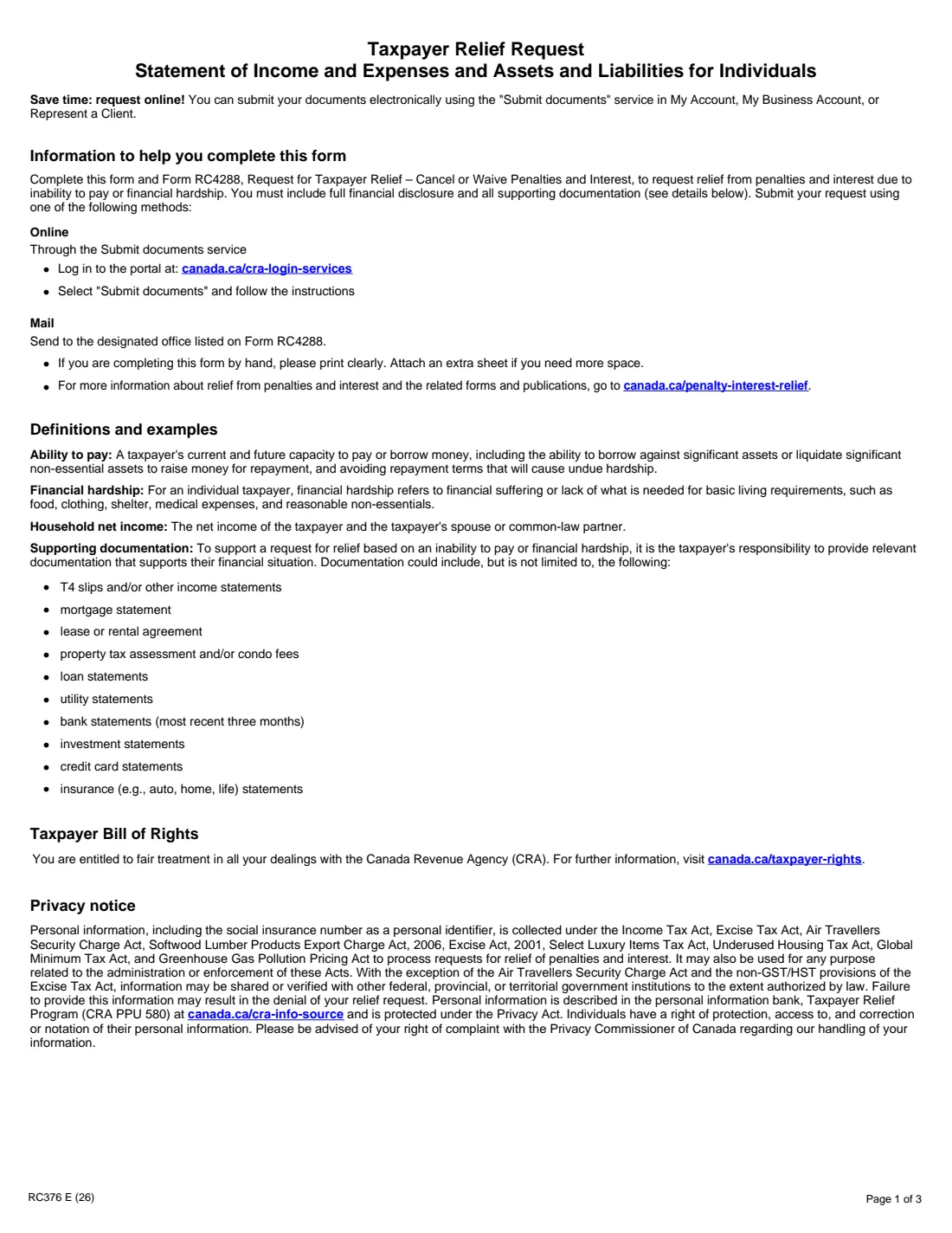
Form RC376 is the Canada Revenue Agency (CRA) statement individuals send with Form RC4288, Request for Taxpayer Relief, when they ask for penalties and interest to be cancelled or waived because of an inability to pay or financial hardship. The CRA asks for full financial disclosure. The current edition is RC376 E (26).
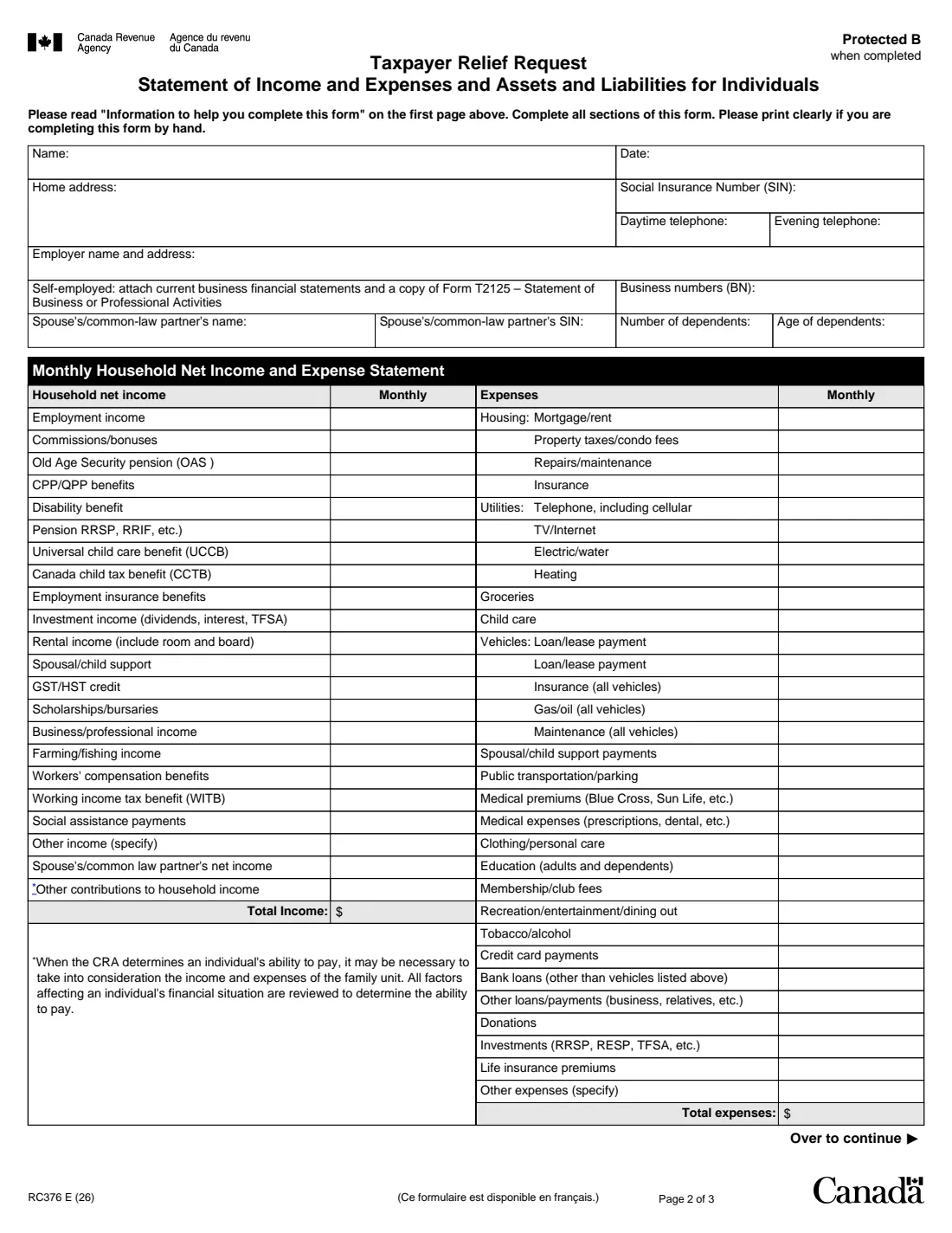
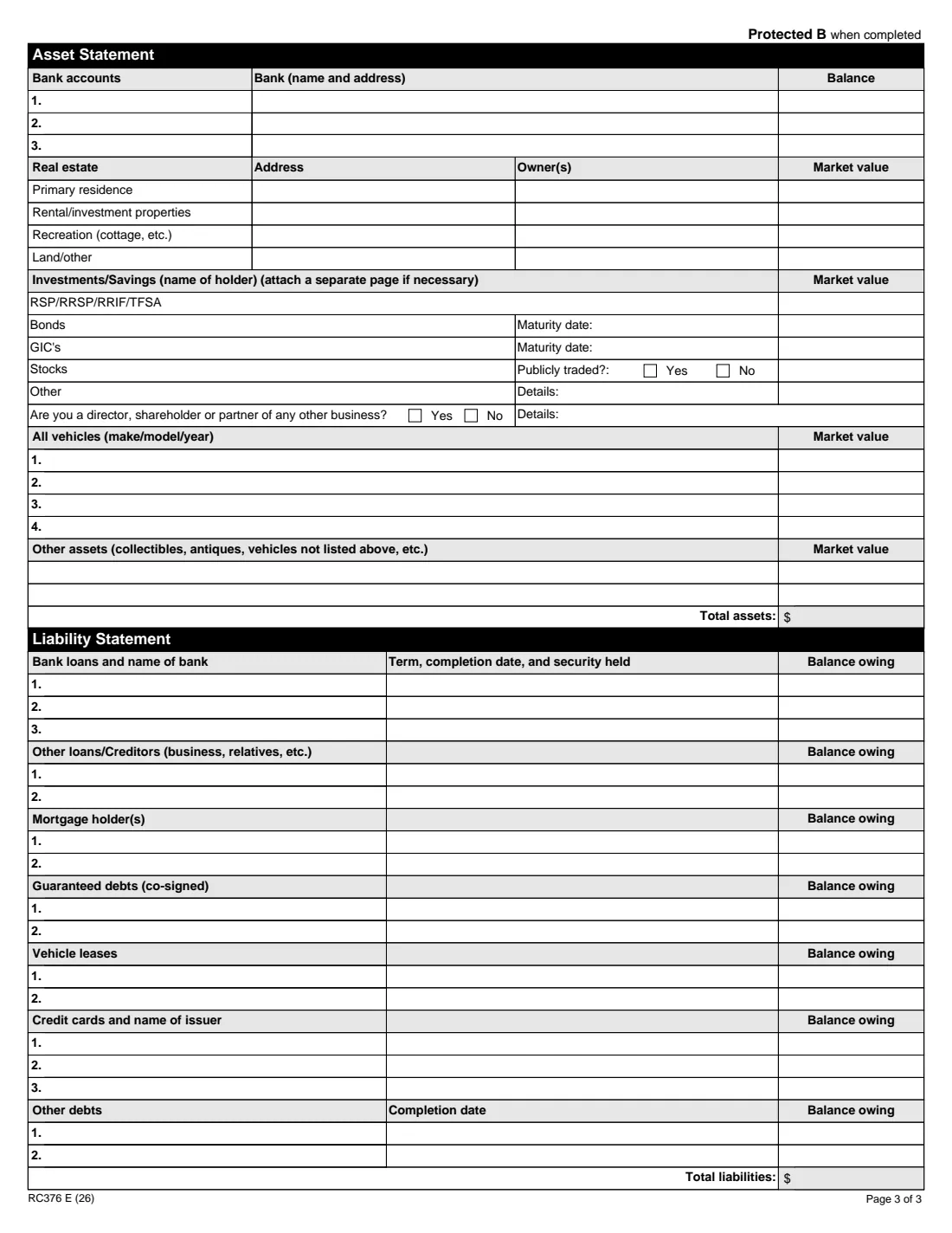
It has four parts: your household's monthly net income (yours and your spouse's or common-law partner's), your monthly expenses, an asset statement, and a liability statement, each with a total. The CRA may look at the whole family unit's income and expenses when it judges your ability to pay. Supporting documents such as income slips, three months of bank statements, mortgage or lease, loan, credit card, utility and insurance statements should go with it.
FileIt lays the long form out in clear sections, adds up all four totals for you, and prints everything, including any accented names, into the CRA's official PDF. The finished statement is saved in your vault next to your RC4288. FileIt never submits anything to the CRA.
- Who fills it
- The individual taxpayer asking for relief
- Sent with
- Form RC4288, online through Submit documents or by mail
- Amounts
- Monthly income and expenses; current asset values and balances owing
- Signatures
- None: the form has no signature line
- Edition
- RC376 E (26)
Who needs to fill out Form RC376?
- Individuals asking the CRA to cancel or waive penalties and interest because they can't pay.
- People facing financial hardship, meaning a lack of what's needed for basic living such as food, clothing, shelter and medical expenses.
- Self-employed people making such a request, who also attach business financial statements and Form T2125.
When to use Form RC376
- Whenever you send Form RC4288 on the grounds of inability to pay or financial hardship.
- When the CRA asks for an updated picture of your finances during a review.
- Together with the supporting documents that back up each figure.
What you need before you start
- Your SIN, phone numbers, employer, and any business numbers.
- Your spouse's or common-law partner's name and SIN, and your dependents' number and ages.
- Recent pay slips and benefit statements to work out monthly income.
- Bills and statements for housing, utilities, vehicles, insurance, loans and credit cards.
- Bank, investment, property and vehicle values, and every debt's balance owing.
What’s on Form RC376
The 2026 edition has 3 pages. FileIt asks for it in 5 parts:
- About youTaxpayer
- Monthly household net incomeTaxpayer
- Monthly expensesTaxpayer
- Asset statementTaxpayer
- Liability statementTaxpayer
How to fill out Form RC376, step by step
1 About you
Name, date, home address, SIN, daytime and evening telephone, employer, business numbers if self-employed, and your spouse's or partner's name and SIN, with the number and ages of dependents.
2 Monthly household net income
Twenty-two lines, from employment income and benefits to support, rental and business income, your spouse's or partner's net income and other contributions to the household. FileIt adds the total.
3 Monthly expenses
Thirty-one lines covering housing, utilities, groceries, child care, vehicles, medical, education, recreation, loans, credit cards, savings and other costs. FileIt adds the total.
4 Asset statement
Bank accounts and balances, real estate with owners and market values, registered plans, bonds, GICs, stocks and other investments, business interests, vehicles and other assets. FileIt adds the total.
5 Liability statement
Bank loans, other loans, mortgages, co-signed debts, vehicle leases, credit cards and other debts, each with its balance owing. FileIt adds the total.
Common mistakes to avoid
- Mixing monthly and yearly figures; the income and expense columns are monthly.
- Leaving out your spouse's or common-law partner's income.
- Sending the statement without RC4288, or without supporting documents.
- Forgetting assets you could borrow against or sell, which the CRA considers in your ability to pay.
- Leaving the business question unanswered when you're a director, shareholder or partner.
After you fill it out
Download the PDF from your FileIt vault and send it with your RC4288 and supporting documents through the CRA's Submit documents service, or mail it to the office listed on RC4288. FileIt doesn't submit it.
Keep the statement and your documents together in your vault in case the CRA follows up.
Update it if your situation changes before the CRA decides.
Fill out Form RC376 online with FileIt
- Pick the person. Choose someone from People and FileIt fills in their name, date of birth, address and other details it already knows.
- Answer plain-language questions. One part of the form at a time, with the official help text beside each question — 168 fields in all. Your answers save as you go.
- Check the live preview. Watch your answers land on the real Canada Revenue Agency (CRA) form, and let FileIt do any worksheet arithmetic.
- Generate the official PDF. FileIt prints your answers into the agency’s own PDF and files it in that person’s folder in your vault.
FileIt fills the form — it never files or submits anything for you. Deliver the finished form to whoever asked for it, the way the form’s instructions say.
Start Form RC376 now — it’s freeForm RC376: frequently asked questions
Do I need RC376 with every RC4288?
Individuals use it when the RC4288 request is based on an inability to pay or financial hardship. The form says it must be completed along with RC4288 in that case, with full financial disclosure.
Should I include my spouse's income?
Yes. The income section has a line for your spouse's or common-law partner's net income, and the form explains that the CRA may consider the family unit's income and expenses.
What documents should I attach?
The form lists examples: T4 slips and other income statements, mortgage, lease or rental agreement, property tax or condo fees, loan, utility, bank (the latest three months), investment, credit card and insurance statements.
Can I fill out RC376 online?
Yes. FileIt guides you through each section, totals the four columns, and prints your answers on the CRA's official RC376 PDF, saved in your vault.
Official sources
- Blank form (PDF), published by Canada Revenue Agency (CRA): https://www.canada.ca/content/dam/cra-arc/formspubs/pbg/rc376/rc376-fill-26e.pdf
- Official instructions and guidance: https://www.canada.ca/en/revenue-agency/services/forms-publications/forms/rc376.html
- Edition shown on this page: RC376 E (26) (checked 2026-10-19).
FileIt is not affiliated with or endorsed by Canada Revenue Agency (CRA) or any government. This page explains the form in general terms and is not legal, tax or immigration advice. Always read the official instructions, and check that you are using the edition the recipient accepts. Page last reviewed 2026-10-19.