What is Form RC199?
Form RC199 is the Canada Revenue Agency (CRA) application for the Voluntary Disclosures Program (VDP). It's for an individual, employer, corporation, partnership, trust, GST/HST registrant or other taxpayer that wants to fix errors or omissions in returns at least one year or reporting period past due, such as unreported income or unfiled information returns, where penalties or interest apply. Each applicant files a separate application. The current edition is RC199 E (25).
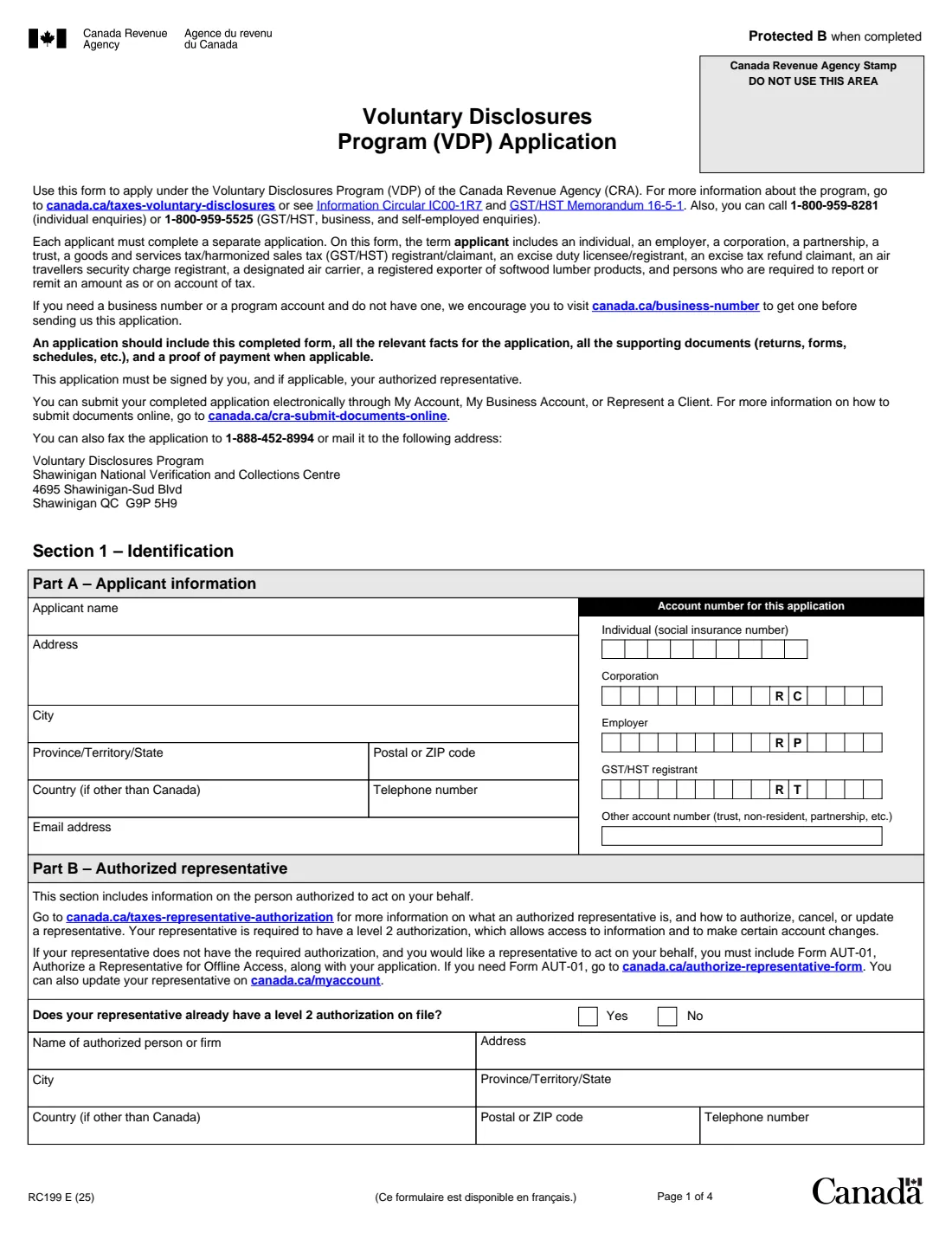
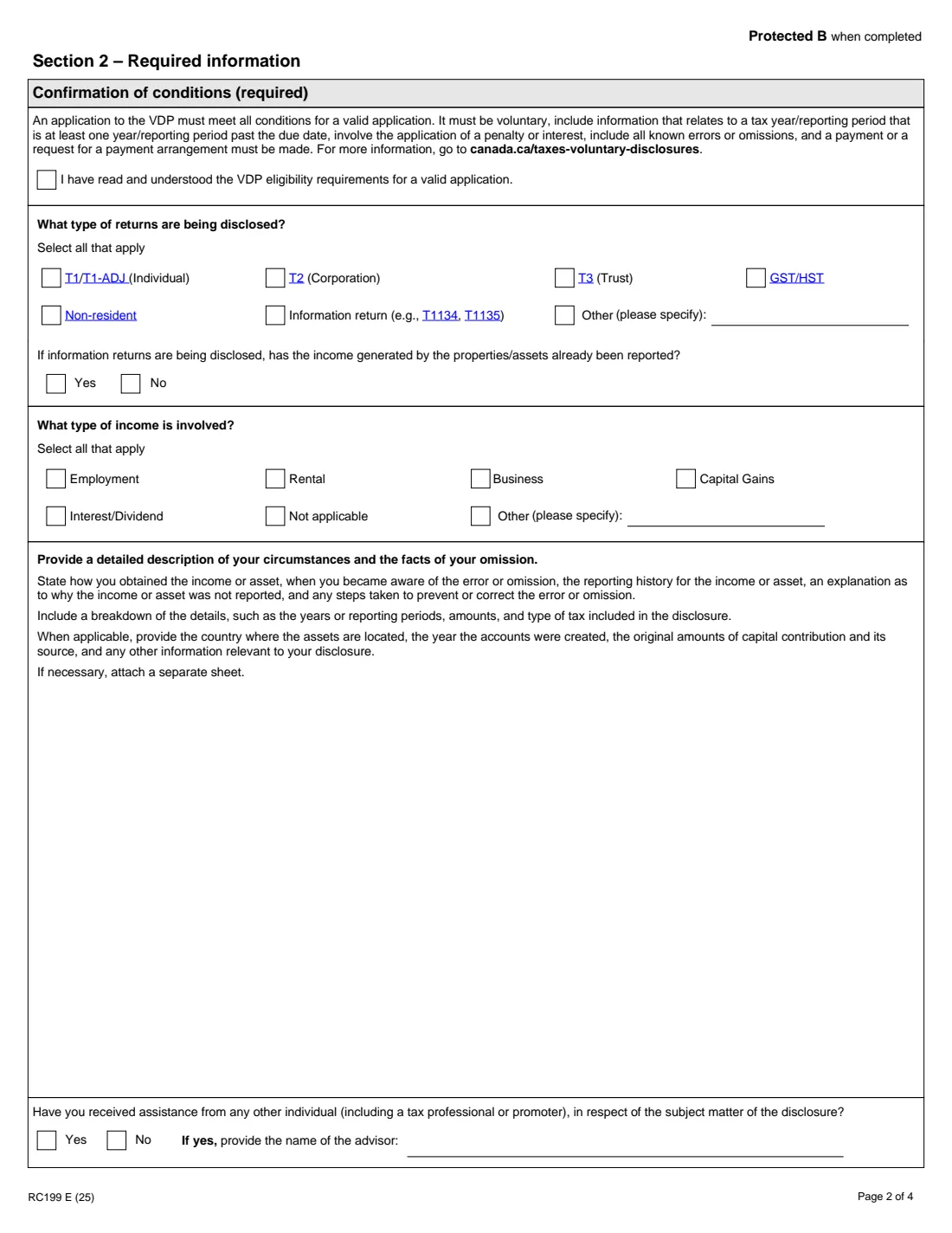
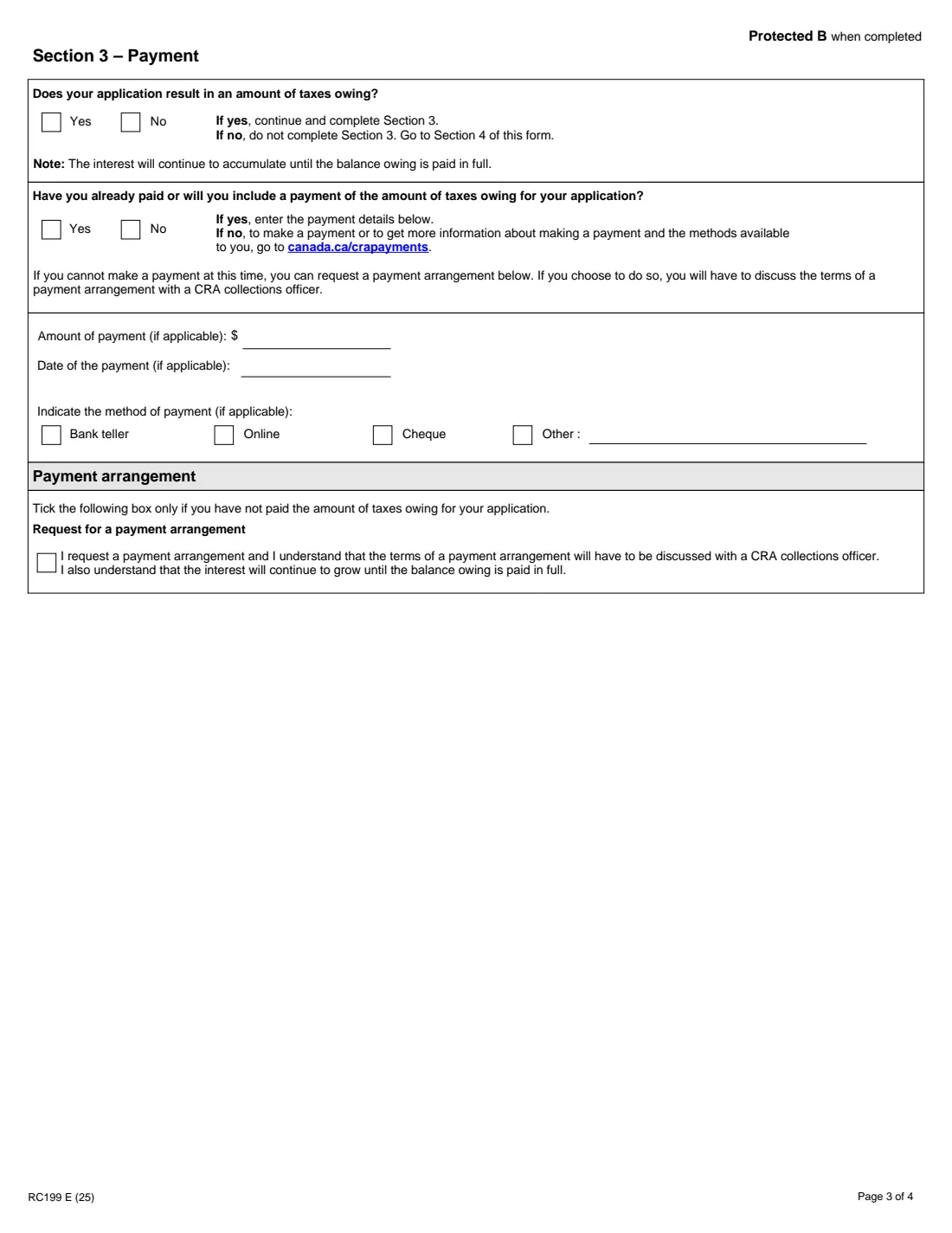
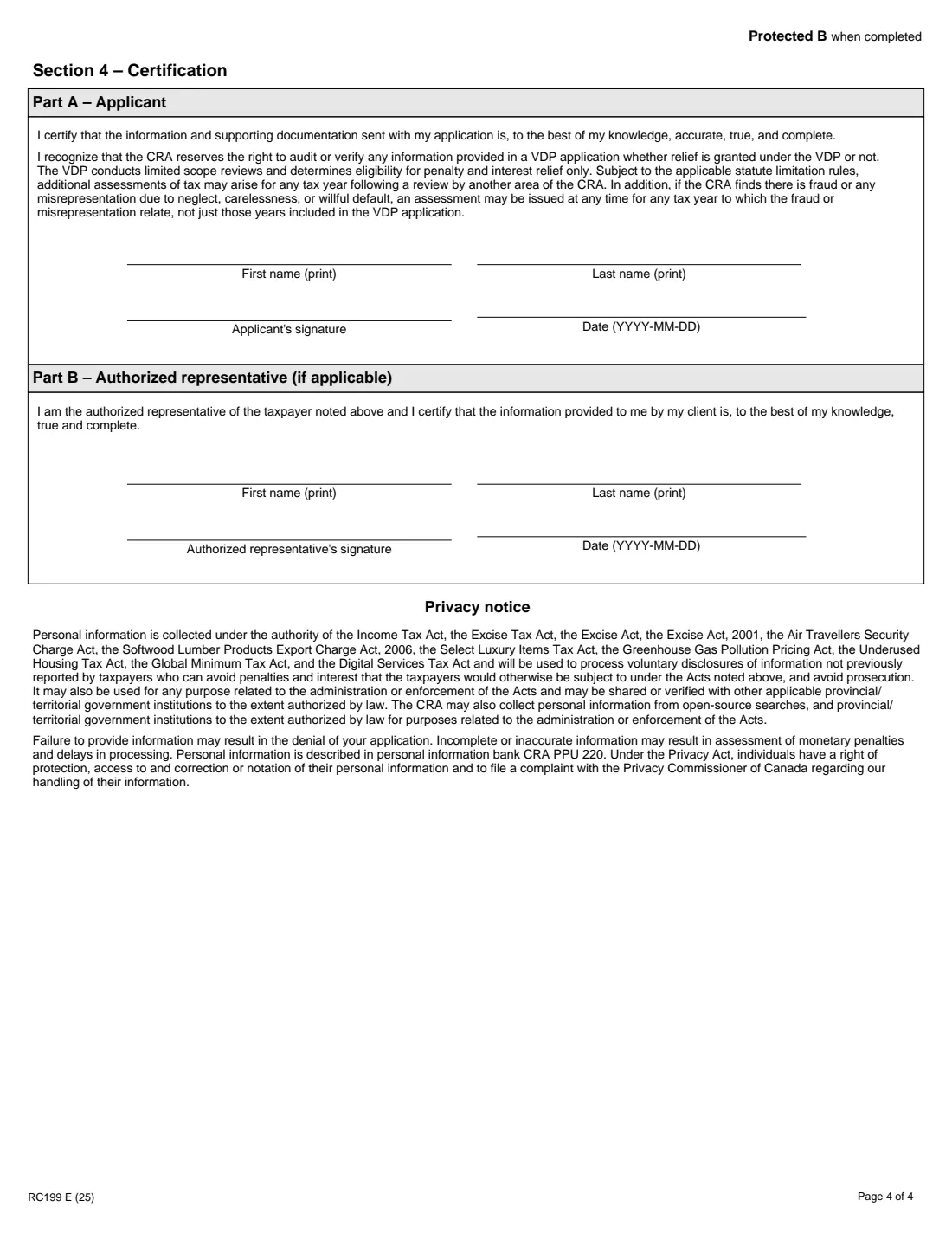
The form identifies you and any authorized representative, the account numbers involved, the types of returns and income being disclosed, and a detailed description of what happened and when. Section 3 covers payment of any taxes owing or a request for a payment arrangement, and Section 4 is the certification, signed by you and your representative if you have one. The CRA's program details are at canada.ca/taxes-voluntary-disclosures and in Information Circular IC00-1R7.
FileIt guides you through each section, splits business numbers into the form's boxes, checks that your description fits the space printed for it, and fills the CRA's official PDF. The completed application is saved in your vault. FileIt never submits anything: you send it through My Account, by fax or by mail yourself.
- Who fills it
- Each applicant, and their authorized representative if any
- Sent to
- The VDP, Shawinigan National Verification and Collections Centre, online, by fax or by mail
- Send with it
- All relevant facts, supporting returns and schedules, and proof of payment
- Signatures
- The applicant, and the representative if any, sign by hand
- Edition
- RC199 E (25)
Who needs to fill out Form RC199?
- Individuals who didn't report income, such as foreign interest or capital gains, or didn't file returns such as T1135.
- Businesses, employers and GST/HST registrants correcting unfiled returns or unremitted amounts.
- Trusts, partnerships, non-residents and other taxpayers required to report or remit tax.
- Representatives applying on a client's behalf, with level 2 authorization or Form AUT-01.
When to use Form RC199
- Before the CRA contacts you about the matter: the application must be voluntary.
- When the error involves a tax year or reporting period at least one year or period past its due date.
- When you can include all known errors or omissions and either pay the estimated tax or ask for a payment arrangement.
What you need before you start
- Your name, address, telephone and email, and the SIN, business number or other account number for the application.
- Your representative's details, and Form AUT-01 if they don't have level 2 authorization.
- The types of returns and income involved.
- A full account of the facts: how and when you got the income or asset, when you noticed the error, why it wasn't reported, and the amounts by year and type of tax.
- The corrected returns, forms and schedules, and proof of any payment you've made.
What’s on Form RC199
The 2025 edition has 4 pages. FileIt asks for it in 5 parts:
- Section 1, Part A – Applicant informationApplicant
- Section 1, Part B – Authorized representativeAuthorized representative
- Section 2 – Required informationApplicant
- Section 3 – PaymentApplicant
- Section 4, Part A – Applicant certificationApplicant
How to fill out Form RC199, step by step
1 Section 1, Part A – Applicant information
Name, address, city, province or state, postal or ZIP code, country, telephone and email, and the account number for this application: a SIN, a corporation, payroll or GST/HST business number, or another account number.
2 Section 1, Part B – Authorized representative
Whether your representative already has level 2 authorization, and their name, address and telephone. If they don't, include Form AUT-01.
3 Section 2 – Required information
Confirm you've read the eligibility conditions, tick the types of returns and income involved, answer whether income from disclosed information-return property was already reported, and write a detailed description of your circumstances. Say whether anyone helped you, and name them.
4 Section 3 – Payment
Say whether the disclosure results in taxes owing and whether you've paid or will include payment. Give the amount, date and method, or request a payment arrangement if you can't pay now.
5 Section 4 – Certification
You print your name, sign and date to certify that the information is accurate and complete; your representative does the same in Part B.
Common mistakes to avoid
- Waiting until the CRA has started looking into the matter; the application has to be voluntary.
- Disclosing only some of the errors you know about.
- Sending the form without the supporting returns and schedules, or without payment or a payment arrangement request.
- Using one application for several applicants; each needs their own.
- Forgetting Form AUT-01 for a representative without level 2 authorization.
After you fill it out
Download the PDF from your FileIt vault, sign Section 4 by hand, and submit it with your documents through My Account, My Business Account or Represent a Client, by fax to 1-888-452-8994, or by mail to the address on page 1. FileIt doesn't submit it.
Keep the application, your corrected returns and proof of payment together in your vault.
Interest keeps adding up until the balance is paid in full, as the form notes.
Fill out Form RC199 online with FileIt
- Pick the person. Choose someone from People and FileIt fills in their name, date of birth, address and other details it already knows.
- Answer plain-language questions. One part of the form at a time, with the official help text beside each question — 55 fields in all. Your answers save as you go.
- Check the live preview. Watch your answers land on the real Canada Revenue Agency (CRA) form, and let FileIt do any worksheet arithmetic.
- Generate the official PDF. FileIt prints your answers into the agency’s own PDF and files it in that person’s folder in your vault.
FileIt fills the form — it never files or submits anything for you. Deliver the finished form to whoever asked for it, the way the form’s instructions say.
Start Form RC199 now — it’s freeForm RC199: frequently asked questions
What does the VDP do?
It lets taxpayers come forward to correct errors or omissions and be considered for relief from penalties and interest. The form says the VDP decides eligibility for penalty and interest relief only, and the CRA may still audit or reassess.
Do I have to pay with my application?
The conditions printed on the form say a valid application needs a payment or a request for a payment arrangement when taxes are owing. Section 3 lets you give payment details or ask for an arrangement.
Can my accountant apply for me?
Yes. Part B identifies your authorized representative, who needs a level 2 authorization on file, or you include Form AUT-01. The representative also certifies in Section 4 Part B.
Where do I send Form RC199?
Online through My Account, My Business Account or Represent a Client, by fax to 1-888-452-8994, or by mail to the Voluntary Disclosures Program in Shawinigan, Quebec, at the address on the form.
Can I fill out RC199 online?
Yes. FileIt guides you through the application and prints your answers on the CRA's official RC199 PDF, saved in your vault, ready to sign and submit.
Official sources
- Blank form (PDF), published by Canada Revenue Agency (CRA): https://www.canada.ca/content/dam/cra-arc/formspubs/pbg/rc199/rc199-fill-25e.pdf
- Official instructions and guidance: https://www.canada.ca/en/revenue-agency/services/forms-publications/forms/rc199.html
- Edition shown on this page: RC199 E (25) (checked 2026-10-19).
FileIt is not affiliated with or endorsed by Canada Revenue Agency (CRA) or any government. This page explains the form in general terms and is not legal, tax or immigration advice. Always read the official instructions, and check that you are using the edition the recipient accepts. Page last reviewed 2026-10-19.