What is Form ISP-1011?
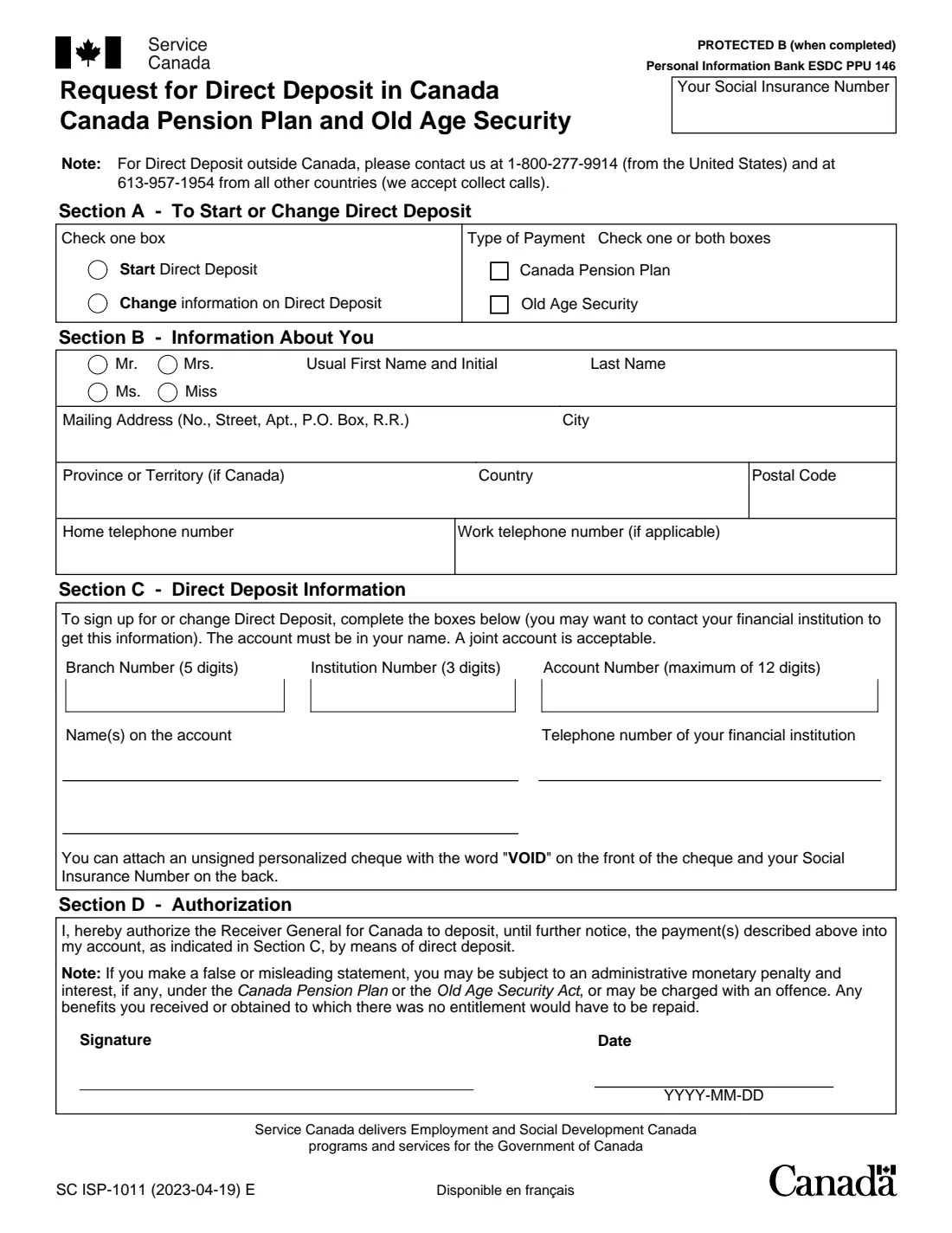
Form ISP-1011, Request for Direct Deposit in Canada, asks Service Canada to deposit your Canada Pension Plan (CPP) and/or Old Age Security (OAS) payments into an account at a Canadian financial institution. It also changes the account if you move your banking. You tick whether you're starting or changing direct deposit and which payments it's for, and give your contact details and the account's branch, institution and account numbers.
The account must be in your name; a joint account is acceptable. You can attach an unsigned personalized cheque marked "VOID" with your Social Insurance Number on the back. For direct deposit outside Canada the form asks you to call instead: 1-800-277-9914 from the United States, or 613-957-1954 from other countries (collect calls accepted).
FileIt walks you through the form and prints your answers into Service Canada's own PDF (edition SC ISP-1011 (2023-04-19) E). Names and addresses with accents print correctly. The finished PDF is saved in your vault, and you can sign it in FileIt's eSignature or print and sign it. FileIt never submits anything to Service Canada.
- Who fills it
- People receiving, or about to receive, CPP and/or OAS payments
- For
- Starting direct deposit, or changing the account it goes to
- Accounts
- In Canada, in your name (joint accounts accepted)
- Outside Canada
- Call 1-800-277-9914 (from the U.S.) or 613-957-1954 (other countries)
- Pages
- 1
- Signatures
- You, with the date
- Edition
- SC ISP-1011 (2023-04-19) E
Who needs to fill out Form ISP-1011?
- New CPP or OAS recipients who want their payments deposited rather than mailed.
- Pensioners who changed banks or accounts and need their payments to follow.
- Someone helping a parent set up direct deposit (the pensioner signs the form).
When to use Form ISP-1011
- When your CPP or OAS payments start, or any time after, to switch to direct deposit.
- Before closing the account your payments go into now, so a payment isn't sent to a closed account.
- Only for accounts in Canada. For an account outside Canada, call the numbers on the form.
What you need before you start
- Your Social Insurance Number.
- Your name, mailing address and telephone numbers.
- The 5-digit branch (transit) number, 3-digit institution number and account number (up to 12 digits), from a cheque or your financial institution.
- The name or names on the account, and your financial institution's telephone number.
- Optionally, an unsigned personalized cheque marked "VOID" with your SIN written on the back.
What’s on Form ISP-1011
The 2023 edition has 1 page. FileIt asks for it in 3 parts, and it is signed by Pensioner:
- Section A – To start or change direct depositPensioner
- Section B – Information about youPensioner
- Section C – Direct deposit informationPensioner
How to fill out Form ISP-1011, step by step
1 Section A – Start or change
Tick Start Direct Deposit or Change information on Direct Deposit, and tick Canada Pension Plan, Old Age Security, or both.
2 Section B – About you
Enter your salutation, usual first name and initial, last name, mailing address, and home and work telephone numbers.
3 Section C – Direct deposit information
Enter the branch, institution and account numbers, the name or names on the account, and your financial institution's telephone number. The account must be in your name; a joint account is fine.
4 Section D – Authorization
Sign and date the form (YYYY-MM-DD). By signing you authorize the Receiver General for Canada to deposit your payments into that account until further notice. The form warns that a false or misleading statement can lead to a penalty, and payments without entitlement must be repaid.
Common mistakes to avoid
- Mixing up the branch (5 digits) and institution (3 digits) numbers.
- Using an account that isn't in your name.
- Ticking neither CPP nor OAS, or only one when you receive both.
- Using this form for an account outside Canada (call instead).
- Closing the old account before the change takes effect.
After you fill it out
Sign the form, in FileIt's eSignature or on paper, and date it.
Send it to Service Canada, with a void cheque if you choose to attach one.
Keep the PDF in your FileIt vault, and check your next payment arrives in the new account.
Fill out Form ISP-1011 online with FileIt
- Pick the person. Choose someone from People and FileIt fills in their name, date of birth, address and other details it already knows.
- Answer plain-language questions. One part of the form at a time, with the official help text beside each question — 20 fields in all. Your answers save as you go.
- Check the live preview. Watch your answers land on the real Service Canada (ESDC) form, and let FileIt do any worksheet arithmetic.
- Generate the official PDF. FileIt prints your answers into the agency’s own PDF and files it in that person’s folder in your vault. Sign it, or send it for e-signature.
FileIt fills the form — it never files or submits anything for you. Deliver the finished form to whoever asked for it, the way the form’s instructions say.
Start Form ISP-1011 now — it’s freeForm ISP-1011: frequently asked questions
Can I use ISP-1011 for a bank account outside Canada?
No. For direct deposit outside Canada, the form asks you to call 1-800-277-9914 from the United States or 613-957-1954 from other countries. Collect calls are accepted.
Can the account be a joint account?
Yes. The form says the account must be in your name, and a joint account is acceptable.
Does one form cover both CPP and OAS?
Yes. Tick Canada Pension Plan, Old Age Security, or both, in Section A.
Do I need to attach a void cheque?
It's optional. The form says you can attach an unsigned personalized cheque with "VOID" on the front and your Social Insurance Number on the back.
Can I sign ISP-1011 electronically in FileIt?
FileIt places a signature and date box on Section D for its eSignature, as it does for ISP-3520. If you prefer, print the form and sign it by hand.
Official sources
- Blank form (PDF), published by Service Canada (ESDC): https://catalogue.servicecanada.gc.ca/apps/EForms/pdf/en/ISP-1011.pdf
- Official instructions and guidance: https://catalogue.servicecanada.gc.ca/content/EForms/en/Detail.html?Form=ISP-1011
- Edition shown on this page: SC ISP-1011 (2023-04-19) E (checked 2026-10-25).
FileIt is not affiliated with or endorsed by Service Canada (ESDC) or any government. This page explains the form in general terms and is not legal, tax or immigration advice. Always read the official instructions, and check that you are using the edition the recipient accepts. Page last reviewed 2026-10-25.