What is Form GST66?
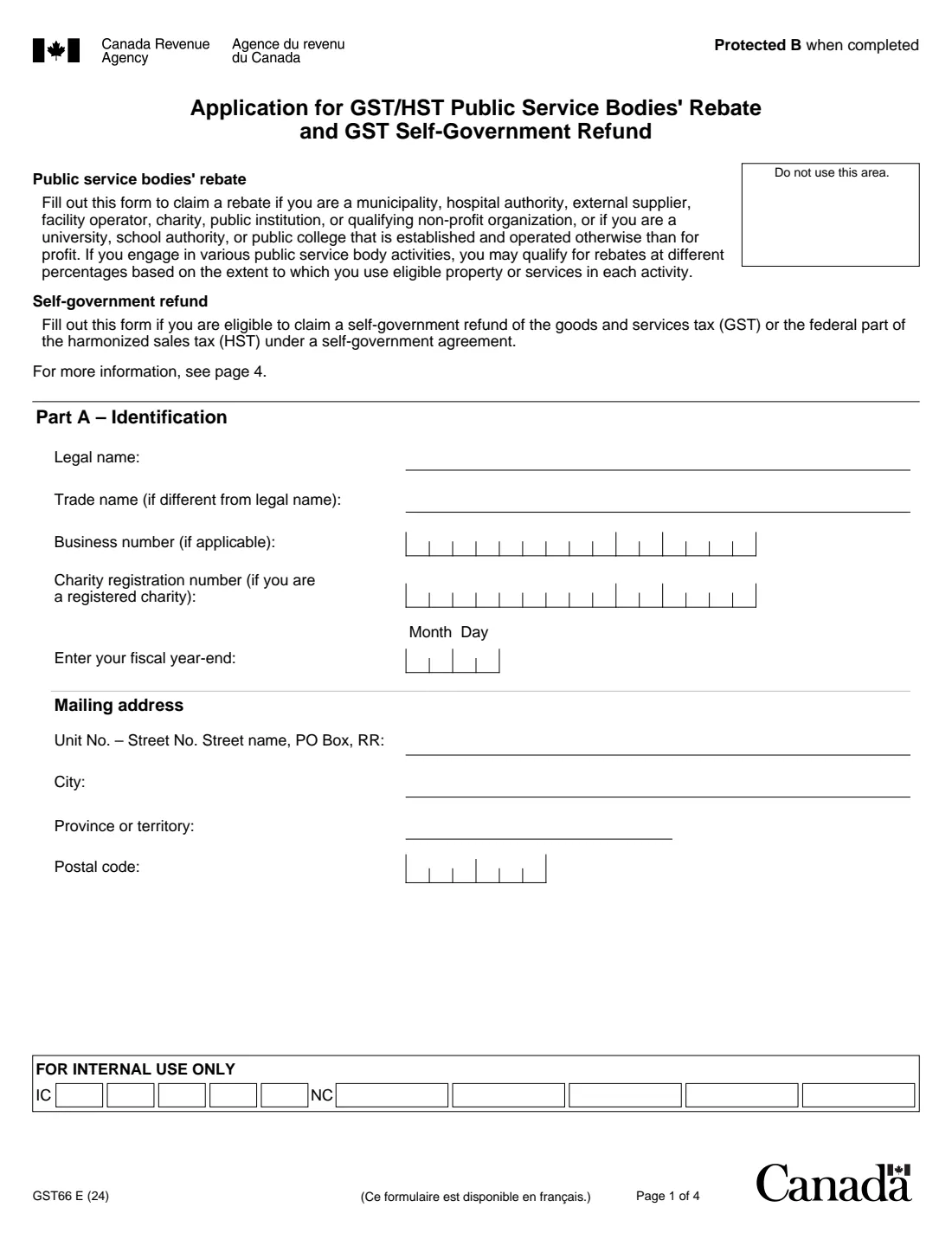
Form GST66 is the Canada Revenue Agency (CRA) application for the GST/HST public service bodies' (PSB) rebate. It also claims the GST self-government refund of the GST, or the federal part of the HST, under a self-government agreement. Municipalities, hospital authorities, external suppliers, facility operators, charities, public institutions and qualifying non-profit organizations can claim the rebate. So can universities, school authorities and public colleges established and operated otherwise than for profit.
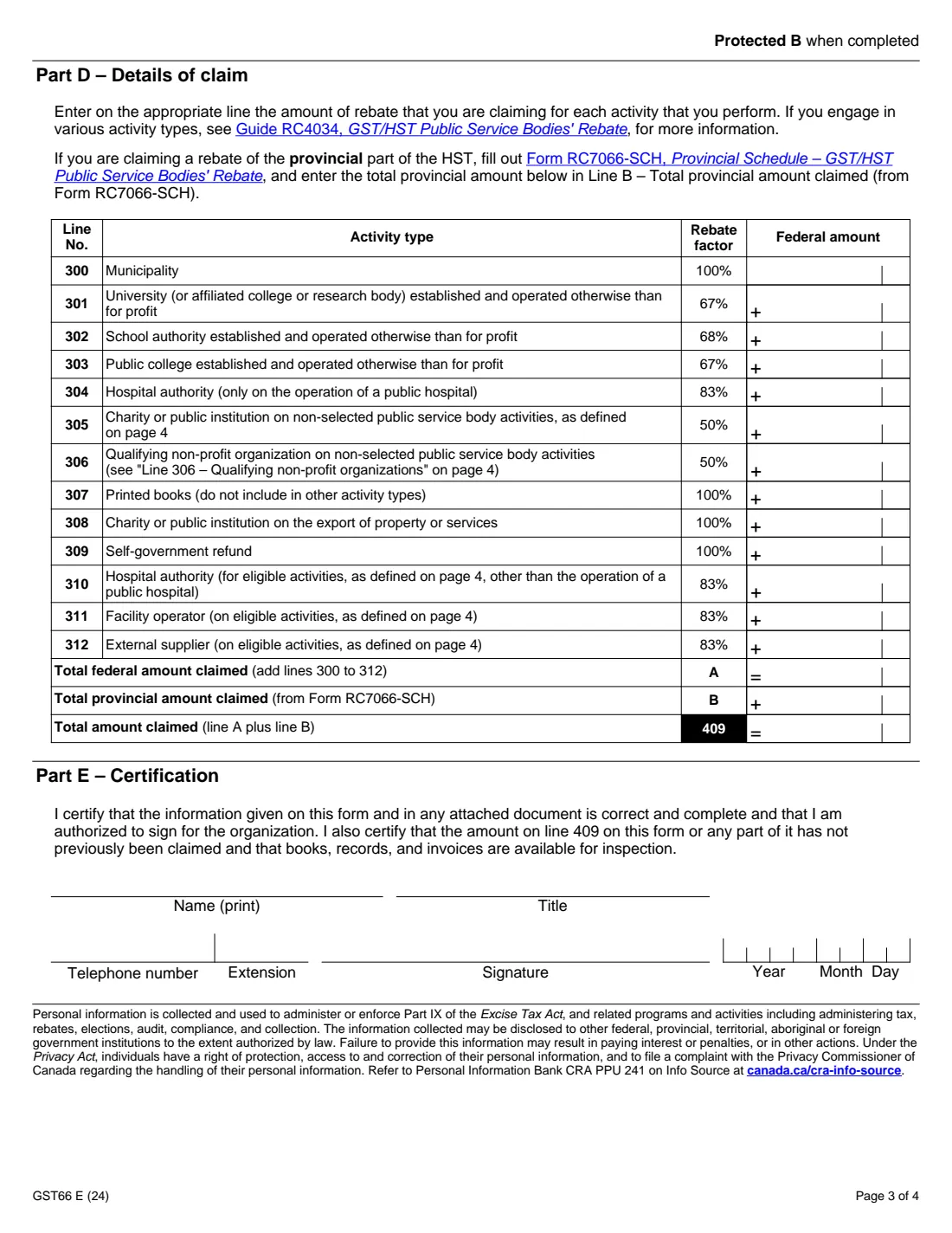
Part D lists the rebate by activity, each line with its own rebate factor: 100% for municipalities, 67% for universities and public colleges, 68% for school authorities, 83% for hospital authorities, facility operators and external suppliers, and 50% for charities and qualifying non-profits. There are separate lines for printed books, exports and the self-government refund. The provincial part of the HST is claimed on Form RC7066-SCH and its total entered on line B. Line 409 is the total claimed.
FileIt walks you through the application, adds up line A and line 409, and prints everything, including your names and addresses with any accents, into the CRA's own fillable PDF (edition GST66 E (24)). An authorized signing officer signs it by hand. FileIt never files anything for you.
- Who claims
- Public service bodies: municipalities, universities, school authorities, public colleges, hospital authorities, charities, public institutions, qualifying non-profits, facility operators, external suppliers
- Also for
- The GST self-government refund (line 309)
- Provincial part
- Claimed on Form RC7066-SCH, its total on line B
- Registrants
- Part C: say whether line 409 is included on line 111 of your GST/HST return
- Signatures
- An authorized signing officer, by hand
- Edition
- GST66 E (24)
Who needs to fill out Form GST66?
- Registered charities and public institutions claiming the 50% rebate on their non-selected public service body activities.
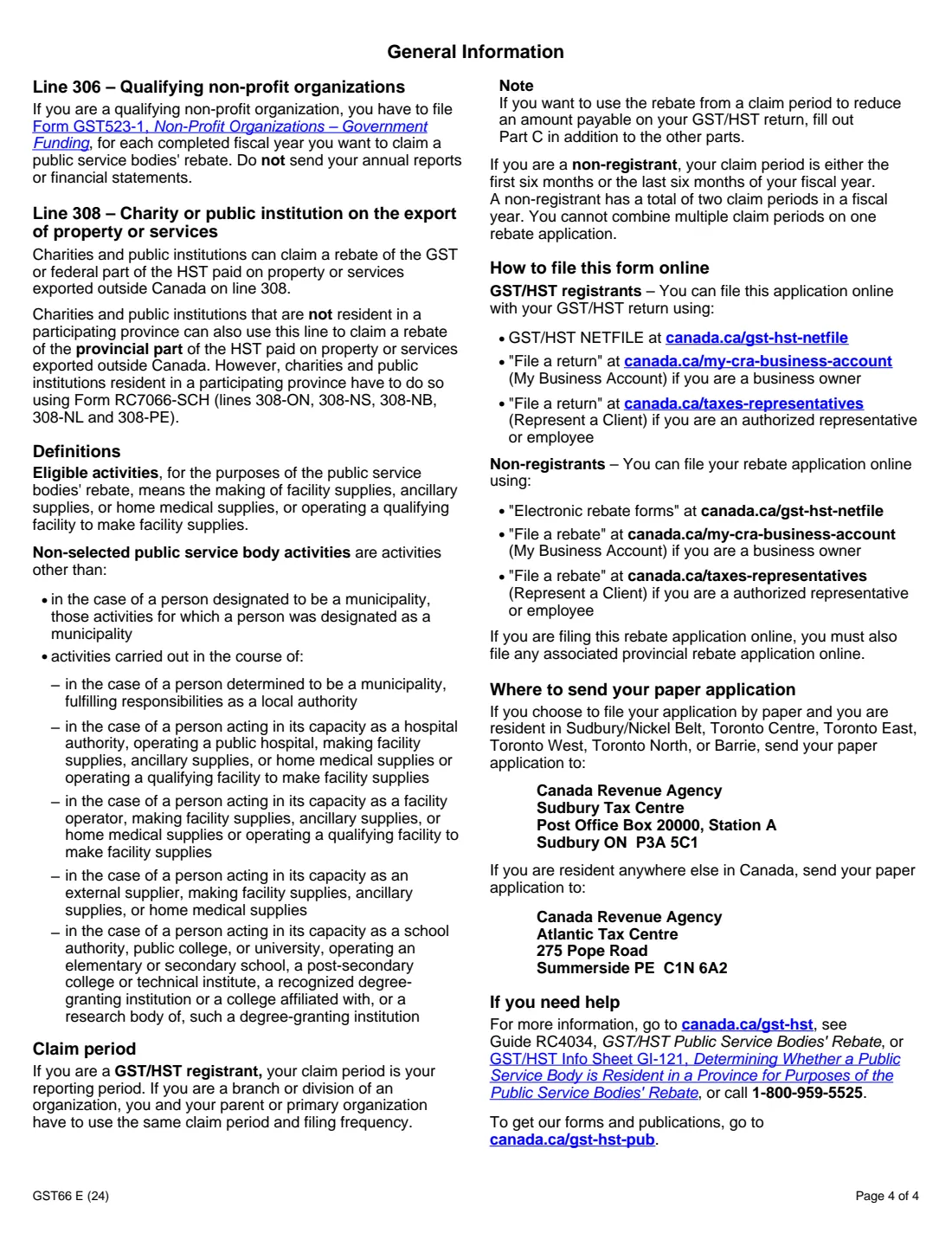
- Qualifying non-profit organizations (see "Line 306" on page 4 of the form).
- Municipalities, universities, school authorities, public colleges and hospital authorities.
- Facility operators and external suppliers on their eligible activities.
- Self-governing First Nations claiming the GST self-government refund.
When to use Form GST66
- For each claim period, after you've worked out the rebate for each activity using Guide RC4034, GST/HST Public Service Bodies' Rebate.
- Together with Form RC7066-SCH if you're also claiming a rebate of the provincial part of the HST.
- If you're a GST/HST registrant, Part C asks whether you're including the amount on your GST/HST return instead of filing the claim separately.
What you need before you start
- The organization's legal name, trade name, business number and, for a registered charity, its registration number.
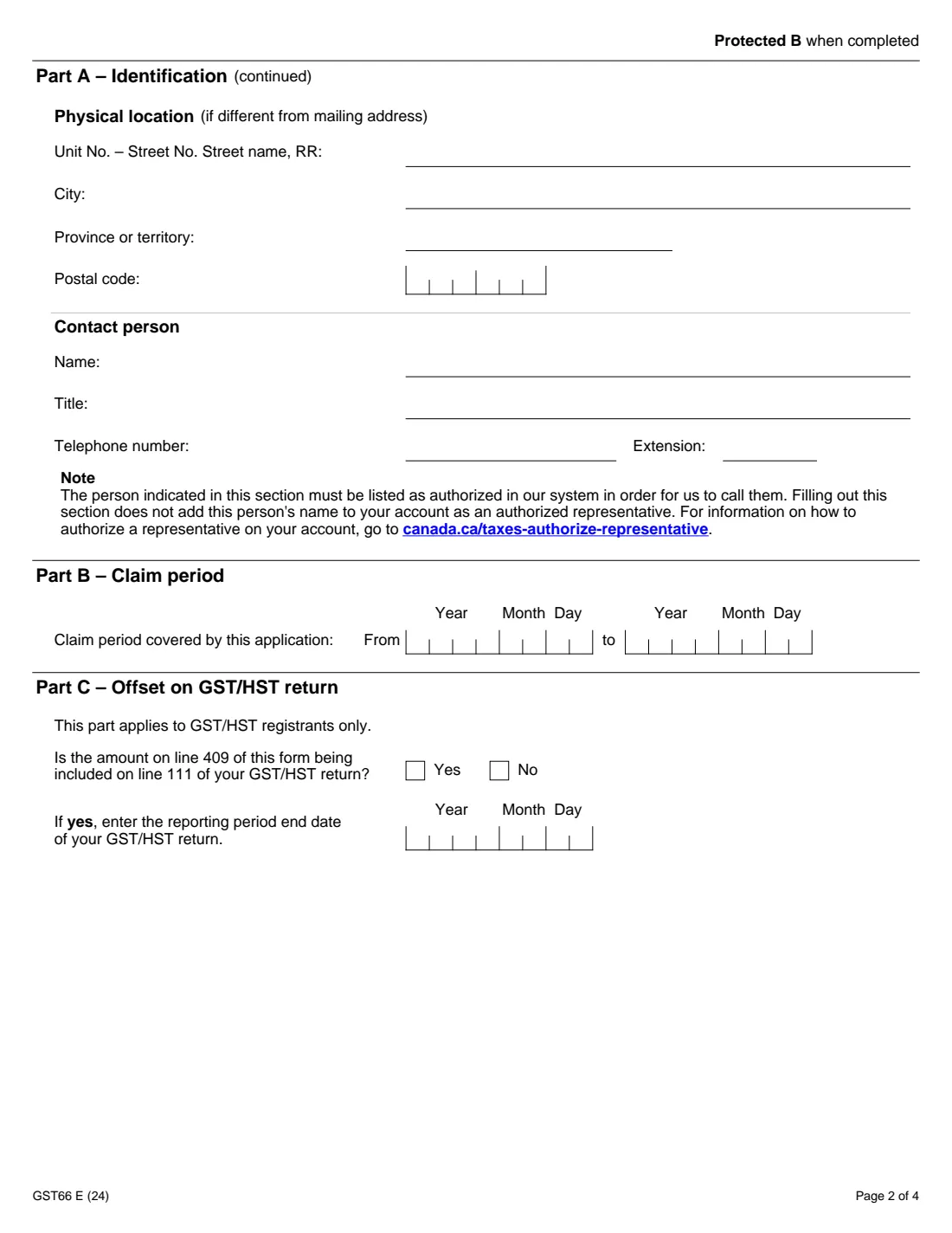
- Its fiscal year-end, mailing address and physical location if different.
- A contact person who is listed as authorized on your CRA account.
- The claim period and the rebate amount for each activity, already multiplied by its rebate factor.
- The provincial total from Form RC7066-SCH, if any.
What’s on Form GST66
The 2024 edition has 4 pages. FileIt asks for it in 7 parts:
- Part A – IdentificationClaimant (authorized signing officer)
- Physical location (if different from mailing address)Claimant (authorized signing officer)
- Contact personClaimant (authorized signing officer)
- Part B – Claim periodClaimant (authorized signing officer)
- Part C – Offset on GST/HST returnClaimant (authorized signing officer)
- Part D – Details of claimClaimant (authorized signing officer)
- Part E – CertificationClaimant (authorized signing officer)
How to fill out Form GST66, step by step
1 Part A – Identification
Enter the legal and trade names, the business number and charity registration number if you have them, the fiscal year-end, the mailing address, the physical location if it's different, and a contact person. The form notes that the CRA can only call a contact person who is listed as authorized on your account.
2 Parts B and C – Claim period and offset
Enter the claim period covered by the application. If you're a GST/HST registrant, say whether the amount on line 409 is included on line 111 of your GST/HST return, and if so, the end date of that return's reporting period.
3 Part D – Details of claim
Enter the rebate you're claiming on the line for each activity you perform (lines 300 to 312), and the provincial total from Form RC7066-SCH on line B. FileIt adds line A and line 409. Leave the lines that don't apply blank.
4 Part E – Certification
An authorized signing officer prints their name, title and telephone number and signs and dates the form by hand. They certify the amount hasn't been claimed before and that the books, records and invoices are available for inspection.
Common mistakes to avoid
- Entering the tax paid instead of the rebate amount (tax × the line's rebate factor).
- Claiming the provincial part of the HST on lines 300 to 312 instead of on Form RC7066-SCH and line B.
- Claiming an amount, or part of it, that was claimed before.
- Listing a contact person who isn't authorized on the organization's CRA account.
- Answering Part C "Yes" but not including the amount on line 111 of the GST/HST return.
After you fill it out
Print the PDF from your FileIt vault and have an authorized signing officer sign Part E.
Attach Form RC7066-SCH if you claimed a provincial amount on line B.
Keep the books, records and invoices behind the claim available for inspection, as the certification says.
Fill out Form GST66 online with FileIt
- Pick the person. Choose someone from People and FileIt fills in their name, date of birth, address and other details it already knows.
- Answer plain-language questions. One part of the form at a time, with the official help text beside each question — 57 fields in all. Your answers save as you go.
- Check the live preview. Watch your answers land on the real Canada Revenue Agency (CRA) form, and let FileIt do any worksheet arithmetic.
- Generate the official PDF. FileIt prints your answers into the agency’s own PDF and files it in that person’s folder in your vault.
FileIt fills the form — it never files or submits anything for you. Deliver the finished form to whoever asked for it, the way the form’s instructions say.
Start Form GST66 now — it’s freeForm GST66: frequently asked questions
Who can claim the public service bodies' rebate?
Municipalities, hospital authorities, external suppliers, facility operators, charities, public institutions and qualifying non-profit organizations, as well as universities, school authorities and public colleges established and operated otherwise than for profit.
What rebate factor applies to a charity?
Line 305 (a charity or public institution on non-selected public service body activities) shows a 50% rebate factor. Line 308 (a charity or public institution on the export of property or services) shows 100%.
How do I claim the provincial part of the HST?
Fill out Form RC7066-SCH, Provincial Schedule – GST/HST Public Service Bodies' Rebate, and enter its total on line B of GST66.
Can I include the rebate on my GST/HST return?
If you're a registrant, Part C asks whether line 409 is included on line 111 of your GST/HST return, and for that return's reporting period end date.
Can GST66 be signed electronically in FileIt?
No. GST66 isn't on the CRA's list of forms that accept electronic signatures, so an authorized signing officer signs the printed form by hand.
Official sources
- Blank form (PDF), published by Canada Revenue Agency (CRA): https://www.canada.ca/content/dam/cra-arc/formspubs/pbg/gst66/gst66-fill-24e.pdf
- Official instructions and guidance: https://www.canada.ca/en/revenue-agency/services/forms-publications/forms/gst66.html
- Edition shown on this page: GST66 E (24) (checked 2026-10-25).
FileIt is not affiliated with or endorsed by Canada Revenue Agency (CRA) or any government. This page explains the form in general terms and is not legal, tax or immigration advice. Always read the official instructions, and check that you are using the edition the recipient accepts. Page last reviewed 2026-10-25.