What is Form GST20?
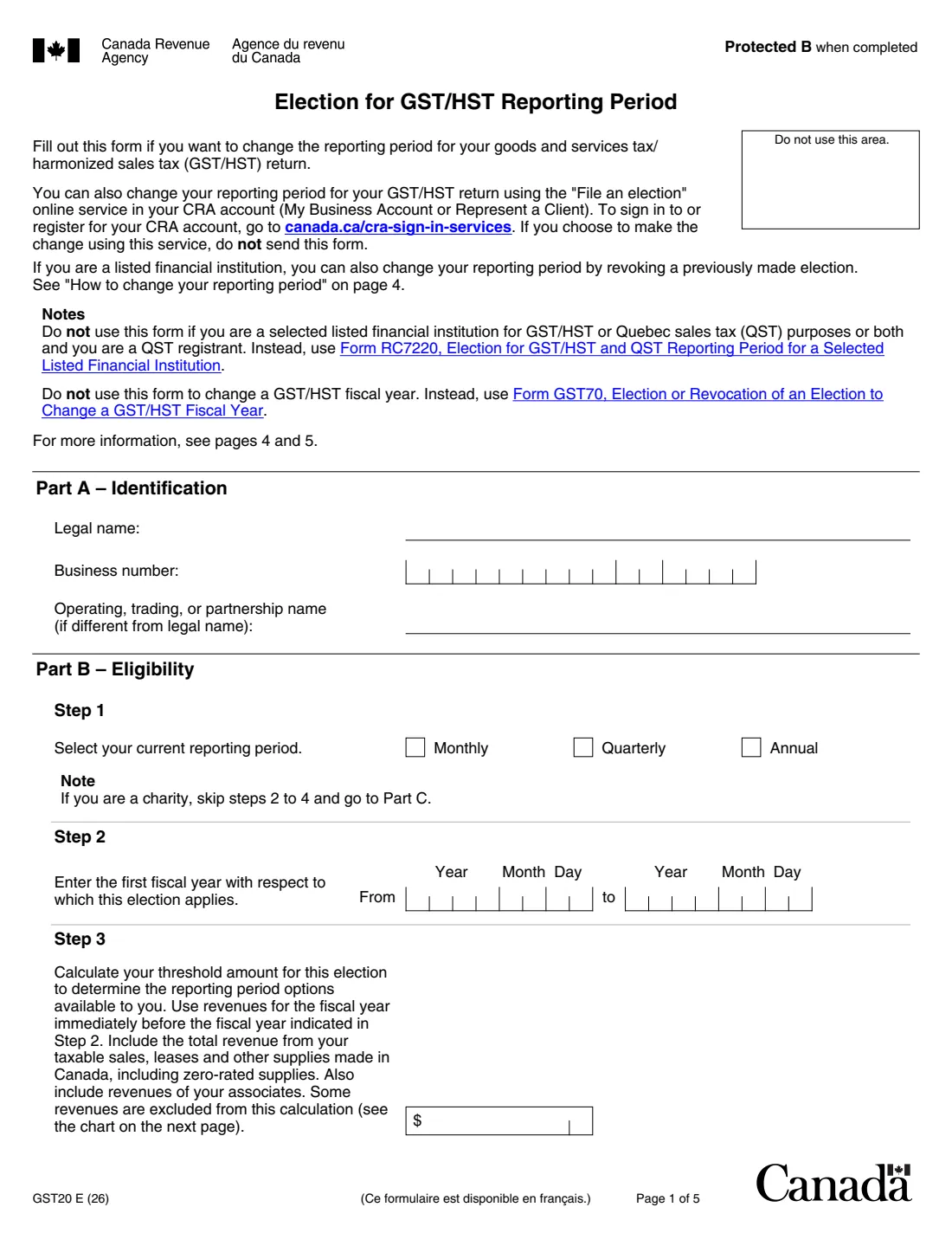
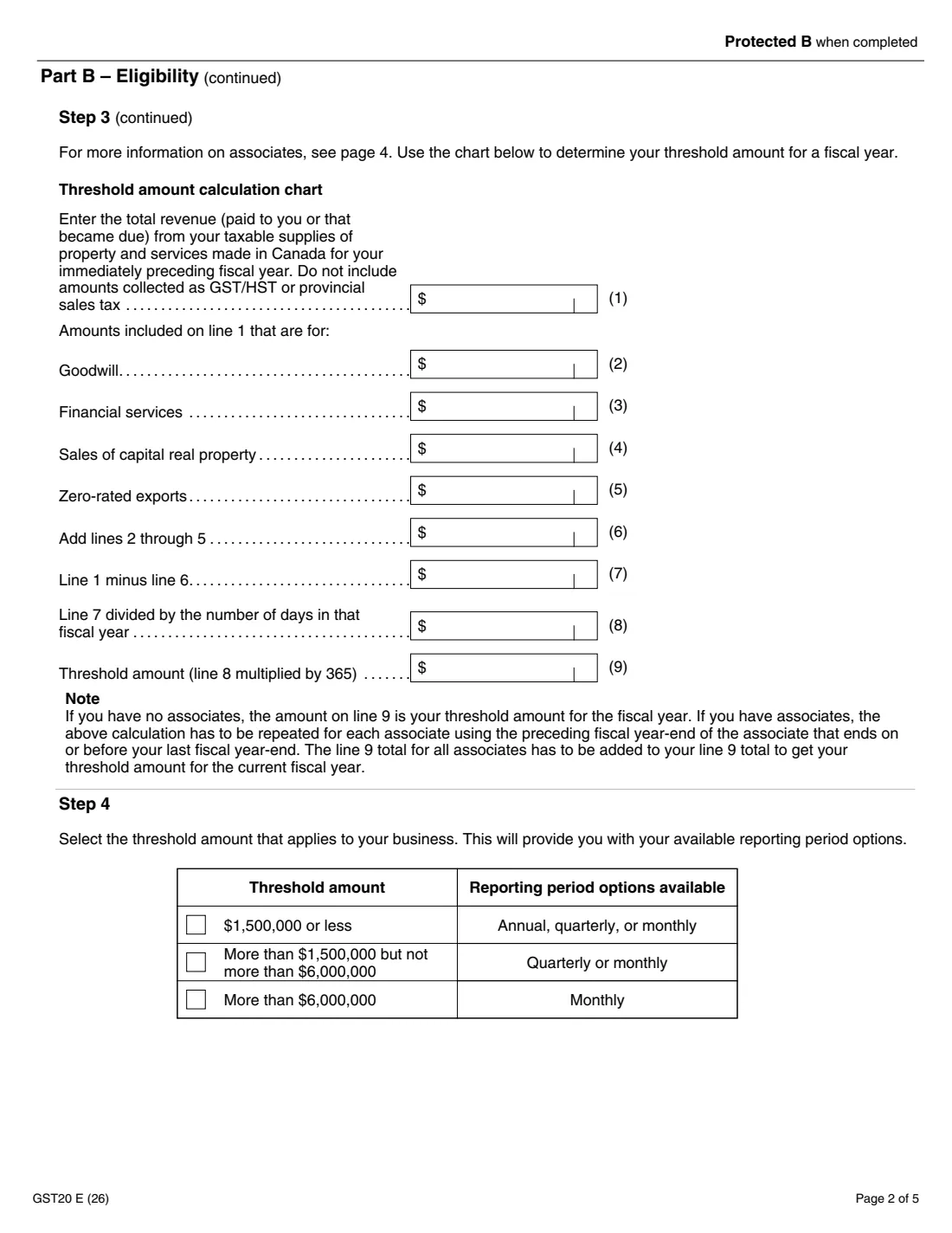
Form GST20, Election for GST/HST Reporting Period, lets a GST/HST registrant change its reporting period. The periods you can choose depend on your threshold amount: your taxable revenue from the previous fiscal year, plus that of any associates. A business at $1,500,000 or less can file annually, quarterly or monthly. Above $1,500,000 and up to $6,000,000 it can file quarterly or monthly. Above $6,000,000 it files monthly. A charity can choose any period.
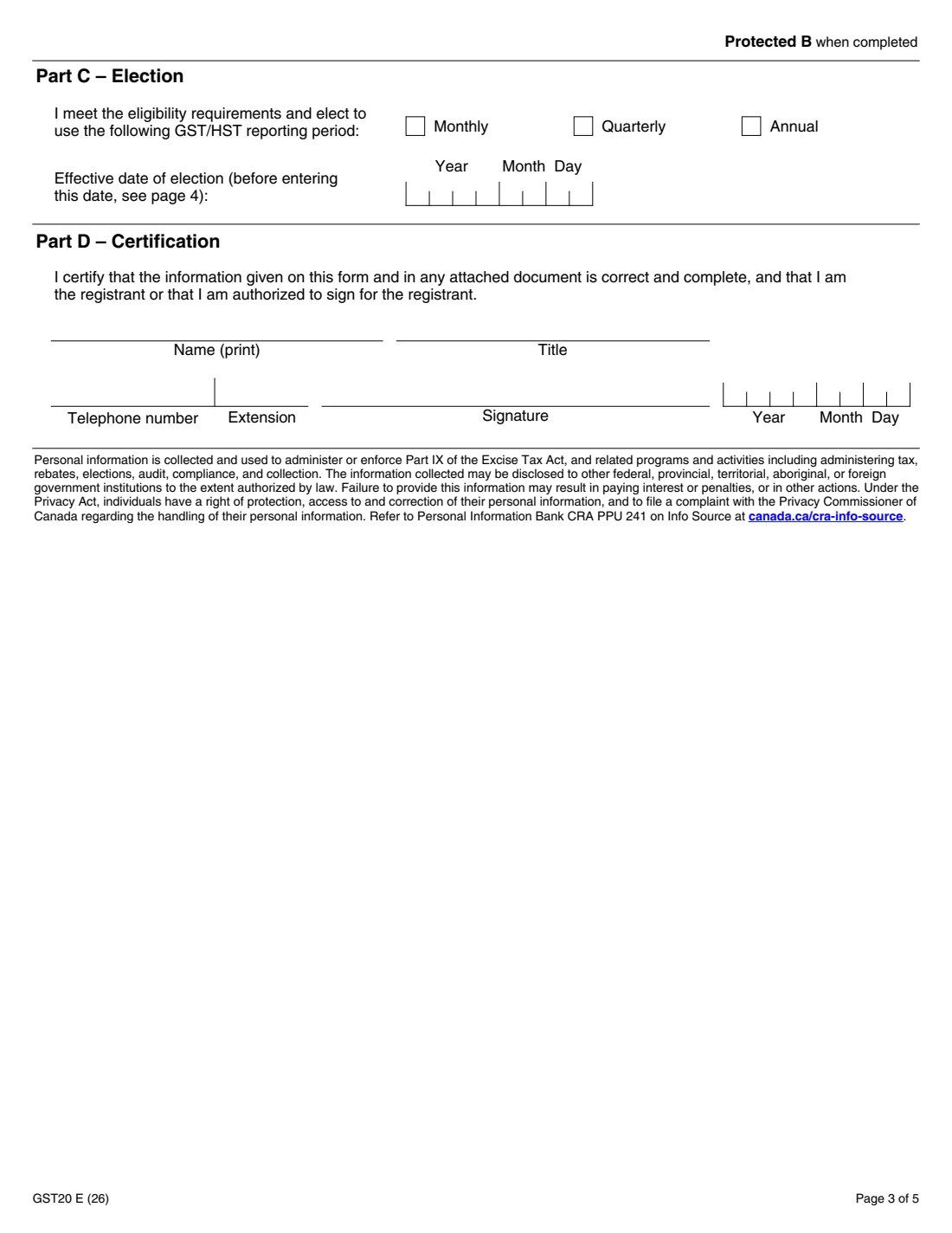
Part B works out the threshold amount: total taxable revenue, minus goodwill, financial services, sales of capital real property and zero-rated exports, scaled to 365 days. Part C names the new period and the date it takes effect, and Part D is the certification. You can also make the change with "File an election" in My Business Account or Represent a Client. If you do, don't send this form.
FileIt does the Part B arithmetic, ticks the right threshold row, checks that the period you choose is allowed, and prints everything into the CRA's own fillable PDF (edition GST20 E (26)). You sign it by hand and send it to your tax centre. FileIt never files anything for you.
- Who fills it
- A GST/HST registrant, or a person authorized to sign for it
- Periods
- Annual, quarterly or monthly, depending on the threshold amount ($1,500,000 and $6,000,000 limits)
- Due
- Quarterly to annual: within three months after the start of the fiscal year. Other cases: generally within two months after the election takes effect
- Online instead
- "File an election" in My Business Account or Represent a Client
- Send to
- Your tax centre (canada.ca/cra-offices)
- Signatures
- The registrant or an authorized person, by hand
- Edition
- GST20 E (26)
Who needs to fill out Form GST20?
- Small businesses that want to file GST/HST annually or quarterly instead of monthly, or the reverse.
- Businesses that have grown past $1,500,000 and need to move from annual to quarterly or monthly filing.
- Charities that want a reporting period other than the annual one the CRA assigns them.
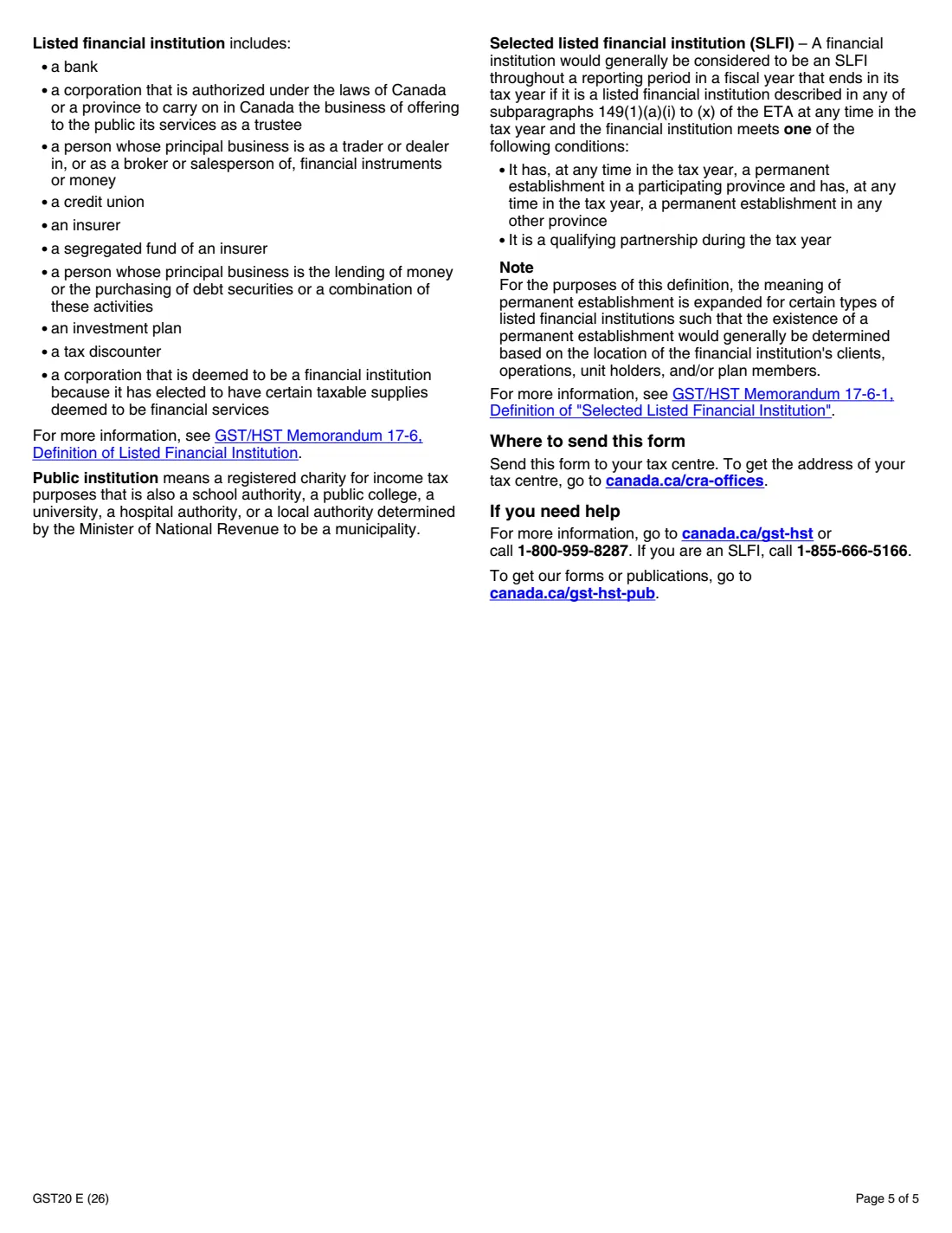
- Listed financial institutions changing their period (an SLFI that is a QST registrant uses Form RC7220 instead).
When to use Form GST20
- When you want a different reporting period for your GST/HST returns. To change your fiscal year, use Form GST70 instead.
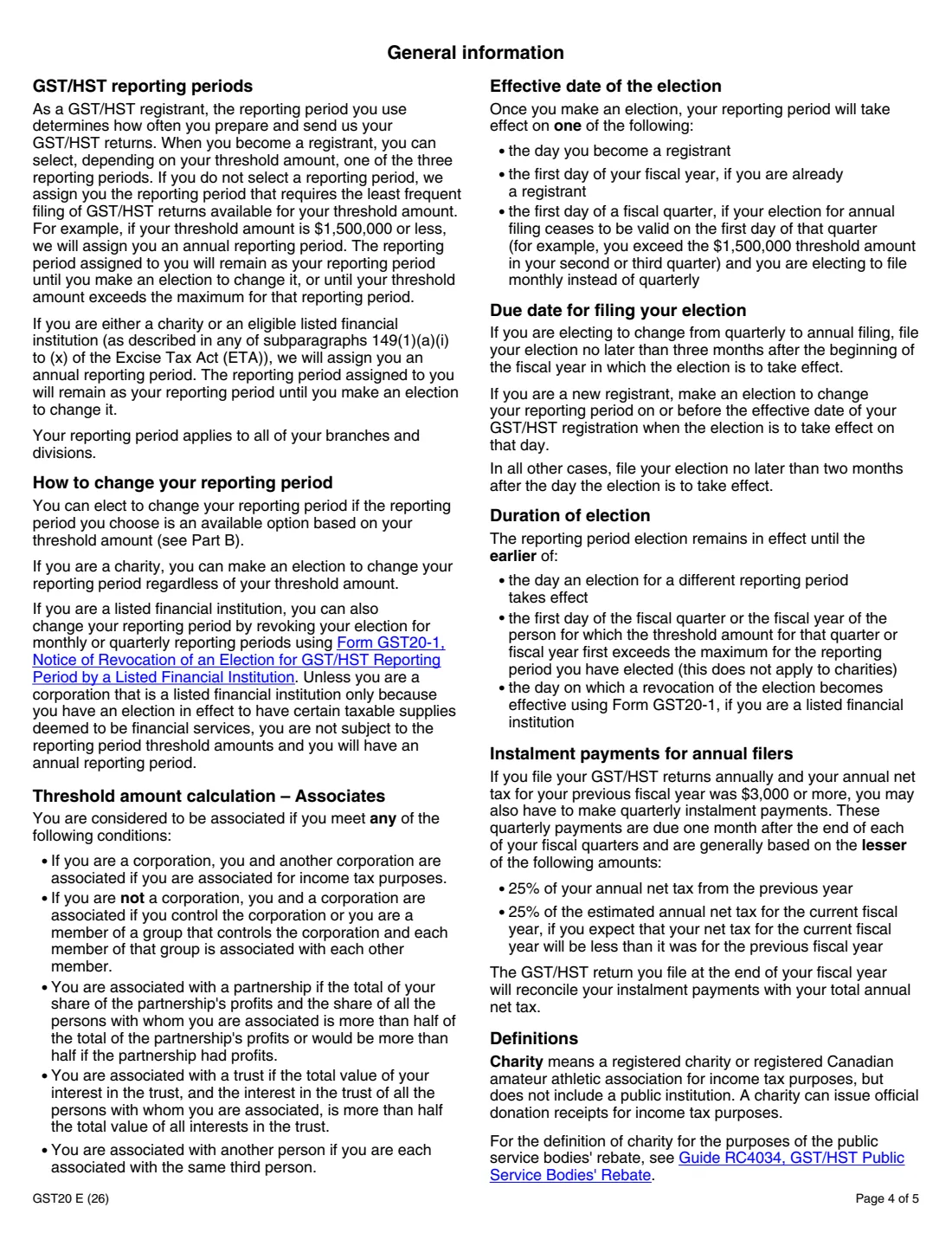
- From quarterly to annual: no later than three months after the beginning of the fiscal year the election takes effect, as the form says.
- As a new registrant: on or before the effective date of your registration, if the election takes effect that day.
- In all other cases: no later than two months after the day the election takes effect.
What you need before you start
- Your legal and operating names and your 15-character business number (123456789RT0001).
- Your current reporting period and the first fiscal year the election applies to.
- Last fiscal year's revenue from taxable supplies made in Canada, and the parts of it that are goodwill, financial services, sales of capital real property and zero-rated exports.
- The threshold amount (line 9) of each associate, if you have any.
- The new reporting period and its effective date.
What’s on Form GST20
The 2026 edition has 5 pages. FileIt asks for it in 7 parts:
- Part A – IdentificationRegistrant (or person authorized to sign)
- Part B, Step 1 – Current reporting periodRegistrant (or person authorized to sign)
- Part B, Step 2 – Fiscal yearRegistrant (or person authorized to sign)
- Part B, Step 3 – Threshold amountRegistrant (or person authorized to sign)
- Part B, Step 4 – Reporting period optionsRegistrant (or person authorized to sign)
- Part C – ElectionRegistrant (or person authorized to sign)
- Part D – CertificationRegistrant (or person authorized to sign)
How to fill out Form GST20, step by step
1 Part A – Identification
Enter the registrant's legal name, business number and operating name if it's different.
2 Part B – Eligibility
Tick your current reporting period. A charity skips steps 2 to 4. Otherwise give the fiscal year the election starts in, then the revenue figures for the threshold chart: line 1 minus lines 2 to 5, divided by the days in that year and multiplied by 365. Add your associates' line 9 amounts. FileIt ticks the threshold row in Step 4 for you.
3 Part C – Election
Choose the new period (only those your threshold allows) and the effective date. The form says it takes effect the day you become a registrant, the first day of your fiscal year, or the first day of a fiscal quarter when your annual election stops being valid and you elect monthly instead of quarterly.
4 Part D – Certification
Print the name and title of the person signing, with a telephone number, and date it. That person signs by hand, certifying they are the registrant or authorized to sign for it.
Common mistakes to avoid
- Electing annual filing with a threshold amount above $1,500,000, or quarterly above $6,000,000.
- Leaving out associates' revenues from the threshold amount.
- Including GST/HST or provincial sales tax collected in line 1.
- Using GST20 to change a fiscal year (that's Form GST70).
- Sending the form after making the same change online in My Business Account.
- Missing the filing deadline for the election.
After you fill it out
Print the PDF from your FileIt vault and sign Part D by hand.
Send it to your tax centre. The form points to canada.ca/cra-offices for the address.
If you'll file annually and your net tax for the previous year was $3,000 or more, you may also have to make quarterly instalment payments, as page 4 of the form explains.
Keep a copy with your GST/HST records in FileIt.
Fill out Form GST20 online with FileIt
- Pick the person. Choose someone from People and FileIt fills in their name, date of birth, address and other details it already knows.
- Answer plain-language questions. One part of the form at a time, with the official help text beside each question — 27 fields in all. Your answers save as you go.
- Check the live preview. Watch your answers land on the real Canada Revenue Agency (CRA) form, and let FileIt do any worksheet arithmetic.
- Generate the official PDF. FileIt prints your answers into the agency’s own PDF and files it in that person’s folder in your vault.
FileIt fills the form — it never files or submits anything for you. Deliver the finished form to whoever asked for it, the way the form’s instructions say.
Start Form GST20 now — it’s freeForm GST20: frequently asked questions
Who can file GST/HST annually?
A registrant whose threshold amount is $1,500,000 or less can choose annual, quarterly or monthly reporting. Charities can choose any period regardless of their threshold amount.
What is the threshold amount?
Your revenue from taxable supplies made in Canada in the previous fiscal year, minus goodwill, financial services, sales of capital real property and zero-rated exports, adjusted to 365 days, plus your associates' amounts. Part B of the form calculates it.
Can I change my reporting period online?
Yes. The form says you can use the "File an election" service in My Business Account or Represent a Client, and if you do, you don't send this form.
When does the new period take effect?
On the day you become a registrant, the first day of your fiscal year if you're already registered, or the first day of a fiscal quarter in the case the form describes on page 4.
Can I sign GST20 electronically in FileIt?
No. GST20 isn't on the CRA's list of forms that accept electronic signatures, so the printed form is signed by hand. The online election service is the electronic route.
Official sources
- Blank form (PDF), published by Canada Revenue Agency (CRA): https://www.canada.ca/content/dam/cra-arc/formspubs/pbg/gst20/gst20-fill-26e.pdf
- Official instructions and guidance: https://www.canada.ca/en/revenue-agency/services/forms-publications/forms/gst20.html
- Edition shown on this page: GST20 E (26) (checked 2026-10-25).
FileIt is not affiliated with or endorsed by Canada Revenue Agency (CRA) or any government. This page explains the form in general terms and is not legal, tax or immigration advice. Always read the official instructions, and check that you are using the edition the recipient accepts. Page last reviewed 2026-10-25.