What is Form CPT30?
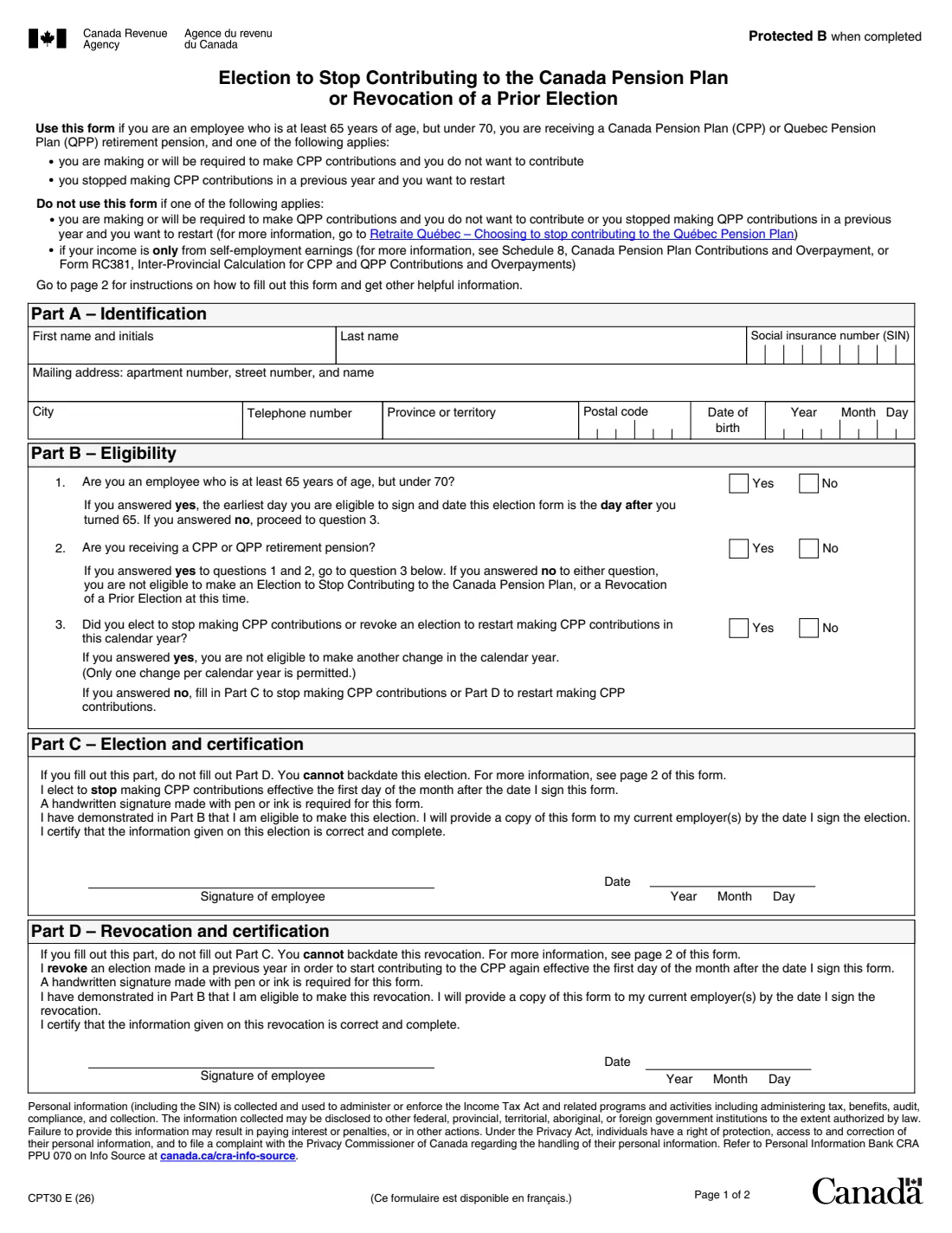
Form CPT30 is for employees who are at least 65 but under 70 and already receive a Canada Pension Plan (CPP) or Quebec Pension Plan (QPP) retirement pension. Part C elects to stop making CPP contributions; Part D revokes an election made in a previous year so contributions start again. You fill in one part or the other, never both, and you can only make one change per calendar year.
The form is not for Quebec Pension Plan contributions (that's Retraite Québec), and not for income that is only from self-employment, which is handled on the tax return with Schedule 8 or Form RC381. The election applies to all income from pensionable employment.
FileIt asks the questions in plain English, checks the eligibility answers in Part B and your age against the date, and prints everything onto the CRA's own PDF (edition CPT30 E (26)). The form requires a handwritten signature in pen or ink, so you print the PDF and sign it. You give a copy to each employer and mail the original to the CRA yourself; FileIt never submits anything. Filling forms is free on every plan.
- Who fills it
- An employee aged 65 to 69 who receives a CPP or QPP retirement pension
- Given to
- A copy to each employer, then the original to the CRA
- Mail the original to
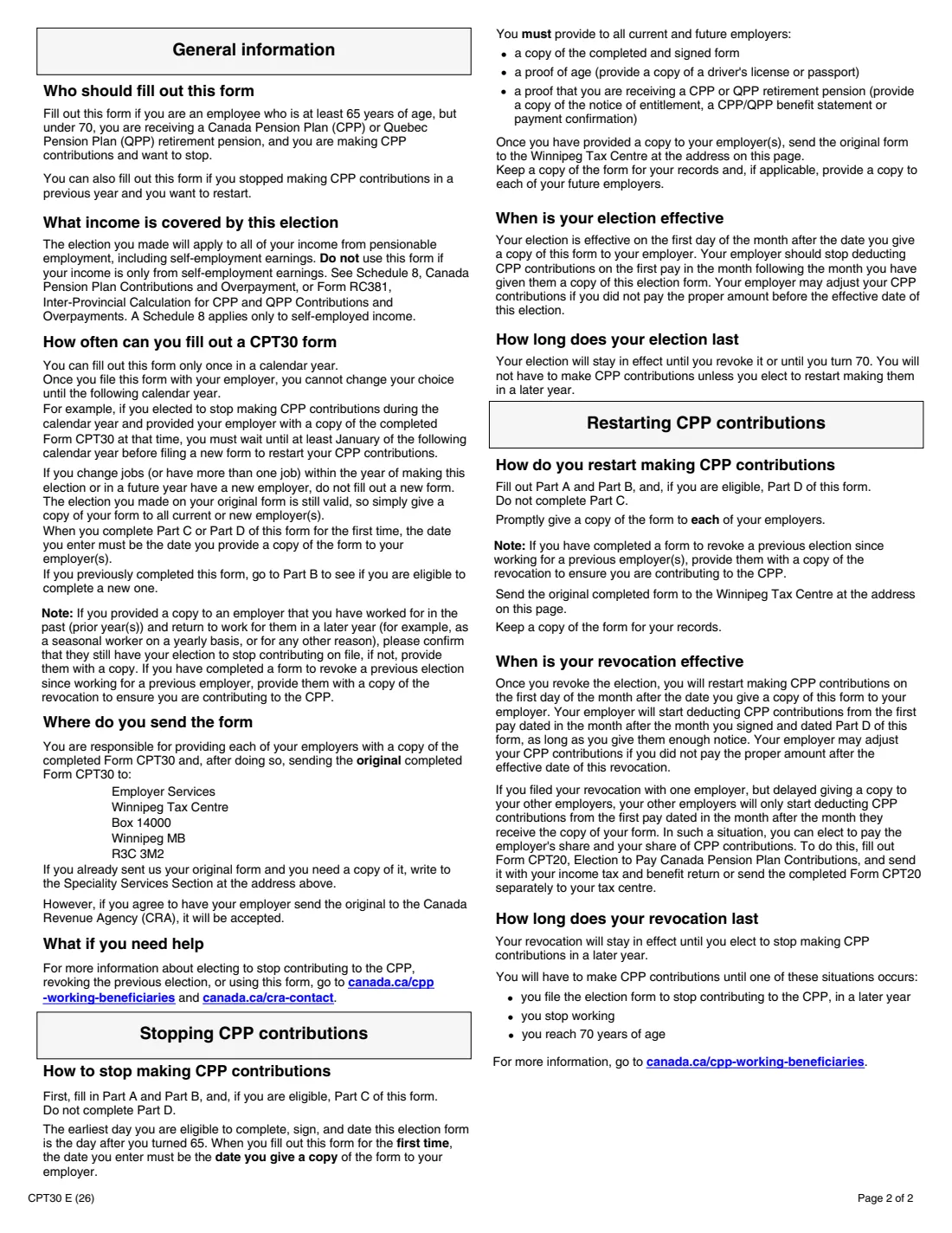
- Employer Services, Winnipeg Tax Centre, Box 14000, Winnipeg MB R3C 3M2
- Signature
- Handwritten in pen or ink, required by the form
- Effective
- The first day of the month after the date you sign and give a copy to your employer
- Edition
- CPT30 E (26)
Who needs to fill out Form CPT30?
- Employees aged at least 65 but under 70 who receive a CPP or QPP retirement pension and no longer want to make CPP contributions from their pay.
- People who stopped contributing to the CPP in a previous year and now want to restart contributions.
- Anyone with a new employer who already made the election: the form says not to fill out a new one, but to give each new employer a copy of the original.
When to use Form CPT30
- At the earliest on the day after your 65th birthday, the first day the form lets you sign and date it.
- Before your 70th birthday: at 70, CPP contributions stop anyway.
- Only once per calendar year. If you already made or revoked an election this year, wait until next year.
What you need before you start
- Your social insurance number, mailing address, telephone number and date of birth.
- Your answers to the three eligibility questions in Part B.
- For an election to stop: proof of age (a copy of your driver's licence or passport) and proof that you receive a CPP or QPP retirement pension (the notice of entitlement, a benefit statement or a payment confirmation), for each employer.
- A pen, because the form must be signed by hand.
What’s on Form CPT30
The 2026 edition has 2 pages. FileIt asks for it in 3 parts:
- Part A – IdentificationEmployee
- Part B – EligibilityEmployee
- Part C or Part D – Election or revocationEmployee
How to fill out Form CPT30, step by step
1 Part A – Identification
Print your first name and initials, last name, social insurance number, mailing address, city, telephone number, province or territory, postal code and date of birth.
2 Part B – Eligibility
Answer three questions: are you an employee at least 65 but under 70; are you receiving a CPP or QPP retirement pension; and did you already elect or revoke this calendar year. You can go on only with yes, yes and no.
3 Part C – Election and certification
To stop making CPP contributions, sign by hand and date Part C. The election takes effect on the first day of the month after that date. You can't backdate it, and the date must be the day you give a copy to your employer.
4 Part D – Revocation and certification
To start contributing again after an election made in a previous year, sign and date Part D instead. Your employer starts deducting CPP contributions from the first pay dated in the month after the month you signed Part D, as long as you give them enough notice.
Common mistakes to avoid
- Filling out both Part C and Part D: fill out only one.
- Signing before the day after your 65th birthday.
- Signing electronically: the form requires a handwritten signature in pen or ink.
- Backdating the election or the revocation: it can't be backdated.
- Using it to stop Quebec Pension Plan contributions, which is handled by Retraite Québec.
- Filling out a new CPT30 for each new job: give each new employer a copy of the original instead.
After you fill it out
Print the PDF and sign it by hand in Part C or Part D.
Give a copy to each of your current employers (with the proofs of age and pension for an election to stop), and keep a copy for future employers.
Mail the original to Employer Services, Winnipeg Tax Centre, Box 14000, Winnipeg MB R3C 3M2. The form says the CRA will also accept the original if your employer sends it.
If you revoke with one employer but give other employers the copy later, they only start deducting from the month after they receive it. You can then use Form CPT20, Election to Pay Canada Pension Plan Contributions, to pay both shares.
Your copy stays in the person's FileIt vault folder.
Fill out Form CPT30 online with FileIt
- Pick the person. Choose someone from People and FileIt fills in their name, date of birth, address and other details it already knows.
- Answer plain-language questions. One part of the form at a time, with the official help text beside each question — 15 fields in all. Your answers save as you go.
- Check the live preview. Watch your answers land on the real Canada Revenue Agency (CRA) form, and let FileIt do any worksheet arithmetic.
- Generate the official PDF. FileIt prints your answers into the agency’s own PDF and files it in that person’s folder in your vault.
FileIt fills the form — it never files or submits anything for you. Deliver the finished form to whoever asked for it, the way the form’s instructions say.
Start Form CPT30 now — it’s freeForm CPT30: frequently asked questions
Can I fill out the CPT30 online?
Yes. FileIt guides you through Parts A to D and prints your answers onto the CRA's official PDF. The form requires a handwritten signature, so you print and sign it. Filling forms is free on every FileIt plan.
Where do I send Form CPT30?
Give a copy to each employer first, then mail the original to Employer Services, Winnipeg Tax Centre, Box 14000, Winnipeg MB R3C 3M2.
When does the election take effect?
On the first day of the month after the date you give a copy of the form to your employer. Your employer should stop deducting CPP contributions on the first pay in that month.
How long does the election last?
Until you revoke it or until you turn 70.
Can I change my mind in the same year?
No. You can fill out the form only once in a calendar year, so a revocation has to wait until at least January of the next year.
Do I need a new form when I change jobs?
No. The election on your original form is still valid; give a copy of it to each new employer.
Does this work for Quebec Pension Plan contributions?
No. To stop QPP contributions, go to Retraite Québec. The CPT30 covers CPP contributions only.
Official sources
- Blank form (PDF), published by Canada Revenue Agency (CRA): https://www.canada.ca/content/dam/cra-arc/formspubs/pbg/cpt30/cpt30-fill-26e.pdf
- Official instructions and guidance: https://www.canada.ca/en/revenue-agency/services/forms-publications/forms/cpt30.html
- Edition shown on this page: CPT30 E (26) (checked 2026-09-28).
FileIt is not affiliated with or endorsed by Canada Revenue Agency (CRA) or any government. This page explains the form in general terms and is not legal, tax or immigration advice. Always read the official instructions, and check that you are using the edition the recipient accepts. Page last reviewed 2026-09-28.