What is CPT20?
CPT20, Election to Pay Canada Pension Plan Contributions, is the Canada Revenue Agency (CRA) form for paying CPP contributions on employment income where they weren't deducted. The 2026 edition, CPT20 E (26), is for the 2026 tax year.
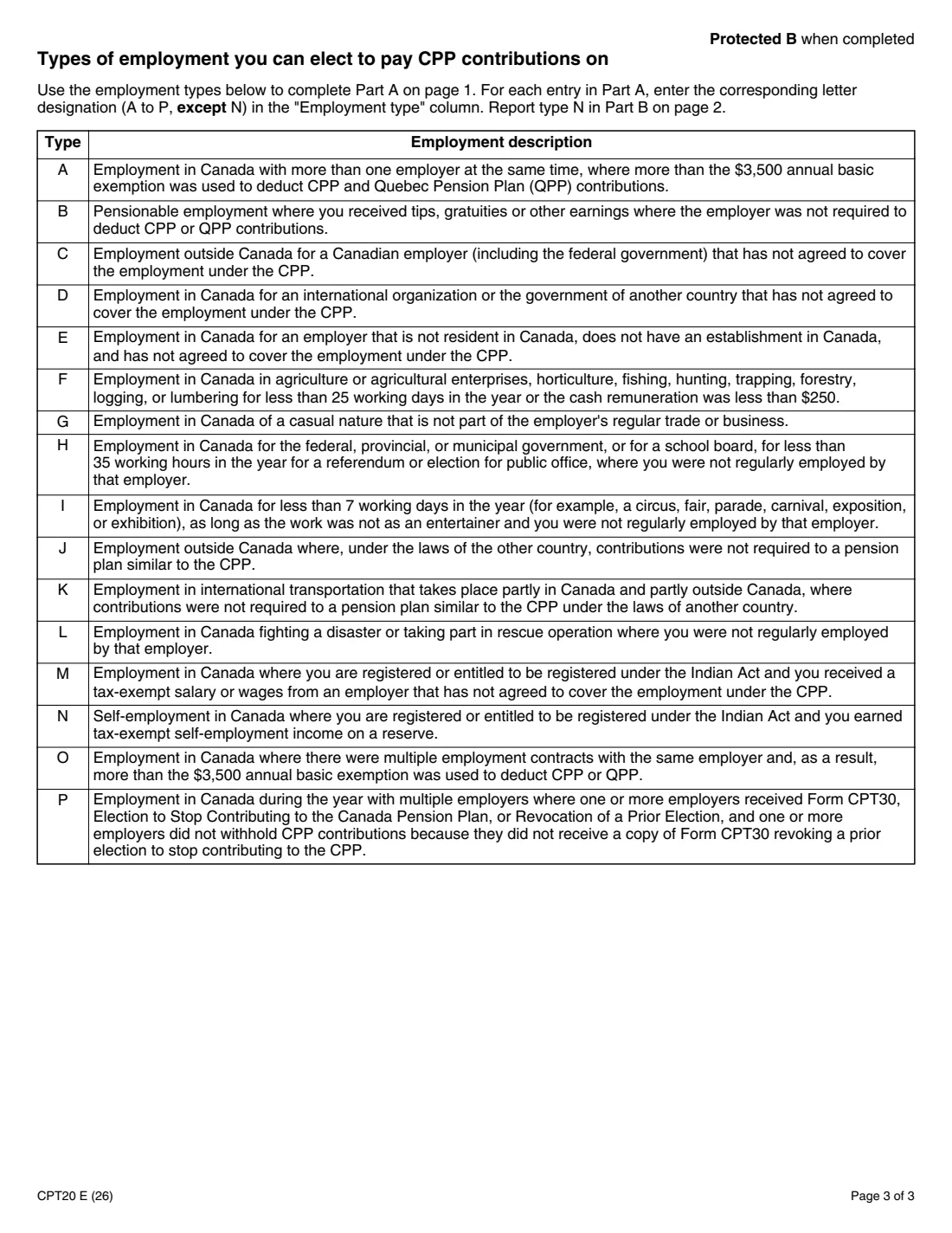
You use it if you were a resident of Canada for income tax purposes and had income from one of the employment types listed on page 3 of the form. Those include work outside Canada for a Canadian employer, tips and gratuities, casual or very short jobs, and several employers at the same time. It also applies if you are registered, or entitled to be registered, under the Indian Act and earned tax-exempt self-employment income on a reserve.
FileIt totals the Part A table and works through Part C, lines 1 to 17, including converting contributions already paid back into earnings. You get the two amounts to carry to Schedule 8 or Form RC381, printed on the CRA's own PDF, and the filled form is kept in your vault. FileIt doesn't file anything with the CRA.
- Who fills it
- A Canadian resident with employment income eligible for the election (types A to P on page 3)
- Given to
- The CRA — attached to your paper return, or sent separately
- When
- The 2026 election is due June 15, 2028; the contributions are due April 30, 2028
- Signatures
- Signed and dated by hand (Part D)
- Edition
- CPT20 E (26), 2026 tax year
Who needs to fill out CPT20?
- People who worked outside Canada for a Canadian employer that doesn't cover the job under the CPP (type C), or in a country with no CPP-like plan (type J).
- People with tips or gratuities their employer didn't have to deduct CPP on (type B).
- People with casual, very short or occasional work, such as a fair, an election or a rescue operation (types F, G, H, I, L).
- People with more than one employer, or several contracts with one employer, where more than the $3,500 basic exemption was used (types A, O, P).
- People registered or entitled to be registered under the Indian Act with tax-exempt employment income (type M) or tax-exempt self-employment income on a reserve (type N).
When to use CPT20
- When you do your 2026 taxes and want CPP contributions on earnings that had none deducted.
- Together with Schedule 8, Canada Pension Plan Contributions and Overpayment, or Form RC381 if you worked in Quebec and elsewhere — CPT20 needs line E of Schedule 8 or line F of RC381.
- By June 15, 2028 for the 2026 election; payment of the contributions is due April 30, 2028.
What you need before you start
- Your SIN, name and mailing address.
- For each employment: the employer's name and address, the employment type letter from page 3, and the amounts from your T4 slip — pensionable earnings (box 26, or box 14 if box 26 is blank), CPP contributions (box 16), second CPP contributions (box 16A), QPP contributions (box 17) and second QPP contributions (box 17A) — or the gross amount of other employment earnings.
- For type N: the reserve's name and address and your tax-exempt self-employment income.
- Line E of Schedule 8 or line F of Form RC381, whichever applies — and your prorated maximum pensionable earnings if yours were prorated.
What’s on CPT20
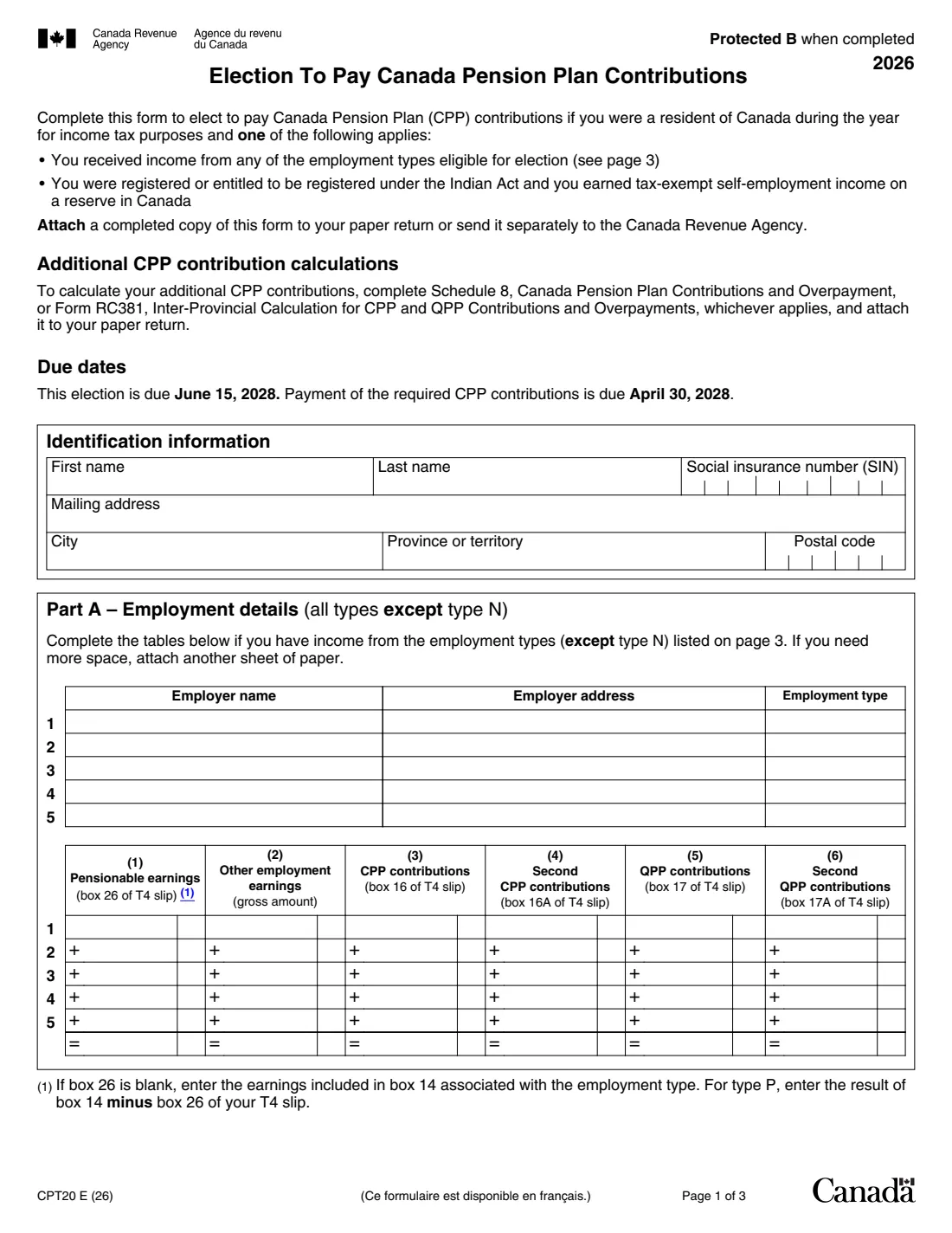
The 2026 edition has 3 pages. FileIt asks for it in 9 parts:
- Identification informationTaxpayer
- Part A – Employment 1Taxpayer
- Part A – Employment 2Taxpayer
- Part A – Employment 3Taxpayer
- Part A – Employment 4Taxpayer
- Part A – Employment 5Taxpayer
- Part B – Tax-exempt self-employment income on a reserve (type N)Taxpayer
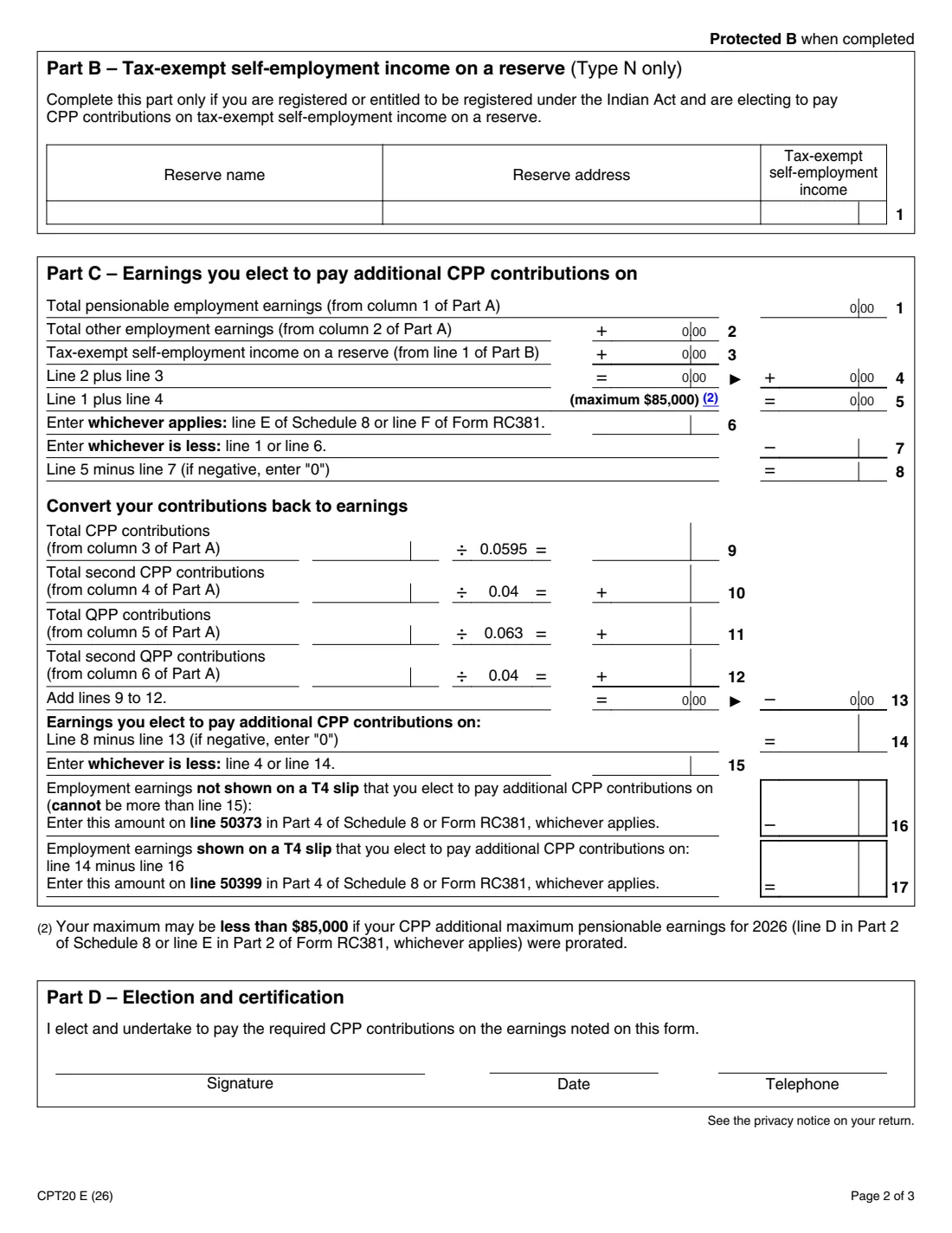
- Part C – Earnings you elect to pay additional CPP contributions onTaxpayer
- Part D – Election and certificationTaxpayer
How to fill out CPT20, step by step
1 Identification information
Your first and last name, SIN, mailing address, city, province or territory and postal code.
2 Part A – Employment details
One line per employment (all types except N), up to five, with the employer's name, address and type letter, then the six amount columns from your T4 slip or the gross earnings for employment not on a T4. FileIt totals each column.
3 Part B – Self-employment income on a reserve
Only for type N: the reserve name and address and your tax-exempt self-employment income.
4 Part C – Earnings you elect on
Lines 1 to 8 add your earnings, cap them at $85,000 (less if your maximum was prorated) and subtract the lesser of line 1 and the line 6 amount from Schedule 8 or RC381. Lines 9 to 13 convert contributions already paid back into earnings (÷ 0.0595, 0.04, 0.063 and 0.04). Line 14 is what you can elect on; lines 16 and 17 split it into earnings not shown on a T4 slip (line 50373) and earnings shown on a T4 slip (line 50399).
5 Part D – Election and certification
You elect and undertake to pay the required CPP contributions. Sign, date and give a phone number.
Common mistakes to avoid
- Entering type N employment in Part A — it goes in Part B.
- Using box 14 when box 26 has an amount; box 14 is only for when box 26 is blank (and for type P, box 14 minus box 26).
- Forgetting to complete Schedule 8 or Form RC381 first, which line 6 needs.
- Electing more on line 16 than line 15 allows.
- Not carrying lines 16 and 17 to lines 50373 and 50399 in Part 4 of Schedule 8 or Form RC381.
After you fill it out
Print the PDF, sign and date Part D by hand, and attach it to your paper return — or send it to the CRA separately.
Enter line 16 on line 50373 and line 17 on line 50399 in Part 4 of Schedule 8 or Form RC381, and attach that schedule to your paper return.
Keep the dates in mind: for 2026, the election is due June 15, 2028 and the contributions April 30, 2028.
Fill out CPT20 online with FileIt
- Pick the person. Choose someone from People and FileIt fills in their name, date of birth, address and other details it already knows.
- Answer plain-language questions. One part of the form at a time, with the official help text beside each question — 83 fields in all. Your answers save as you go.
- Check the live preview. Watch your answers land on the real Canada Revenue Agency (CRA) form, and let FileIt do any worksheet arithmetic.
- Generate the official PDF. FileIt prints your answers into the agency’s own PDF and files it in that person’s folder in your vault.
FileIt fills the form — it never files or submits anything for you. Deliver the finished form to whoever asked for it, the way the form’s instructions say.
Start CPT20 now — it’s freeCPT20: frequently asked questions
What is Form CPT20?
The CRA form for electing to pay Canada Pension Plan contributions on employment income that had none deducted, such as work outside Canada for a Canadian employer, tips, or casual employment.
When is the CPT20 election due?
The 2026 form says the election is due June 15, 2028 and payment of the required contributions is due April 30, 2028.
Which employment types can I elect on?
The 16 types listed on page 3 of the form, A to P. Types A to M, O and P go in Part A; type N (tax-exempt self-employment income on a reserve) goes in Part B.
Why does the form convert contributions back to earnings?
Lines 9 to 12 turn the CPP and QPP contributions already deducted into the earnings they covered, so you only elect on earnings that haven't had contributions yet.
Where do the results go on my return?
Line 16 goes on line 50373 and line 17 on line 50399, in Part 4 of Schedule 8 or Form RC381, whichever applies.
Can I file CPT20 online with FileIt?
FileIt fills it in and does the arithmetic on the official PDF. You sign it and attach it to your paper return, or send it to the CRA yourself.
Official sources
- Blank form (PDF), published by Canada Revenue Agency (CRA): https://www.canada.ca/content/dam/cra-arc/formspubs/pbg/cpt20/cpt20-fill-26e.pdf
- Official instructions and guidance: https://www.canada.ca/en/revenue-agency/services/forms-publications/forms/cpt20.html
- Edition shown on this page: CPT20 E (26) (checked 2026-09-28).
FileIt is not affiliated with or endorsed by Canada Revenue Agency (CRA) or any government. This page explains the form in general terms and is not legal, tax or immigration advice. Always read the official instructions, and check that you are using the edition the recipient accepts. Page last reviewed 2026-09-28.