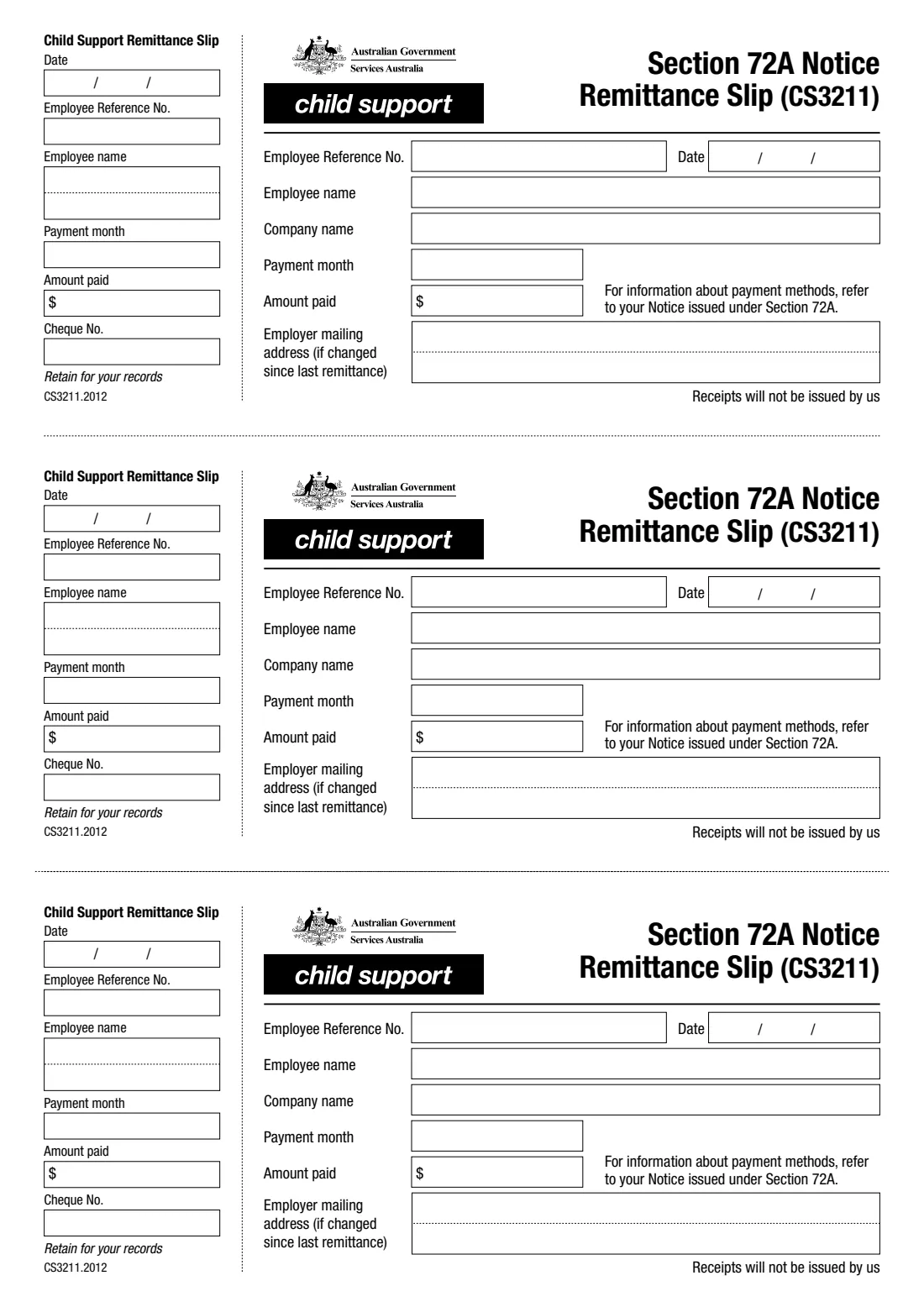
What is Child support remittance slip for employers (CS3211)?
When Services Australia (Child Support) issues an employer a notice under Section 72A, the employer deducts child support from the employee's pay and sends it to Child Support. Form CS3211, the Section 72A Notice Remittance Slip, goes with the payment when the employer pays by cheque, so the money is matched to the right employee.
Each page holds three identical slips, one per employee: the employee's reference number and name, your company name, the payment month, the date and the amount paid, plus your mailing address if it has changed since your last remittance. Each slip has a stub on the left, with the cheque number, to keep for your records. Employers registered for Child Support Business Online Services can report the deduction online instead.
FileIt fills in the current slip (CS3211.2012) and prints it into Services Australia's own PDF: enter your company once, then one slip per employee. The finished page is saved to your FileIt vault. You send it with your payment yourself — FileIt never sends anything.
- Who fills it
- An employer deducting child support under a Section 72A notice
- Used when
- Paying Services Australia (Child Support) by cheque
- Per page
- Three slips, one per employee, each with a stub to keep
- Signature
- None
- Receipts
- Not issued
- Edition
- CS3211.2012
Who needs to fill out Child support remittance slip for employers (CS3211)?
- Employers and payroll officers who have received a Section 72A notice from Services Australia to deduct child support from an employee's pay.
- Businesses that pay those deductions to Child Support by cheque.
- Bookkeepers and payroll services remitting deductions for several employees at once.
When to use Child support remittance slip for employers (CS3211)
- Each time you pay Child Support by cheque for amounts deducted under a Section 72A notice.
- Not needed if you report the deduction through Child Support Business Online Services instead.
- For payment methods and timing, follow the notice issued to you under Section 72A — the slip itself refers you to it.
What you need before you start
- The Section 72A notice for each employee, with their Employee Reference No.
- The employee's name and the payment month the deduction is for.
- The amount deducted and paid for each employee.
- Your company name, and your new mailing address if it changed since your last remittance.
- The cheque number, for your record stub.
What’s on Child support remittance slip for employers (CS3211)
The 2020 edition has 1 page. FileIt asks for it in 4 parts:
- Your businessEmployer
- Slip 1: employeeEmployer
- Slip 2: another employeeEmployer
- Slip 3: another employeeEmployer
How to fill out Child support remittance slip for employers (CS3211), step by step
1 Your business
Enter your company name once. If your mailing address has changed since your last remittance, give the new address — FileIt prints both on every slip you use.
2 One slip per employee
For each employee give the Employee Reference No. from the notice, their name, the date, the payment month and the amount paid. Slips 2 and 3 are optional; a blank slip stays blank.
3 The stub
The left-hand 'Retain for your records' stub repeats the date, reference number, employee name, payment month and amount, and adds the cheque number. Keep it for your records.
Common mistakes to avoid
- Using the wrong Employee Reference No. — copy it from the Section 72A notice for that employee.
- Sending one slip for several employees — each employee needs their own slip.
- Forgetting to update the mailing address box when your address has changed.
- Expecting a receipt — the slip says receipts are not issued.
After you fill it out
Detach the stubs and keep them with your payroll records.
Send the slips with your cheque as set out in the notice issued to you under Section 72A. FileIt doesn't send the payment or the slips for you.
A copy of the filled page stays in your FileIt vault.
Fill out Child support remittance slip for employers (CS3211) online with FileIt
- Pick the person. Choose someone from People and FileIt fills in their name, date of birth, address and other details it already knows.
- Answer plain-language questions. One part of the form at a time, with the official help text beside each question — 28 fields in all. Your answers save as you go.
- Check the live preview. Watch your answers land on the real Services Australia (Child Support) form, and let FileIt do any worksheet arithmetic.
- Generate the official PDF. FileIt prints your answers into the agency’s own PDF and files it in that person’s folder in your vault.
FileIt fills the form — it never files or submits anything for you. Deliver the finished form to whoever asked for it, the way the form’s instructions say.
Start Child support remittance slip for employers (CS3211) now — it’s freeChild support remittance slip for employers (CS3211): frequently asked questions
What is a Section 72A notice?
It's a notice from Services Australia (Child Support) that requires an employer to deduct child support from an employee's pay and pay it to Child Support. The CS3211 slip goes with the payment when the employer pays by cheque.
Do I need a separate slip for each employee?
Yes. Each slip carries one employee's reference number, name and amount. One page holds three slips.
Can I report deductions online instead?
Yes. The Services Australia page for the form says employers registered for Child Support Business Online Services can report the deduction online instead.
Will I get a receipt?
No. The slip says receipts will not be issued, so keep the stub for your records.
Does the slip need a signature?
No. It has no signature or declaration.
Official sources
- Blank form (PDF), published by Services Australia (Child Support): https://www.servicesaustralia.gov.au/sites/default/files/cs3211-2012en-f.pdf
- Official instructions and guidance: https://www.servicesaustralia.gov.au/cs3211
- Edition shown on this page: CS3211.2012 (checked 2026-09-28).
FileIt is not affiliated with or endorsed by Services Australia (Child Support) or any government. This page explains the form in general terms and is not legal, tax or immigration advice. Always read the official instructions, and check that you are using the edition the recipient accepts. Page last reviewed 2026-09-28.