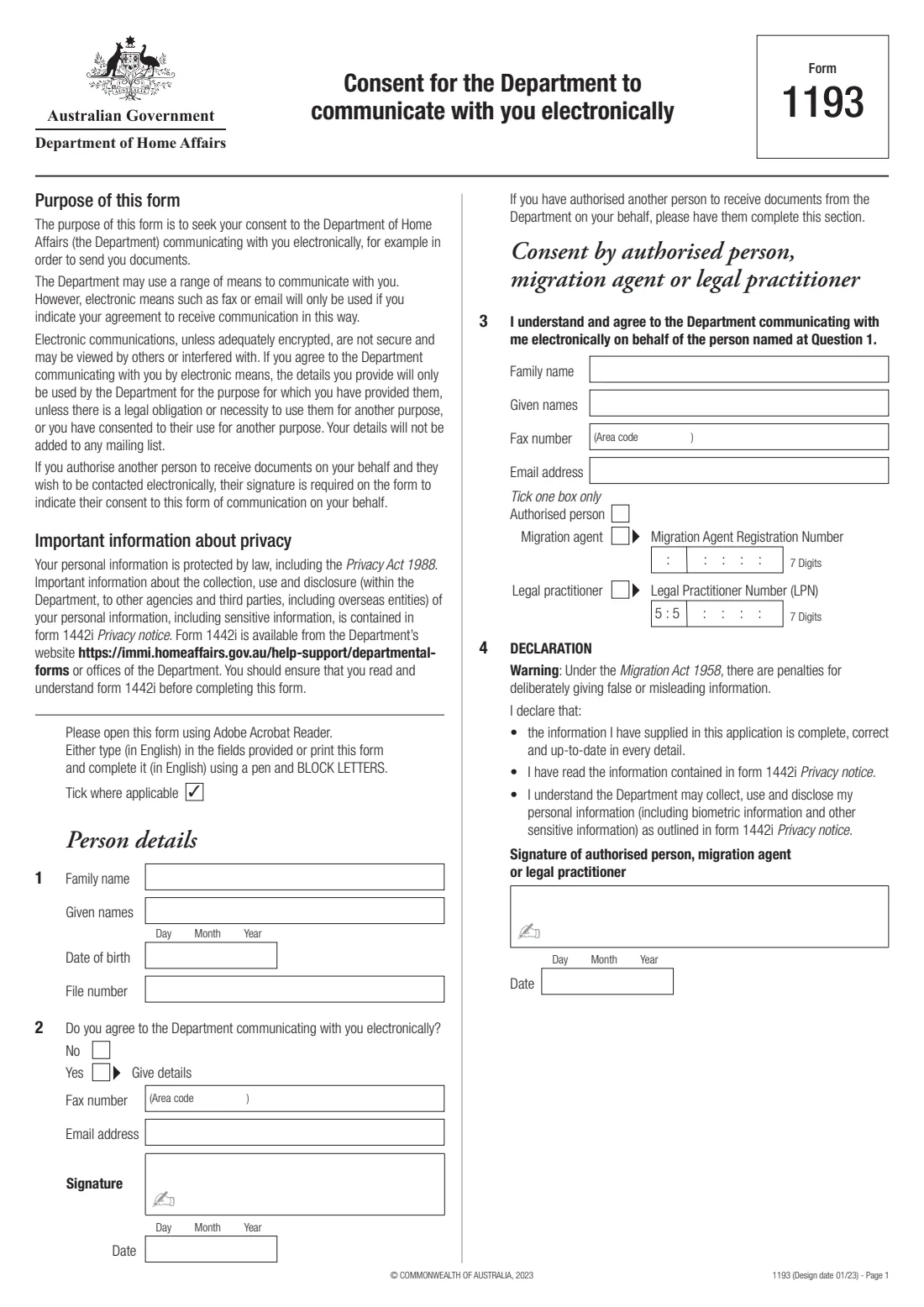
What is Form 1193 — consent to electronic communication?
The Department of Home Affairs can communicate with you in a range of ways, but electronic means such as email or fax are only used if you agree to them. Form 1193, Consent for the Department to communicate with you electronically, is how you give (or refuse) that agreement — for example so that the Department can send you documents about your visa or citizenship matter by email.
If you have authorised another person to receive documents from the Department on your behalf — an authorised recipient, a registered migration agent or a legal practitioner — and they want to be contacted electronically, they complete the second part of the form and sign it. The form explains that their signature is needed to show they consent to this form of communication on your behalf.
FileIt guides you through Form 1193 and prints your answers into the Department's own PDF, with names like O'Brien or Wiśniewska printed correctly and dates in the form's Day / Month / Year boxes. It saves the finished form to your vault. You sign it and give it to the Department yourself; FileIt never submits anything.
- Who fills it
- The person the Department is dealing with, and optionally their authorised person, migration agent or legal practitioner
- Given to
- The Department of Home Affairs office handling your matter
- Length
- One page, four questions
- Signatures
- You sign beside question 2; an authorised person signs the declaration at question 4
- Privacy notice
- Form 1442i, which the form asks you to read first
- Edition
- Design date 01/23
Who needs to fill out Form 1193 — consent to electronic communication?
- Visa and citizenship clients who want the Department of Home Affairs to email or fax them documents and letters.
- People who don't want to be contacted electronically and want that on record — the form has a No box.
- Authorised recipients, registered migration agents and legal practitioners acting for a client who want the Department to contact them electronically about that client's matter.
When to use Form 1193 — consent to electronic communication
- When the Department asks for your consent to electronic communication, or when you want to give it for a paper application or other matter.
- When an authorised person, migration agent or legal practitioner you have appointed needs to consent to being contacted electronically for you.
- When your email address or fax number changes and you want the Department to use the new one.
What you need before you start
- Your family name, given names and date of birth.
- Your Department file number, if you have one.
- The email address and/or fax number (with area code) you want the Department to use.
- For an authorised person: their name, email address or fax number, and whether they are an authorised person, a migration agent (with their 7-digit Migration Agent Registration Number) or a legal practitioner (with their Legal Practitioner Number).
- Form 1442i Privacy notice, which the form asks you to read before completing it.
What’s on Form 1193 — consent to electronic communication
The 2023 edition has 1 page. FileIt asks for it in 2 parts, and it is signed by Person (visa or citizenship client):
- Person details and consent (questions 1–2)Person (visa or citizenship client)
- Consent by authorised person, migration agent or legal practitioner (questions 3–4)Authorised person, migration agent or legal practitioner
How to fill out Form 1193 — consent to electronic communication, step by step
1 Person details (question 1)
Give your family name, given names, date of birth and, if you have one, the file number the Department uses for your matter.
2 Your consent (question 2)
Tick No if you don't agree to the Department communicating with you electronically. Tick Yes and give your fax number (with area code) and/or email address if you do, then sign and date beside it.
3 Consent by an authorised person (question 3)
Only if you have authorised someone to receive documents for you and they want to be contacted electronically. They give their name, fax number and email address, and tick one box: authorised person, migration agent (with their Migration Agent Registration Number) or legal practitioner (with their Legal Practitioner Number).
4 Declaration (question 4)
The authorised person, migration agent or legal practitioner declares that the information is complete and correct and that they have read form 1442i Privacy notice, then signs and dates it.
Common mistakes to avoid
- Ticking Yes without giving an email address or fax number for the Department to use.
- Leaving out the authorised person's signature — the form says it's required for them to be contacted electronically on your behalf.
- Ticking more than one box at question 3 — the form says to tick one box only.
- Giving an email address that others can read, without thinking about it — the form warns that unencrypted electronic communications are not secure.
After you fill it out
Sign and date the form beside question 2, by hand or with FileIt's optional e-signature. If an authorised person completed question 3, they sign and date question 4 by hand.
Give the form to the Department of Home Affairs office handling your matter, or include it with your application.
Keep a copy. FileIt keeps the completed PDF in your vault with your other visa documents.
Fill out Form 1193 — consent to electronic communication online with FileIt
- Pick the person. Choose someone from People and FileIt fills in their name, date of birth, address and other details it already knows.
- Answer plain-language questions. One part of the form at a time, with the official help text beside each question — 18 fields in all. Your answers save as you go.
- Check the live preview. Watch your answers land on the real Department of Home Affairs form, and let FileIt do any worksheet arithmetic.
- Generate the official PDF. FileIt prints your answers into the agency’s own PDF and files it in that person’s folder in your vault. Sign it, or send it for e-signature.
FileIt fills the form — it never files or submits anything for you. Deliver the finished form to whoever asked for it, the way the form’s instructions say.
Start Form 1193 — consent to electronic communication now — it’s freeForm 1193 — consent to electronic communication: frequently asked questions
What is Form 1193?
It's the Department of Home Affairs form for consenting (or not) to the Department communicating with you electronically, for example by email or fax, and for an authorised person to consent to electronic contact on your behalf.
Will the Department email me without this form?
The form says the Department may use a range of means to communicate with you, but electronic means such as fax or email will only be used if you indicate your agreement to receive communication in this way.
Does my migration agent need to sign?
Only if they complete the consent section so the Department can contact them electronically on your behalf. The form says their signature is required to show they consent to this form of communication.
Will my email address be added to a mailing list?
No. The form says your details will only be used by the Department for the purpose you gave them for, unless the law requires otherwise or you consent, and won't be added to any mailing list.
Can I fill in Form 1193 online?
Yes. FileIt guides you through the questions and prints your answers into the Department's official PDF, ready to sign and hand in.
Official sources
- Blank form (PDF), published by Department of Home Affairs: https://immi.homeaffairs.gov.au/form-listing/forms/1193.pdf
- Official instructions and guidance: https://immi.homeaffairs.gov.au/form-listing/forms/1193.pdf
- Edition shown on this page: Design date 01/23 (checked 2026-10-01).
FileIt is not affiliated with or endorsed by Department of Home Affairs or any government. This page explains the form in general terms and is not legal, tax or immigration advice. Always read the official instructions, and check that you are using the edition the recipient accepts. Page last reviewed 2026-10-01.