What is L 35 — childcare subsidy declaration?
Austrian employers can pay towards their staff's childcare costs without deducting wage tax: up to €2,000 per child and calendar year, for a child under 14. Before the employer can treat the subsidy (Zuschuss für Kinderbetreuungskosten) as tax-free, the employee has to declare that the conditions are met. That declaration is the L 35, published by the Federal Ministry of Finance (Bundesministerium für Finanzen, BMF). The edition covered here is 'L 35, Version vom 05.01.2024'. BMF keeps it in its multi-year folder, so you write the year on the form yourself.
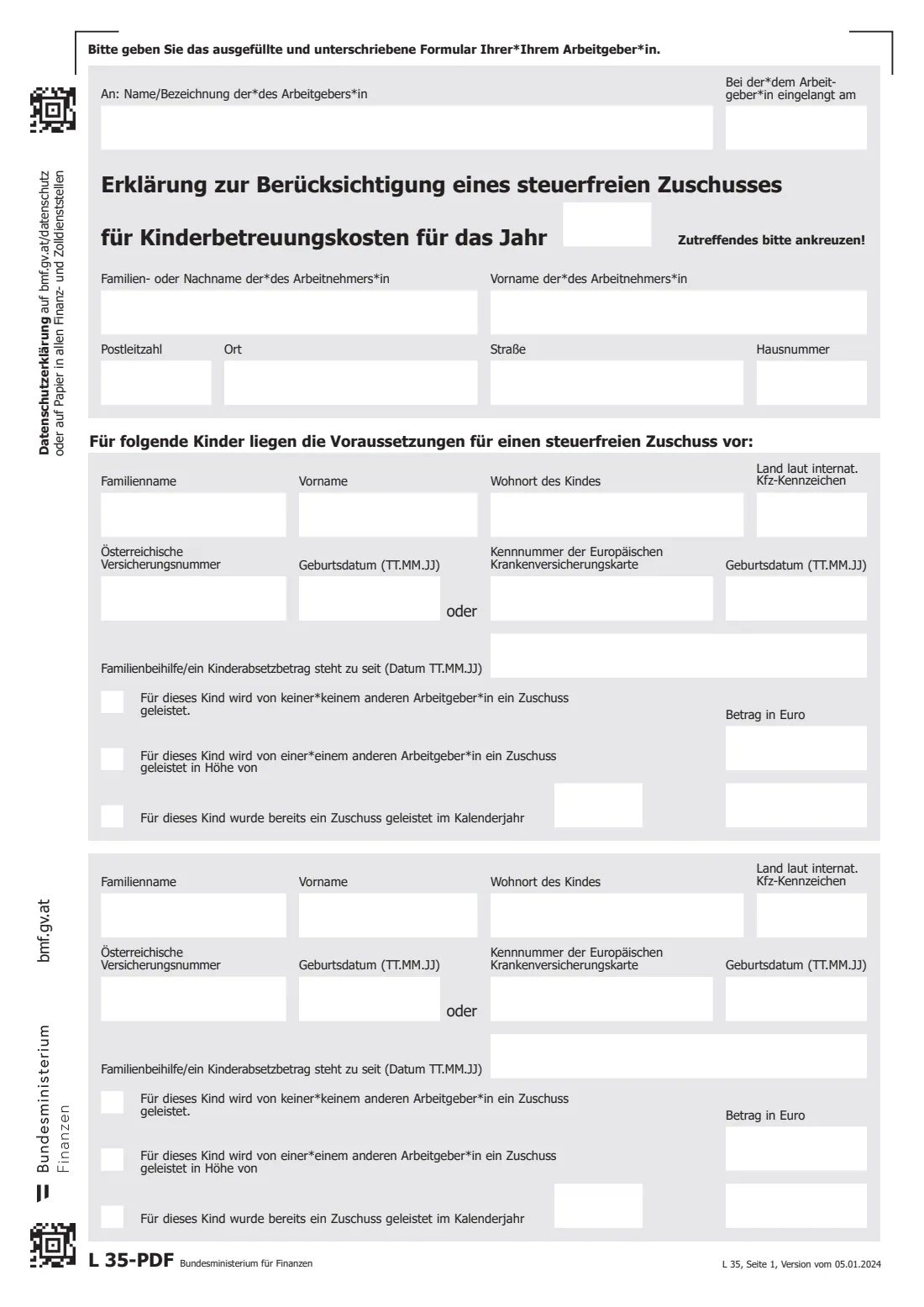
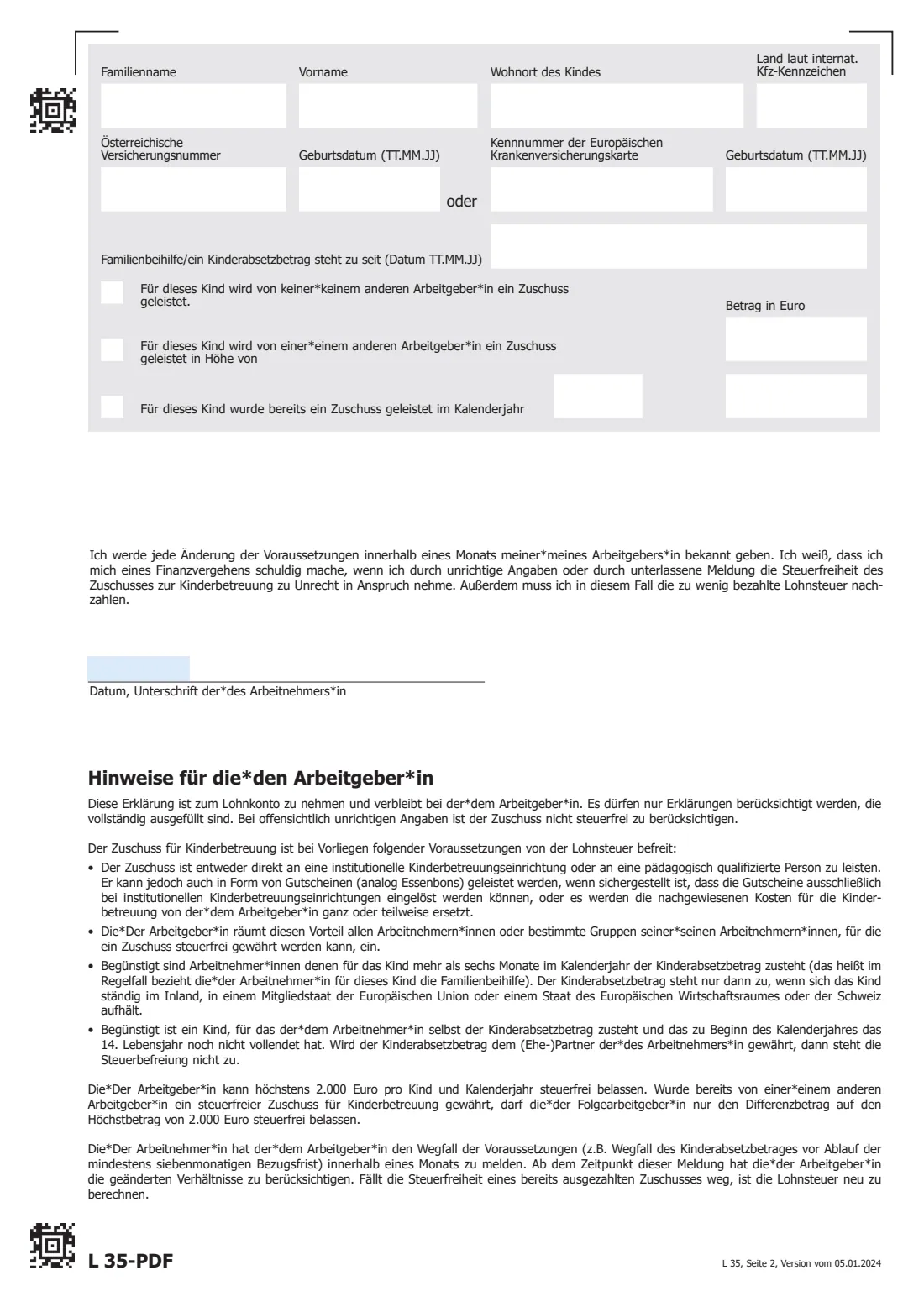
The L 35 is a declaration to your employer, not a tax return. You name the employer and the year, give your own name and address, and list up to three children with their social security number or European Health Insurance Card number, their date of birth and the date from which you get the family allowance or child tax credit for them. For each child you also say whether another employer pays a subsidy too, and whether one has already been paid this year.
FileIt explains each box in English with the German wording alongside. It checks the social security numbers and the age limit, and prints your answers into the official BMF PDF, with dates as TT.MM.JJ and amounts in the Austrian style (1.234,56). Your own details can be pre-filled from your People records, and the finished PDF is saved in your vault. FileIt does not send anything to your employer or to the tax office: you print it, sign it and hand it over.
- Issued by
- Bundesministerium für Finanzen (BMF)
- Given to
- Your employer, who keeps it with your payroll records (Lohnkonto)
- Tax-free limit
- Up to €2,000 per child and calendar year, as printed in the form's notes
- Children per form
- Up to 3
- Signatures
- The employee signs and dates it by hand
- Edition
- L 35, Version vom 05.01.2024 (multi-year form)
Who needs to fill out L 35 — childcare subsidy declaration?
- Employees in Austria whose employer offers a childcare subsidy and wants to pay it free of wage tax.
- Parents who get the child tax credit (Kinderabsetzbetrag) for the child themselves for more than six months of the year, usually because they receive the Familienbeihilfe.
- Parents of children who had not yet turned 14 at the start of the calendar year.
- Employees who change jobs during the year, so the new employer knows how much tax-free subsidy has already been paid.
When to use L 35 — childcare subsidy declaration
- Before your employer pays the first childcare subsidy of the year, so it can be treated as tax-free from the start.
- For each new calendar year, because the year is written on the form.
- When you start with a new employer that also pays a subsidy, and an earlier employer already paid one for the same child this year.
- When another child becomes eligible. A new declaration lists all the children the subsidy is for.
What you need before you start
- Your employer's name, and the year the subsidy is for.
- Your name and home address.
- Each child's name, town and country of residence (as a vehicle registration code: A for Austria, D for Germany and so on).
- Each child's 10-digit Austrian social security number from the e-card, or the number of their European Health Insurance Card.
- Each child's date of birth, and the date from which the family allowance or child tax credit is due to you.
- Whether another employer also pays a subsidy for the child, and how much.
- If a subsidy was already paid for the child this year, for example by a previous employer: the year and the amount.
What’s on L 35 — childcare subsidy declaration
The 2024 edition has 2 pages. FileIt asks for it in 7 parts, and it is signed by Employee (arbeitnehmer*in):
- Your employer and the year (An: Arbeitgeber*in)Employee (arbeitnehmer*in)
- About you, the employee (Arbeitnehmer*in)Employee (arbeitnehmer*in)
- Child 1 (Kind)Employee (arbeitnehmer*in)
- Child 2 (Kind)Employee (arbeitnehmer*in)
- Child 3 (Kind)Employee (arbeitnehmer*in)
- Declaration and signature (Datum, Unterschrift)Employee (arbeitnehmer*in)
- For the employer: date received (Bei der*dem Arbeitgeber*in eingelangt am)Employer (arbeitgeber*in)
How to fill out L 35 — childcare subsidy declaration, step by step
1 Your employer and the year
At the top, write your employer's name after 'An:' and the year after 'für das Jahr'. The box 'Bei der*dem Arbeitgeber*in eingelangt am' is for the employer to note the day the form arrived. Leave it to them.
2 About you
Your surname, first name, postcode, town, street and house number. The form doesn't ask for your own social security number.
3 The children
There is a block for each child, with room for three. Give the surname, first name, town and the country code. Then give either the Austrian social security number or, if the child has none, the European Health Insurance Card number, each with the date of birth beside it. FileIt asks for the date of birth once and prints it next to the number you gave.
Below that is the date from which the Familienbeihilfe or the Kinderabsetzbetrag is due to you for this child. For a newborn this is often the date of birth.
4 Other employers and earlier subsidies
Tick one of the first two boxes for each child: either no other employer pays a subsidy, or another employer pays one, with the amount. Tick the third box if a subsidy has already been paid for the child, and give the calendar year and amount. The €2,000 limit is per child and year, so a later employer can only add the difference tax-free.
5 Date and signature
Page 2 carries your promise to tell your employer about any change within a month, and a warning that wrongly claiming the tax-free subsidy is a tax offence. Date it, sign by hand on the line and give it to your employer.
Common mistakes to avoid
- Sending it to the tax office. The L 35 stays with your employer.
- Claiming for a child who had already turned 14 on 1 January of the year. The form's notes rule that out.
- Claiming when your partner, not you, gets the child tax credit. The notes say the exemption then doesn't apply.
- Leaving out a subsidy from another or a previous employer. The €2,000 limit covers all employers together.
- Handing in an incomplete form. The notes say employers may only accept fully completed declarations.
- Not telling your employer within a month when the conditions stop, for example when the family allowance ends.
After you fill it out
Print the PDF, sign it by hand beside the date and give it to your employer, in person or however they ask.
Your employer keeps it with your payroll records and can then pay the subsidy free of wage tax, directly to a childcare facility or qualified carer, or as vouchers.
Tell your employer within a month if anything changes, for example when the family allowance for a child ends.
FileIt keeps the finished PDF in your vault, so you have a copy of what you declared.
Fill out L 35 — childcare subsidy declaration online with FileIt
- Pick the person. Choose someone from People and FileIt fills in their name, date of birth, address and other details it already knows.
- Answer plain-language questions. One part of the form at a time, with the official help text beside each question — 64 fields in all. Your answers save as you go.
- Check the live preview. Watch your answers land on the real Bundesministerium für Finanzen (BMF) form, and let FileIt do any worksheet arithmetic.
- Generate the official PDF. FileIt prints your answers into the agency’s own PDF and files it in that person’s folder in your vault. Sign it, or send it for e-signature.
FileIt fills the form — it never files or submits anything for you. Deliver the finished form to whoever asked for it, the way the form’s instructions say.
Start L 35 — childcare subsidy declaration now — it’s freeL 35 — childcare subsidy declaration: frequently asked questions
How much can my employer pay tax-free?
The form's notes give a maximum of €2,000 per child and calendar year. If another employer has already paid a tax-free subsidy for the same child that year, the next employer can only add the difference up to €2,000.
Can my employer just give me the money?
Not tax-free. The notes say the subsidy must go directly to a childcare facility or a qualified carer, or be given as vouchers that can only be used there. It can also reimburse the costs you prove.
Which children qualify?
A child for whom you yourself get the child tax credit for more than six months of the year, who had not turned 14 at the start of that year, and who lives in Austria, the EU, the EEA or Switzerland.
My child has no Austrian social security number. What do I give?
The number of the child's European Health Insurance Card, with the date of birth beside it. The form asks for one or the other.
Do I need a new L 35 every year?
The year is part of the form's title, so a declaration covers the year you write on it. You also have to report any change within a month.
Is the L 35 in English?
No, the form is in German. FileIt explains every box in English and prints your answers into the official BMF PDF.
Does FileIt send the form to my employer?
No. FileIt fills in the PDF and saves it in your vault. You sign it and give it to your employer yourself.
Official sources
- Blank form (PDF), published by Bundesministerium für Finanzen (BMF): https://formulare.bmf.gv.at/service/formulare/inter-Steuern/pdfs/9999/L35.pdf?open=download
- Official instructions and guidance: https://formulare.bmf.gv.at/service/formulare/inter-Steuern/
- Edition shown on this page: L 35, Version vom 05.01.2024 (checked 2026-10-19).
FileIt is not affiliated with or endorsed by Bundesministerium für Finanzen (BMF) or any government. This page explains the form in general terms and is not legal, tax or immigration advice. Always read the official instructions, and check that you are using the edition the recipient accepts. Page last reviewed 2026-10-19.