What is the fluid intake and output chart form template?
Fluid charts are some of the most-used and least-loved paperwork in care. They get filled in at the end of a shift from memory, drinks offered get confused with drinks taken, and totals are worked out on the back of a glove box. When someone is at risk of dehydration, that matters.
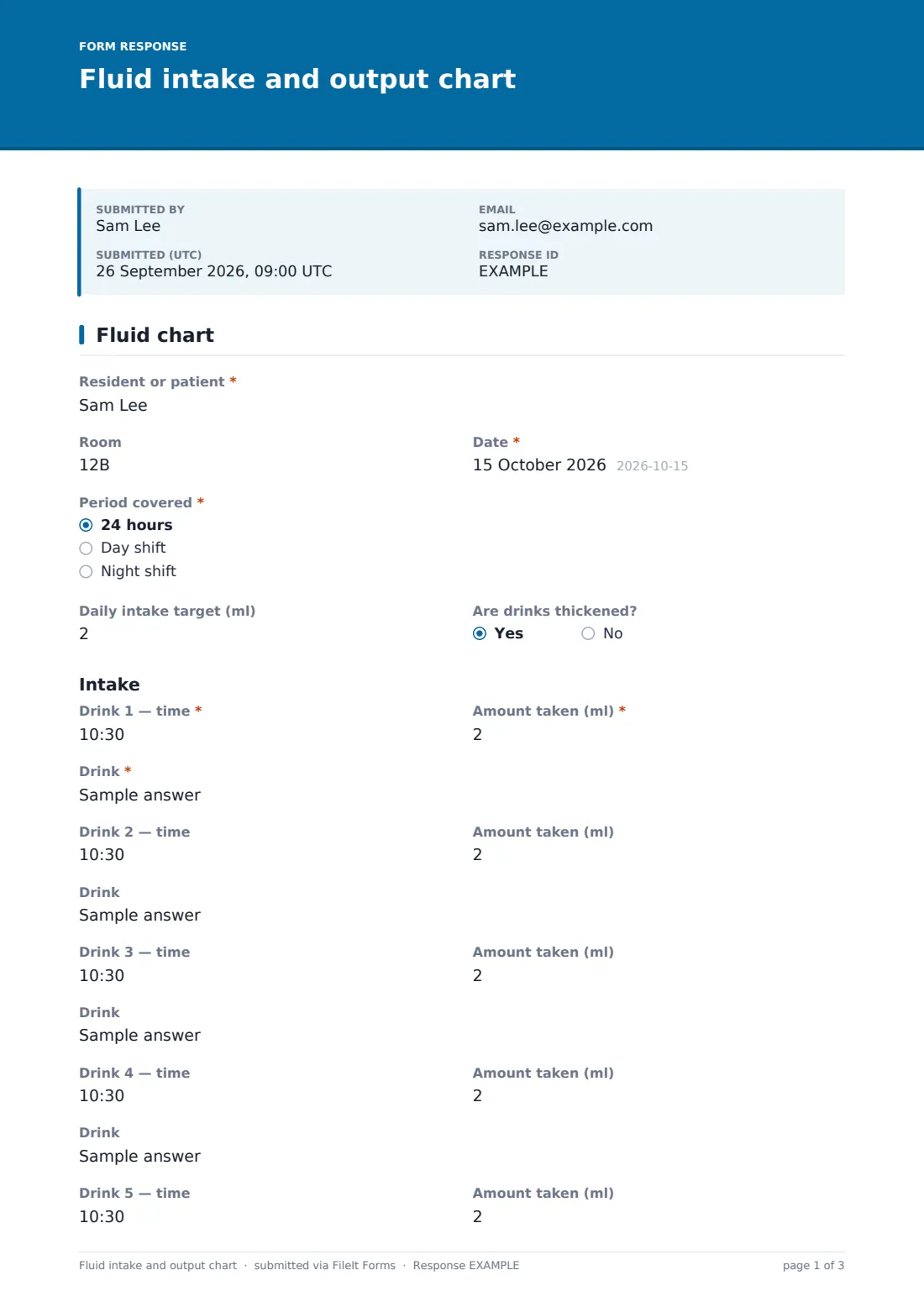
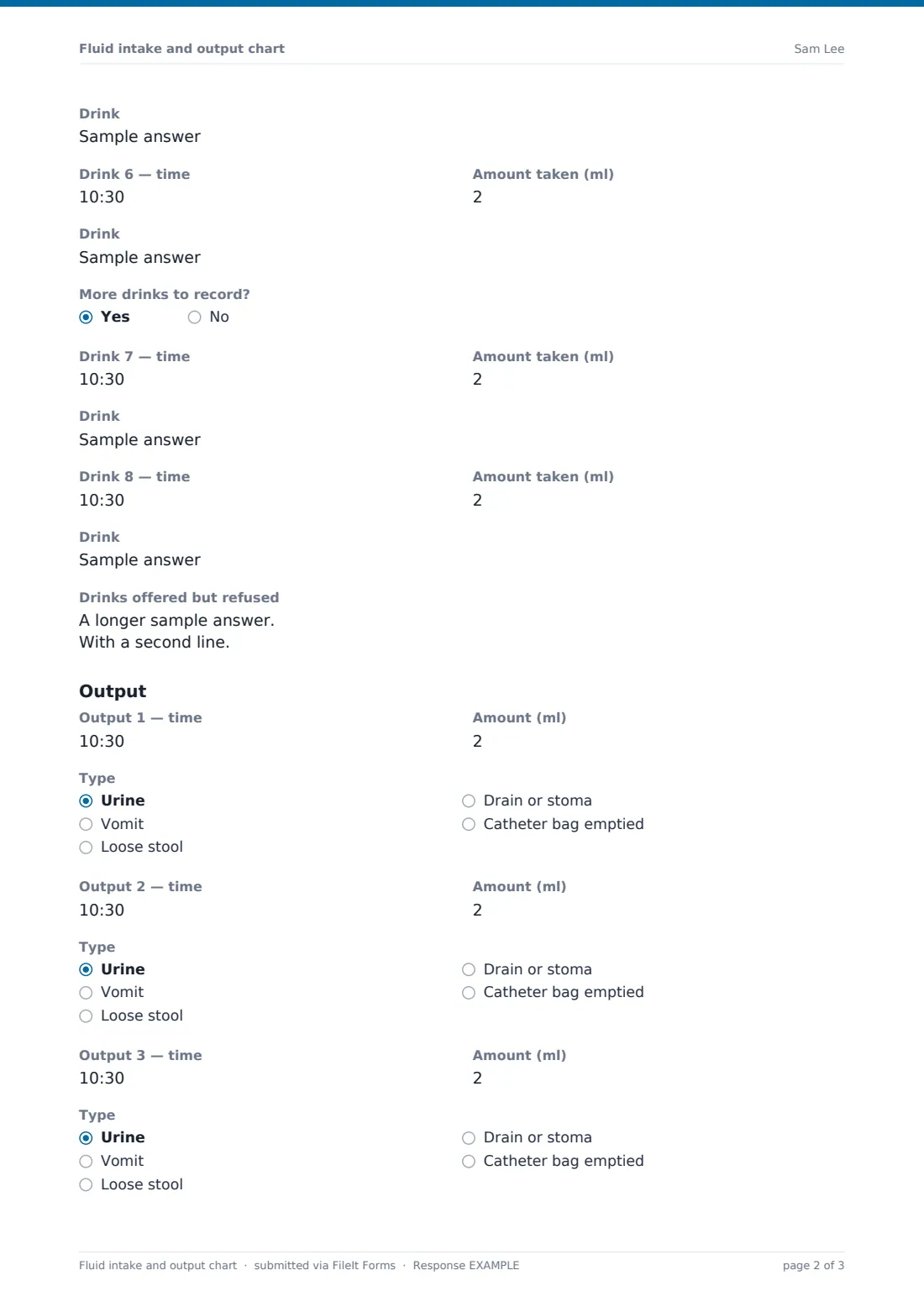
This template is a single-page digital chart for one resident and one period, whether that's 24 hours, a day shift or a night shift. Staff record each drink with its time, what it was and the amount actually taken in millilitres. Six drink entries are always shown, and answering yes to More drinks to record? adds two more. Output has three entries, each with a time, an amount (estimated if it couldn't be measured) and a type, from urine to a drain or stoma.
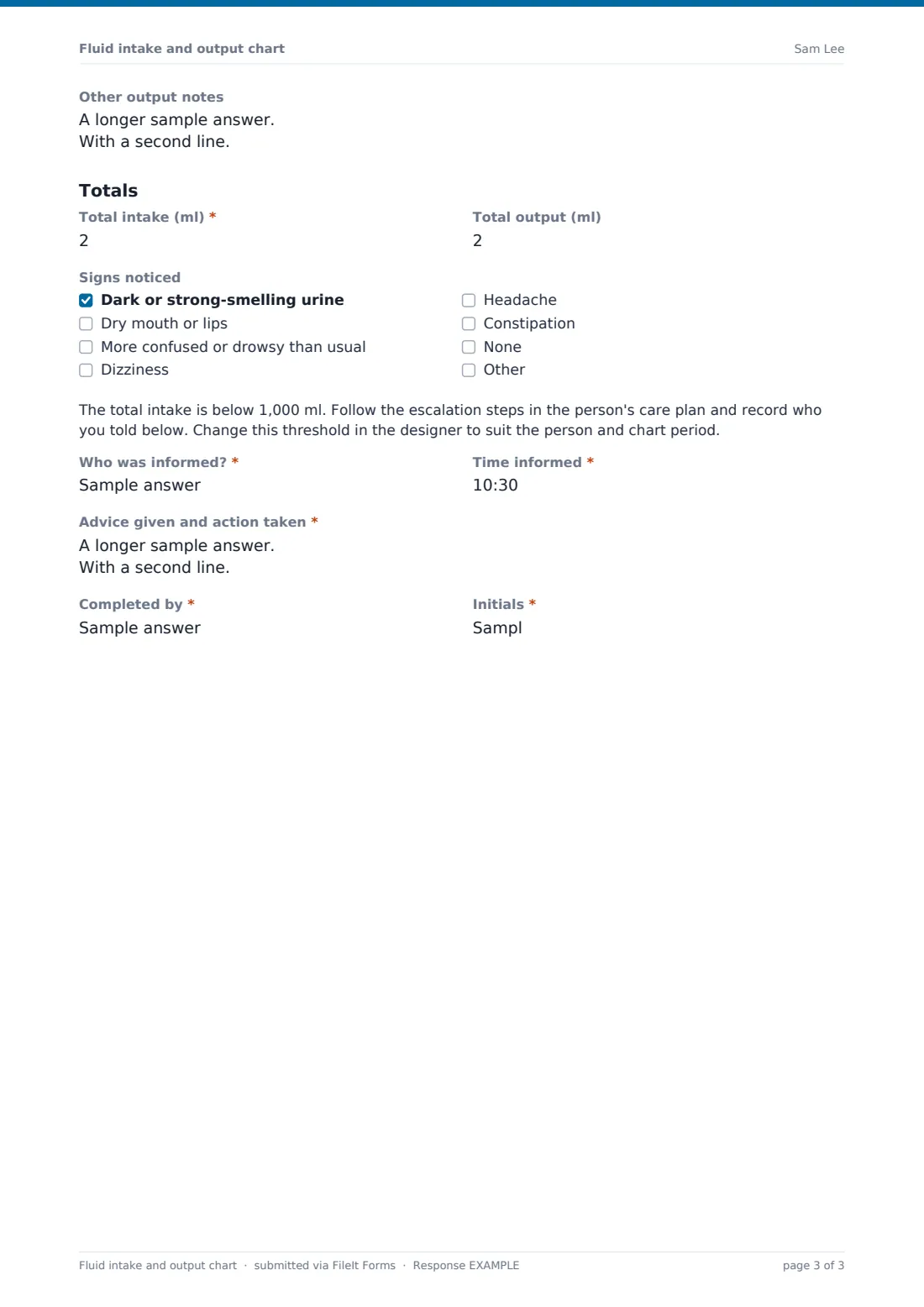
At the end of the period, staff enter the total intake and total output and tick any signs they've noticed, such as dark urine or new confusion. If the total intake entered is below 1,000 ml, a note appears with three required questions: who was informed, at what time, and what advice was given and action taken. Each chart is saved as a PDF in FileIt.
- Best for
- Care homes, nursing homes, home care agencies and supported living services
- Filled in by
- Care staff or nurses during the shift
- Time to complete
- A few seconds per drink, then about 2 minutes for totals
- Includes
- Daily target, up to eight drink entries, three output entries, refused drinks, totals, signs checklist and low-intake escalation
Who uses a fluid intake and output chart form?
- Residents on a fluid chart because of a urine infection or dehydration risk
- People with dementia who forget to drink without prompting
- Monitoring after a hospital discharge when the care plan asks for it
- Residents with catheters, drains or stomas whose output must be recorded
- Home care visits where carers prompt and record drinks
- Showing families and visiting nurses how much someone has been drinking
Questions on this fluid intake and output chart form
50 questions · includes conditional questions.
1 Fluid chart
- Resident or patient*
- Room
- Date*
- Period covered* 24 hours · Day shift · Night shift
- Daily intake target (ml)
- Are drinks thickened?
- Drink 1 — time*
- Amount taken (ml)*
- Drink*
- Drink 2 — time
- Amount taken (ml)
- Drink
- Drink 3 — time
- Amount taken (ml)
- Drink
- Drink 4 — time
- Amount taken (ml)
- Drink
- Drink 5 — time
- Amount taken (ml)
- Drink
- Drink 6 — time
- Amount taken (ml)
- Drink
- More drinks to record?
- Drink 7 — time asked only when it applies
- Amount taken (ml) asked only when it applies
- Drink asked only when it applies
- Drink 8 — time asked only when it applies
- Amount taken (ml) asked only when it applies
- Drink asked only when it applies
- Drinks offered but refused
- Output 1 — time
- Amount (ml)
- Type Urine · Vomit · Loose stool · Drain or stoma · Catheter bag emptied
- Output 2 — time
- Amount (ml)
- Type Urine · Vomit · Loose stool · Drain or stoma · Catheter bag emptied
- Output 3 — time
- Amount (ml)
- Type Urine · Vomit · Loose stool · Drain or stoma · Catheter bag emptied
- Other output notes
- Total intake (ml)*
- Total output (ml)
- Signs noticed Dark or strong-smelling urine · Dry mouth or lips · More confused or drowsy than usual · Dizziness · Headache · Constipation · None
- Who was informed?* asked only when it applies
- Time informed* asked only when it applies
- Advice given and action taken* asked only when it applies
- Completed by*
- Initials*
The fluid intake and output chart form, page by page
1 Fluid chart
The resident's name, the date and the period covered are required, with room, the daily intake target from the care plan and whether drinks are thickened as optional details.
Under Intake, Drink 1 needs a time, an amount taken in ml and the drink, for example tea with milk. Drinks 2 to 6 follow the same layout but can be left blank. More drinks to record? reveals Drinks 7 and 8. Drinks offered but refused has its own box, so a refused cup of tea isn't counted.
Under Output, three entries each take a time, an amount in ml and a type: urine, vomit, loose stool, drain or stoma, or catheter bag emptied. Other output notes covers anything unmeasured, such as pad changes.
Under Totals, Total intake (ml) is required and Total output (ml) is optional. Signs noticed lists dark urine, a dry mouth, more confusion or drowsiness, dizziness, headache and constipation. If the total intake is below 1,000 ml, the escalation note and its questions appear. The staff member's name and initials complete the chart.
Make the template yours
- Change the 1,000 ml escalation threshold to fit the person and the period you chart
- Turn the drink question into a dropdown of the drinks your home serves
- Add more drink entries for residents who drink little and often
- Remove the output section for residents who only need intake recorded
- Edit the escalation note to name your own procedure and on-call contacts
- Duplicate the form per unit so charts file into separate vault folders
Tips for a better fluid intake and output chart form
- Record drinks as they're finished, not at the end of the shift
- Only count what was actually drunk; note the rest under refused
- Keep a standard list of cup and beaker volumes on the unit so amounts are consistent
- Check the total against the care plan target before handover
- Watch the signs checklist; new confusion can be an early warning
- This chart supports the person's care plan and your policies; it isn't clinical advice
Every response becomes a PDF in your vault
Each chart is filed as a dated PDF in the vault folder you choose, with the intake, output and totals printed in order. The account owner can be emailed every time a chart is saved, which helps managers spot low totals the same day.
Use the Responses table to see a resident's charts by date, or export to CSV to compare daily totals over a week.
- Start from this template. It opens in the FileIt Forms designer — change any question, add pages, set the rules for when questions appear.
- Share it. Turn on a public link, or send it to people by email, each with their own link. They don’t need a FileIt account.
- Get the answers as PDFs. Each response is saved as a PDF in the vault folder you choose, with uploaded files attached — and listed in a Responses table you can export to CSV.
Fluid intake and output chart form: frequently asked questions
Is this fluid chart template free?
Yes. The Forms app and every starter template are included in all FileIt accounts, including the free plan.
Does the form calculate the totals?
No. Staff add up the amounts and enter the totals. The escalation questions appear automatically when the total intake entered is under 1,000 ml.
Why is the escalation threshold 1,000 ml?
It's a placeholder for a 24-hour chart. Change it in the designer to match the person's care plan and the period you chart.
Can staff fill it in on a phone or tablet?
Yes. Publish the form and keep the link on a unit tablet or staff phones.
Can I chart more than eight drinks?
Yes. Add more entries in the designer, or note extra drinks in the refused or notes boxes.
Will families be able to see the charts?
Only if you share them. Charts are filed in your vault, and you decide who has access.