
What is the executor estate administration checklist form template?
Being named executor usually arrives at the worst possible time, and the job turns out to be dozens of small tasks spread over many months, from ordering death certificates to handing everything to the beneficiaries. Most people end up tracking it in a notebook only they understand.
This checklist gives that work a structure. Each section lists the common steps as rows, and you mark each one Not started, In progress, Done or N/A. Free-text boxes sit under each section for the reference numbers, dates and phone calls you'll want later. If the estate includes a house, land or a rental, answering yes to the real estate question adds a property section with its own tasks.
You fill it in again whenever you make progress, and FileIt saves each update as a separate PDF in your vault: a dated record to show co-executors, beneficiaries or an accountant.
- Best for
- Executors, administrators and family members helping them
- Filled in by
- The executor, or someone keeping the records for them
- Time to complete
- 15 minutes the first time, a few minutes for each update
- Includes
- Status grids for notifications, assets, property, debts, tax and distributions, a next-step date and document uploads
Who uses a executor estate administration checklist form?
- An adult child named as sole executor of a parent's will, keeping track between work and family
- Two siblings acting as co-executors who want one shared picture of progress
- An administrator handling an estate where no will was found
- Sending a dated status update to beneficiaries without writing a long email
- Handing a clear history to a probate solicitor or accountant at the first meeting
Questions on this executor estate administration checklist form
34 questions over 3 pages · includes file upload, conditional questions, multiple pages, ratings.
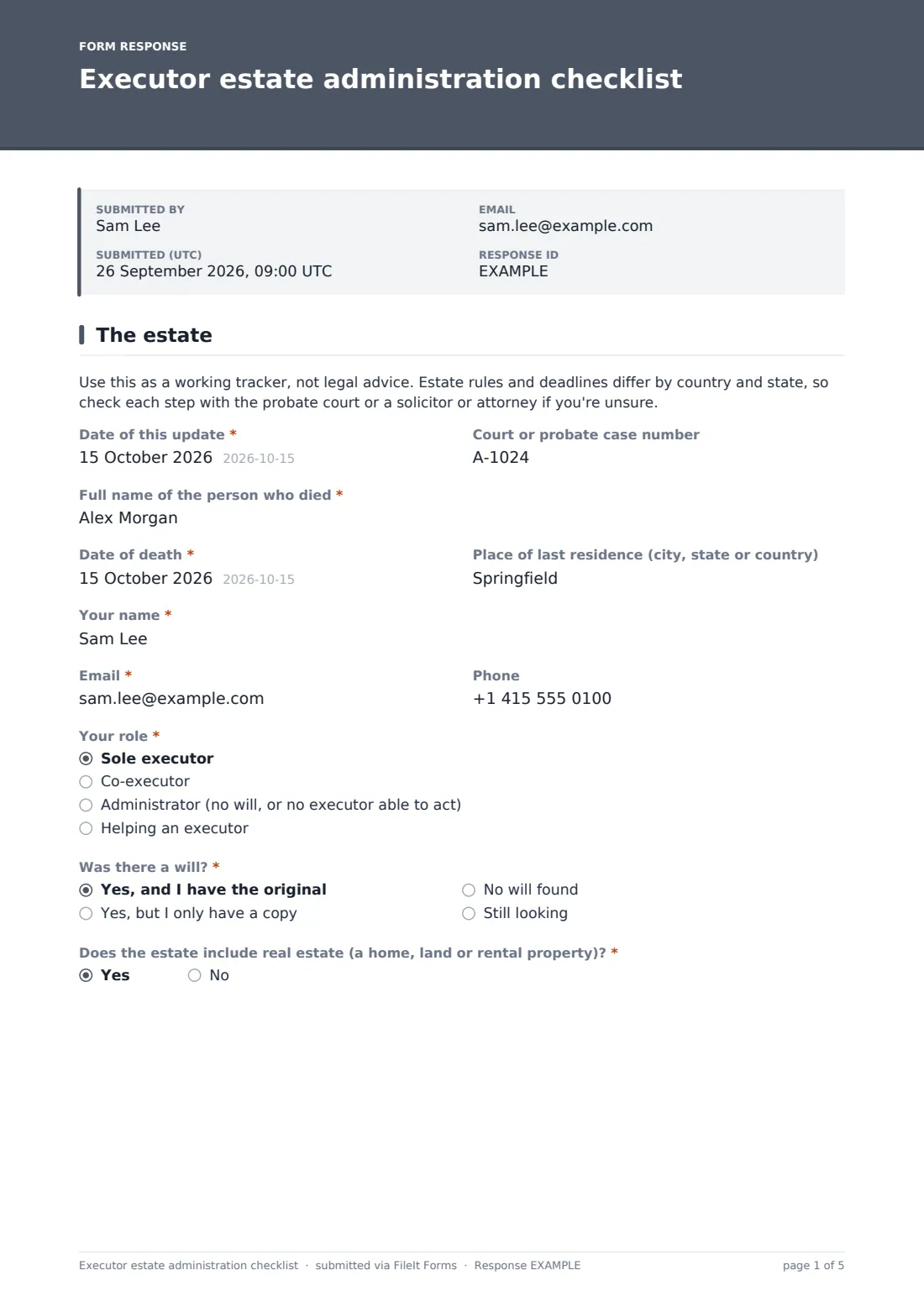
1 The estate
- Date of this update*
- Court or probate case number
- Full name of the person who died*
- Date of death*
- Place of last residence (city, state or country)
- Your name*
- Email*
- Phone
- Your role* Sole executor · Co-executor · Administrator (no will, or no executor able to act) · Helping an executor
- Other executor's name and contact asked only when it applies
- Was there a will?* Yes, and I have the original · Yes, but I only have a copy · No will found · Still looking
- Does the estate include real estate (a home, land or rental property)?*
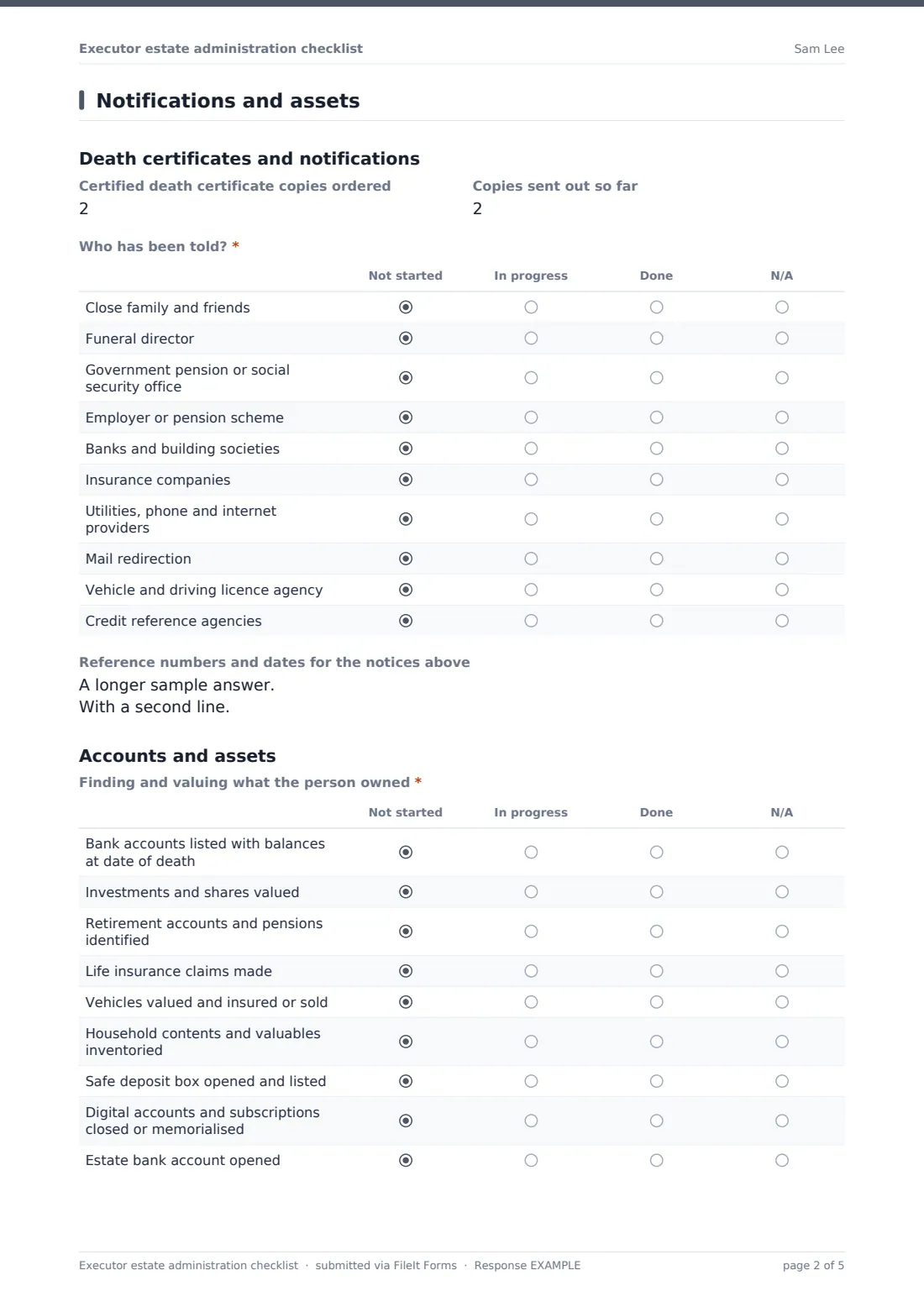
2 Notifications and assets
- Certified death certificate copies ordered
- Copies sent out so far
- Who has been told?* Not started · In progress · Done · N/A
- Reference numbers and dates for the notices above
- Finding and valuing what the person owned* Not started · In progress · Done · N/A
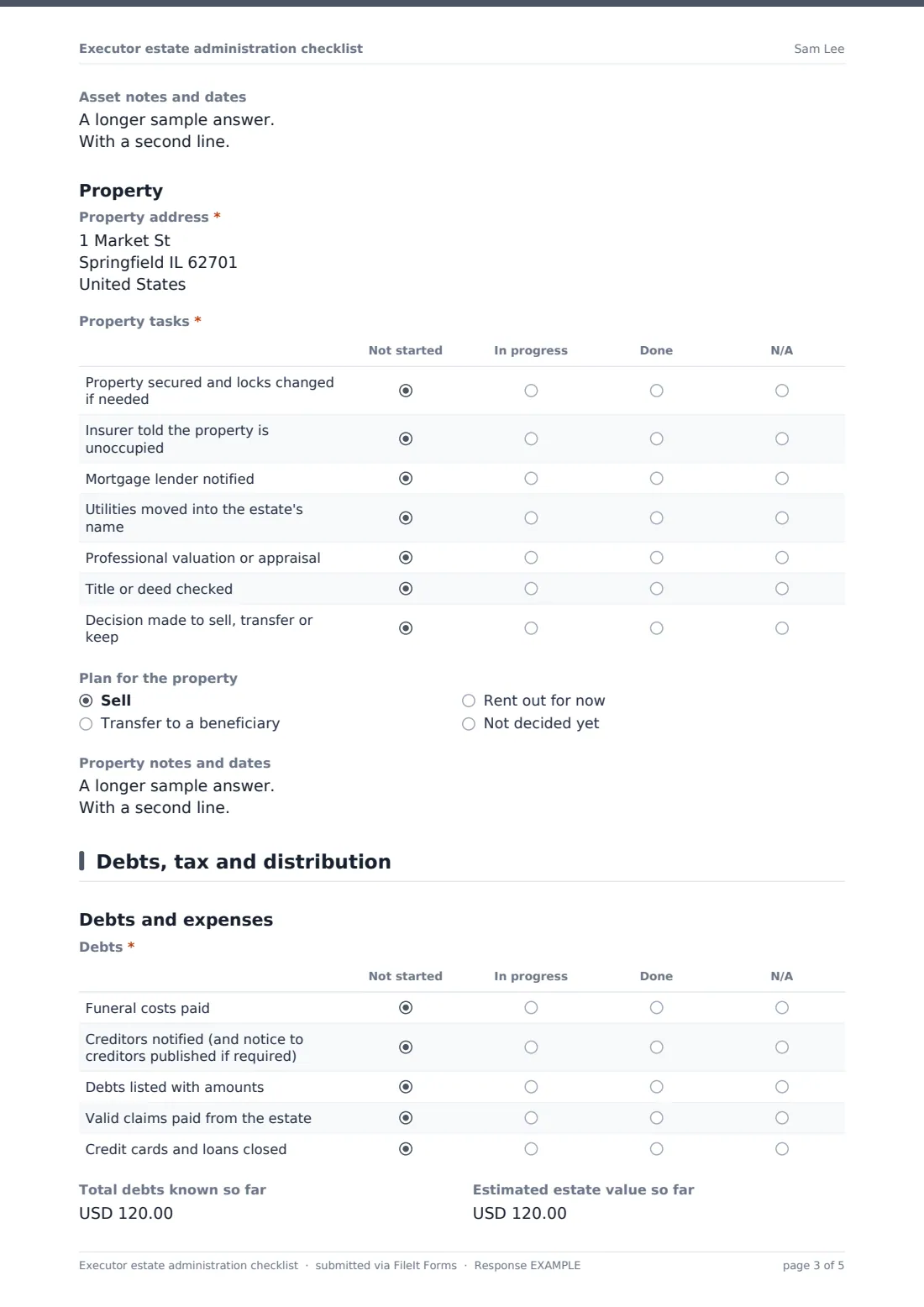
- Asset notes and dates
- Property address* asked only when it applies
- Property tasks* asked only when it applies Not started · In progress · Done · N/A
- Plan for the property asked only when it applies Sell · Transfer to a beneficiary · Rent out for now · Not decided yet
- Property notes and dates asked only when it applies
3 Debts, tax and distribution
- Debts* Not started · In progress · Done · N/A
- Total debts known so far
- Estimated estate value so far
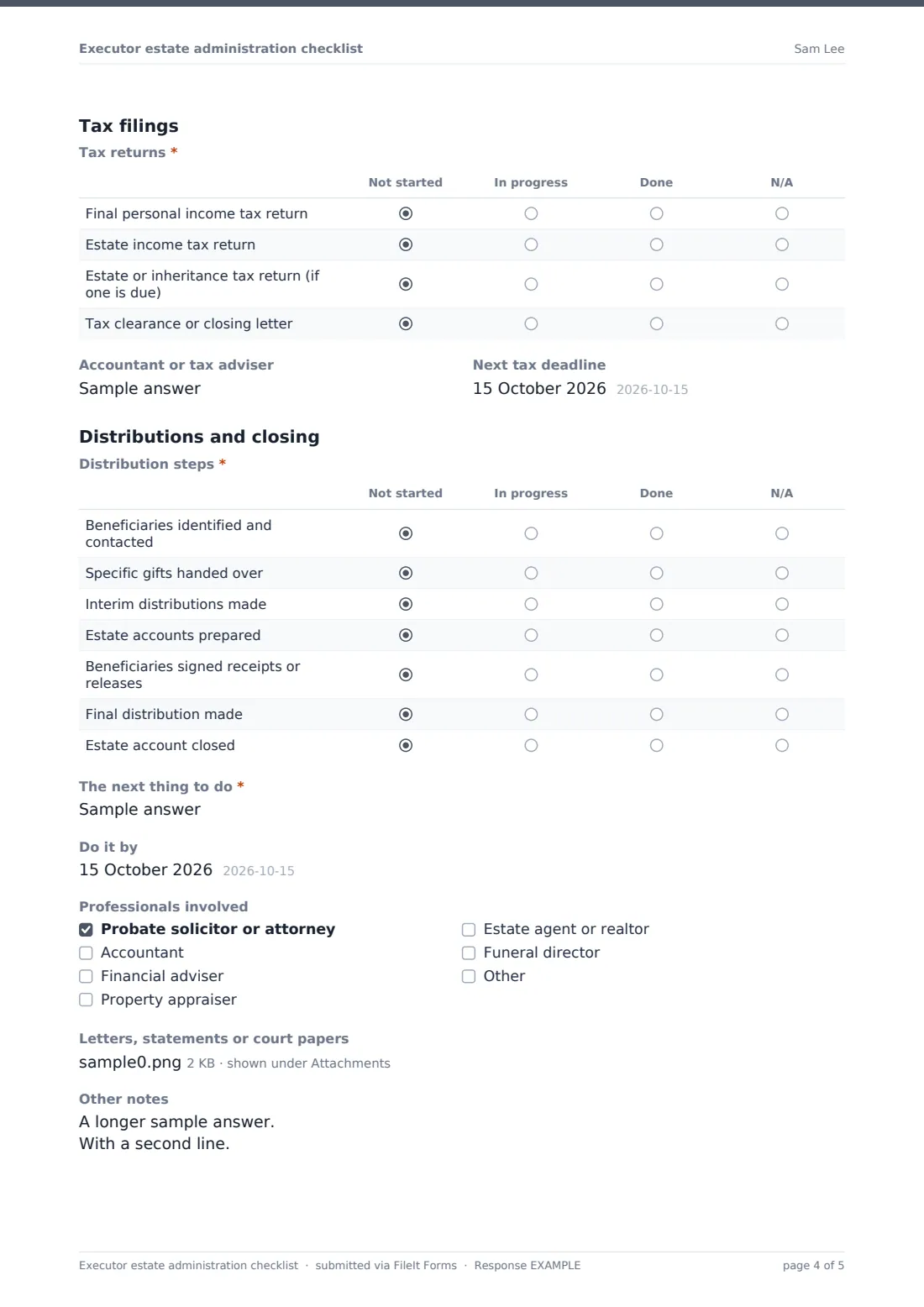
- Tax returns* Not started · In progress · Done · N/A
- Accountant or tax adviser
- Next tax deadline
- Distribution steps* Not started · In progress · Done · N/A
- The next thing to do*
- Do it by
- Professionals involved Probate solicitor or attorney · Accountant · Financial adviser · Property appraiser · Estate agent or realtor · Funeral director
- Letters, statements or court papers
- Other notes
The executor estate administration checklist form, page by page
1 The estate
Start with the date of this update and the court or probate case number if there is one. Then the basics: the full name of the person who died, the date of death and their place of last residence. Your name, email and phone come next, and you pick your role: sole executor, co-executor, administrator or someone helping an executor. Co-executors get a box for the other executor's name and contact. Two questions shape the rest of the form: "Was there a will?" and "Does the estate include real estate (a home, land or rental property)?"
2 Notifications and assets
Record how many certified death certificate copies you ordered and how many you've sent out. The "Who has been told?" grid covers family, the funeral director, the pension or social security office, the employer, banks, insurers, utilities, mail redirection, the vehicle licensing agency and the credit reference agencies. A box underneath holds reference numbers and dates.
The assets grid follows the same pattern for bank balances at the date of death, investments, retirement accounts, life insurance claims, vehicles, household contents, a safe deposit box, digital accounts and opening an estate bank account. If you said the estate includes real estate, a property section appears with the address, a task grid (securing the property, telling the insurer it's empty, the mortgage lender, utilities, a valuation, checking the title) and the plan: sell, transfer, rent out or not decided yet.
3 Debts, tax and distribution
The last page tracks funeral costs, notifying creditors, listing and paying valid debts, and closing cards and loans, with running totals for debts and estimated estate value. The tax grid lists the final personal income tax return, an estate income tax return, an estate or inheritance tax return if one is due, and a clearance letter. You can name the accountant and the next tax deadline.
Distribution steps run from contacting beneficiaries through specific gifts, interim and final distributions, signed receipts or releases and closing the estate account. Finish with "The next thing to do" and a date, tick the professionals involved, and upload letters, statements or court papers.
Make the template yours
- Rename the grid rows to match the steps in your country or state
- Change the currency fields from USD to the estate's currency
- Add rows for things specific to this estate, such as a business, a farm or overseas accounts
- Point the form at a vault folder for this estate so every update lands in one place
- Turn on notifications to a co-executor's email so they get each update too
Tips for a better executor estate administration checklist form
- Order more death certificate copies than you think you need. Many organisations want an original, and counting copies sent helps you spot when to order more
- Write down who you spoke to and the reference number every time you call an organisation
- Keep estate money in a separate estate account rather than your own
- Hold off on final distributions until debts and taxes are settled and you've taken professional advice if the estate is complex
Every response becomes a PDF in your vault
Each time you submit, FileIt saves the checklist as a PDF in your vault, titled with the date, and emails you a copy. Because it's filed alongside the will, death certificate scans and statements you upload, the estate's paperwork stays together instead of across inboxes and drawers.
In the Responses table you can see every update in date order, open any earlier PDF to check what had been done by then, or export to CSV if an accountant or solicitor wants the history in a spreadsheet.
- Start from this template. It opens in the FileIt Forms designer — change any question, add pages, set the rules for when questions appear.
- Share it. Turn on a public link, or send it to people by email, each with their own link. They don’t need a FileIt account.
- Get the answers as PDFs. Each response is saved as a PDF in the vault folder you choose, with uploaded files attached — and listed in a Responses table you can export to CSV.
Executor estate administration checklist form: frequently asked questions
Is this executor checklist free?
Yes. It's one of the ready-made templates in the Forms app on every FileIt account, including the free plan, and you can change any row or question.
Does it tell me what the law requires in my state or country?
No. It lists steps that come up in most estates, but the rules, forms and deadlines differ by place. Check them with the probate court or a solicitor or attorney, and edit the rows to match.
Why do I fill it in more than once?
Each submission is a snapshot. Filling it in after each round of work gives you a dated series of PDFs showing progress, which is easier to share than a single document you keep overwriting.
When does the property section appear?
Only when you answer yes to "Does the estate include real estate (a home, land or rental property)?" on the first page.
Can a co-executor see the updates?
Add their email in the form's notification settings and they'll get an email each time a new update is submitted. You can also send them the PDF from your vault.