What is the congregation feedback survey form template?
Leaders of a faith community usually hear from the same few voices: the people who stay for coffee, serve on committees or send long emails. The quieter majority, and the visitors who came once and didn't return, rarely get asked.
This survey gives everyone an easy, anonymous way to answer. It opens by asking how people would describe their connection: member, regular attender, someone who comes now and then, or new visitor. Everyone rates the services, from music and teaching to children's provision, accessibility and the livestream. The second page asks about activities they've joined, what they'd like to see, how much they feel they belong, how well they're kept informed and what one thing would make the community better.
New visitors get their own short section: how they heard about you, how welcome they felt, what stood out on their first visit and whether they'd come again. The wording is neutral, so it suits churches, mosques, synagogues, temples and other faith groups. Responses are saved as PDFs in FileIt.
- Best for
- Churches, parishes, mosques, synagogues, temples and other faith communities
- Filled in by
- Members, regular attenders, occasional attenders and new visitors
- Time to complete
- About 5 minutes
- Includes
- First-visit questions, a services rating grid, activities, belonging scale, communication preferences and an optional contact request
Who uses a congregation feedback survey form?
- An annual survey ahead of a leadership planning day
- Collecting first impressions from visitors via a card with a QR code
- Checking how a new service time or format is landing
- Planning which small groups or programs to start next
- Deciding how to communicate: email, texts, an app or printed bulletins
- Giving a new leader a picture of the community they're joining
Questions on this congregation feedback survey form
19 questions over 2 pages · includes conditional questions, multiple pages, ratings.
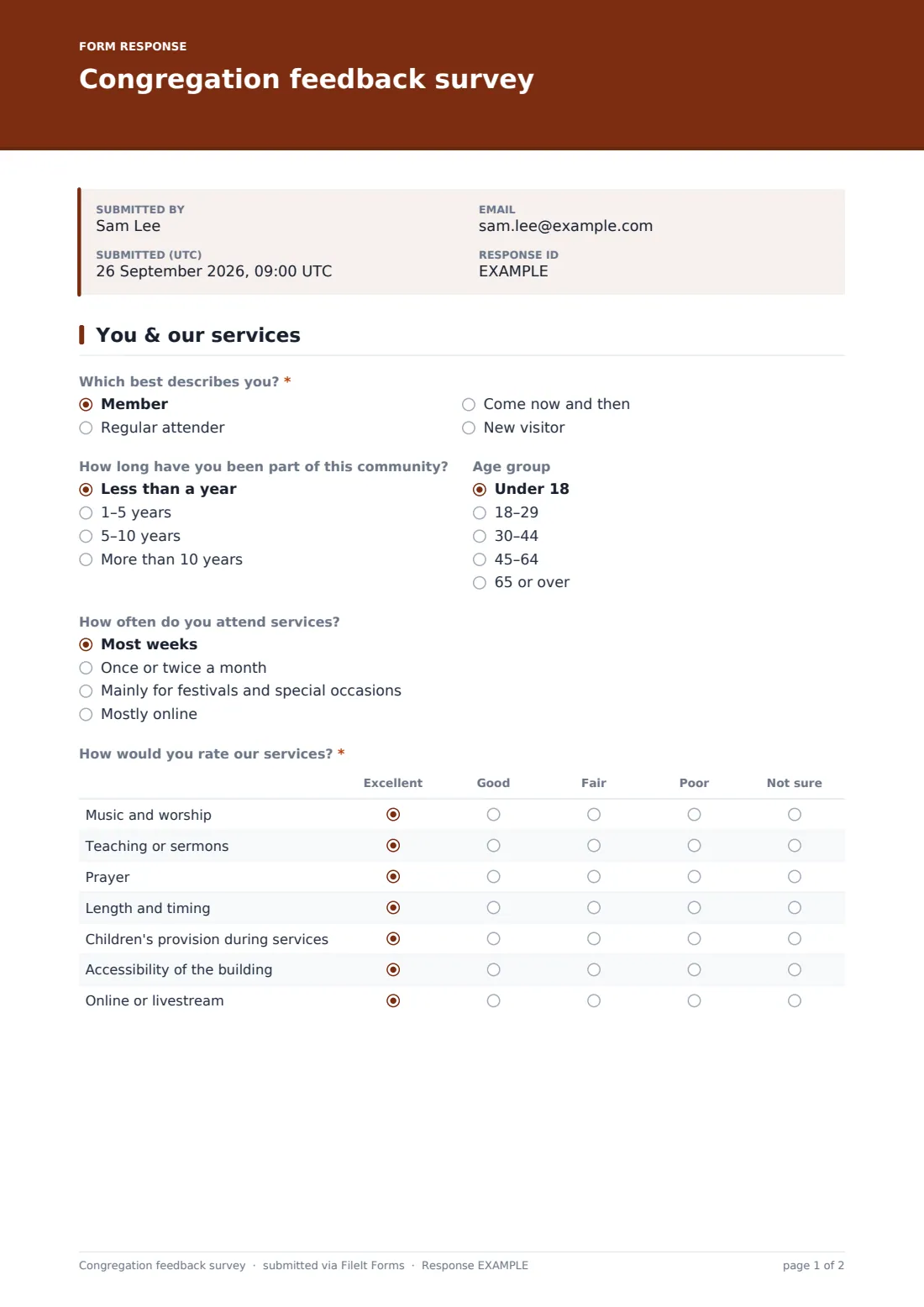
1 You & our services
- Which best describes you?* Member · Regular attender · Come now and then · New visitor
- How did you hear about us? asked only when it applies A friend or family member · Website or online search · Social media · Passing by · A community event
- How welcome did you feel?* asked only when it applies
- What stood out on your first visit? asked only when it applies
- Would you come again? asked only when it applies Yes · Maybe · Probably not
- How long have you been part of this community? asked only when it applies Less than a year · 1–5 years · 5–10 years · More than 10 years
- Age group Under 18 · 18–29 · 30–44 · 45–64 · 65 or over
- How often do you attend services? Most weeks · Once or twice a month · Mainly for festivals and special occasions · Mostly online
- How would you rate our services?* Excellent · Good · Fair · Poor · Not sure
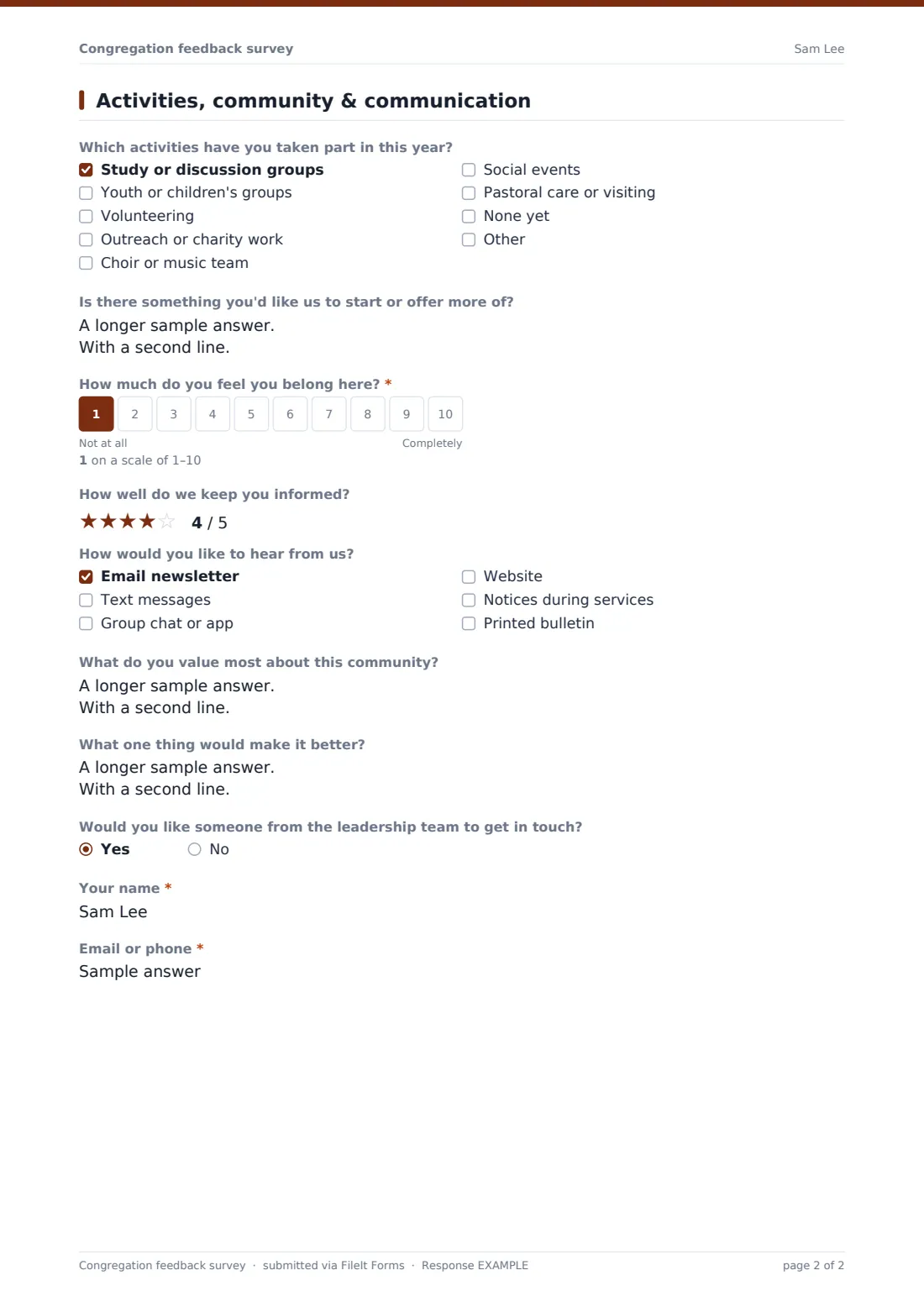
2 Activities, community & communication
- Which activities have you taken part in this year? Study or discussion groups · Youth or children's groups · Volunteering · Outreach or charity work · Choir or music team · Social events · Pastoral care or visiting · None yet
- Is there something you'd like us to start or offer more of?
- How much do you feel you belong here?*
- How well do we keep you informed?
- How would you like to hear from us? Email newsletter · Text messages · Group chat or app · Website · Notices during services · Printed bulletin
- What do you value most about this community?
- What one thing would make it better?
- Would you like someone from the leadership team to get in touch?
- Your name* asked only when it applies
- Email or phone* asked only when it applies
The congregation feedback survey form, page by page
1 You & our services
Which best describes you? is required. Choosing new visitor reveals Your first visit: how they heard about you, a required star rating for How welcome did you feel?, what stood out and whether they'd come again. Everyone else is asked how long they've been part of the community. Age group and how often people attend are optional.
The required grid How would you rate our services? covers music and worship, teaching or sermons, prayer, length and timing, children's provision during services, accessibility of the building, and online or livestream, each rated excellent, good, fair, poor or not sure.
2 Activities, community & communication
People tick which activities they've taken part in this year, from study groups and youth groups to volunteering, outreach, music teams and pastoral care, and suggest something you could start. How much do you feel you belong here? is a required 1–10 scale. A star rating covers how well you keep them informed, followed by how they'd like to hear from you. Two open questions ask what they value most and what one thing would make it better. Answering yes to Would you like someone from the leadership team to get in touch? asks for a name and an email or phone number.
Make the template yours
- Rename 'services' and the grid rows to match your tradition and calendar
- Add your own groups and ministries to the activities list
- Remove the livestream row if you don't broadcast services
- Add a question about giving, facilities or a building project
- Make a short visitor-only version by duplicating the form
- Send the responses to a pastoral team address as well as the owner
Tips for a better congregation feedback survey form
- Tell people the survey is anonymous unless they choose to leave contact details
- Run it at a regular time each year so you can compare results
- Print the link as a QR code on welcome cards for visitors
- Share a summary of what you heard and what you'll change
- Follow up personally with anyone who asks to be contacted
- Keep responses in a vault folder that only your leadership team can open
Every response becomes a PDF in your vault
Each response is filed as a PDF in the vault folder you choose, and the account owner is emailed when one arrives. If someone asks to be contacted, their details are in that response.
The Responses table can be filtered and exported to CSV, so you can compare how members and visitors rated each part of your services.
- Start from this template. It opens in the FileIt Forms designer — change any question, add pages, set the rules for when questions appear.
- Share it. Turn on a public link, or send it to people by email, each with their own link. They don’t need a FileIt account.
- Get the answers as PDFs. Each response is saved as a PDF in the vault folder you choose, with uploaded files attached — and listed in a Responses table you can export to CSV.
Congregation feedback survey form: frequently asked questions
Is this congregation survey template free?
Yes. It's part of the Forms app, which every FileIt account includes, the free plan too.
Is the survey anonymous?
Yes. It doesn't ask for a name unless someone asks a leader to get in touch.
Can I use it for a mosque, synagogue or temple?
Yes. The wording avoids terms specific to one tradition, and every label can be edited in the designer.
Do visitors see different questions?
Yes. Choosing new visitor shows four first-visit questions, and skips the question about how long they've been part of the community.
Can people answer on their phones during a service?
Yes. Share the link or a QR code, and the survey works on any phone.
Can we run it every year?
Yes. Duplicate the form each year, or set a closing date so each round stays separate.