What is the user access review form template?
Access tends to accumulate. People change roles and keep their old permissions, leavers are missed, and temporary admin rights become permanent. A periodic user access review — where the person responsible for a system confirms each account is still appropriate — is a common control for exactly this reason, and auditors will usually ask to see evidence of it.
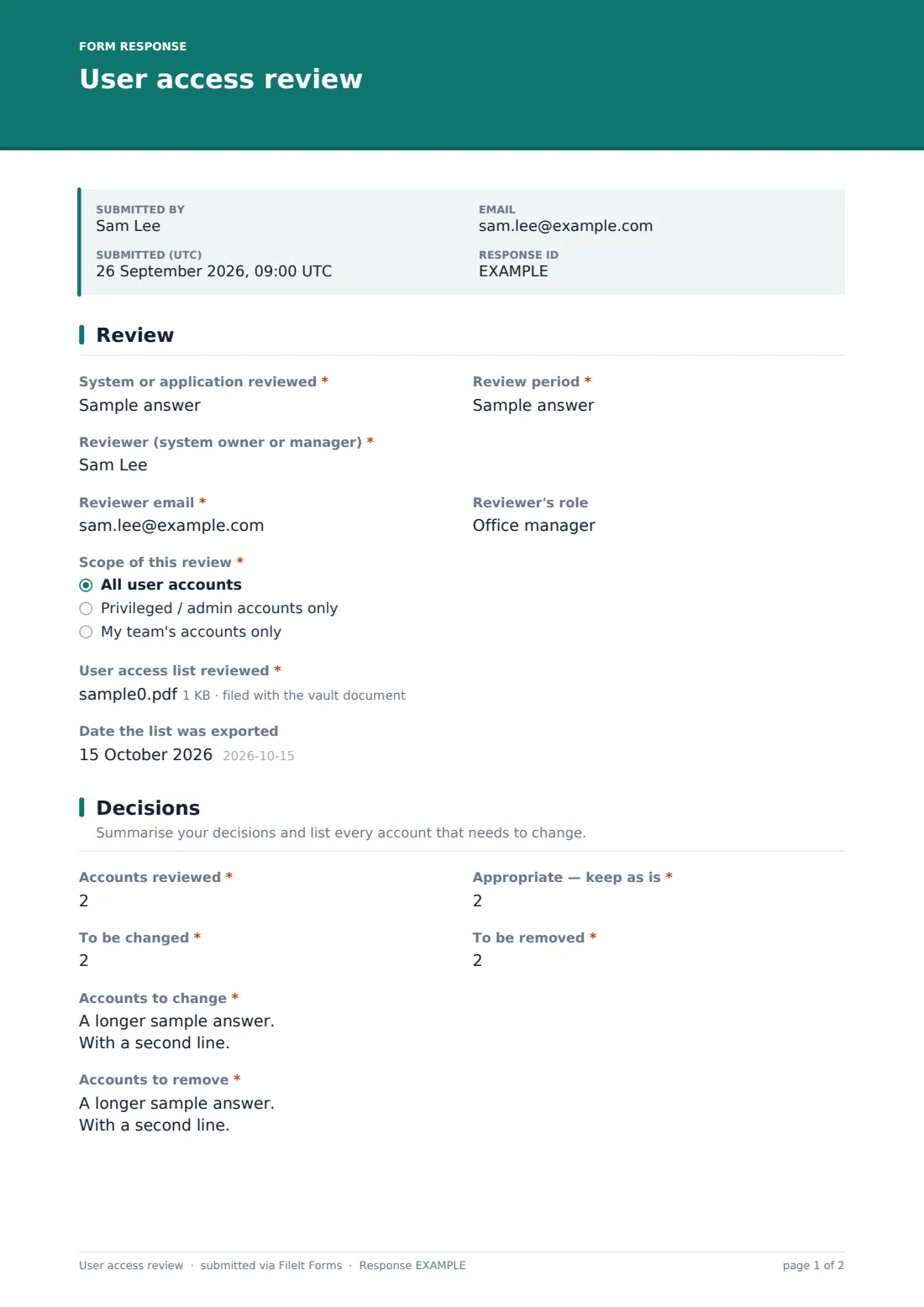
This user access review form asks the reviewer which system and period they're reviewing, the scope, and for the exported user list they worked from. They record how many accounts they reviewed and how many to keep, change or remove, list every account that needs to change, and run through specific checks — leavers, dormant accounts, admins, shared and service accounts, conflicting roles and external users. They finish with a due date, comments and a signed certification.
Each completed review is saved as a signed PDF in your FileIt vault with the user list attached — the evidence trail a reviewer or auditor typically wants to see.
- Best for
- IT, security and compliance teams running quarterly or annual access reviews
- Filled in by
- System owners, application owners and line managers
- Time to complete
- About 10–20 minutes, depending on the number of accounts
- Includes
- User list upload, change and removal lists shown only when needed, checks grid, signature
Who uses a user access review form?
- A quarterly review of who has access to the finance system
- Managers confirming their team's access to shared drives
- An annual review of privileged and administrator accounts
- Evidence for a security audit, customer questionnaire or certification
- Checking access after a reorganisation or restructure
- Reviewing contractor and external user access to a client portal
Questions on this user access review form
23 questions over 3 pages · includes signature, file upload, conditional questions, multiple pages, consent checkbox, ratings.
1 Review
- System or application reviewed*
- Review period*
- Reviewer (system owner or manager)*
- Reviewer email*
- Reviewer's role
- Scope of this review* All user accounts · Privileged / admin accounts only · My team's accounts only
- User access list reviewed*
- Date the list was exported
2 Decisions
- Accounts reviewed*
- Appropriate — keep as is*
- To be changed*
- To be removed*
- Accounts to change* asked only when it applies
- Accounts to remove* asked only when it applies
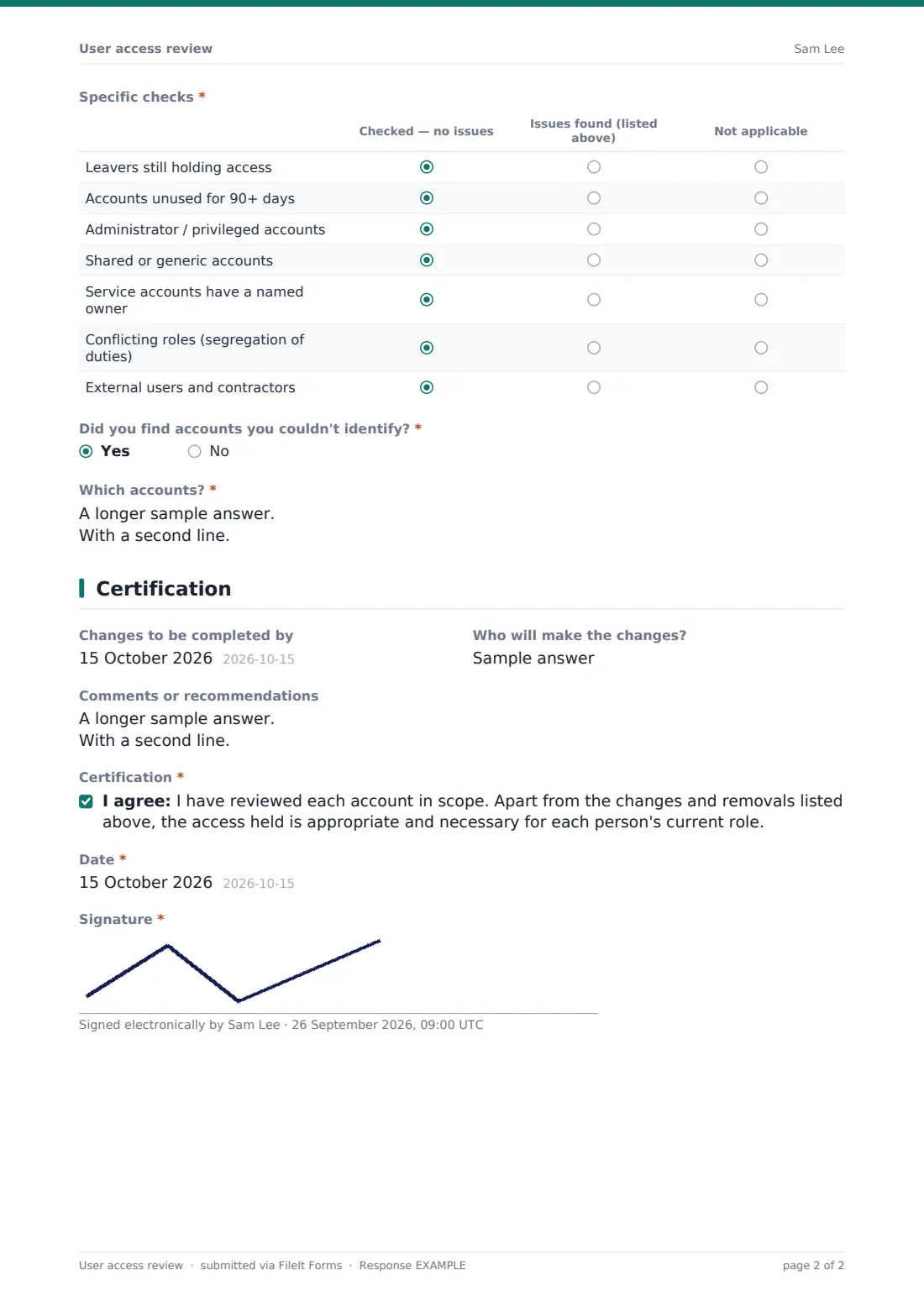
- Specific checks* Checked — no issues · Issues found (listed above) · Not applicable
- Did you find accounts you couldn't identify?*
- Which accounts?* asked only when it applies
3 Certification
- Changes to be completed by
- Who will make the changes?
- Comments or recommendations
- Certification*
- Date*
- Signature*
The user access review form, page by page
1 Review
The reviewer names the system and the review period, gives their name, email and role, and chooses the scope — all accounts, privileged accounts only, or their own team. They must upload the user access list they reviewed, in Excel, CSV or PDF, and can note the date it was exported.
2 Decisions
Four number fields record how many accounts were reviewed and how many to keep, change or remove. Entering more than zero changes or removals reveals a required list for each, one account per line. A grid then asks the reviewer to mark seven specific checks — leavers, accounts unused for 90 days or more, admin accounts, shared accounts, service account owners, conflicting roles and external users — as checked with no issues, issues found or not applicable. Accounts the reviewer couldn't identify are listed separately.
3 Certification
The reviewer sets a date for changes to be completed and says who will make them, adds any comments, then certifies that apart from the changes listed, access is appropriate for each person's current role. They date and sign.
Make the template yours
- Send personal links to each system owner with the system name already in the request message
- Adjust the dormant account threshold in the checks grid to match your policy
- Add rows to the checks grid for controls specific to your system
- Set a closing date so the review cycle has a clear deadline
- File reviews into a vault folder per quarter or per system
- Add a second signature for IT confirming changes were made
Tips for a better user access review form
- Give reviewers a fresh export of users and roles, not last quarter's
- Make sure the reviewer actually knows the people — managers for their teams, owners for their systems
- Chase unknown accounts until someone claims them or they're removed
- Record when changes are completed, not just when they were requested
- Pay extra attention to privileged, shared and service accounts
- Keep past reviews — showing the control ran every period matters as much as one good review
Every response becomes a PDF in your vault
Each review is saved as a signed PDF in your FileIt vault with the user list attached, and the form owner is emailed. The reviewer can receive a copy.
If you sent personal links, you can see which system owners haven't completed their review yet. The Responses table and CSV export make it easy to total changes and removals across all systems for the period.
- Start from this template. It opens in the FileIt Forms designer — change any question, add pages, set the rules for when questions appear.
- Share it. Turn on a public link, or send it to people by email, each with their own link. They don’t need a FileIt account.
- Get the answers as PDFs. Each response is saved as a PDF in the vault folder you choose, with uploaded files attached — and listed in a Responses table you can export to CSV.
User access review form: frequently asked questions
Is this user access review template free?
Yes. It's a starter template in the FileIt Forms app, included on every plan including free.
Does FileIt pull the user list from our systems?
No. The reviewer uploads an export of users and roles from the system being reviewed.
Does it remove access automatically?
No. The form records decisions. Changes and removals are made by IT or the system admin in the system itself.
Will this satisfy our auditor?
It gives you a consistent, signed and dated record with the user list attached, which is the kind of evidence access review controls usually call for. What exactly your auditor needs depends on your framework and scope.
Can I track who hasn't completed their review?
Yes, if you send personal links to each reviewer. Outstanding requests are shown until they're completed.
Can a reviewer cover several systems?
Each submission covers one system, which keeps the evidence clear. Reviewers can submit the form once per system.