What is a recall to work letter?
After a layoff or furlough, the call back to work is a welcome one, but it still needs to be clear. Which day, which shift, the same job or a different one, the same pay? And what if the employee has found other work in the meantime? A recall letter answers those questions and gives a firm date to reply by.
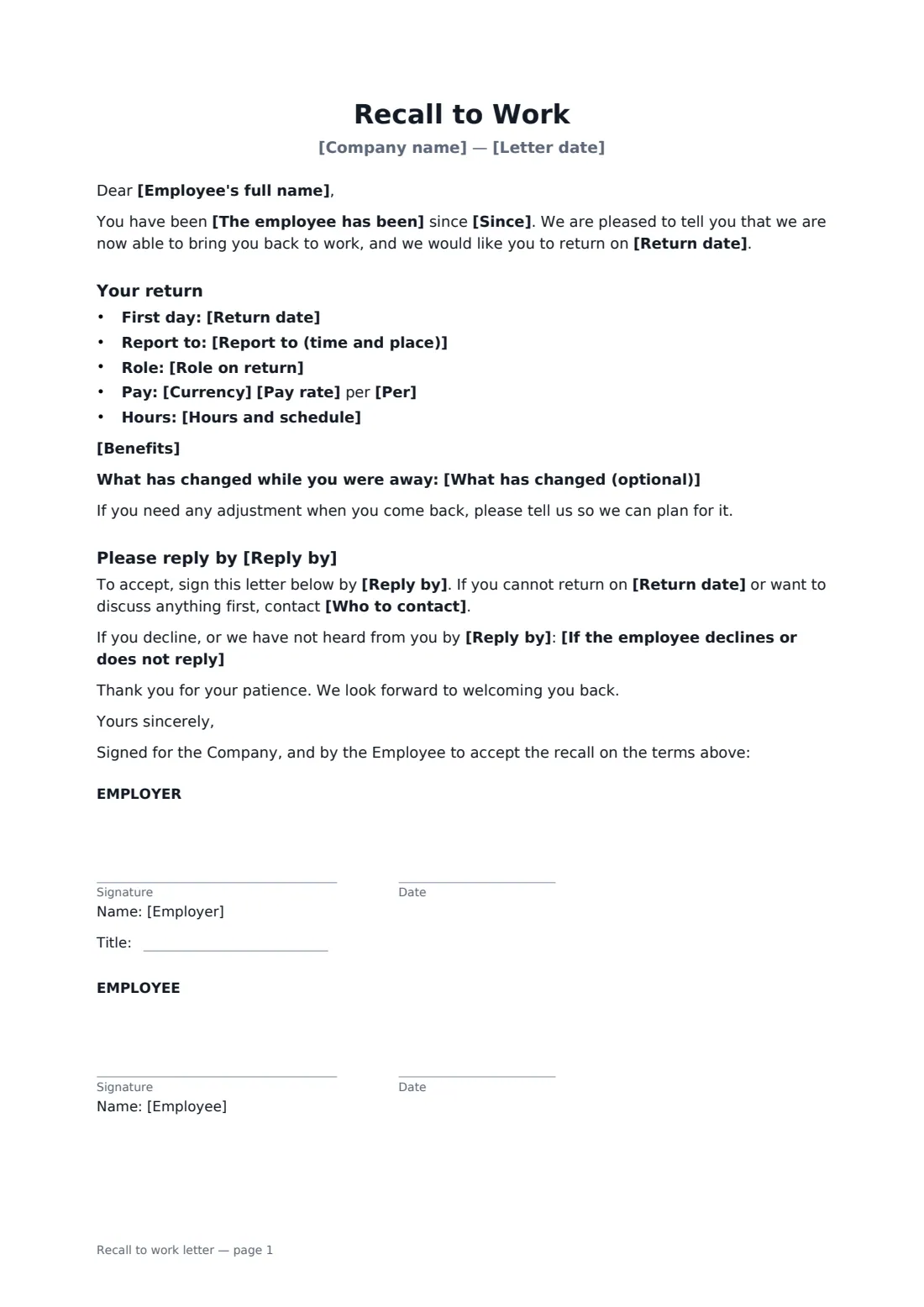
This one-page letter says how long the employee has been away and invites them back on a set date. It lists where and when to report, the role, the pay and the hours, says whether the role is the same as before, and confirms continuous service and benefits. You can describe what has changed while they were away, and it invites them to mention any adjustment they need. It sets a reply deadline and a contact, and explains what happens if they decline or don't reply. The employee accepts by signing; to decline, they can use Decline on the signing page or contact you.
- Best for
- Bringing back employees after a temporary layoff or furlough
- Signed by
- The employer, then the employee to accept
- States
- Return date, role, pay, schedule, changes and reply deadline
- Length
- One page
When to use a recall to work letter
- Reopening a plant or site after a shutdown
- Ending a furlough as orders pick up
- Recalling seasonal staff laid off over the quiet months
- Bringing someone back to a different role than before
- Recalling staff in seniority order under a recall list
What you fill in
18 blanks, then the name and email of each person who signs: employer, employee.
1 The letter
- Company name*
- Letter date*
- Employee's full name*
- The employee has been* on temporary layoff · on furlough
- Since*
2 Return terms
- Return date*
- Report to (time and place)*
- Role on return*
- Is this the same role as before?* Yes · No
- Currency*
- Pay rate*
- Per* hour · week · month · year
- Hours and schedule*
- What has changed (optional)
- Benefits* Your benefits will restart from your return date on the same terms as before. · Your benefits continued during your absence and are unchanged.
3 Reply
- Reply by*
- Who to contact*
- If the employee declines or does not reply*
4 Who signs
- Employer signature and date, job title · The manager or HR person making the recall.
- Employee signature and date · Signs to accept. To decline, they can use Decline in the signing page or tell the contact named in the letter.
What the recall to work letter covers
- Your return
Using the recall to work letter, step by step
1 Say who and since when
Enter the employee's name, whether they were on temporary layoff or furlough, and since when.
2 Set the return terms
Add the return date, where and when to report, the role, pay and hours, and whether it's the same role. Describe anything that has changed and choose how benefits restart.
3 Set the deadline
Pick a reply date, name the contact, and edit what happens if they decline or don't reply.
4 Send for signature
Sign and send. When the employee signs, they've accepted. FileIt shows you who has opened, signed or declined.
Tips before you send it
- Phone the employee too — a letter alone can feel cold after a long time away.
- Check any recall rights in contracts or a collective agreement, including the order in which people must be recalled.
- Give enough time to reply and to arrange childcare or end other work.
- Declining a recall can affect unemployment benefits in some places, so be accurate about the terms offered.
Sign it online in minutes
- Fill in the blanks. Names, dates and amounts go straight into the agreement — the preview shows exactly where.
- Name who signs. Tick “This is me” for your own part. FileIt builds the PDF with every signature, date box on the right line, and you can check or move anything before sending.
- Send it. Each signer gets a secure link and signs from any device — no account needed. The signed PDF, with an audit trail and a Certificate of Completion, is filed in your vault and emailed to everyone.
Recall to work letter: frequently asked questions
How does the employee decline?
They can choose Decline on the FileIt signing page, or tell the contact named in the letter. Signing means they accept.
Can I recall someone to a different role?
Yes. Choose "No" for the same-role question. The letter then says it's a different role, that their other terms and continuous service carry on, and invites questions before they reply.
What if they don't reply by the deadline?
The letter says what you'll do — by default, take it that they don't wish to return and write to them about next steps. Check contracts and local law before changing it.
Is this the same as a job offer?
No. It's for someone who is still your employee, or has a right to be recalled, returning after a layoff or furlough. For a new hire, use an employment offer letter.