What is a novation agreement?
A novation replaces one party to a contract with a new one. Unlike a simple assignment, it moves the obligations as well as the benefits, and the party leaving is released. That's why everyone has to agree: the remaining party is accepting a new counterparty it may never have dealt with before. Novations are common when a business is sold or restructured, when a contractor hands over a long project, or when a contract needs to move to a newly formed company.
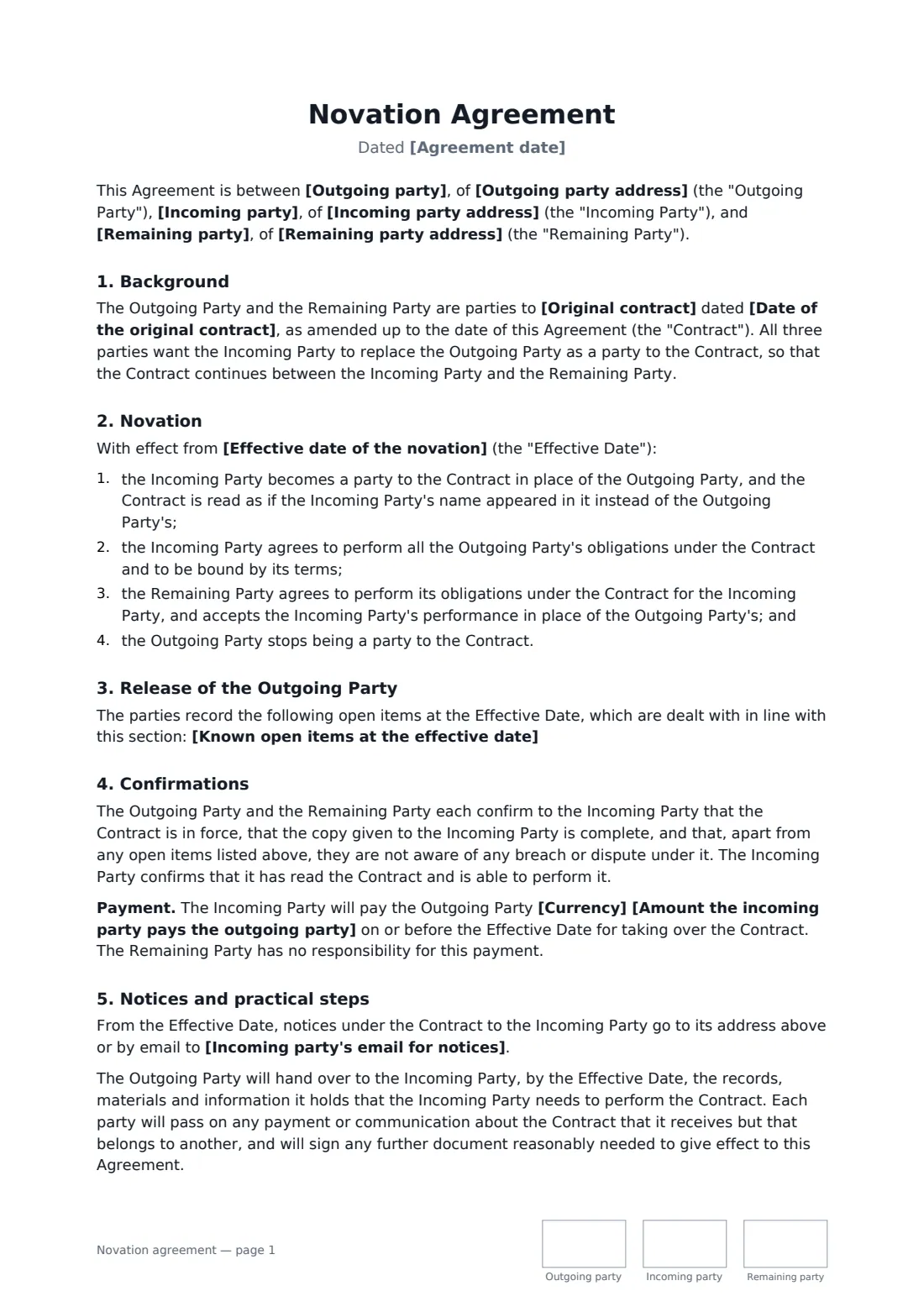
This template is signed by the outgoing, incoming and remaining parties. It names the original contract and the effective date, puts the incoming party in the outgoing party's place, and releases the outgoing party. You choose whether obligations from before the effective date stay with the outgoing party or pass to the newcomer too, and can list open items such as unpaid invoices or deposits. It also covers confirmations about the contract, an optional payment, notices, handover of records and cooperation.
- Best for
- Moving a contract to a new company or buyer with a full release
- Signed by
- Outgoing, incoming and remaining parties
- Past obligations
- You choose: they stay with the outgoing party, or pass to the incoming party
- Length
- 2–3 pages, initialled by all three on every page
When to use a novation agreement
- A sole trader incorporating and moving client contracts into the new company
- A business sale where key supplier contracts must move to the buyer
- A building contractor handing a project to another contractor with the owner's agreement
- Moving an agreement from one company to another within the same group
- A franchisee selling its unit, with the franchisor agreeing to the new operator
What you fill in
16 blanks, then the name and email of each person who signs: outgoing party, incoming party, remaining party.
1 The parties
- Agreement date*
- Outgoing party*
- Outgoing party address
- Incoming party*
- Incoming party address
- Incoming party's email for notices
- Remaining party*
- Remaining party address
2 The contract
- Original contract*
- Date of the original contract*
- Effective date of the novation*
- Obligations from before the effective date* Stay with the outgoing party · Pass to the incoming party as well
- Known open items at the effective date
3 Other terms
- Currency
- Amount the incoming party pays the outgoing party
- Governing law*
4 Who signs
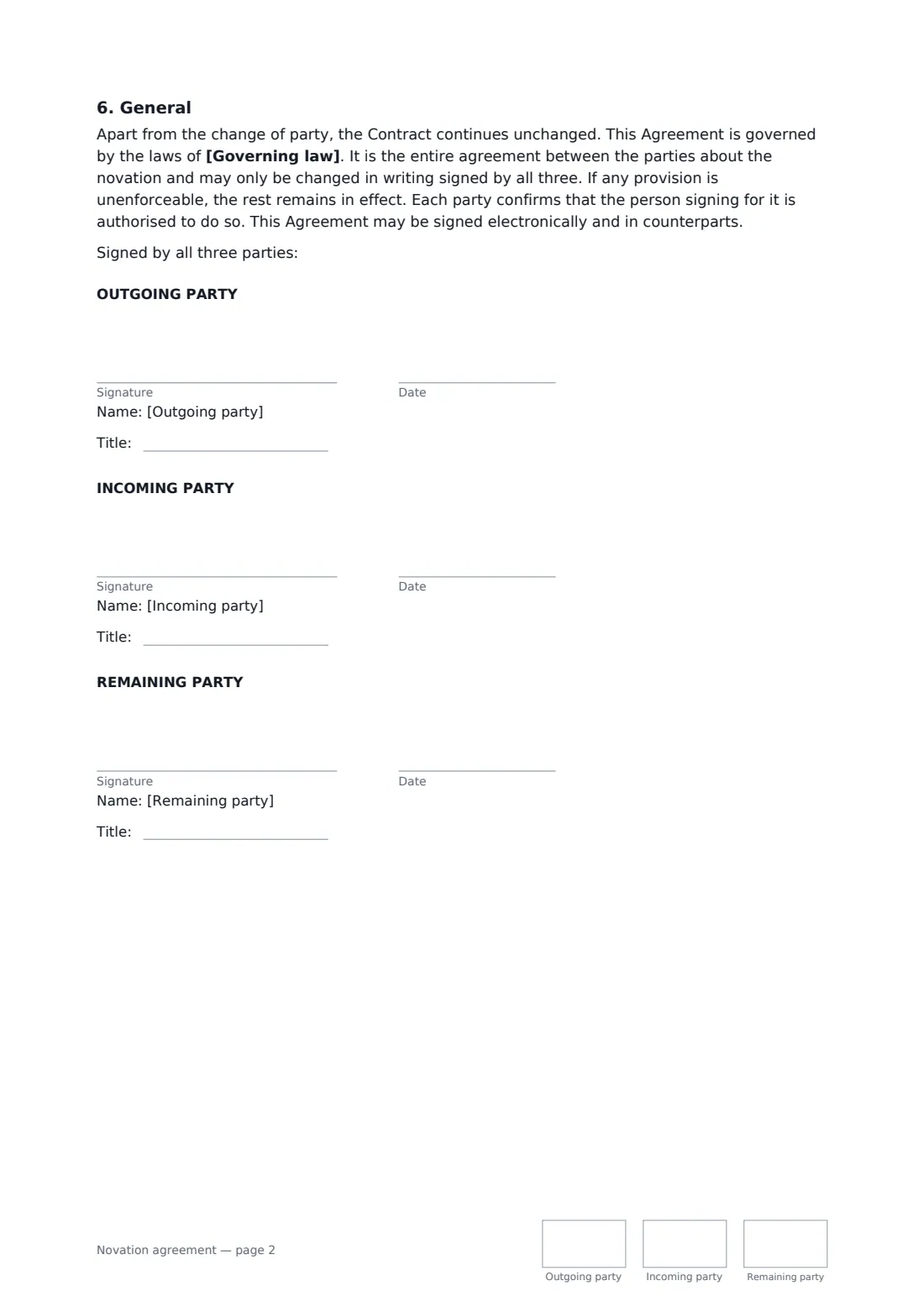
- Outgoing party signature and date, job title, initials on every page · The party leaving the contract.
- Incoming party signature and date, job title, initials on every page · The party taking the outgoing party's place.
- Remaining party signature and date, job title, initials on every page · The other original party, who stays in the contract.
What the novation agreement covers
- Background
- Novation
- Release of the Outgoing Party
- Confirmations
- Notices and practical steps
- General
Using the novation agreement, step by step
1 Name all three parties
Enter the outgoing party (usually you), the incoming party and the remaining party, with addresses. Add the incoming party's email for notices if it has one.
2 Identify the contract and the date
Give the contract's title and date, and the effective date when the incoming party takes over.
3 Decide about the past
Choose whether obligations from before the effective date stay with the outgoing party or pass to the incoming party, and list any open items so nothing is forgotten.
4 Send to all three
Set a signing order if you want the remaining party to sign last. FileIt places three signature blocks with title boxes, and every signer initials each page.
Tips before you send it
- Use this template when the leaving party needs a clean break. If it should stay responsible, an assignment of contract may suit better.
- Check whether the original contract sets a particular way of agreeing to a change of party.
- In some places a novation is normally made as a deed, which can need witnesses — check before relying on an electronic signature alone.
- List deposits, prepayments and unpaid invoices as open items; they're the usual source of arguments afterwards.
Sign it online in minutes
- Fill in the blanks. Names, dates and amounts go straight into the agreement — the preview shows exactly where.
- Name who signs. Tick “This is me” for your own part. FileIt builds the PDF with every signature, date and initials box on the right line, and you can check or move anything before sending.
- Send it. Each signer gets a secure link and signs from any device — no account needed. The signed PDF, with an audit trail and a Certificate of Completion, is filed in your vault and emailed to everyone.
Novation agreement: frequently asked questions
What's the difference between novation and assignment?
Broadly, an assignment transfers the benefit of a contract, and the original party often stays on the hook for the obligations. A novation replaces the party altogether, with the consent of everyone, and releases the one leaving. The words are used differently in different places, so the template spells out the effect rather than relying on the label.
Does the remaining party have to agree?
Yes. A novation needs the agreement of all three parties, which is why the remaining party signs. Without it, the outgoing party can't be released.
Who is responsible for problems that happened before the switch?
That's your choice in the template. Either they stay with the outgoing party, or the incoming party takes them on as if it had always been a party to the contract.
Can it be signed electronically?
For most ordinary commercial contracts, yes — the US (ESIGN Act and UETA), the UK, the EU (eIDAS) and Canada generally accept electronic signatures. Where a novation must be made as a deed, there may be extra formalities such as a witness. FileIt keeps an audit trail and a Certificate of Completion with the signed PDF.
Is this template free?
Yes. The template is free to use with the eSignature app in FileIt, and the people you send it to don't need a FileIt account to sign.